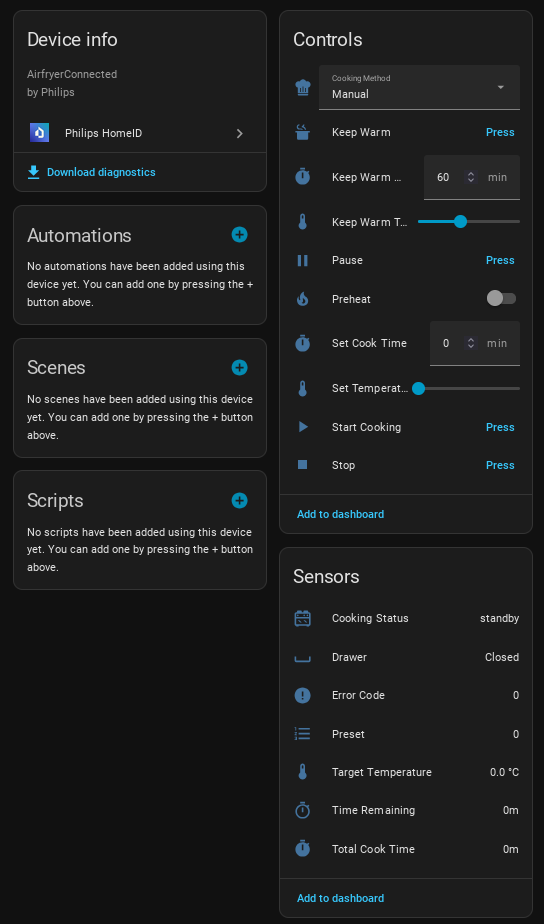
Screenshots From the README of renaudallard/homeassistant_philips_homeid.
About
Philips HomeID is an integration that controls Philips home appliances from Home Assistant, mostly over the local network. It covers air purifiers, air fryers, multicookers and espresso machines, adding fans, sensors, switches, numbers, selects, buttons and firmware updates. Air purifiers report air quality readings and filter timers, and cooking devices offer start, pause, stop and keep warm controls with cooking method and preset selection. Newer devices registered as FUSION devices in the Philips cloud are handled through a cloud relay that needs internet access. Setup runs in the UI, with a Philips account login for cloud devices, and polling intervals can be changed in the options. Older air purifiers and humidifiers that use the encrypted CoAP protocol are not supported.
Automatic summary of the README and code of renaudallard/homeassistant_philips_homeid. Something wrong, or are you the maintainer and want your own text here? Get in touch
Supports
Works locally Talks to your devices on your own network. No vendor cloud in between.
Found by itself Home Assistant spots it on the network and offers to add it.
From the Marketplace Installed through the Marketplace, formerly HACS.
Actively maintained Its author released or pushed a change in the last six months.
Provides
- Fans
- Switches
- Sensors
Setting it up
Install it from the Marketplace and restart Home Assistant, then add it under Settings, Devices and services.
Enter Device IP
- IP Address
- Device Model
Philips Account Login
- Enter credentials manually instead
Enter Verification Code
- Verification Code
Select Device
- Device
Manual credentials
- Client ID
- Client Secret
- Encryption Key (required for HTTP devices like HD9285)
Cloud login required
Enter verification code
- Verification code
After setup
- Polling interval (seconds)
- Active polling interval while cooking (seconds)
Texts from the code of renaudallard/homeassistant_philips_homeid.
Entities
- Binary sensorsFilter Replace Required, Water Tank Empty, Drawer, Shake Reminder, Flip Reminder, Preheat Active, Probe Unplugged, Probe Required, Resting, Lid, No Water, Left Basket Drawer, and 3 more
- ButtonsStart Cooking, Pause, Stop, Keep Warm, Refresh Recipes, Send AutoCook Program, Brew Saved Recipe, Brew Built-in Drink, Abort Brew, Resume Brew, Skip Step, and 5 more
- FansAir Purifier
- NumbersSet Temperature, Set Cook Time, Set Air Speed, Set Probe Temperature, Beep Volume, Air Quality Threshold, Keep Warm Duration, Keep Warm Temperature, Grinder Dose, Brew Temperature, Number of Brews, and 2 more
- SelectsAutoCook Program, Cooking Method, My Presets, Roast Level, Bean Type, Brew Profile, Saved Recipe, Built-in Drink, Operation Mode
- SensorsPM2.5, PM1.0, PM10, Indoor Air Index, Total VOC, Gas Level, Allergen Index, Humidity, Temperature, Pre-filter, HEPA Filter, and 75 more
- SwitchesChild Lock, Preheat, Sensor Monitor in Standby, Power
- UpdatesFirmware
Troubleshooting
- DiagnosticsDownloads a diagnostics file to attach to a bug report.
From the README
Control your Philips domestic appliances through Home Assistant. Local control for most devices, cloud relay for FUSION devices.
- Fan control: power on/off and preset modes (per model, for example gentle/sleep/turbo on AC0650, auto/medium/sleep/turbo on AC0651, plus fast on AC1715)
- Air quality sensors: PM2.5 and indoor air quality index
- Fan speed: the speed the fan is running at, as the purifier reports it
- Settings: beep volume, air quality threshold, sensor monitor in standby
- Filter tracking: remaining and total hours of the filter's clean and replace timers, with buttons to restart either timer after cleaning or replacing the filter

Shows in Vulpo
Quick Toggle card, Fan card, Button card, Select card, Apple Watch, Control Center.Information
- Installs
- 280 sharing analytics
- GitHub stars
- 48
- Connection
- Works locally
- Upkeep
- Updated in the last 6 months
- Version
- v3.9.13,
- Category
- Climate
- Kind
- Marketplace integration
- Brand
- Philips
- Needs
- Needs the Marketplace (HACS on 2026.10 and older)
- Domain
philips_homeid- Issues
- Report an issue
More from Philips
 Philips AirPurifier (with CoAP)3k installs · 💨 Philips AirPurifier custom component for Home Assistant. Suppo…Open
 Philips Hue Play Sync devices2.2k installs · Custom integration for Home Assistant to control the Philips Hu…Open