
Your home, supercharged.Try Vulpo Pro free for a week.
Pro
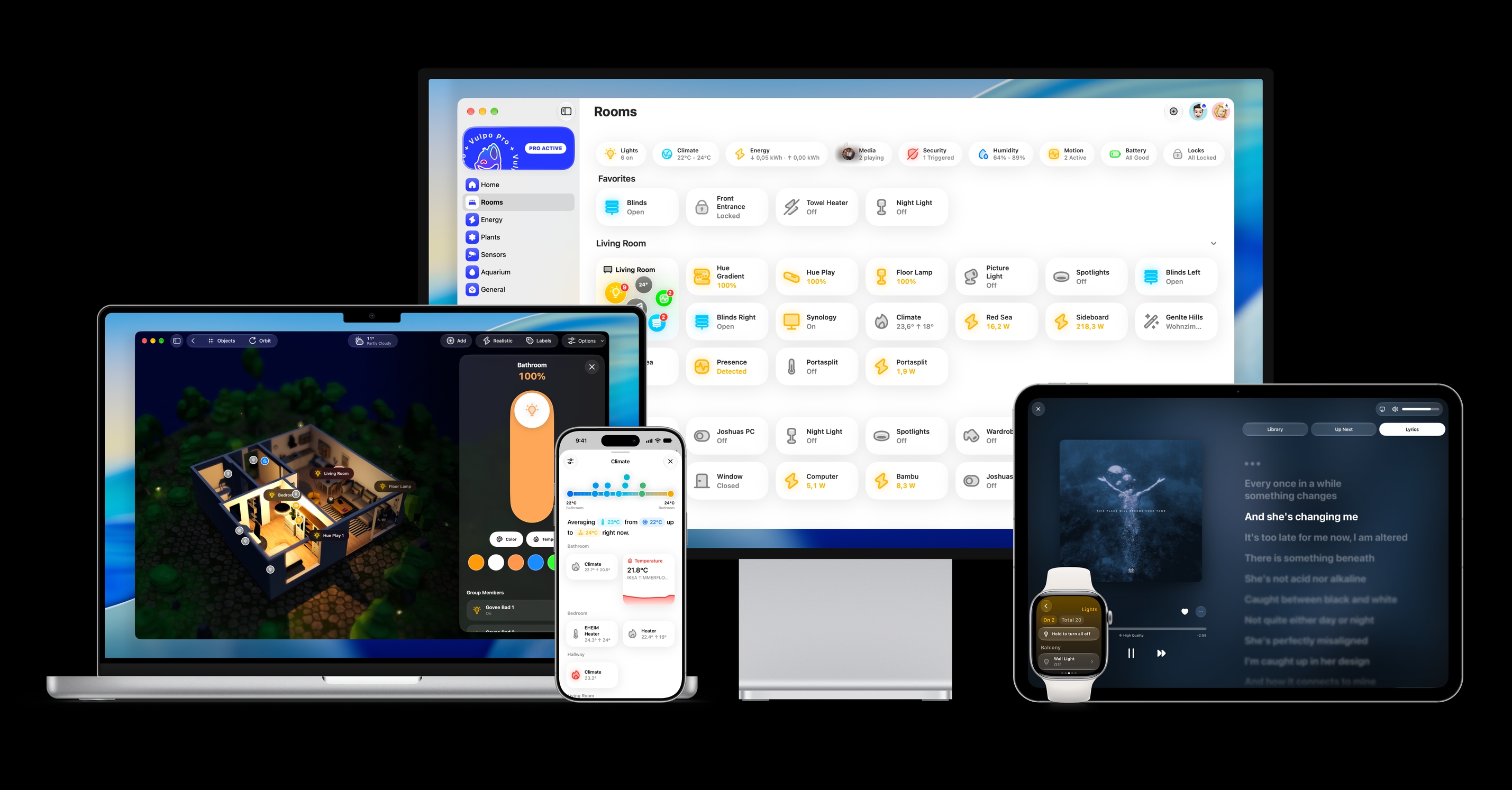
- Live Activities. Appliances, vacuums, solar and climate on the Lock Screen
- 3D rooms. Scan your rooms and light them in Vulpo Lumen
- Intercom. Voice messages to any Home Assistant speaker
- Unlimited widgets. Plus the Group widget for a whole room at once
- Vulpo Intelligence. 50 automation drafts a month, and labels
- Family Sharing. One purchase covers your family
Works on iPhone, iPad, Mac and Apple Watch.
Vulpo is free to download and the core app stays free without a time limit. Vulpo Pro is an optional upgrade at $4.99 per month, $29.99 per year or $59.99 one-time, purchased through the App Store with Family Sharing. Prices are in US dollars; the App Store shows local prices.
Compare plans.
| In every plan | Free | Pro |
|---|---|---|
| Dashboards with 40+ card types | Included | Included |
| GlancesLights, climate, security, media, covers and locks | Included | Included |
| Live camerasWith 24 hours of motion | Included | Included |
| Automation editor | Included | Included |
| Apple Watch app | Included | Included |
| Siri, Shortcuts and Control Center | Included | Included |
| iCloud syncBetween iPhone, iPad and Mac | Included | Included |
| Home and remote addressSwitches between them on its own | Included | Included |
| History charts | Included | Included |
| iPhone Duo layoutsIn every pose | Included | Included |
| Media playerWith the Music Assistant and Sonos queue | Included | Included |
| No account, a direct connection | Included | Included |
| More with Pro | ||
| Home Screen widgets | 2 | Unlimited |
| Vulpo IntelligenceAutomation drafts and labels | Limited | Extended |
| Only in Pro | ||
| Live ActivitiesAppliances, vacuums, solar, climate and people | Not included | Included |
| 3D roomsVulpo Lumen | Not included | Included |
| IntercomVoice messages to your Home Assistant speakers | Not included | Included |
| Energy dashboard | Not included | Included |
| Whisker on Apple WatchPoint at a device and double-tap | Not included | Included |
| Group widget | Not included | Included |
| Labs cardsAlarm Panel, Vacuum and Bambu printer | Not included | Included |
| Synced lyrics and visualizer | Not included | Included |
| HomePass sharing and Daily Recaps | Not included | Included |
| Update and repair alertsWith Lock Screen actions | Not included | Included |
| Backgrounds and app icons | Not included | Included |
One purchase. Every device, the whole family.
Pro belongs to your Apple Account, so it unlocks on your iPhone, iPad, Mac and Apple Watch at once. Family Sharing comes with every plan.
Frequently asked questions
Can I try Pro before I pay?
Yes. The annual plan starts with a free week. Cancel in Settings, Apple Account, Subscriptions at least a day before it ends and you are not charged. The free app keeps working either way.
Do I need a Nabu Casa subscription?
No. Vulpo talks to your Home Assistant directly: at home through its local address, away through whatever external address it already has, whether that is Nabu Casa's remote URL, a VPN or your own domain. Neither the free app nor Pro needs Home Assistant Cloud.
Does my family have to buy Pro too?
No. Every Pro plan includes Family Sharing, so up to five people in your Apple family get Pro on their own devices, each signed in to Home Assistant with their own user.
What happens if my subscription ends?
Nothing you set up is deleted. Your dashboards, automations and widgets stay; the Pro features, such as Live Activities, Intercom and 3D rooms, lock again, and you can't add widgets past the free two until you renew.
I pay monthly. Can I switch to Lifetime?
Yes. Tap the Vulpo Pro banner in the app's Settings and choose Upgrade to Lifetime. Apple never cancels a subscription on its own, so Vulpo then takes you to cancel the old one.
Does Lifetime include features that come later?
Yes. Vulpo Pro Lifetime is one payment of $59.99 with no renewal, and it unlocks every Pro feature that ships after it, with Family Sharing.
Is Pro tied to my Home Assistant server?
No. Pro belongs to your Apple Account, not to a server. It unlocks on every device signed in with that account, and stays unlocked if you connect Vulpo to a different Home Assistant.
Pro doesn't show up on my iPad. What now?
Check that the iPad is signed in with the same Apple Account, or one in your Family Sharing group. Then tap the Vulpo Pro banner in the app's Settings and choose Restore Purchases.
Can I get a refund?
Purchases go through Apple, so refunds do too: ask for one at reportaproblem.apple.com. Vulpo never sees your payment details and can't refund an App Store purchase itself.