UniFi Network Map
On Home Assistant 2026.11 or newer? Open it in the Marketplace
- Installs
- 503 sharing analytics
- GitHub stars
- 38
- Connection
- Works locally
- Upkeep
- Updated in the last 6 months
- Version
- v0.5.11,
- Category
- Computers and network, Routers and network
- Kind
- Marketplace integration
- Brand
- Ubiquiti
- Needs
- Needs the Marketplace (HACS on 2026.10 and older)
- Domain
unifi_network_map- Issues
- Report an issue
Independent directory, made by the developer of Vulpo. Not affiliated with Home Assistant or the Open Home Foundation.
Screenshots From the README of merlijntishauser/unifi-network-maps-ha.
About
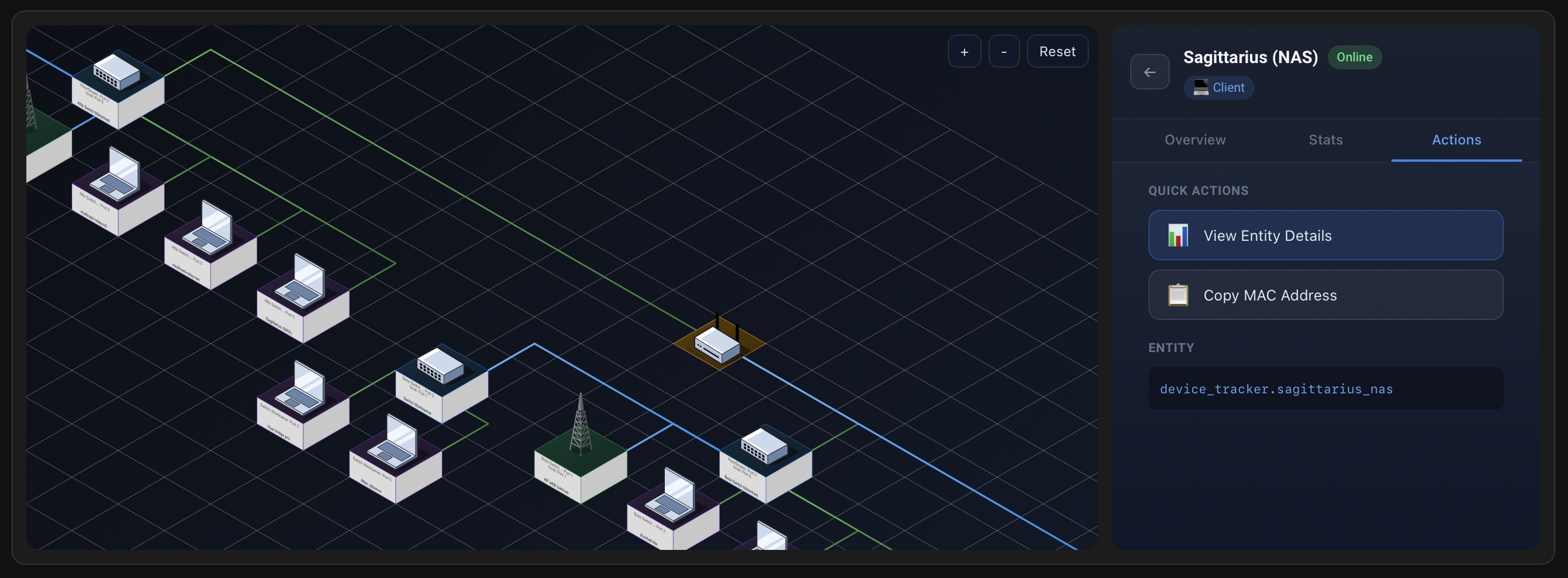
UniFi Network Map is an integration that draws an interactive topology map of a UniFi network. It connects locally to a UniFi controller using either a username and password or a site-level API key, and it is set up in the UI. The map shows how gateways, switches, access points and clients link together, with optional port labels, client filtering by wired or wireless, and a choice between a flat and an isometric layout. Display options include several color themes, two icon sets, and custom map width and height. Besides the map card, it adds sensors and binary sensors for status, clients and device presence. It is meant to run next to the built-in UniFi integration, which lets a device on the map link to its Home Assistant entity.
Automatic summary of the README and code of merlijntishauser/unifi-network-maps-ha. Something wrong, or are you the maintainer and want your own text here? Get in touch
Supports
Works locally Talks to your devices on your own network. No vendor cloud in between.
From the Marketplace Installed through the Marketplace, formerly HACS.
Actively maintained Its author released or pushed a change in the last six months.
Provides
- Sensors
Setting it up
Install it from the Marketplace and restart Home Assistant, then add it under Settings, Devices and services.
Connect to UniFi
- Controller URLInclude the scheme (http or https) and port if needed.
- Username
- Password
- API keySite-level API key from UniFi OS (Settings -> Control Plane -> Integrations). Use this instead of username and password.
- SiteThe internal site ID, usually 'default'. For a multi-site setup use the site code shown in the Network app URL (the segment after /manage/ or /network/), not the site's display name.
- Verify SSL
Map Options
- Show port labelsAdds switch port labels to links.
- Show clientsIncludes client devices on the topology.
- Client scopeChoose wired, wireless, or all clients.
- Only UniFi devicesHide non-UniFi devices in the topology.
- Isometric layoutRender a 3D-style view.
- SVG width (px)Leave blank to auto-size.
- SVG height (px)Leave blank to auto-size.
- Request timeout (seconds)Abort UniFi API calls after this many seconds.
- Cache rendered mapRe-use the last render between polls.
Re-authenticate
- Username
- Password
- API keySite-level API key from UniFi OS (Settings -> Control Plane -> Integrations). Use this instead of username and password.
Reconfigure connection
- Controller URLInclude the scheme (http or https) and port if needed.
- Username
- Password
- API keySite-level API key from UniFi OS (Settings -> Control Plane -> Integrations). Use this instead of username and password.
- SiteThe internal site ID, usually 'default'. For a multi-site setup use the site code shown in the Network app URL (the segment after /manage/ or /network/), not the site's display name.
- Verify SSLUniFi controllers use self-signed certificates by default, which will fail verification. Only enable if you have installed a trusted certificate.
After setup
- Update interval (minutes)How often to refresh data from the UniFi controller.
- Show port labelsAdds switch port labels to links.
- Show clientsIncludes client devices on the topology.
- Client scopeChoose wired, wireless, or all clients.
- Only UniFi devicesHide non-UniFi devices in the topology.
- Isometric layoutRender a 3D-style view.
- Map themeColor theme for the rendered map.
- Icon setIcon style for device nodes.
- Isometric lightingShades tile side faces and adds contact shadows (isometric layout only).
- Route links around devicesRoutes links around nodes that would otherwise be crossed (isometric layout only).
- Show floor gridDraws the isometric floor grid behind the map (isometric layout only).
- SVG width (px)Leave blank to auto-size.
- SVG height (px)Leave blank to auto-size.
- Request timeout (seconds)Abort UniFi API calls after this many seconds.
- Payload cache TTL (seconds)Cache enriched payload data for this many seconds. Set to 0 to disable.
Texts from the code of merlijntishauser/unifi-network-maps-ha.
Entities
- SensorsStatus, Clients
Troubleshooting
- DiagnosticsDownloads a diagnostics file to attach to a bug report.
From the README
A Home Assistant integration that visualizes your UniFi network topology as an interactive map. See how your devices connect, which clients are online, and understand your network structure at a glance.

Shows in Vulpo
Chart card, Apple Watch.Information
- Installs
- 503 sharing analytics
- GitHub stars
- 38
- Connection
- Works locally
- Upkeep
- Updated in the last 6 months
- Version
- v0.5.11,
- Category
- Computers and network, Routers and network
- Kind
- Marketplace integration
- Brand
- Ubiquiti
- Needs
- Needs the Marketplace (HACS on 2026.10 and older)
- Domain
unifi_network_map- Issues
- Report an issue