UniFi UNAS
On Home Assistant 2026.11 or newer? Open it in the Marketplace
- Installs
- Not shown: shared domain unifi_unas
- GitHub stars
- 58
- Connection
- Works locally
- Upkeep
- Updated in the last 6 months
- Version
- v0.9.7,
- Category
- Computers and network, Routers and network
- Kind
- Marketplace integration
- Brand
- Ubiquiti
- Needs
- Needs the Marketplace (HACS on 2026.10 and older)
- Domain
unifi_unas- Issues
- Report an issue
Independent directory, made by the developer of Vulpo. Not affiliated with Home Assistant or the Open Home Foundation.
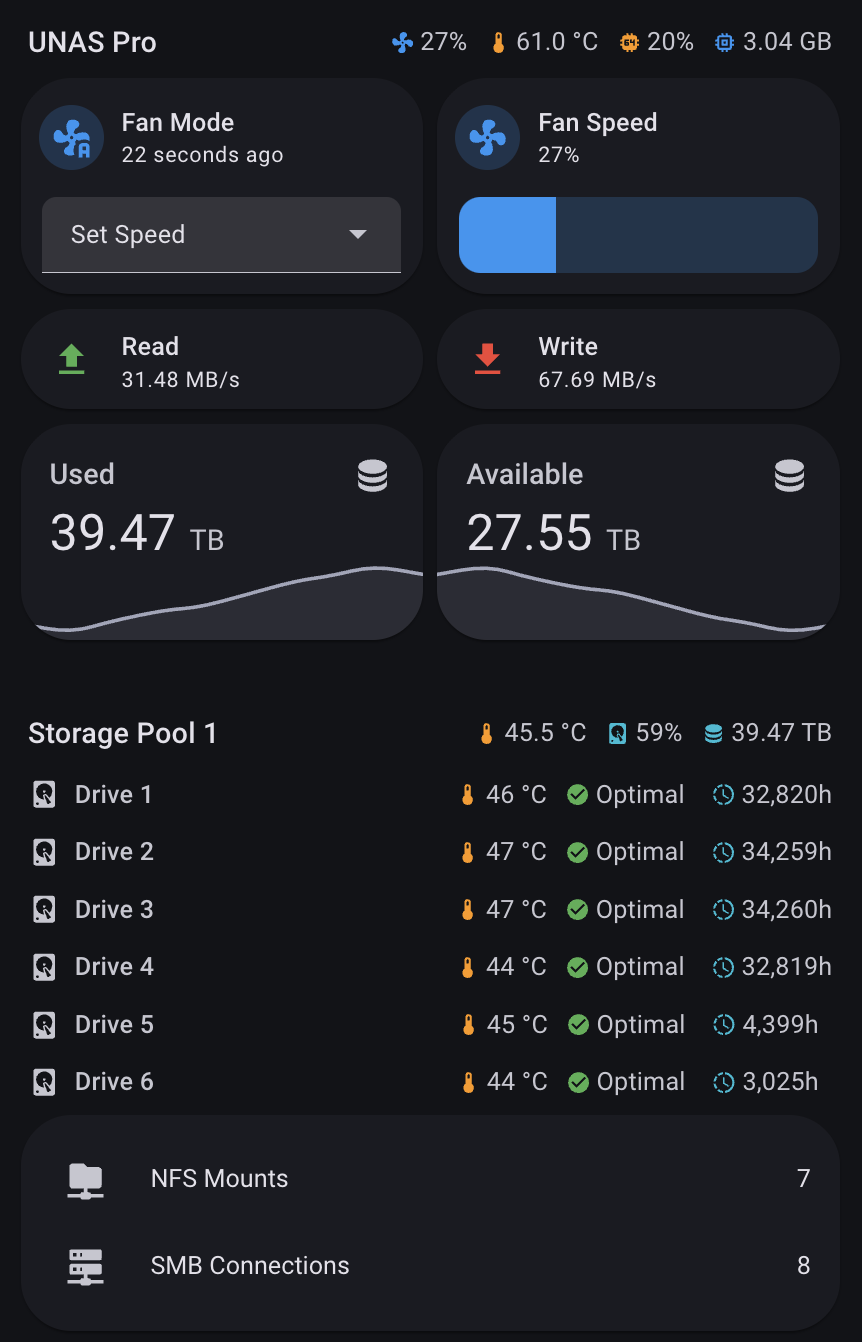
Screenshots From the README of cardouken/homeassistant-unifi-unas.
About
UniFi UNAS is an integration for monitoring and fan control of Ubiquiti UniFi UNAS network storage devices. It runs locally, connecting over SSH and publishing data through an MQTT broker, and it is set up in the UI. Sensors cover system metrics, HDD and NVMe drive health, storage pools, network shares and backup tasks. Fan control offers four modes: UNAS managed, custom curve, target temperature and set speed, with adjustable temperature and fan speed limits. Buttons can reinstall the monitoring scripts, reboot or shut down the device, and trigger backups, while switches enable or disable scheduled backup tasks. Repair notices appear for a missing MQTT integration, a lost SSH connection or a changed SSH host key.
Automatic summary of the README and code of cardouken/homeassistant-unifi-unas. Something wrong, or are you the maintainer and want your own text here? Get in touch
Supports
Works locally Talks to your devices on your own network. No vendor cloud in between.
From the Marketplace Installed through the Marketplace, formerly HACS.
Actively maintained Its author released or pushed a change in the last six months.
Provides
- Switches
- Sensors
Setting it up
Install it from the Marketplace and restart Home Assistant, then add it under Settings, Devices and services.
Connect to UniFi UNAS
- Host (UNAS IP Address)
- UNAS SSH username (root by default)
- UNAS SSH password (Leave blank if HA SSH keys are configured on the UNAS)
- MQTT Broker IP Address
- MQTT Username (required)
- MQTT Password (required)
- Use TLSOnly enable if your MQTT broker is configured for TLS (port 8883). Leave off for standard setups.
- Device Model
- Device NameOptional custom name (e.g. UNAS Pro Hallway) - will be used for entity ID-s, e.g.: sensor.unas_pro_hallway_cpu_temperature
- Verify SSH host keyVerify the NAS SSH host key. On the first connection the key is recorded (trust-on-first-use) and checked on every connection after that. Leave off to keep the current permissive behavior.
- Polling Interval (seconds, 5-60)
MQTT TLS Settings
- MQTT Broker Port
- Allow untrusted certificateEnable if your MQTT broker uses a self-signed certificate.
Also asked when changing the connection.
Reconfigure UniFi UNAS
- Host (UNAS IP Address)
- UNAS SSH username (root by default)
- UNAS SSH password (Leave blank if HA SSH keys are configured on the UNAS)
- MQTT Broker IP Address
- MQTT Username (required)
- MQTT Password (required)
- Use TLSOnly enable if your MQTT broker is configured for TLS (port 8883). Leave off for standard setups.
- Device ModelWARNING: Changing the device model requires deleting and re-adding the integration to update drive entities.
- Device NameChanges device display names only. Entity IDs are set at initial setup and cannot be changed here.
- Verify SSH host keyVerify the NAS SSH host key. On the first connection the key is recorded (trust-on-first-use) and checked on every connection after that. Leave off to keep the current permissive behavior.
- Polling Interval (seconds, 5-60)
After setup
- Polling Interval (seconds, 5-60)
Texts from the code of cardouken/homeassistant-unifi-unas.
Troubleshooting
- Repair noticesNotices it can show in Settings, Repairs:MQTT Integration Required, Multiple devices publishing to the same MQTT topic, UNAS SSH connection unavailable, UniFi UNAS SSH host key changed
From the README
Monitoring and fan control for UniFi UNAS with native Home Assistant integration.
- One-Click Setup - Automatic script deployment via SSH
- Full Monitoring - 40+ sensors for drives, system metrics, storage pools, and network shares
- Fan Control - Three modes with custom temperature curves
- Auto-Recovery - Scripts redeploy automatically on integration updates or if missing after firmware updates
- Native Integration - Proper HA devices and entities with MQTT discovery

Shows in Vulpo
Quick Toggle card, Button card, Select card, Chart card, Apple Watch, Control Center.Information
- Installs
- Not shown: shared domain unifi_unas
- GitHub stars
- 58
- Connection
- Works locally
- Upkeep
- Updated in the last 6 months
- Version
- v0.9.7,
- Category
- Computers and network, Routers and network
- Kind
- Marketplace integration
- Brand
- Ubiquiti
- Needs
- Needs the Marketplace (HACS on 2026.10 and older)
- Domain
unifi_unas- Issues
- Report an issue