
Zigbee2MQTT gets a memory, Better Thermostat 2.0 and 2026.11.2
Z2M Device Tracker keeps a history of every Zigbee2MQTT device, Better Thermostat 2.0 heats through sensor failures, and 2026.11.2 fixes MQTT.
A memory for every Zigbee2MQTT device, even after it's gone
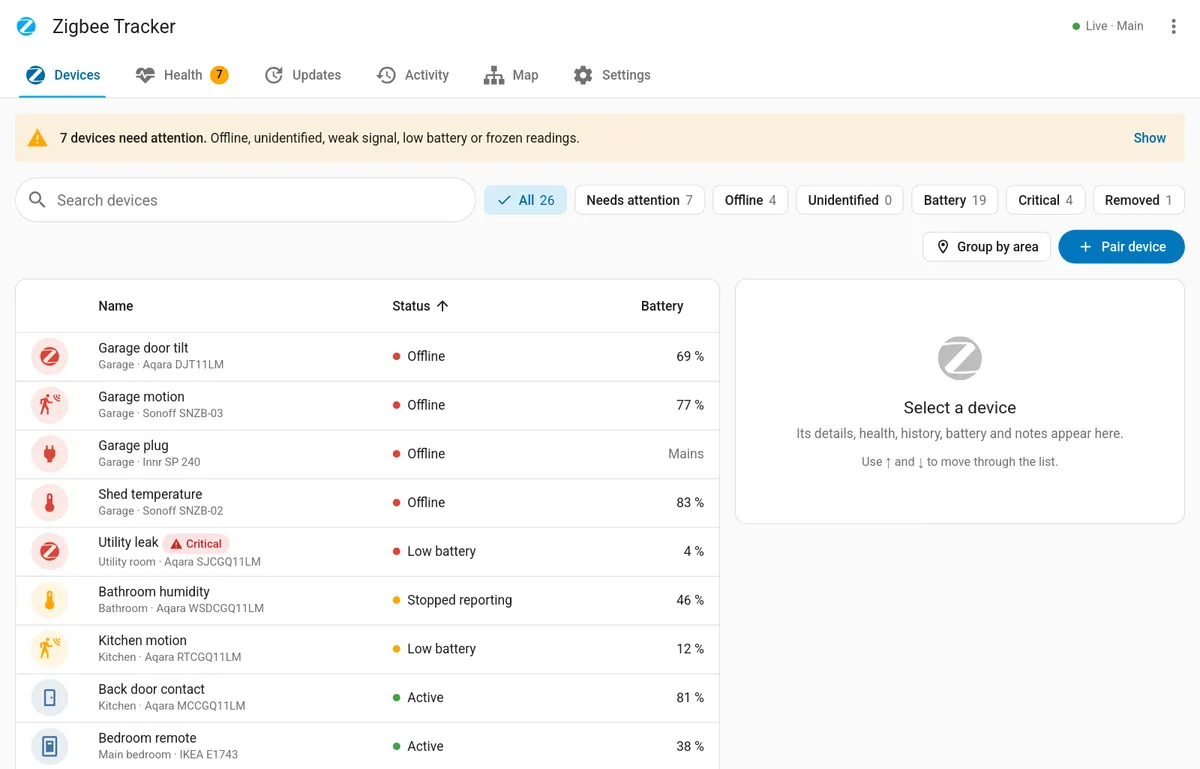
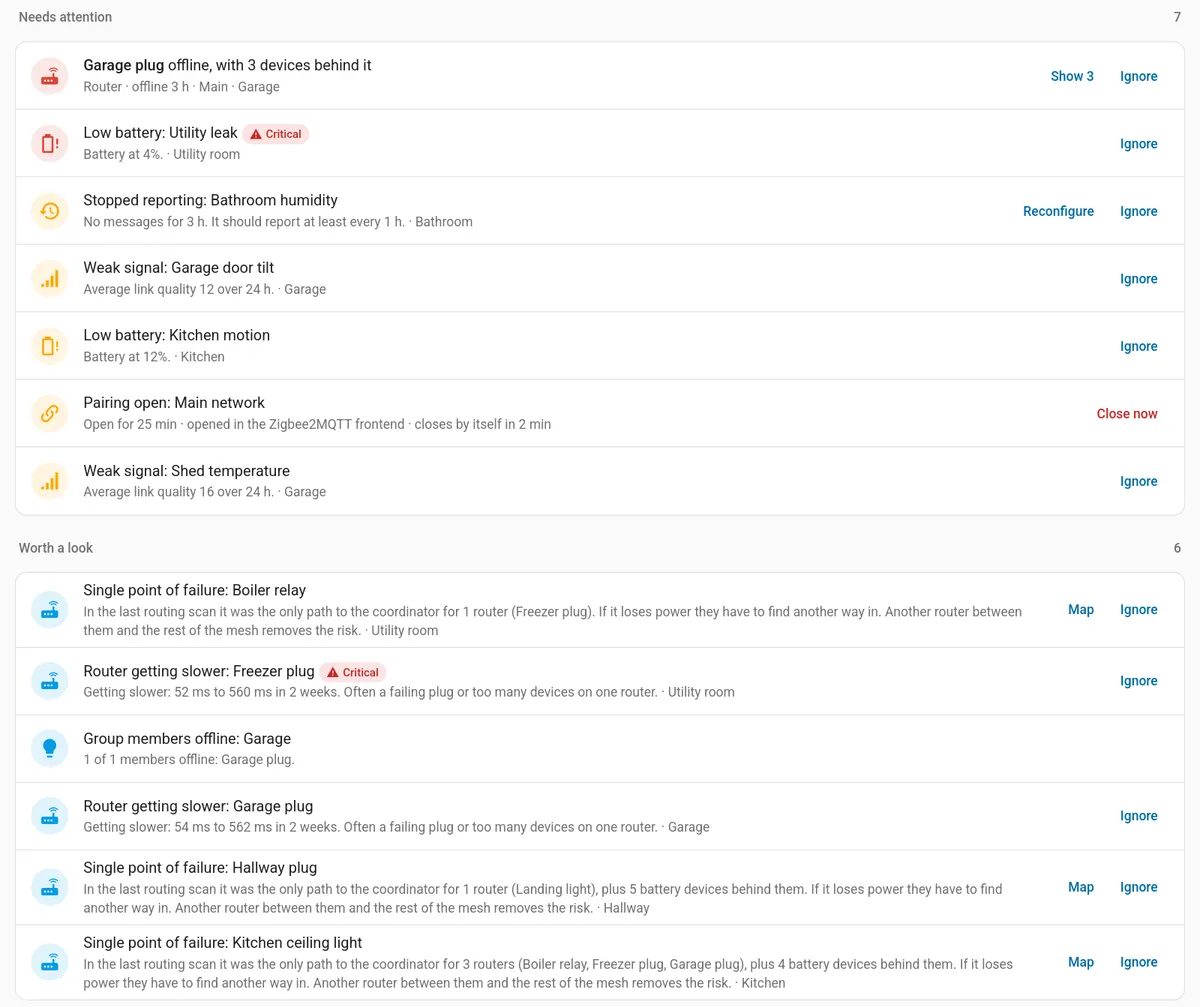
If you run Zigbee2MQTT, you've met the device that turns up as nothing but a hex address, with no hint of what it used to be. Z2M Device Tracker, new to the directory this week, is built for that moment: it records every name, model, area and change for each device on your Zigbee2MQTT networks, and it keeps the record after the device has left.
It comes in two halves. The part doing the work is an app that listens to Zigbee2MQTT over MQTT, stores the history and adds a Zigbee Tracker page to your sidebar, so it needs Mosquitto or another broker already set up in Home Assistant. The integration is optional: it adds summary sensors, a dashboard card and Repairs entries that clear themselves once you've fixed the problem.
The health checks are the real reason to install it. The tracker flags devices that are offline, silent, stuck on a frozen reading, losing signal or low on battery, plus failed interviews and devices Zigbee2MQTT couldn't identify, and it can send those alerts to Home Assistant notifications, events or a notify service. A second set of checks (flapping or chatty devices, fast battery drain, lost bindings, routers that are a single point of failure, a missing or stale coordinator backup) shows up under Health and stays quiet until you switch its notifications on.
There's more in the sidebar than lists, too. A network map suggests which router a device should use, a channel view puts your Zigbee channels next to your 2.4 GHz Wi-Fi and warns about overlap, and the battery page borrows Battery Notes' library to track battery types and even build a shopping list.
Who should bother? Anyone with a Zigbee2MQTT mesh big enough that a dead sensor can go unnoticed for a week. It's a brand new project, though, so run it alongside your setup for a while before you let its alerts replace the ones you already trust.
Picks
Better Thermostat 2.0 keeps the heat on when a window sensor dies
Better Thermostat users got a big one this week: version 2.0, out on Saturday, rebuilds the decision engine, and your rooms, targets and learned heating profiles carry over with no reconfiguring.
The change you'll notice this winter is how it fails. In 1.9 an unavailable window or door contact counted as open and switched the heating off; 2.0 treats it as closed, keeps the room warm and raises a repair notice. Lose the room temperature sensor and it falls back to the average of the radiators' own sensors, then holds the last valve position until your sensor has reported reliably for five minutes. A new control_mode attribute on the climate entity (optimal, sensor_fallback or hold) is handy for an automation that tells you a room is running blind.
Shelly BLU TRV owners get direct valve control. And if 2.0 misbehaves, the developer says 1.9.3 or newer reads the new settings format, so rolling back won't cost you your rooms.
2026.11.2 fixes an MQTT reload loop and flaky LG TVs
If MQTT carries a lot of your house, Home Assistant 2026.11.2 is the patch to take this month. It fixes a reload loop caused by a disabled entity sharing a unique ID, and an unsubscribe callback that broke after the MQTT entry was reloaded.
LG webOS TVs get a handful of fixes, the main one being a TV that no longer drops to unavailable when it resets the connection. The Hue migration that failed on multi-channel Zigbee devices is fixed, and so is Reolink playback through NVRs and Hubs.
One change can bite, though. input_text.set_value now rejects a value that doesn't match the helper's pattern. An automation that's been quietly writing bad values into a text helper will start throwing errors, so have a look at your traces after updating.
Chore Calendar turns household jobs into calendars and to-do lists
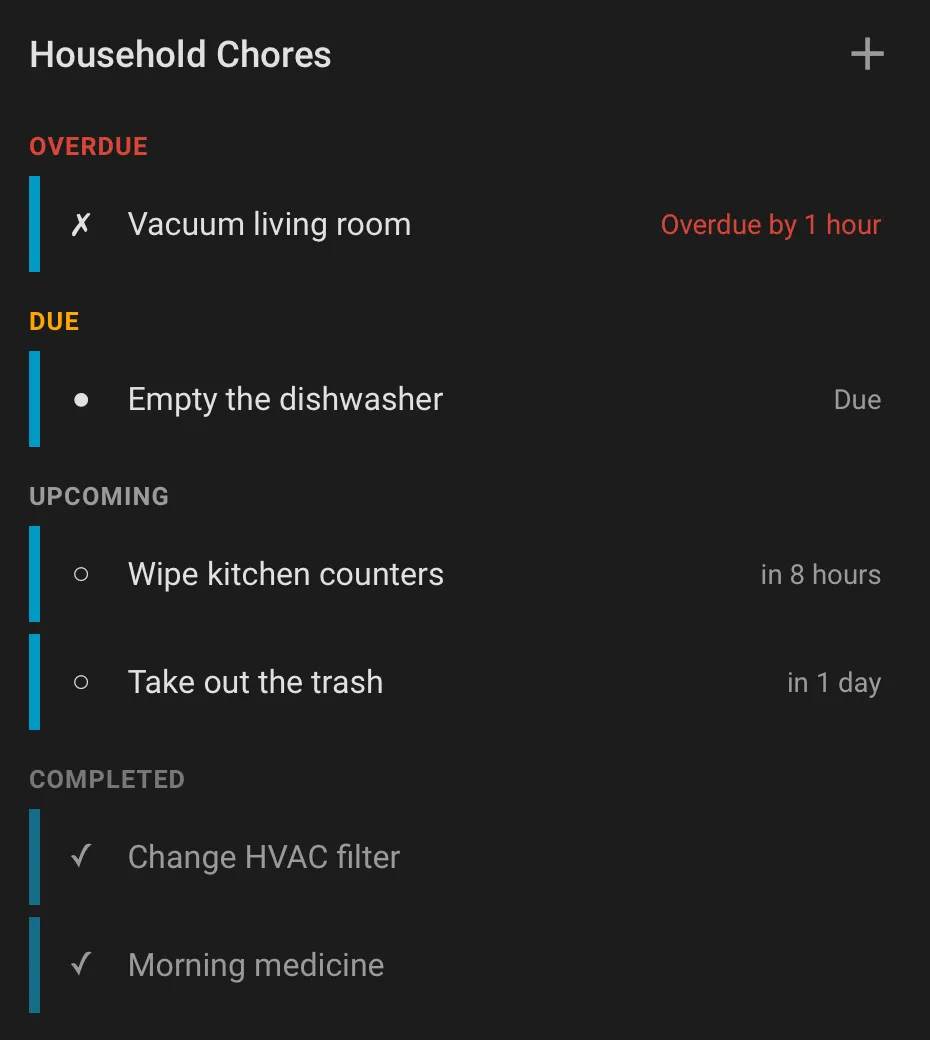
Recurring chores are a classic Home Assistant project, usually stitched together from helpers and automations nobody else in the house understands. Chore Calendar packs the whole thing into one integration: each chore list gets a to-do entity, a read-only calendar of upcoming and recently finished chores, and a sensor per chore for your own automations.
Scheduling goes well past weekly. There's calendar-style recurrence with weekday ordinals and season windows, interval chores that come back a set time after you finish them, and one-off tasks, and you can skip an occurrence without touching its history. The nice touch is tags: assign a Home Assistant tag to a chore, stick it on the bin, and a scan marks the job done.
Chores live in local storage, like the local calendar does, and the bundled card has create and edit dialogs, so the rest of the household never has to see a service call.
From the community

Node-RED Companion 5.0 stops swallowing bad entity updates
Node-RED Companion 5.0.0
Version 5.0.0 is a breaking release for anyone whose flows write to Home Assistant entities. An update that fails Home Assistant's validation now comes back as an error instead of being acknowledged silently: invalid sensor values, states that are too long, unknown select options, dates that can't be parsed, and text breaking length or pattern rules. Text that used to be truncated is now rejected, so check flows that push long strings before you update.

Bambu Lab 2.4.1 cuts cloud traffic and moves Makerworld
Bambu Lab 2.4.1
If your printers run in cloud mode, update: 2.4.1 fixes bugs that opened too many connections to Bambu's servers, which Bambu flagged to the developers. The breaking part is Makerworld. The profile no longer hangs off a printer; the old device is deleted, and you add it back yourself as a standalone device if you want those stats. E1 air purifier support and an opt-in filament manager sensor come along too.

Thermal Comfort 3.2 drops the old YAML format
Thermal Comfort 3.2.0
Still configuring Thermal Comfort with the pre-2.0 sensor platform in YAML? After 3.2.0, Home Assistant calls that config invalid and creates no sensors. Move each device under the thermal_comfort key first, keeping its old key as the name and its unique_id so the entity IDs survive. The tc icons are now built in, so the separate icon pack can go, and new sensors start disabled on existing UI devices.