Screenshots From the README of nicois/foxess-control.
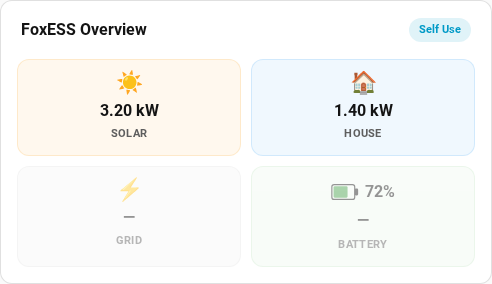
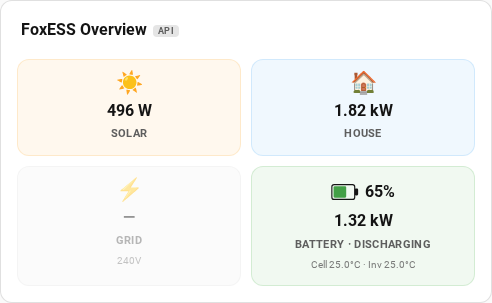
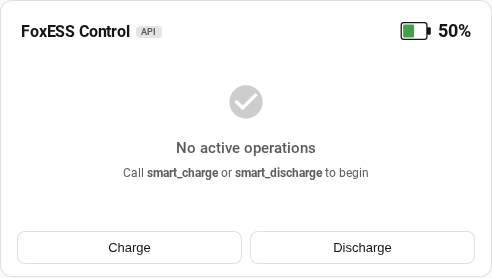
About
Allow Home Assistant to modify FoxESS inverter charge/discharge modes
Description from nicois/foxess-control
Supports
Uses the vendor's cloud Needs an internet connection and an account with the vendor.
From the Marketplace Installed through the Marketplace, formerly HACS.
Actively maintained Its author released or pushed a change in the last six months.
Provides
- Sensors
Setting it up
Install it from the Marketplace and restart Home Assistant, then add it under Settings, Devices and services.
FoxESS Control
- API Key
- Device Serial Number
FoxESS Control — entity mode
- Work mode entity (select)
- Charge power limit entity (number)
- Discharge power limit entity (number)
- Min SoC entity (number)
- Battery SoC entity (sensor)
- House load power entity (sensor)
- Solar generation power entity (sensor)
- Cumulative feed-in energy entity (sensor)
- Battery charge power entity (sensor)
- Battery discharge power entity (sensor)
- Grid consumption power entity (sensor)
- Grid feed-in power entity (sensor)
- Max grid export limit entity (number, optional — enables hardware-actuator tapering)
- Inverter rated power (W)
FoxESS Control — battery
- Minimum SoC on Grid (%)
- Battery Capacity (kWh)
- Minimum Power Change for Smart Charge (W)
Real-Time Data (Optional)
- Web Username
- Web Password (or MD5 hash)
After setup
- Minimum SoC on Grid (%)
- Battery Capacity (kWh)
- Minimum Power Change for Smart Charge (W)
- Minimum API fdSoc (%) — ⚠️ Values below 11 may not work with all firmware versions
- API Polling Interval (seconds)
- BMS Temperature Polling Interval (seconds)
- Smart Headroom (%)
- Grid Export Limit (W) — net export cap set on inverter (0 = no limit)
- WebSocket real-time data mode
- Additional solar power variableOptional. For AC-coupled systems where a second inverter's generation is reported in a separate FoxESS variable (e.g. meterPower2). Its value is added to the solar reading. Leave blank otherwise.
- Work mode entity (select)
- Charge power limit entity (number)
- Discharge power limit entity (number)
- Min SoC entity (number)
- Battery SoC entity (sensor)
- House load power entity (sensor)
- Solar generation power entity (sensor)
- Cumulative feed-in energy entity (sensor)
- Battery charge power entity (sensor)
- Battery discharge power entity (sensor)
- Grid consumption power entity (sensor)
- Grid feed-in power entity (sensor)
- Max grid export limit entity (number, optional — enables hardware-actuator tapering)
- Inverter rated power (W)
Texts from the code of nicois/foxess-control.
Entities
- Binary sensorsSmart Charge Active, Smart Discharge Active
- SensorsBattery SoC, Charge Rate, Discharge Rate, House Load, Solar Power, Battery Temperature, BMS Battery Temperature, Grid Consumption, Grid Feed-in, Generation, Battery Voltage, Battery Current, and 31 more
Actions
- Clear overridesReturn the inverter to self-use mode, clearing all or selected overrides.Fields: Mode
- Feed-inPrioritise feeding excess solar to the grid for a set duration, optionally at a specific time and power limit.Fields: Duration, Power limit, Start time, Remove conflicting overrides instead of aborting
- Force chargeCharge the battery for a set duration, optionally at a specific time and power limit. The inverter automatically reverts to self-use when the window ends.Fields: Duration, Power limit, Start time, Remove conflicting overrides instead of aborting
- Force dischargeDischarge the battery for a set duration, optionally at a specific time and power limit. The inverter automatically reverts to self-use when the window ends.Fields: Duration, Power limit, Start time, Remove conflicting overrides instead of aborting
- Smart chargeCharge the battery within a time window, pacing the charge rate to reach a target SoC by the end of the interval. Charging may start late if the target can be reached in less time.Fields: Start time, End time, Target SoC, Maximum power, Remove conflicting overrides instead of aborting
- Smart dischargeDischarge the battery within a time window. Stays in self-use as long as possible, then switches to forced discharge at full power when needed to meet the target by the window end. Reverts to self-use when the minimum SoC or feed-in energy limit is reached.Fields: Start time, End time, Power limit, Minimum SoC to stop discharge, Feed-in energy limit, Remove conflicting overrides instead of aborting
Troubleshooting
- DiagnosticsDownloads a diagnostics file to attach to a bug report.
- Repair noticesNotices it can show in Settings, Repairs:Unmanaged work mode detected, Smart charge can't reach target SoC
From the README
A Home Assistant custom integration for monitoring and controlling FoxESS inverter battery modes.
FoxESS Control polls real-time inverter data (battery SoC, charge/discharge power, solar generation, house load, temperature) and provides actions for force charge, force discharge, smart charge/discharge with SoC targets, and feed-in management. It supports two backends: the FoxESS Cloud API and local entity mode via foxess_modbus. It includes comprehensive polled sensors and can fully replace the foxess-ha integration — see Migrating from foxess-ha.

Shows in Vulpo
Chart card, Apple Watch.Information
- Installs
- 121 sharing analytics
- GitHub stars
- 21
- Connection
- Uses the vendor's cloud
- Upkeep
- Updated in the last 6 months
- Version
- v1.0.21,
- Category
- Energy, Solar and batteries
- Kind
- Marketplace integration
- Brand
- FoxESS
- Needs
- Needs the Marketplace (HACS on 2026.10 and older)
- Domain
foxess_control- Issues
- Report an issue