Solcast PV Forecast
On Home Assistant 2026.11 or newer? Open it in the Marketplace
- Installs
- 12.9k sharing analytics
- GitHub stars
- 466
- Connection
- Uses the vendor's cloud
- Upkeep
- Updated in the last 6 months
- Version
- v4.6.2,
- Category
- Energy, Solar and batteries
- Kind
- Marketplace integration
- Brand
- Solcast
- Needs
- Needs the Marketplace (HACS on 2026.10 and older)
- Domain
solcast_solar- Issues
- Report an issue
Independent directory, made by the developer of Vulpo. Not affiliated with Home Assistant or the Open Home Foundation.
Screenshots From the README of BJReplay/ha-solcast-solar.
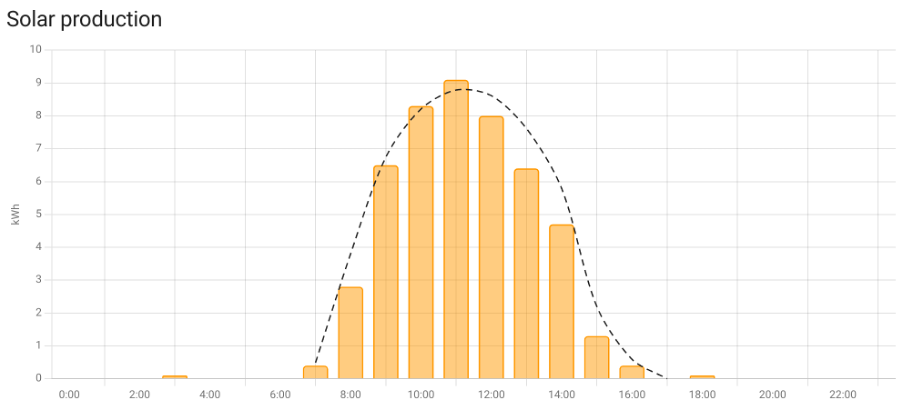
About
Solcast PV Forecast brings Solcast solar generation forecasts into Home Assistant and feeds the Energy dashboard. It relies on the Solcast cloud service and needs an API key from a Solcast hobbyist account, with setup done in the UI. Sensors cover daily forecast totals for the first seven days, expected peak power and peak time, and shorter windows such as the next hour, plus a custom next-hours sensor. Forecast values can be reduced with manual or automated dampening to account for shading, and capped with an inverter hard limit. Several rooftop sites are combined into one forecast, and the Energy dashboard can show past forecasts or estimated actuals. Actions allow forecast updates, data queries and option changes, and a diagnostic self-test, repair notices and system health are included.
Automatic summary of the README and code of BJReplay/ha-solcast-solar. Something wrong, or are you the maintainer and want your own text here? Get in touch
Supports
Uses the vendor's cloud Needs an internet connection and an account with the vendor.
From the Marketplace Installed through the Marketplace, formerly HACS.
Actively maintained Its author released or pushed a change in the last six months.
Provides
- Sensors
Setting it up
Install it from the Marketplace and restart Home Assistant, then add it under Settings, Devices and services.
Connect
- API keyEnter one or more Solcast API keys, separated by commas
- API limitEnter a forecast update daily limit, comma separated when using multiple keys
- Auto-updateIf not using auto-update, create an automation that calls the action "solcast_solar.update_forecasts" periodically, while adhering to your Solcast advised maximum total limit (usually ten times total per day for one rooftop site, or with two sites five times per day)
Also asked when changing the connection.
Sign in again
- API keyEnter one or more Solcast API keys, separated by commas
After setup
- 00:00Enter a value between 0.0 (no production counted) and 1.0 (full production counted)
- 01:00
- 02:00
- 03:00
- 04:00
- 05:00
- 06:00
- 07:00
- 08:00
- 09:00
- 10:00
- 11:00
- 12:00
- 13:00
- 14:00
- API keyEnter one or more Solcast API keys, separated by commas
- API limitEnter a forecast update daily limit, comma separated when using multiple keys
- Forecast attributes breakdownSelect which breakdowns are enabled
- Auto-dampenRequires estimated actuals and a PV generation entity — see the integration documentation
- Auto-updateIf not using auto-update, create an automation that calls the action "solcast_solar.update_forecasts" periodically, while adhering to your Solcast advised maximum total limit (usually ten times total per day for one rooftop site, or with two sites five times per day)
- Modify the hourly dampening factorsClick submit to proceed to the dampening factor editor
- Custom next X hours sensorNumber of hours for the custom sensor (minimum 1, maximum 144)
- Site(s) to exclude from totalsSite(s) to exclude from the Energy dashboard and sensor totals when adding local and remote site API keys for a single Home Assistant local/remote deployment
- PV generation entity/entitiesFor automated dampening: energy (Wh/kWh/MWh, total increasing) or power (W/kW/MW, instantaneous)
- Estimated actuals updated at midnightUses one API call per site per day — see the integration documentation; a reduced API limit is recommended
- Inverter hard limit (kW)See the integration documentation; comma separate multiple values for each key
- Preferred forecast likelihood
- Granular dampening is setGranular dampening is set — clear to revert to overall hourly dampening
- Site export entityOptional — for automated dampening (Wh/kWh/MWh, total increasing)
- Site export limit (kW)Required if a site export entity is specified
Texts from the code of BJReplay/ha-solcast-solar.
Entities
- SelectsUse Forecast Field
- SensorsAccuracy, API Used, API Limit, Dampening, Forecast Next X Hours, Forecast Next Hour, Forecast Remaining Today, Forecast This Hour, Hard Limit Set, API Last Polled, Peak Time Today, Peak Time Tomorrow, and 19 more
Actions
- Clear all saved Solcast dataDeletes the solcast.json file to remove all current solcast site data.
- Diagnostic self-testRun a diagnostic self-test to validate API connectivity, cache file integrity, generation entity accessibility, and overall configuration health.
- Force Update Estimated ActualsForce fetches the latest estimated actual data from Solcast.
- Force UpdateForce fetches the latest forecasts data from Solcast.
- Get forecasts dampeningGet the forecast dampening factors.Fields: Site ID
- Get optionsGet current integration configuration options.
- Query estimated actual dataReturn a data set for a given query.Fields: End date time, Start date time
- Query forecast dataReturn a data set for a given query.Fields: End date time, Site ID, Start date time, Undampened
- Remove inverter forecast hard limitRemove set limit.
- Set custom hours sensorSet the custom X hours sensor number of hours.Fields: Hours
- Set forecasts dampeningSet forecast dampening factors.Fields: Dampening string, Site ID
- Set inverter forecast hard limitPrevent forecast values being higher than the inverter can produce.Fields: Limit value in Watts
- Set optionsSet one or more integration configuration options.Fields: API key, API limit, Breakdown site detailed, Breakdown estimate, Breakdown estimate 10, Breakdown estimate 90, Breakdown half-hourly, Breakdown hourly, Breakdown site, Auto dampen
- UpdateFetches the latest forecasts data from Solcast.
Troubleshooting
- DiagnosticsDownloads a diagnostics file to attach to a bug report.
- System healthAdds its status to Home Assistant's system information.
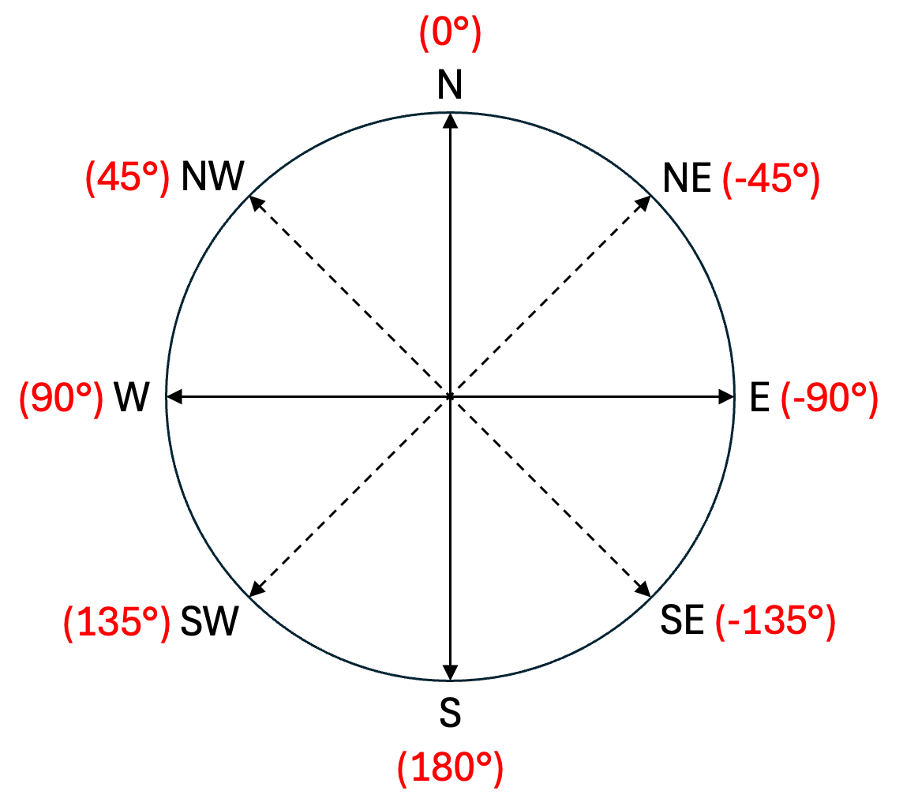
- Repair noticesNotices it can show in Settings, Repairs:Deprecated action, Adjust API limit for estimated actuals, Estimated actuals fetch may exceed daily API quota, Advanced option deprecated, Advanced option problem, Solcast API temporarily unavailable, Corrupted cached data, Future forecasts missing, Forecasts missing, Unusual azimuth

Shows in Vulpo
Select card, Chart card, Apple Watch.Information
- Installs
- 12.9k sharing analytics
- GitHub stars
- 466
- Connection
- Uses the vendor's cloud
- Upkeep
- Updated in the last 6 months
- Version
- v4.6.2,
- Category
- Energy, Solar and batteries
- Kind
- Marketplace integration
- Brand
- Solcast
- Needs
- Needs the Marketplace (HACS on 2026.10 and older)
- Domain
solcast_solar- Issues
- Report an issue