Screenshots From the README of JimboHamez/ha_solcast_solar_enhanced.
About
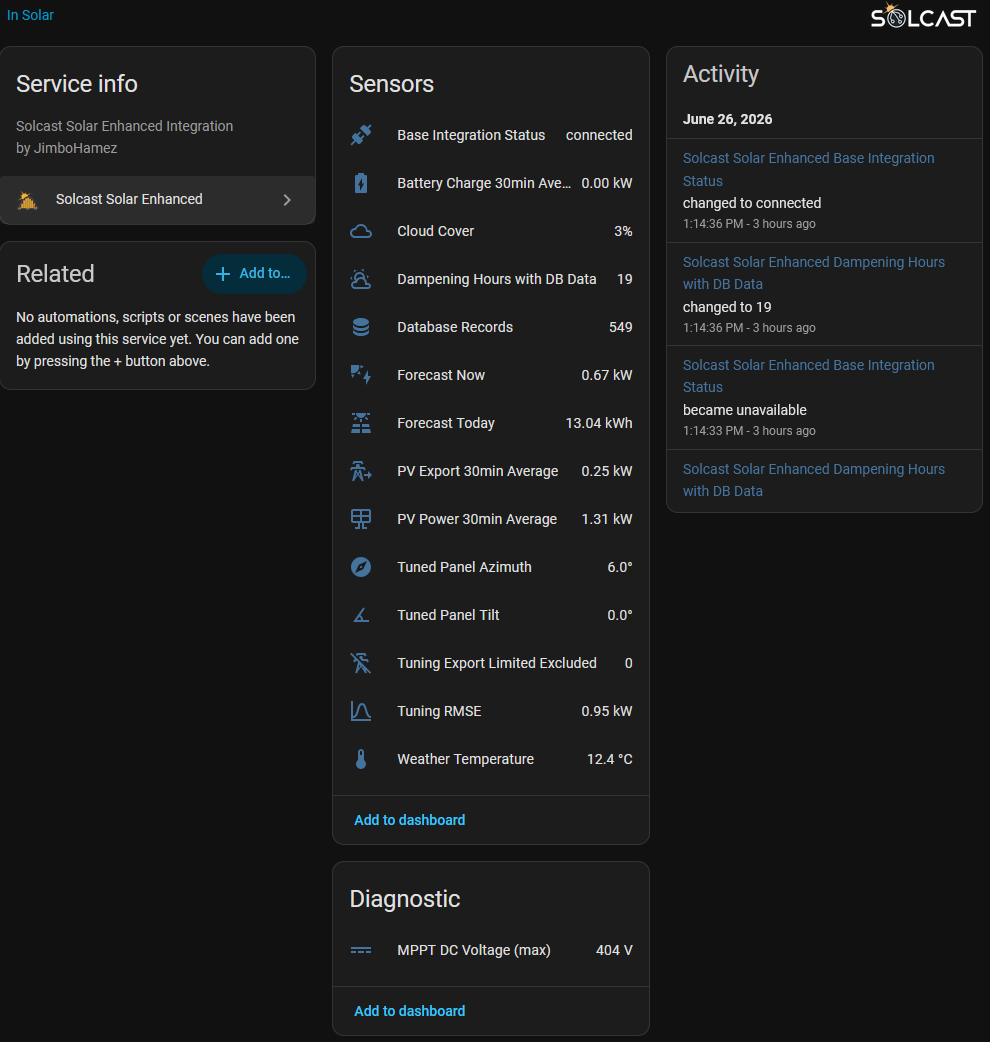
Solcast Solar Enhanced is an adaptive forecasting layer that tunes Solcast PV forecasts using a home's own generation data. It works alongside the base Solcast PV Forecast integration, which must be installed first, and reads forecast data from it without extra Solcast API calls. History of PV, forecast, weather and battery data is stored locally in a built-in SQLite file, with an option to limit how many days are kept. It estimates panel tilt from generation data, learns shading and other local effects as dampening, and pushes that correction back to Solcast. It handles multiple arrays, accepts energy counters or power sensors, and can use optional inverter voltage and current readings to detect export curtailment. Weather inputs come from Open-Meteo or optionally OpenWeatherMap, and the results appear as sensors, with repair notices for conflicting settings.
Automatic summary of the README and code of JimboHamez/ha_solcast_solar_enhanced. Something wrong, or are you the maintainer and want your own text here? Get in touch
Supports
Uses the vendor's cloud Needs an internet connection and an account with the vendor.
From the Marketplace Installed through the Marketplace, formerly HACS.
Actively maintained Its author released or pushed a change in the last six months.
Provides
- Sensors
Setting it up
Install it from the Marketplace and restart Home Assistant, then add it under Settings, Devices and services.
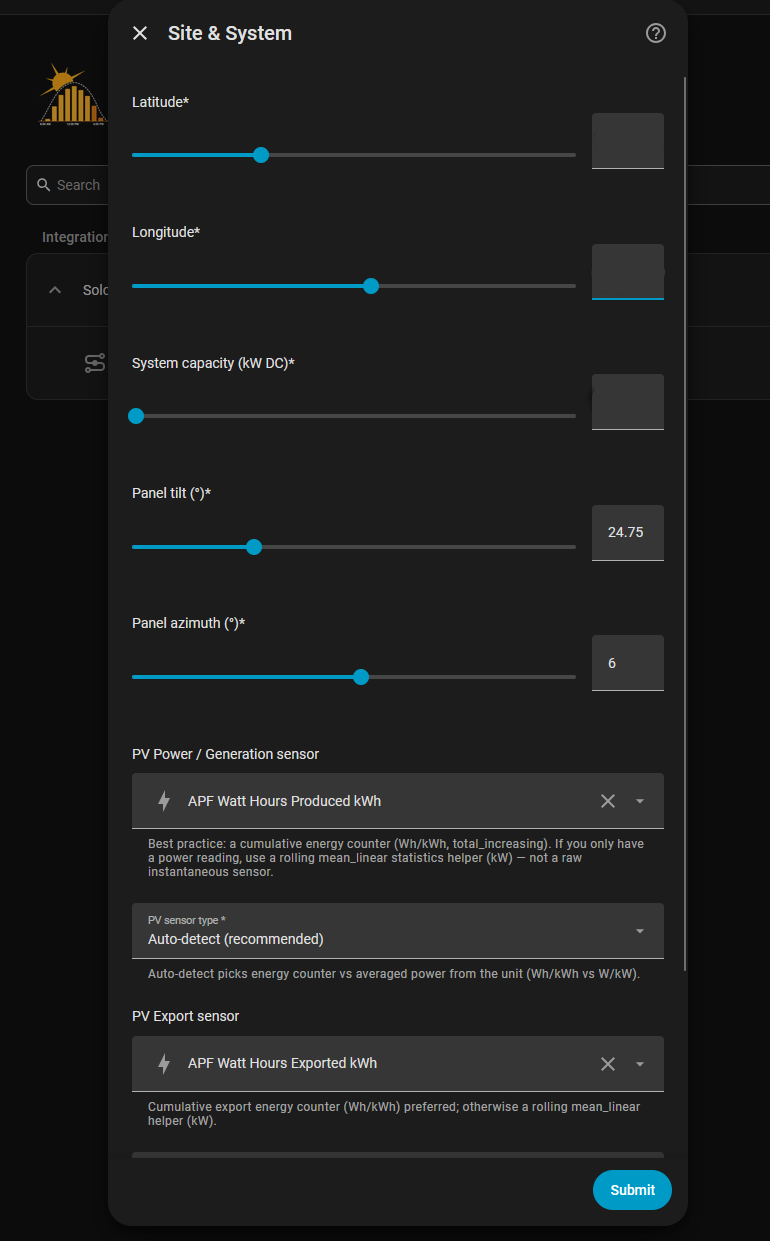
Site & System
- Latitude
- Longitude
- System capacity (kW AC — inverter rating)Your inverter's AC nameplate rating — not the panel (DC) total. Readings at or above this value times the clipping threshold are treated as inverter clipping and excluded from tuning and shading. Read automatically from Solcast when your sites report it; this value is the fallback.
- Panel tilt (°)
- Panel azimuth (°)
- PV Power / Generation sensorBest practice: a cumulative energy counter (Wh/kWh, total_increasing). If you only have a power reading, use a rolling mean_linear statistics helper (kW) — not a raw instantaneous sensor. Whole-system total — multi-array systems also map each array on the per-site page that follows.
- PV Export sensorCumulative export energy counter (Wh/kWh) preferred; otherwise a rolling mean_linear helper (kW).
- Battery Charge 30min Average sensor (optional)
- MPPT 1 DC voltage sensor (optional, for curtailment detection)Optional per-MPPT DC string sensors (e.g. from Fronius). Point at the raw per-string voltage/current entities — the integration takes the maximum voltage and minimum current over each 30-minute slot from history, so no statistics helper is needed. Voltage climbing toward open-circuit while current collapses is the off-MPP fingerprint of export curtailment. MPPT 2 is optional; single-tracker inverters leave it blank. Shown only for single-array systems — multi-array systems map each array's MPPT voltage/current in the per-site step instead.
- MPPT 1 DC current sensor (optional)
- MPPT 2 DC voltage sensor (optional)
- MPPT 2 DC current sensor (optional)
- PV sensor typeAuto-detect picks energy counter vs averaged power from the unit (Wh/kWh vs W/kW).
- PV Export sensor typeAuto-detect by unit. Energy counter recommended.
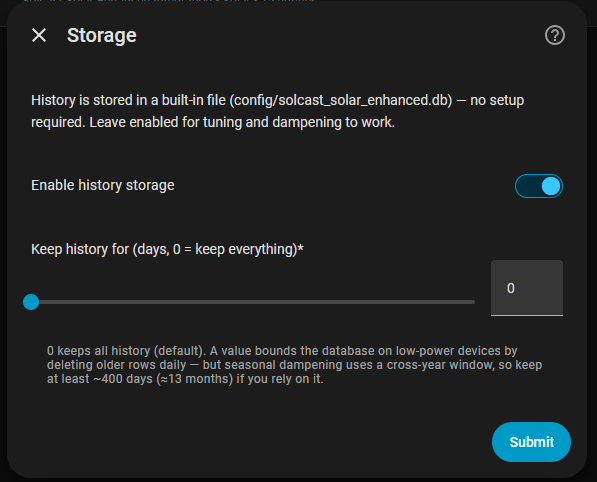
Storage
- Enable history storage
- Keep history for (days, 0 = keep everything)0 keeps all history (default). A value bounds the database on low-power devices by deleting older rows daily — but seasonal dampening uses a cross-year window, so keep at least ~400 days (≈13 months) if you rely on it.
Weather & Irradiance
- Enable Open-Meteo (recommended, no API key)Free, keyless source of solar irradiance (required for PV tilt tuning) plus cloud cover and temperature. Leave enabled unless you specifically prefer OpenWeatherMap.
- Enable OpenWeatherMap (legacy, optional)Optional legacy alternative for cloud cover and temperature; needs a free API key. When enabled it takes precedence over Open-Meteo for cloud/temperature — irradiance still comes from Open-Meteo.
- OpenWeatherMap API key
Battery Storage
- Enable raw battery fallback
- Mode
- Net battery power sensor (signed)
- Battery charge power sensor
PV Tuning & Dampening
- Auto PV tuning
- Auto dampeningEvery 6 hours, pushes a shading curve measured from your own history to Solcast PV Forecast. This takes over Solcast PV Forecast's dampening, hourly values included: it switches on granular (per-site) dampening and replaces each site's factors, so dampening you set there by hand stops applying while this is on. If no Solcast site is found, it writes the hourly values instead. Skipped while Solcast PV Forecast's own automatic dampening is on.
- Warn when tuning disagrees with Solcast orientation
- Sun-position dampening (sharp horizon, beta)Builds each half-hour's factor from past records taken with the sun in nearly the same place, in all weather. Meant for a hard horizon, such as a building or tree line that blocks the low sun. Leave off for an unshaded or softly shaded array.
- Cloud threshold (%)
- Max cloud cover to include (%)
- Clearness index threshold (clear-sky)
- Clipping threshold (fraction of capacity)
- Grid export limit (kW, 0 = disabled)
Per-site sensor mapping
- How are your arrays measured?
After setup
- Latitude
- Longitude
- System capacity (kW AC — inverter rating)Your inverter's AC nameplate rating — not the panel (DC) total. Readings at or above this value times the clipping threshold are treated as inverter clipping and excluded from tuning and shading. Read automatically from Solcast when your sites report it; this value is the fallback.
- Panel tilt (°)
- Panel azimuth (°)
- PV Power / Generation sensorBest practice: a cumulative energy counter (Wh/kWh, total_increasing). If you only have a power reading, use a rolling mean_linear statistics helper (kW) — not a raw instantaneous sensor.
- PV Export sensorCumulative export energy counter (Wh/kWh) preferred; otherwise a rolling mean_linear helper (kW).
- Battery Charge 30min Average sensor (optional)
- MPPT 1 DC voltage sensor (optional, for curtailment detection)Optional per-MPPT DC string sensors (e.g. from Fronius). Point at the raw per-string voltage/current entities — the integration takes the maximum voltage and minimum current over each 30-minute slot from history, so no statistics helper is needed. Voltage climbing toward open-circuit while current collapses is the off-MPP fingerprint of export curtailment. MPPT 2 is optional; single-tracker inverters leave it blank.
- MPPT 1 DC current sensor (optional)
- MPPT 2 DC voltage sensor (optional)
- MPPT 2 DC current sensor (optional)
- PV sensor typeAuto-detect picks energy counter vs averaged power from the unit (Wh/kWh vs W/kW).
- PV Export sensor typeAuto-detect by unit. Energy counter recommended.
- Enable history storage
- Keep history for (days, 0 = keep everything)0 keeps all history (default). A value bounds the database on low-power devices by deleting older rows daily — but seasonal dampening uses a cross-year window, so keep at least ~400 days (≈13 months) if you rely on it.
- Enable Open-Meteo (recommended, no API key)Free, keyless source of solar irradiance (required for PV tilt tuning) plus cloud cover and temperature. Leave enabled unless you specifically prefer OpenWeatherMap.
- Enable OpenWeatherMap (legacy, optional)Optional legacy alternative for cloud cover and temperature; needs a free API key. When enabled it takes precedence over Open-Meteo for cloud/temperature — irradiance still comes from Open-Meteo.
- OpenWeatherMap API key
- Enable raw battery fallback
- Mode
- Net battery power sensor (signed)
- Battery charge power sensor
- Auto PV tuning
- Auto dampeningEvery 6 hours, pushes a shading curve measured from your own history to Solcast PV Forecast. This takes over Solcast PV Forecast's dampening, hourly values included: it switches on granular (per-site) dampening and replaces each site's factors, so dampening you set there by hand stops applying while this is on. If no Solcast site is found, it writes the hourly values instead. Skipped while Solcast PV Forecast's own automatic dampening is on.
- Warn when tuning disagrees with Solcast orientation
- Sun-position dampening (sharp horizon, beta)Builds each half-hour's factor from past records taken with the sun in nearly the same place, in all weather. Meant for a hard horizon, such as a building or tree line that blocks the low sun. Leave off for an unshaded or softly shaded array.
- Cloud threshold (%)
- Max cloud cover to include (%)
- Clearness index threshold (clear-sky)
- Clipping threshold (fraction of capacity)
- Grid export limit (kW, 0 = disabled)
- How are your arrays measured?
Texts from the code of JimboHamez/ha_solcast_solar_enhanced.
Entities
- SensorsTuning Export Limited Excluded, PV Forecast Confidence, Shading, PV Power 30min Average, Tuned Tilt, Azimuth, Tuning RMSE, Current Hour Dampening, Forecast Now, Forecast Today, Tuned Panel Tilt, Tuned Panel Azimuth, and 9 more
Troubleshooting
- DiagnosticsDownloads a diagnostics file to attach to a bug report.
- Repair noticesNotices it can show in Settings, Repairs:No weather source for PV tuning & dampening, Tuned tilt differs from your Solcast site, Solcast granular dampening conflicts with per-site dampening, System capacity looks like a DC (panel) figure
From the README
An adaptive forecasting layer that uses the telemetry available from your PV system to identify and compensate for site-specific differences between modelled and actual generation.
A companion to BJReplay/ha-solcast-solar: it learns from your own generation history to make your Solcast forecasts more accurate — automatically, and entirely on your device.

Shows in Vulpo
Chart card, Apple Watch.Information
- Installs
- 83 sharing analytics
- GitHub stars
- 10
- Connection
- Uses the vendor's cloud
- Upkeep
- Updated in the last 6 months
- Version
- v1.13.1,
- Category
- Energy, Solar and batteries
- Kind
- Marketplace integration
- Brand
- Solcast
- Needs
- Needs the Marketplace (HACS on 2026.10 and older)
- Domain
solcast_solar_enhanced- Issues
- Report an issue