
Bosch SHC
On Home Assistant 2026.11 or newer? Open it in the Marketplace
- Installs
- 2.1k sharing analytics
- GitHub stars
- 239
- Connection
- Works locally
- Upkeep
- Updated in the last 6 months
- Version
- v0.12.42,
- Category
- Hubs and protocols, Smart home hubs
- Kind
- Marketplace integration
- Brand
- Bosch
- Needs
- Needs the Marketplace (HACS on 2026.10 and older)
- Domain
bosch_shc- Issues
- Report an issue
Independent directory, made by the developer of Vulpo. Not affiliated with Home Assistant or the Open Home Foundation.
Screenshots From the README of tschamm/boschshc-hass.
About
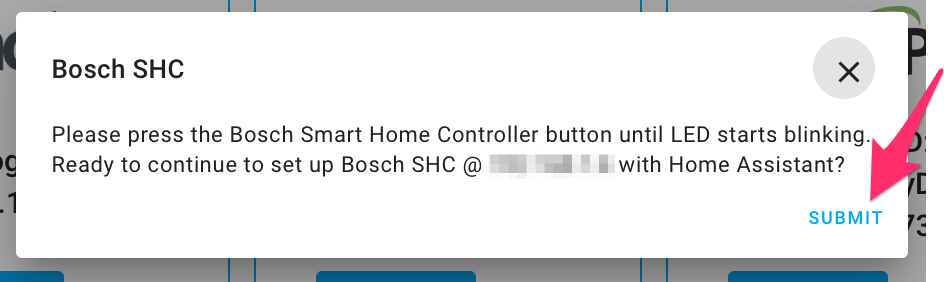
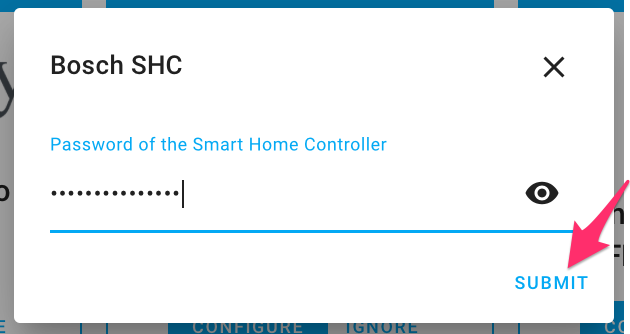
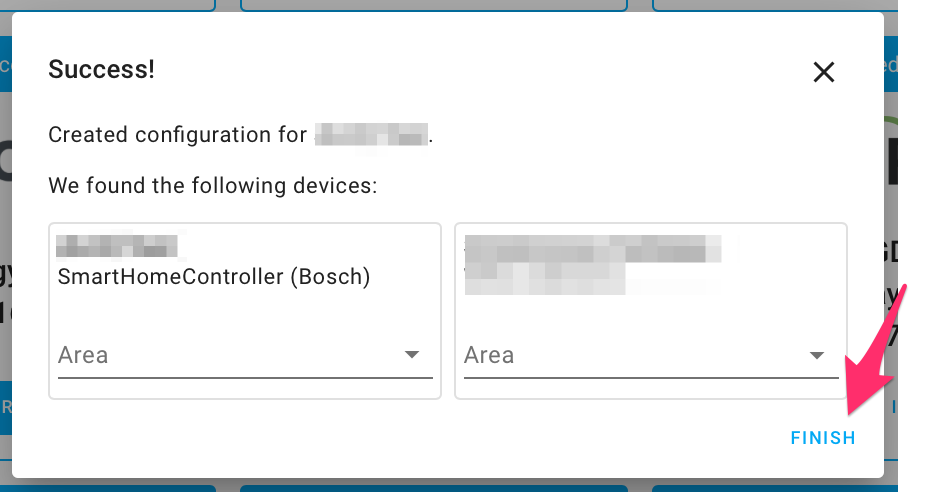
Bosch SHC connects Home Assistant to a Bosch Smart Home Controller over the local network, with no cloud involved. It uses the boschshcpy library and receives updates pushed from the controller, with mutual TLS between the two. Paired devices appear as entities across many platforms, including climate, covers, lights, valves, sensors, switches and update entities for firmware. Options can suppress selected sensors, expose scenarios and Bosch automation rules as buttons or switches, group lights per room, and show some lights as lights instead of switches. Actions cover triggering scenarios, smoke detector tests, reading measurement history and exporting a Zigbee topology map. The controller is usually discovered automatically, and setup asks for the controller address and the system password from the Bosch app.
Automatic summary of the README and code of tschamm/boschshc-hass. Something wrong, or are you the maintainer and want your own text here? Get in touch
Supports
Works locally Talks to your devices on your own network. No vendor cloud in between.
Found by itself Home Assistant spots it on the network and offers to add it.
Device triggers Its devices can start automations directly.
From the Marketplace Installed through the Marketplace, formerly HACS.
Actively maintained Its author released or pushed a change in the last six months.
Provides
- Lights
- Climate
- Covers
- Valves
- Alarms
- Switches
- Sensors
Setting it up
Install it from the Marketplace and restart Home Assistant, then add it under Settings, Devices and services.
SHC authentication parameters
- HostIP address or hostname of the SHC controller (e.g. 192.168.x.y).
Also asked when signing in again.
Sign in
- Client name for certificateName shown in the SHC app under connected clients.
- Password of the Smart Home ControllerThe password set in the Bosch Smart Home app.
Re-pair — regenerate client certificate
- HostIP address or hostname of the SHC controller (e.g. 192.168.x.y).
- Password of the Smart Home ControllerThe password set in the Bosch Smart Home app.
- Client name for certificateName shown in the SHC app under connected clients.
Change host / IP address
- HostNew IP address or hostname of the SHC controller (e.g. 192.168.x.y).
After setup
- Expose scenarios as button entitiesWhen ON: each Bosch SHC scenario also appears as a button entity in Home Assistant (in addition to the trigger_scenario service). Useful for dashboard tiles and automations that trigger scenarios directly. Default: off.
- Create diagnostic sensorsWhen ON (default): diagnostic sensor entities are created for each supported device — valve tappet position (thermostats) and communication quality (smart plugs). Turn OFF to reduce entity count if you do not need these sensors.
- Enable rawscan diagnostic serviceWhen ON: registers the bosch_shc.trigger_rawscan service for raw API debugging. Turn OFF to hide it. Default: on.
- Expose ALL Light/Shutter Control II as lightsTurn ON to present every Light Control II / in-wall light-switch device as a light entity at once — overrides the per-device selection below. Off (default) keeps the per-device choice. Same caveat: this swaps the entity domain (switch.* ↔ light.*), so update automations/dashboards that reference the old entities.
- Expose Light/Shutter Control II as lightsSelect the Light Control II / in-wall light-switch devices that should appear as light entities instead of switch entities. Each selected device's switch is replaced by an on/off light. Leave empty (default) to keep them as switches. Changing this swaps the entity domain (switch.* ↔ light.*), so update any automations or dashboards that reference the old entity.
- Suppress Hue lights from Bosch SHCWhen ON: Hue lights paired to the SHC are no longer exposed as entities by this integration. Use this to avoid duplicates when the Hue integration is also active. Default: off (Hue lights are shown).
- Suppress power & energy sensorsWhen ON: power and energy sensors (watt / kWh) are not created for smart plugs, BSM switches, micromodule controls, and the EMMA energy manager. Default: off (sensors are shown).
- Scenario button filterLeave empty to create buttons for ALL scenarios (default). Select one or more to limit buttons to only those scenarios. Applies only when 'Expose scenarios as button entities' is on.
- Suppress LEDVANCE lights from Bosch SHCWhen ON: LEDVANCE lights paired to the SHC are no longer exposed as entities by this integration. Use this to avoid duplicates when the LEDVANCE or Zigbee integration is also active. Default: off.
- Suppress motion detector indicator lightWhen ON: the indicator-LED brightness entity for Motion Detector II devices is not created. Default: off (entity is shown).
- Suppress Bosch camera switchesWhen ON: privacy-mode, light, and notification switch entities for Bosch cameras (Eyes / 360 / Outdoor Gen2) are not created. Use this when the Bosch Camera Tool is also active to avoid duplicate controls. Default: off.
- Enable per-room light groupsWhen ON: creates one aggregate light entity per SHC room with 2+ dimmable/color lights (LEDVANCE, Hue, Light/Shutter Control II dimmers), letting you turn all of a room's lights on/off from a single entity — mirroring the room-level control heating already has via Room Climate Control. On/off only, no brightness/colour aggregation. Default: off (no new entities).
- Expose Bosch automation rules as entitiesWhen ON: creates a switch (enable/disable) and a button (manually trigger) for every automation rule configured in the Bosch app — Bosch's own local rule engine, entirely separate from Home Assistant's own automations. Default: off (no new entities).
- Enable temperature-drop entitiesWhen ON: creates a switch (enable/disable) and a number (drop value) for each room's temperature-drop (anti-frost/window-open) service. Most setups don't use this feature. Default: off (no new entities).
- Bridge physical pushbuttons for HA automationsWhen ON: for every Shutter/Light Control II device with a physical detached pushbutton, creates a small automation directly on the Bosch Smart Home Controller that pulses a virtual on/off state when a button is pressed. That state already appears as a regular switch entity — use its on/off transitions as a trigger in your own Home Assistant automations. Turning this off removes the automations and states it created. Default: off (no new entities, nothing created on the Controller).
Texts from the code of tschamm/boschshc-hass.
Entities
- Binary sensorsAcoustic alarm, Visual alarm, Tamper, AC/DC error, Battery defect, Battery temperature abnormal, Power supply outage, Call for heat, and 7 more
- ButtonsTest alarm, Start function test, Stop function test, Reset tamper, Preview max brightness, Preview min brightness, Reset consumption value, Start automatic calibration, and 4 more
- ClimateRoom temperature control
- EventsLower key, Upper key, Lower left key, Lower right key, Upper left key, Upper right key
- LightsOrientation light, Light
- NumbersPulse length, Temperature deviation, Energy-saving power threshold, Energy-saving enter duration, LED brightness, Display brightness, Display switch-on duration, Siren alarm duration, and 10 more
- SelectsMotion sensitivity, Vibration sensitivity, State after power outage, Smoke sensitivity, Display orientation, Displayed temperature, Sensor connection, Valve type, and 11 more
- SensorsOpen doors and windows, Function test state, Battery level, Combined rating, Air quality description, Signal strength, Battery charge, Primary source, and 18 more
- SwitchesBreak function, Break function never expires, Child lock, Temperature drop, Enabled, Pet / robot vacuum cleaner, Automatic sensitivity, Sabotage detection, and 15 more
- UpdatesSoftware update, Firmware
- ValvesValve
Actions
- Smoke Detector CheckCalls the test routine of a smoke detector.Fields: Entity ID
- Trigger ScenarioTriggers a scenario on Bosch SHC.Fields: SHC name, Scenario name
- Trigger RawscanTriggers a rawscan on Bosch SHC to discover devices. Result is streamed to the info logger.Fields: SHC name, Rawscan command, Device ID, Service ID
- Smoke Detector Alarm StateSend a custom command to a smoke detector.Fields: Entity ID, Custom command
- Export Zigbee TopologyBuilds a Zigbee mesh topology graph (per-hop link quality) from the last routing poll and writes it as JSON + a viewable HTML page under www/bosch_shc/. Also returns the graph as JSON and as Mermaid diagram text in the service response.Fields: SHC name
- Refresh Zigbee RoutingFetches a fresh Zigbee routing reading now. Routing data is otherwise only fetched once at startup, not on a recurring schedule, to avoid unnecessary battery drain on Zigbee devices — use this before Export Zigbee Topology for an up-to-date map.Fields: SHC name
- Get measurement historyReads one page of stored measurements (for example Twinguard temperature or humidity) from the SHC and returns it in the response. The SHC endpoint was found in the Bosch app and is not yet confirmed on real hardware. All times are in seconds.Fields: SHC name, Device id, Reference time, Interval, Rounding, Overlap
Troubleshooting
- DiagnosticsDownloads a diagnostics file to attach to a bug report.
- Repair noticesNotices it can show in Settings, Repairs:More for your Bosch cameras, Bosch SHC client certificate expiring soon, Firmware update blocked by low battery, Manual calibration required
From the README
A local-only Home Assistant integration for the Bosch Smart Home Controller (SHC I & II). It talks directly to the controller over mutual-TLS on your LAN — no cloud, no polling (local_push) — using boschshcpy as the API backend (the exact version is pinned in manifest.json).
Looking for the version that ships inside Home Assistant Core? This HACS repo is the bleeding-edge upstream — fixes and new devices land here first, then flow to Core later.
- 🔒 Local & private — mutual-TLS to the SHC, real-time push updates, nothing leaves your network.
- 🧩 Broad device coverage — thermostats, shutters/blinds (with tilt), micromodules, plugs, lights, cameras, Twinguard, smoke & intrusion, motion, contacts, water-leak, Energy Manager (EMMA), and more.
- 🔥 Firmware updates in HA — the controller and every firmware-capable device get a normal HA "Update available" notification with an Install button, no need to open the Bosch app.
- 🤖 Bosch's own automation rules as HA entities (opt-in) — enable/disable and trigger any rule you already built in the Bosch app, straight from Home Assistant.
- 🚨 Alarm "Mute" buttons for the intrusion system and the whole-home water-leak alarm.
- 🌡️ Per-room temperature-drop (anti-frost) controls and a thermostat regulation-algorithm select, mirroring the Bosch app's room-detail screen.
- 🚪 Whole-home "Open Doors/Windows" summary sensor — one glance at how many openings are open.

Shows in Vulpo
Light card, Quick Toggle card, Cover card, Climate card, Apple Watch, Control Center, Climate Live Activity.Information
- Installs
- 2.1k sharing analytics
- GitHub stars
- 239
- Connection
- Works locally
- Upkeep
- Updated in the last 6 months
- Version
- v0.12.42,
- Category
- Hubs and protocols, Smart home hubs
- Kind
- Marketplace integration
- Brand
- Bosch
- Needs
- Needs the Marketplace (HACS on 2026.10 and older)
- Domain
bosch_shc- Issues
- Report an issue