
Midea Auto Cloud
On Home Assistant 2026.11 or newer? Open it in the Marketplace
- Installs
- 1.9k sharing analytics
- GitHub stars
- 300
- Connection
- Uses the vendor's cloud
- Upkeep
- Updated in the last 6 months
- Version
- v0.4.19,
- Category
- Climate, Heat pumps and air conditioning
- Kind
- Marketplace integration
- Brand
- Midea
- Needs
- Needs the Marketplace (HACS on 2026.10 and older)
- Domain
midea_auto_cloud- Issues
- Report an issue
Independent directory, made by the developer of Vulpo. Not affiliated with Home Assistant or the Open Home Foundation.
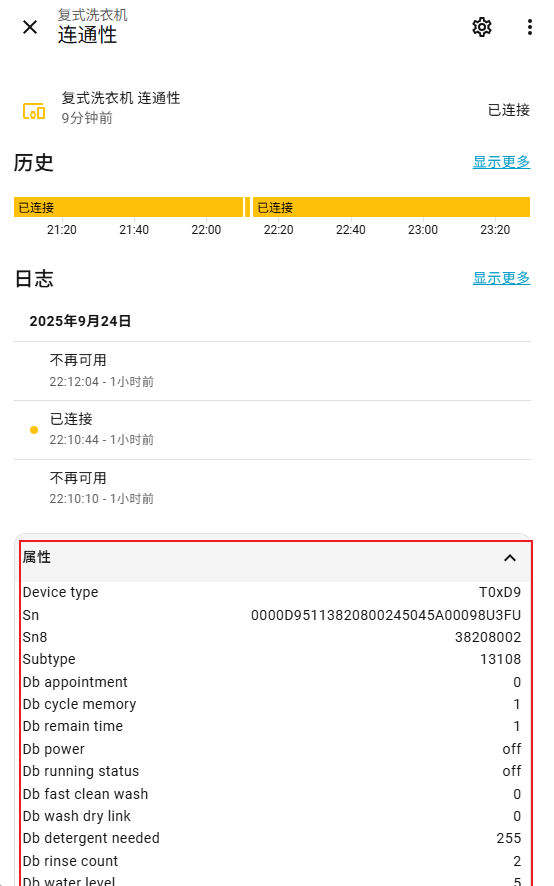
Screenshots From the README of sususweet/midea_auto_cloud.
About
Midea Auto Cloud controls Midea and Midea Meiju devices from Home Assistant through the vendor's cloud API. It finds devices on a MSmartHome or Meiju account, downloads the matching device protocol files automatically, and shows device status as attributes. Supported device types include air conditioners, water heaters, washing machines, dishwashers, refrigerators, ovens, robot vacuums, humidifiers, air purifiers and fans. Devices appear as many entity types, among them climate, sensors, switches, selects, numbers, fans, lights, locks, vacuums and water heaters. Setup runs in the UI with an account login, a home and appliance choice, and an optional device IP address, and options cover credentials, refresh interval and a reset. Two actions set appliance attributes and send custom commands.
Automatic summary of the README and code of sususweet/midea_auto_cloud. Something wrong, or are you the maintainer and want your own text here? Get in touch
Supports
Uses the vendor's cloud Needs an internet connection and an account with the vendor.
From the Marketplace Installed through the Marketplace, formerly HACS.
Actively maintained Its author released or pushed a change in the last six months.
Provides
- Lights
- Climate
- Water heaters
- Humidifiers
- Fans
- Covers
- Locks
- Vacuums
- Switches
- Sensors
Setting it up
Install it from the Marketplace and restart Home Assistant, then add it under Settings, Devices and services.
Login
- Account
- Password
Home
- Choose a location where your appliance in
Appliances
- Choice a appliance to add
Appliance info
- IP address('auto' for discovery automatic)
Select Homes
- Select Homes
After setup
- Option
- Username
- Password
- Server
- I know that, do it
- IP address
- Refresh interval(0 means not refreshing actively)
Texts from the code of sususweet/midea_auto_cloud.
Entities
- Binary sensorsDevice Status, Probo on, Heating Work Status, Bathing Work Status, Door Unlock Switch, Softener Lack, Detergent Lack, and 83 more
- ButtonsLight off, Light on, Left stove off, Right stove off, Middle stove off, Locate Robot
- ClimateFreezing Zone, Left Flexzone, Right Flexzone, Storage Zone, Thermostat, Thermostat 1, Thermostat 2, and 10 more
- CoversLaundry Rack
- FansFan, Fan only, Fresh Air
- HumidifiersHumidifier, Dehumidifier
- LightsLight, Ceiling Light, Night Light
- LocksChild Lock, Lock
- NumbersVoice Level, Auto Temperature Lower Limit, Auto Temperature Upper Limit, Drying Storage Set Time, Delay Light Off, PM2.5 Upper(Auto Purification), PM2.5 Lower(Stop Purification), and 67 more
- SelectsOdor Threshold, Heating Tank, Aidry, Soft Water Level, Drying Storage Switch, Dry Step Switch, Dry Switch, and 151 more
- SensorsCurrent Water Temperature, Target Water Temperature, Hot Water Amount, Heating Remaining Time, Water Quality Score, Fault Code, Washing Stage, and 395 more
- SwitchesLow Power Insulation, Low Energy Save, Prevent Super Cool, Cool Power Saving, Light Sensitive, Sound, and 397 more
- TextsExternal Humidity Sensor
- VacuumsRobotic Vacuum
Actions
- set the attributesSet the attributes of appliance in a dictFields: Appliance code, Attributes
- Custom commandSend a custom command to applianceFields: Appliance code, Type of command, Body of command
From the README
Get devices from MSmartHome/Midea Meiju homes through the network and control them via Midea's cloud API.

Shows in Vulpo
Light card, Quick Toggle card, Cover card, Climate card, Apple Watch, Control Center, Climate Live Activity, Vacuum Live Activity.Information
- Installs
- 1.9k sharing analytics
- GitHub stars
- 300
- Connection
- Uses the vendor's cloud
- Upkeep
- Updated in the last 6 months
- Version
- v0.4.19,
- Category
- Climate, Heat pumps and air conditioning
- Kind
- Marketplace integration
- Brand
- Midea
- Needs
- Needs the Marketplace (HACS on 2026.10 and older)
- Domain
midea_auto_cloud- Issues
- Report an issue