On Home Assistant 2026.11 or newer? Open it in the Marketplace
- Installs
- 51 sharing analytics
- GitHub stars
- 50
- Connection
- Works locally
- Upkeep
- Updated in the last 6 months
- Version
- v3.7.0,
- Category
- Energy, Energy prices
- Kind
- Marketplace integration
- Needs
- Needs the Marketplace (HACS on 2026.10 and older)
- Domain
smgw_han- Issues
- Report an issue
Independent directory, made by the developer of Vulpo. Not affiliated with Home Assistant or the Open Home Foundation.
Screenshots From the README of TRON4R/ha-ppc-smgw-han.
About
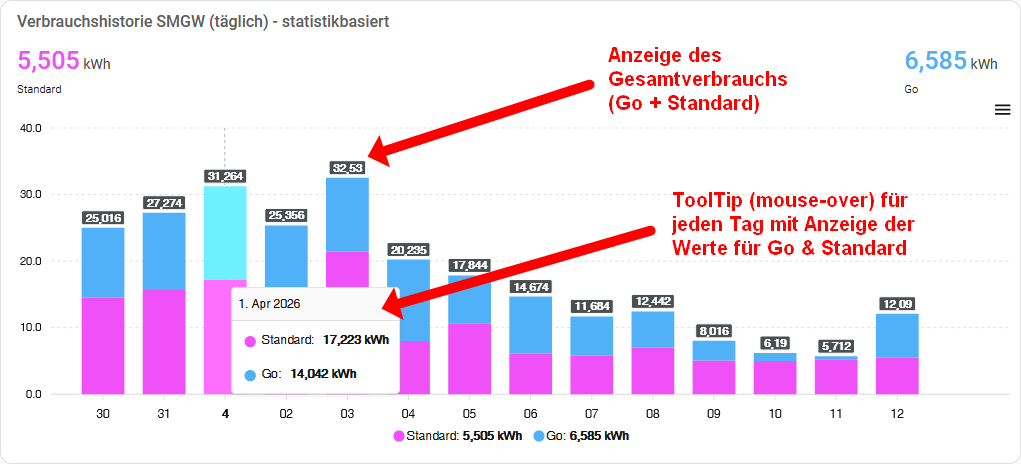
PPC SMGW HAN Daily Import fetches daily consumption and feed-in values from a PPC Smart Meter Gateway. It connects locally to the gateway once a day at a configurable time and reads the calibrated end-of-day meter values, instead of polling at short intervals. It adds sensors for daily consumption, daily feed-in and the closing meter readings of the previous day, and these can be used in the Energy dashboard. Consumption can be split into freely defined tariff zones, including separate times for Saturdays, Sundays and public holidays, and a later change of zones can be scheduled. Actions export readings for a custom or preset period as CSV, Excel or a signed CMS file, and the gateway log can be exported as well. Several gateways or meters can run side by side, and repair notices appear when data is missing or a fetch fails.
Automatic summary of the README and code of TRON4R/ha-ppc-smgw-han. Something wrong, or are you the maintainer and want your own text here? Get in touch

Shows in Vulpo
Chart card, Apple Watch.Installs over time
#1,468 of 1,483 Marketplace integrations. Installs sharing analytics.
Supports
- Works locallyTalks to your devices on your own network. No vendor cloud in between.
- From the MarketplaceInstalled through the Marketplace, formerly HACS.
- Actively maintainedIts author released or pushed a change in the last six months.
Provides
- Sensors
Setting it up
Install it from the Marketplace and restart Home Assistant, then add it under Settings, Devices and services.
Connect to Smart Meter Gateway
- URLURL of the SMGW HAN interface (default: https://192.168.100.100/cgi-bin/hanservice.cgi)
- Username
- Password
- Tariff zones (switch points)One entry per switch point in the format "HH:MM zone name", starting at 00:00; the last entry runs until midnight. Example Octopus Go: "00:00 Go" and "05:00 Standard". Equal zone names share one sensor: "00:00 Standard", "02:00 Low", "06:00 Standard", "12:00 Low" creates two sensors — "Standard" sums 00:00-02:00 and 06:00-12:00, "Low" sums 02:00-06:00 and 12:00-24:00. Minutes must be 00, 15, 30 or 45.
- Fetch timeTime of day for the automatic daily data fetch
- Device name (optional)A telling name for this device. Fill it in as soon as you run more than one entry against the same SMGW — whether because you evaluate the same meter by two sets of time windows (e.g. your supplier's tariff and your grid operator's module-3 windows), or because your metering operator issued separate credentials for consumption (1.8.0) and feed-in (2.8.0). Good pairs are "SMGW Octopus" / "SMGW Modul 3" and "SMGW Import" / "SMGW Export". Leave it empty only while this stays the single entry for this SMGW — otherwise Home Assistant just numbers the identically named devices. The name feeds into the entity ids, so it is worth picking the right one now.
- Different times for Saturday, Sunday and public holidaysTick this if your tariff switches at other times on Saturdays, Sundays or public holidays. You enter those times in the next step; the zones above then apply to Monday to Friday only. Unticking it removes the rules for these days.
Select meter
- Meter
Evaluate this meter a second time?
- Device name (recommended)Without a name Home Assistant only numbers the two identical devices ("PPC SMGW 2"). A name such as "Modul 3" tells them apart at a glance.
Saturday, Sunday and public holidays
- Saturday zonesSame format as the tariff zones of the previous form, e.g. "00:00 NT", "06:00 HT", "13:00 NT". Leave empty if Saturdays use the same zones as Monday to Friday.
- Sunday zonesSame format. A single entry such as "00:00 NT" means: this zone all day. Leave empty if Sundays use the same zones as Monday to Friday.
- Public holidaysOn which public holidays the Sunday zones apply, also when the holiday falls on a Saturday. Your grid operator's price sheet says what applies to you. "Off": a holiday counts as the weekday it falls on. "Nationwide holidays only": the nine holidays common to every German state. A federal state: also the statutory holidays of that state. For Bavaria this includes Assumption Day (15 August), counted for all of Bavaria although by law it applies only in municipalities with a predominantly Catholic population. Not included are holidays that only apply locally, such as the Augsburg Peace Festival or Corpus Christi in individual municipalities of Saxony and Thuringia. Every choice except "Off" needs Sunday zones.
Re-authenticate SMGW
- Username
- Password
After setup
- Valid fromThe first day the new layout applies. Prefilled with the next 1 January, the most common case — but any future date works, for example the day a new supplier tariff starts. It switches at 00:00 on that day; the fetch later that night still splits the previous day by the old windows.
- Tariff zones (switch points) from that dateOne entry per switch point in the format "HH:MM zone name", starting at 00:00, minutes 00, 15, 30 or 45. Prefilled with the zones active today, so only the changed times have to be corrected. Keeping the zone names identical keeps each sensor's history in one series. Sensors are identified by their position in the list, so a renamed or reordered zone continues the old sensor's series and its statistics get mixed.
- Discard the scheduled change
- Different times for Saturday, Sunday and public holidaysTick this if your tariff switches at other times on Saturdays, Sundays or public holidays. You enter those times in the next step; the zones above then apply to Monday to Friday only. Unticking it removes the rules for these days.
- URLURL of the SMGW HAN interface (default: https://192.168.100.100/cgi-bin/hanservice.cgi)
- Username
- Password
- Tariff zones (switch points)One entry per switch point in the format "HH:MM zone name", starting at 00:00; the last entry runs until midnight. Example Octopus Go: "00:00 Go" and "05:00 Standard". Equal zone names share one sensor: "00:00 Standard", "02:00 Low", "06:00 Standard", "12:00 Low" creates two sensors — "Standard" sums 00:00-02:00 and 06:00-12:00, "Low" sums 02:00-06:00 and 12:00-24:00. Minutes must be 00, 15, 30 or 45. Note on statistics history: each zone gets its own consumption sensor. Home Assistant identifies these sensors by their position in the list (first zone, second zone …), not by the name you enter. Changing times or appending further zones at the end is therefore safe – existing sensors keep their history. But if you reorder or rename the zones so that a different zone now occupies a previously used position, the new zone's data is appended to the old zone's data in the Home Assistant history, i.e. the sensor's statistics get mixed.
- Fetch timeTime of day for the automatic daily data fetch
- Device name (optional)A telling name for this device, needed as soon as several entries point at the same SMGW — two evaluations of one meter (supplier tariff vs. module-3 windows), or separate logins for import and feed-in. Otherwise leave it empty.
- Different times for Saturday, Sunday and public holidaysTick this if your tariff switches at other times on Saturdays, Sundays or public holidays. You enter those times in the next step; the zones above then apply to Monday to Friday only. Unticking it removes the rules for these days.
- PeriodThe next step pre-fills the date range from this choice; you can still edit it there.
- Download certified CMS file
- Create CSV
- Create Excel (XLSX)
- From
- To
- Period"Everything" starts on 2000-01-01 and fetches whatever the SMGW still holds.
- Download signed CMS file(s)
- Create CSV
- Create Excel (XLSX)
- From
- To
- Saturday zonesSame format as the tariff zones of the previous form, e.g. "00:00 NT", "06:00 HT", "13:00 NT". Leave empty if Saturdays use the same zones as Monday to Friday.
- Sunday zonesSame format. A single entry such as "00:00 NT" means: this zone all day. Leave empty if Sundays use the same zones as Monday to Friday.
- Public holidaysOn which public holidays the Sunday zones apply, also when the holiday falls on a Saturday. Your grid operator's price sheet says what applies to you. "Off": a holiday counts as the weekday it falls on. "Nationwide holidays only": the nine holidays common to every German state. A federal state: also the statutory holidays of that state. For Bavaria this includes Assumption Day (15 August), counted for all of Bavaria although by law it applies only in municipalities with a predominantly Catholic population. Not included are holidays that only apply locally, such as the Augsburg Peace Festival or Corpus Christi in individual municipalities of Saxony and Thuringia. Every choice except "Off" needs Sunday zones.
Texts from the code of TRON4R/ha-ppc-smgw-han.
Entities
- SensorsDaily consumption total, Daily feed-in total, Meter consumption previous day closing, Meter feed-in previous day closing, Daily date, Device ID
Actions
- Export readings (custom range)Fetch the SMGW meter readings for a custom From/To range. Returns the data as a response variable and can additionally create the signed CMS original file, a CSV and/or an Excel file, downloadable via the links (shown at the top of the response variable).
- Device
- From
- To
- Download certified CMS file
- Create CSV
- Create Excel (XLSX)
- Export readings (period preset)Fetch the SMGW meter readings for a ready-made period. The range, including the closing reading of the last day, is computed automatically. Identical outputs and download options as the custom-range export.
- Device
- Period
- Download certified CMS file
- Create CSV
- Create Excel (XLSX)
Troubleshooting
- DiagnosticsDownloads a diagnostics file to attach to a bug report.
- Repair noticesNotices it can show in Settings, Repairs:SMGW is not delivering current data, SMGW fetch failed - retrying, SMGW fetch gave up for one day, SMGW daily data is missing
From the README
Home Assistant Custom Integration zum Abruf geeichter Tagesendwerte von PPC Smart Meter Gateways über die HAN-Schnittstelle.
Information
- Installs
- 51 sharing analytics
- GitHub stars
- 50
- Connection
- Works locally
- Upkeep
- Updated in the last 6 months
- Version
- v3.7.0,
- Category
- Energy, Energy prices
- Kind
- Marketplace integration
- Needs
- Needs the Marketplace (HACS on 2026.10 and older)
- Domain
smgw_han- Issues
- Report an issue