

Xiaomi Mi Air Purifier, Air Humidifier, Air Fresh and Pedestal Fan Integration
On Home Assistant 2026.11 or newer? Open it in the Marketplace
- Installs
- 331 sharing analytics
- GitHub stars
- 499
- Connection
- Works locally
- Upkeep
- Updated in the last 6 months
- Version
- 2026.6.0.0,
- Category
- Climate, Fans and ventilation
- Kind
- Marketplace integration
- Brand
- Xiaomi
- Needs
- Needs the Marketplace (HACS on 2026.10 and older)
- Domain
xiaomi_miio_airpurifier- Issues
- Report an issue
Independent directory, made by the developer of Vulpo. Not affiliated with Home Assistant or the Open Home Foundation.
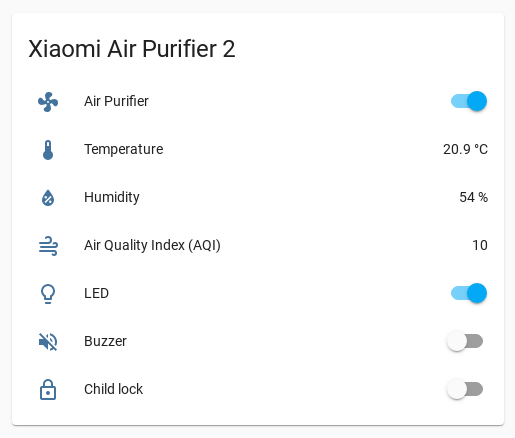
Screenshots From the README of syssi/xiaomi_airpurifier.
About
Xiaomi Mi Air Purifier, Air Humidifier, Air Fresh and Pedestal Fan Integration adds Xiaomi air devices to Home Assistant. It talks to the devices locally and is configured in the YAML configuration file, using an access token retrieved from the device. It provides climate and fan entities, with power, preset modes such as auto, silent and favorite, and a favorite level setting. Actions cover the buzzer, child lock, LED brightness, fan level, volume, and resetting the filter lifetime and usage. Humidifier models get a target humidity action and a dry mode switch. Exposed attributes include temperature, humidity, air quality index and filter life remaining, which vary by model. The README describes it as a beta version of the component in Home Assistant Core that also supports additional devices.
Automatic summary of the README and code of syssi/xiaomi_airpurifier. Something wrong, or are you the maintainer and want your own text here? Get in touch
Supports
Works locally Talks to your devices on your own network. No vendor cloud in between.
From the Marketplace Installed through the Marketplace, formerly HACS.
Actively maintained Its author released or pushed a change in the last six months.
Provides
- Climate
- Fans
Setting it up
Install it from the Marketplace and restart Home Assistant. It is then set up in configuration.yaml.
Actions
- Set buzzer onTurn the buzzer on.Fields: Entity ID
- Set buzzer offTurn the buzzer off.Fields: Entity ID
- Set child lock onTurn the child lock on.Fields: Entity ID
- Set child lock offTurn the child lock off.Fields: Entity ID
- Set favorite levelSet the favorite level.Fields: Entity ID, Level
- Set fan levelSet the fan level.Fields: Entity ID, Level
- Set LED brightnessSet the LED brightness.Fields: Entity ID, Brightness
- Set auto detect onTurn the auto detect on.Fields: Entity ID
- Set auto detect offTurn the auto detect off.Fields: Entity ID
- Set learn mode onTurn the learn mode on.Fields: Entity ID
- Set learn mode offTurn the learn mode off.Fields: Entity ID
- Set volumeSet the sound volume.Fields: Entity ID, Volume
- Reset filterReset the filter lifetime and usage.Fields: Entity ID
- Set extra featuresManipulates a storage register which advertises extra features. The Mi Home app evaluates the value. A feature called "turbo mode" is unlocked in the app on value 1.Fields: Entity ID, Features
- Set target humiditySet the target humidity.Fields: Entity ID, Humidity
- Set dry onTurn the dry mode on.Fields: Entity ID
- Set dry offTurn the dry mode off.Fields: Entity ID
- Set filters cleanedInform the device that filters are cleaned.Fields: Entity ID
From the README
This is a custom component for home assistant to integrate the Xiaomi Mi Air Purifier 2, Air Purifier 2S, Air Purifier Pro, Air Humidifier, Air Fresh and Pedestal Fan.
Please follow the instructions on Retrieving the Access Token to get the API token to use in the configuration.yaml file.
- Power (on, off)
- Preset modes (auto, silent, favorite, idle)
- Buzzer (on, off)
- Child lock (on, off)
- LED (on, off), LED brightness (bright, dim, off)
- Favorite Level (0...16)
- Attributes
- model
- temperature
- humidity
- aqi
- mode

Shows in Vulpo
Climate card, Fan card, Apple Watch, Climate Live Activity.Information
- Installs
- 331 sharing analytics
- GitHub stars
- 499
- Connection
- Works locally
- Upkeep
- Updated in the last 6 months
- Version
- 2026.6.0.0,
- Category
- Climate, Fans and ventilation
- Kind
- Marketplace integration
- Brand
- Xiaomi
- Needs
- Needs the Marketplace (HACS on 2026.10 and older)
- Domain
xiaomi_miio_airpurifier- Issues
- Report an issue
More from Xiaomi
 Xiaomi Cloud Map Extractor3.4k installs · This custom integration provides a way to present a live view o…OpenXiaomi Gateway 33.2k installs · Home Assistant custom component for control Xiaomi Multimode Ga…Open









