Xiaomi Home
On Home Assistant 2026.11 or newer? Open it in the Marketplace
- Installs
- 20.2k sharing analytics
- GitHub stars
- 22.3k
- Connection
- Uses the vendor's cloud
- Upkeep
- Updated in the last 6 months
- Version
- v0.5.0,
- Category
- Hubs and protocols, Smart home hubs
- Kind
- Marketplace integration
- Brand
- Xiaomi
- Needs
- Needs the Marketplace (HACS on 2026.10 and older)
- Domain
xiaomi_home- Issues
- Report an issue
Independent directory, made by the developer of Vulpo. Not affiliated with Home Assistant or the Open Home Foundation.
Screenshots From the README of XiaoMi/ha_xiaomi_home.
About
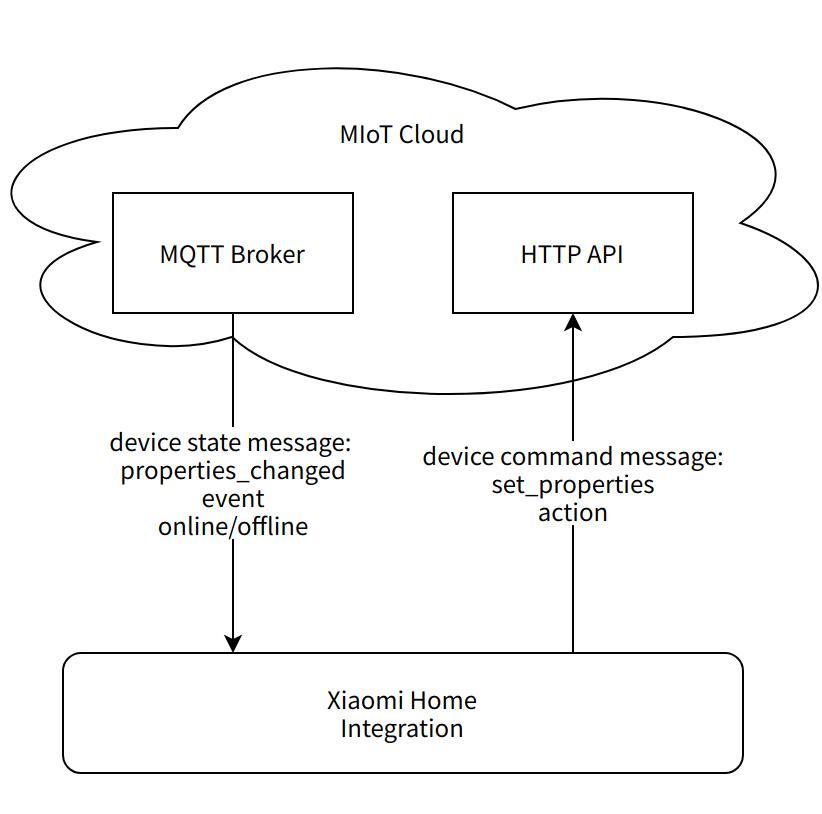
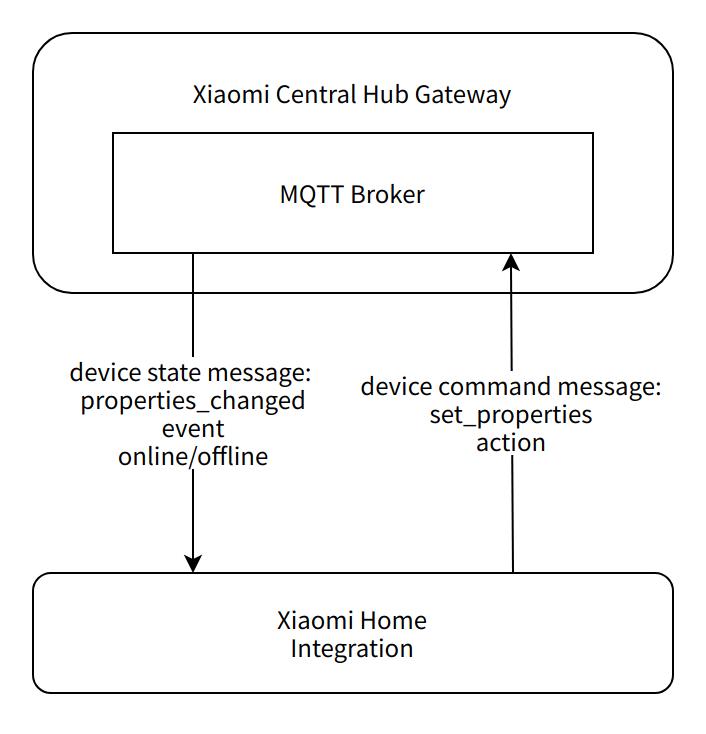
Xiaomi Home is a marketplace integration that connects Xiaomi devices to Home Assistant through the vendor's cloud. It creates entities across many platforms, including lights, climate, covers, fans, vacuums, humidifiers, media, sensors, switches and water heaters. Setup runs in the UI, where a login region and language are chosen and a home with its devices is imported. Devices can be filtered by family room, connection type, model or a device list, and room names can be synced. Options cover a control mode, an action debug mode, hiding non-standard generated entities, binary sensor display mode and device status change notifications. Local network control can be adjusted by picking a network card and enabling LAN subscription, and the cover dead zone width can be set.
Automatic summary of the code of XiaoMi/ha_xiaomi_home. Something wrong, or are you the maintainer and want your own text here? Get in touch
Supports
Uses the vendor's cloud Needs an internet connection and an account with the vendor.
Found by itself Home Assistant spots it on the network and offers to add it.
From the Marketplace Installed through the Marketplace, formerly HACS.
Actively maintained Its author released or pushed a change in the last six months.
Provides
- Lights
- Climate
- Water heaters
- Humidifiers
- Fans
- Covers
- Media
- Vacuums
- Switches
- Sensors
- Presence
Setting it up
Install it from the Marketplace and restart Home Assistant, then add it under Settings, Devices and services.
Basic configuration
- Login Region
- Language
- OAuth2 Redirect URL
- Integrated Network Configuration
Integrated Network Configuration
- Network Detection Address
- Check Network Dependencies
Select Family and Device
- Import Device's Family
- Room Name Sync Mode
- Advanced Settings
Advanced Settings
- Filter Devices
- Control Mode
- Action Debug Mode
- Hide Non-Standard Generated Entities
- Binary Sensor Display Mode
- Display Device Status Change Notifications
Filter Devices
- Filter Family Rooms
- Family Rooms
- Filter Device Connect Type
- Device Connect Type
- Filter Device Model
- Device Model
- Filter Devices
- Device List
- Statistics Logic
After setup
- OAuth2 Redirect URL
- Integration Language
- Update user information
- Update device list
- Debug mode for action
- Hide non-standard created entities
- Binary Sensor Display Mode
- Display device status change notifications
- Update entity conversion rules
- Update LAN control configuration
- Integrated network configuration
- Cover dead zone width
- Nick Name
- Import devices from home
- Filter devices
- Control mode
- Filter Family Rooms
- Family Rooms
- Filter Device Connect Type
- Device Connect Type
- Filter Device Model
- Device Model
- Filter Devices
- Device List
- Statistics Logic
- Confirm the update
- Please select the network card to use
- Enable LAN subscription
- Network Detection Address
- Check Network Dependencies

Shows in Vulpo
Light card, Quick Toggle card, Cover card, Climate card, Apple Watch, Control Center, Climate Live Activity, Vacuum Live Activity.Information
- Installs
- 20.2k sharing analytics
- GitHub stars
- 22.3k
- Connection
- Uses the vendor's cloud
- Upkeep
- Updated in the last 6 months
- Version
- v0.5.0,
- Category
- Hubs and protocols, Smart home hubs
- Kind
- Marketplace integration
- Brand
- Xiaomi
- Needs
- Needs the Marketplace (HACS on 2026.10 and older)
- Domain
xiaomi_home- Issues
- Report an issue
More from Xiaomi
 Xiaomi Cloud Map Extractor3.4k installs · This custom integration provides a way to present a live view o…OpenXiaomi Gateway 33.2k installs · Home Assistant custom component for control Xiaomi Multimode Ga…OpenXiaomi Mi Air Purifier, Air Humidifier, Air Fresh and Pedestal Fan Integration331 installs · Xiaomi Mi Air Purifier and Xiaomi Mi Air Humidifier integration …Open