
Tibber Graph
On Home Assistant 2026.11 or newer? Open it in the Marketplace
- Installs
- 285 sharing analytics
- GitHub stars
- 8
- Connection
- Works locally
- Upkeep
- Updated in the last 6 months
- Version
- v0.7.4,
- Category
- Energy, Energy prices
- Kind
- Marketplace integration
- Brand
- Tibber
- Needs
- Needs the Marketplace (HACS on 2026.10 and older)
- Domain
tibber_graph- Issues
- Report an issue
Independent directory, made by the developer of Vulpo. Not affiliated with Home Assistant or the Open Home Foundation.
Screenshots From the README of stefanes/tibber-graph.
About
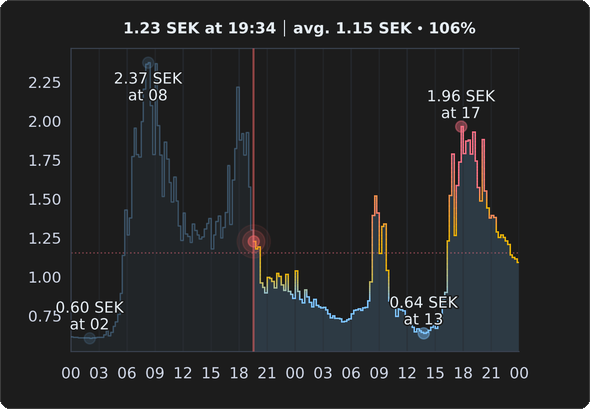
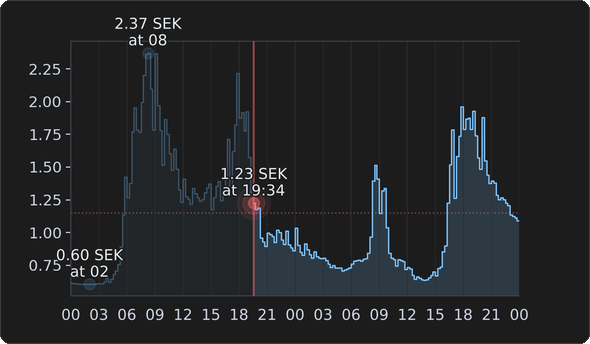
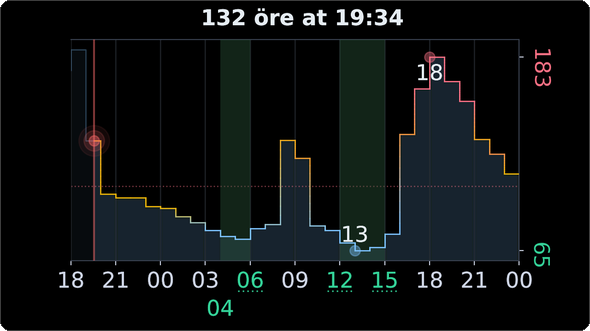
Tibber Graph renders past and future electricity prices as a graph image inside Home Assistant. It adds a camera entity and an image entity that show the graph, plus a sensor with the time of the last successful render. Prices come from the Tibber integration by default, or from any price sensor that holds price data in its attributes, such as Nord Pool or EPEX Spot. Options cover light or dark themes, a transparent background, canvas size, the start point and number of hours shown, an average price line, hourly aggregation and display in cents. The cheapest periods of each day can be highlighted using a count or a price threshold. Actions allow changing options, resetting them, setting a custom theme, rendering the graph, and creating or deleting graph entities from automations.
Automatic summary of the README and code of stefanes/tibber-graph. Something wrong, or are you the maintainer and want your own text here? Get in touch
Supports
Works locally Talks to your devices on your own network. No vendor cloud in between.
From the Marketplace Installed through the Marketplace, formerly HACS.
Actively maintained Its author released or pushed a change in the last six months.
Provides
- Cameras
- Sensors
Setting it up
Install it from the Marketplace and restart Home Assistant, then add it under Settings, Devices and services.
Add Tibber Graph entry
- Price entity (leave blank to use Tibber integration)
- Entity name (leave blank for auto)Custom name for this entity. Leave blank for automatic name. Must be unique.
- ThemeVisual theme: 'Dark' or 'Light'. Default: Dark
- Start graph atStarting point: 'Midnight', 'Current hour', or 'Show all' available data. Default: Show all
Change the connection
- Hours to showReset to show all available data from start point.
- Number of Y-axis ticksReset Y-axis tick count to automatic.
- Number of price decimalsReset price decimals to automatic.
- Currency overrideReset currency to automatic.
- All settingsReset all settings to defaults.
After setup
- ThemeVisual theme: 'Dark' or 'Light'. Default: Dark
- Transparent backgroundUse transparent background with selected theme. Default: off
- Canvas width (pixels)Width in pixels. Default: 1180
- Canvas height (pixels)Height in pixels. Default: 820
- Force fixed sizeAlways render at fixed size. Default: on
- Label font sizeFont size for all labels. Default: 11
- Start graph atStarting point: 'Midnight', 'Current hour', or 'Show all' available data. Default: Midnight
- Hours to show (leave empty for all available data)Number of hours to show from start point. Leave empty for all available data. Default: all available data (reconfigure to reset)
- Cheap price points to highlightNumber of lowest-price periods to highlight per day (0 = none). Works with 'Cheap price threshold'. Default: 0
- Cheap price thresholdPrice threshold for highlighting cheap periods (0 = disabled). Works with 'Cheap price points'. Default: 0
- Show average price lineShow line at average price level. Default: on
- Color price line by averageColor price line based on average price with gradients. Default: on
- Number of price decimalsNumber of decimal places for prices. Leave empty for automatic. Default: automatic (reconfigure to reset)
- Aggregate to hourly pricesAggregate to hourly averages. Default: off
- Display in centsDisplay prices in cents. Default: off
Texts from the code of stefanes/tibber-graph.
Actions
- Set optionUpdate one or more configuration options for a Tibber Graph entity.Fields: Entity ID, Options, Overwrite
- Reset optionReset one or more configuration options to their default values for a Tibber Graph entity.Fields: Entity ID, Options
- Set data sourceChange the data source for a Tibber Graph entity. Can switch between Tibber integration and price sensors as a data source.Fields: Entity ID, Price entity
- RenderRender the graph for a Tibber Graph entity.Fields: Entity ID
- Set custom themeSet a custom theme for a Tibber Graph entity. All theme properties must be provided. Call without theme_config to clear the custom theme and revert to the configured theme.Fields: Entity ID, Theme config
- Create graphCreate a new Tibber Graph camera entity programmatically with specified configuration.Fields: Entity name, Price entity, Options, Custom theme, Recreate
- Delete graphDelete one or more Tibber Graph camera entities programmatically.Fields: Entity ID
From the README
Display past and future electricity prices as a graph in Home Assistant - an out-of-the-box alternative to e.g. Apex Charts. Tibber Graph was originally built for the official Tibber integration but supports any price sensor as a data source, such as Nord Pool or EPEX Spot.

Shows in Vulpo
Camera card, Chart card, Apple Watch.Information
- Installs
- 285 sharing analytics
- GitHub stars
- 8
- Connection
- Works locally
- Upkeep
- Updated in the last 6 months
- Version
- v0.7.4,
- Category
- Energy, Energy prices
- Kind
- Marketplace integration
- Brand
- Tibber
- Needs
- Needs the Marketplace (HACS on 2026.10 and older)
- Domain
tibber_graph- Issues
- Report an issue