Tibber Price Information & Ratings
On Home Assistant 2026.11 or newer? Open it in the Marketplace
- Installs
- 1.1k sharing analytics
- GitHub stars
- 60
- Connection
- Uses the vendor's cloud
- Upkeep
- Updated in the last 6 months
- Version
- v0.37.0,
- Category
- Energy, Energy prices
- Kind
- Marketplace integration
- Brand
- Tibber
- Needs
- Needs the Marketplace (HACS on 2026.10 and older)
- Domain
tibber_prices- Issues
- Report an issue
Independent directory, made by the developer of Vulpo. Not affiliated with Home Assistant or the Open Home Foundation.
Screenshots From the README of jpawlowski/hass.tibber_prices.
About
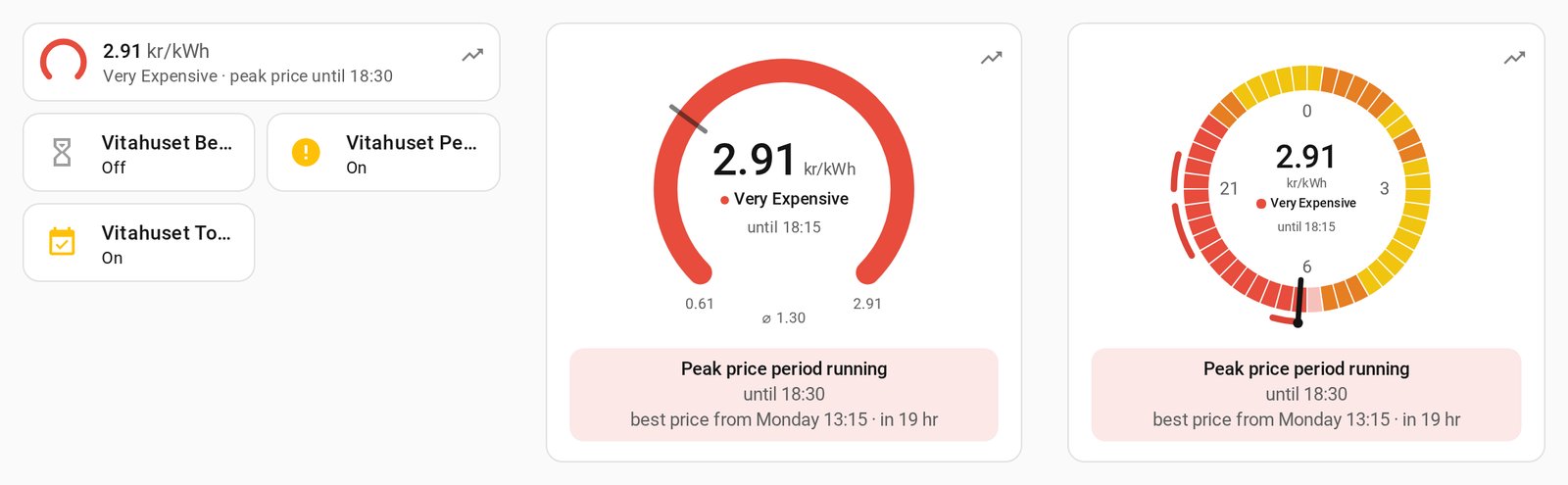
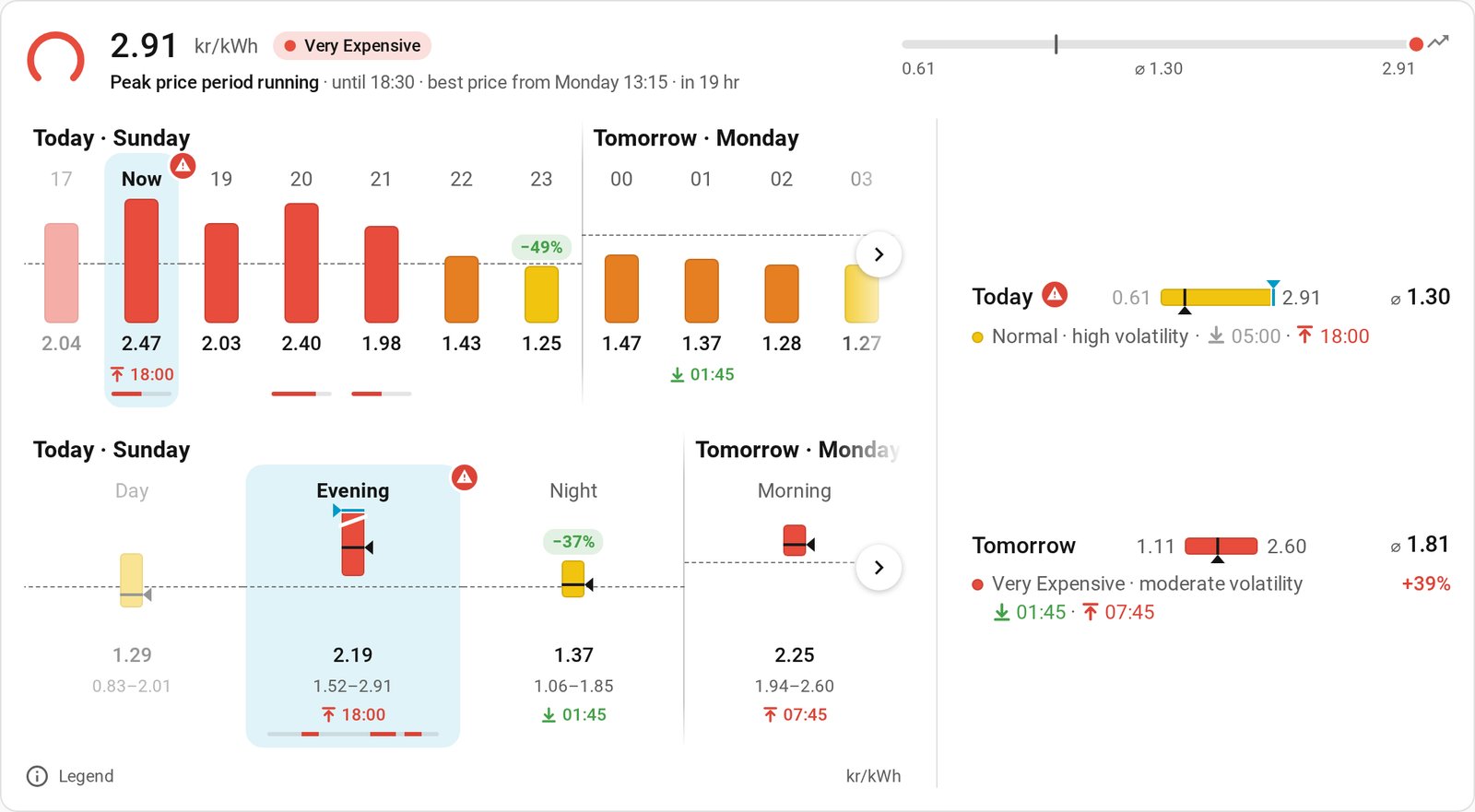
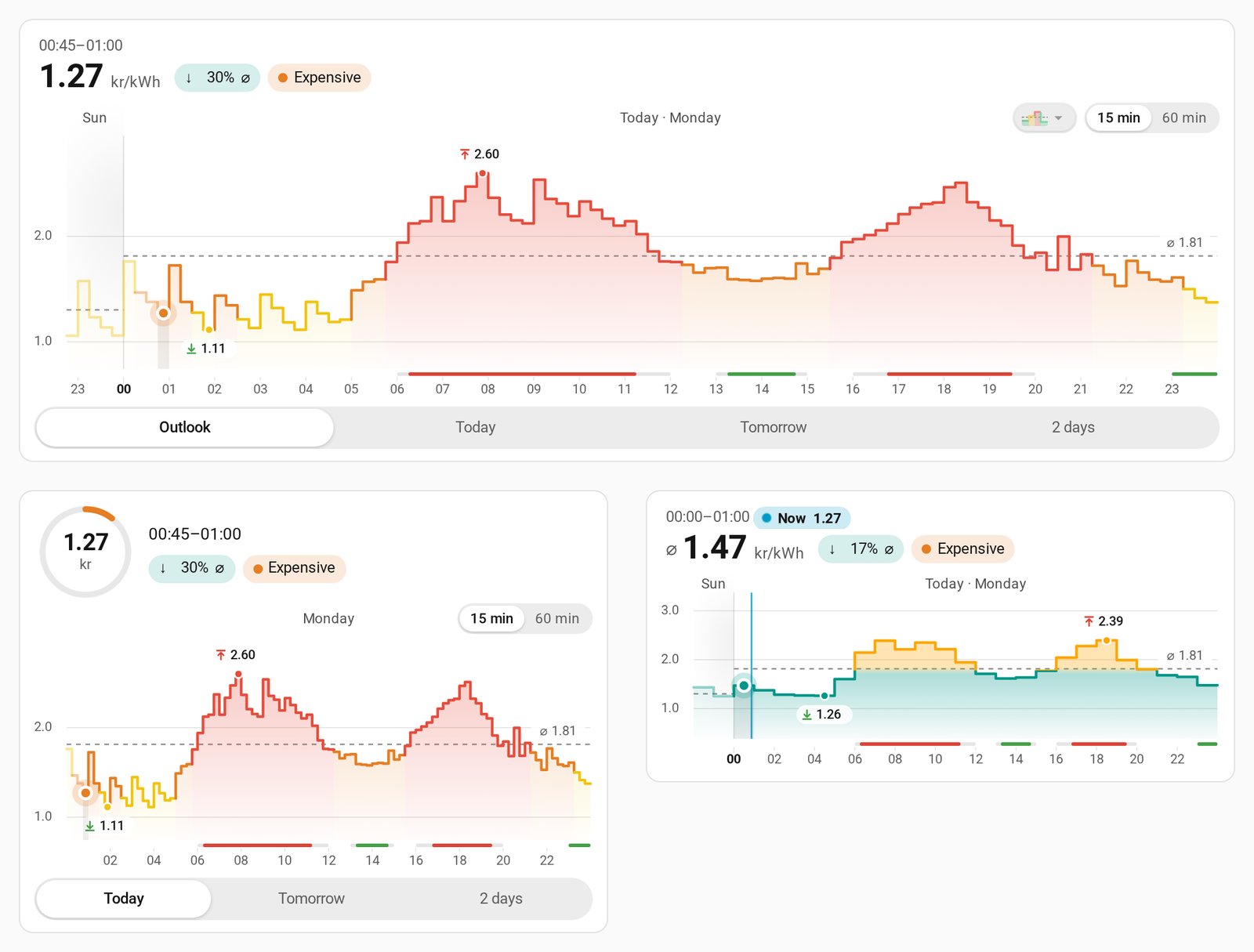
Tibber Price Information & Ratings is a community integration that brings Tibber electricity prices into Home Assistant. It provides prices at 15-minute resolution, forecasts of average prices for the coming hours, trend analysis, and volatility classification. Binary sensors mark the best and peak price periods of the day, and settings such as flexibility, minimum length and gap tolerance can be adjusted at runtime through switches and number entities. Actions find the cheapest or most expensive time window or hours, plan appliance schedules, plan battery charging, and return chart data. It also includes its own Forecast, Now and Chart dashboard cards, and supports several currencies with a choice between base and subunit display. It connects to the Tibber cloud with an API access token and is configured in the user interface.
Automatic summary of the README and code of jpawlowski/hass.tibber_prices. Something wrong, or are you the maintainer and want your own text here? Get in touch
Supports
Uses the vendor's cloud Needs an internet connection and an account with the vendor.
From the Marketplace Installed through the Marketplace, formerly HACS.
Actively maintained Its author released or pushed a change in the last six months.
Setting it up
Install it from the Marketplace and restart Home Assistant, then add it under Settings, Devices and services.
Connect
- API access token
Also asked when at the enter api token step and signing in again.
Choose Account
- Account
Pick a Home
- Home
Pick a home
- Home ID
After setup
- Extended DescriptionsControls whether entity attributes include detailed explanations and usage tips. • Disabled (default): Brief description only • Enabled: Detailed explanation + practical usage examples Example: Disabled = 1 attribute Enabled = 2 additional attributes
- Average Sensor DisplayChoose which statistical measure to display in the sensor state for average price sensors. The other value will be shown as an attribute. • Median (default): Shows the 'typical' price, resistant to extreme spikes - best for display and human interpretation • Arithmetic Mean: Shows the true mathematical average including all prices - best when you need exact cost calculations For automations, use the attribute price_mean or price_median to access both values regardless of this setting.
- Display ModeChoose how prices are displayed: • Base Currency (€/kWh, kr/kWh): Decimal values (e.g., 0.25 €/kWh) - differences visible from 3rd-4th decimal place • Subunit Currency (ct/kWh, øre/kWh): Larger values (e.g., 25.00 ct/kWh) - differences visible from 1st decimal place Default depends on your currency: • EUR → Subunit (cents) - German/Dutch preference • NOK/SEK/DKK → Base (kroner) - Scandinavian preference • USD/GBP → Base currency 💡 Tip: When selecting Subunit Currency, you can enable the additional "Current Electricity Price (Energy Dashboard)" sensor (disabled by default).
- Low ThresholdPercentage below the trailing 24-hour average that the current price must be to qualify as 'low' rating. Example: -10 means at least 10% below average. Sensors with this rating indicate favorable time windows. Default: -10%
- High ThresholdPercentage above the trailing 24-hour average that the current price must be to qualify as 'high' rating. Example: 10 means at least 10% above average. Sensors with this rating warn about expensive time windows. Default: 10%
- HysteresisPercentage band around thresholds to prevent rapid state changes. When the rating is already LOW, the price must rise above (threshold + hysteresis) to switch to NORMAL. Similarly, HIGH requires the price to fall below (threshold - hysteresis) to leave. This provides stability for automations that react to rating changes. Set to 0 to disable. Default: 2%
- Gap ToleranceMaximum number of consecutive intervals that can be 'smoothed out' if they differ from surrounding ratings. Small isolated rating changes are merged into the dominant neighboring block. This provides stability for automations by preventing brief rating spikes from triggering unnecessary actions. Example: 1 means a single 'normal' interval surrounded by 'high' intervals gets corrected to 'high'. Set to 0 to disable. Default: 1
- Gap ToleranceMaximum number of consecutive intervals that can be 'smoothed out' if they differ from surrounding price levels. Small isolated level changes are merged into the dominant neighboring block. Example: 1 means a single 'normal' interval surrounded by 'cheap' intervals gets corrected to 'cheap'. Set to 0 to disable. Default: 1
- Minimum Period LengthMinimum duration for a period to be considered as 'best price'. Longer periods are more practical for running appliances like dishwashers or heat pumps. Best price periods require 60 minutes minimum (vs. 30 minutes for peak price warnings) because they should provide meaningful time windows for consumption planning, not just brief opportunities.
- Price Level FilterOnly show best price periods if they contain intervals with price levels ≤ selected value. For example, selecting 'Cheap' means the period must have at least one 'Very cheap' or 'Cheap' interval. This ensures 'best price' periods are not just relatively cheap for the day, but actually cheap in absolute terms. Select 'Any' to show best prices regardless of their absolute price level.
- Gap ToleranceMaximum number of consecutive intervals allowed that deviate by exactly one level step from the required level. For example: with 'Cheap' filter and gap count 1, a sequence 'Cheap, Cheap, Normal, Cheap' is accepted (Normal is one step above Cheap). This prevents periods from being split by occasional level deviations. Note: Gap tolerance requires periods ≥90 minutes (6 intervals) to detect outliers effectively. Default: 0 (strict filtering, no tolerance).
- FlexibilityMaximum above the daily minimum price that intervals can be and still qualify as 'best price'. Recommended: 15-20 with relaxation enabled (default), or 25-35 without relaxation. Maximum: 50 (hard cap for reliable period detection).
- Minimum DistanceEnsures periods are significantly cheaper than the daily average, not just marginally below it. This filters out noise and prevents marking slightly-below-average periods as 'best price' on days with flat prices. Higher values = stricter filtering (only truly cheap periods qualify). Default: 5 means periods must be at least 5% below the daily average.
- Achieve Minimum CountWhen enabled, filters will be gradually relaxed if not enough periods are found. This attempts to reach the desired minimum number of periods, which may include less optimal time windows as best-price periods.
- Minimum PeriodsMinimum number of best price periods to aim for per day. Filters will be relaxed step-by-step to try achieving this count. Only active when 'Achieve Minimum Count' is enabled. Default: 1
- Relaxation AttemptsHow many flex levels (attempts) to try before giving up. Each attempt runs all filter combinations at the new flex level. More attempts increase the chance of finding additional periods at the cost of longer processing time.
- Extend to Very Cheap IntervalsWhen enabled, detected best price periods expand outward to absorb adjacent intervals with a 'Very cheap' price level. This widens low-price windows to better capture extremely cheap intervals at the edges of detected periods.
- Maximum Extension IntervalsMaximum number of additional intervals to absorb per side (left and right edge). Each interval is 15 minutes. Example: 4 intervals = up to 1 hour extension per edge. Default: 4
- Geometric Flex BonusExtra flex percentage applied to intervals that fall inside a detected price valley (V-shape). When a valley pattern is detected for the day, intervals within the valley zone get this additional tolerance, making the period detector more likely to include them. 0 = disabled. Default: 0
- W-Shape Segment ForcingWhen enabled, days with a W-shaped price curve (two valleys separated by a central peak) split at the central peak. Period detection runs independently for each valley side, ensuring each valley has the required number of periods. This prevents both periods from clustering in the same valley. Requires the day pattern sensor to detect a 'double_dip' pattern.
- Periods per SegmentMinimum number of best price periods required per valley side when W-shape segment forcing is enabled. Each side must independently produce at least this many periods. Default: 1
- Minimum Period LengthMinimum duration for a period to be considered as 'peak price'. Peak price warnings are allowed for shorter periods (30 minutes minimum vs. 60 minutes for best price) because brief expensive spikes are worth alerting about, even if they're too short for consumption planning.
- Price Level FilterOnly show peak price periods if they contain intervals with price levels ≥ selected value. For example, selecting 'Expensive' means the period must have at least one 'Expensive' or 'Very expensive' interval. This ensures 'peak price' periods are not just relatively expensive for the day, but actually expensive in absolute terms. Select 'Any' to show peak prices regardless of their absolute price level.
- Gap ToleranceMaximum number of consecutive intervals allowed that deviate by exactly one level step from the required level. For example: with 'Expensive' filter and gap count 2, a sequence 'Expensive, Normal, Normal, Expensive' is accepted (Normal is one step below Expensive). This prevents periods from being split by occasional level deviations. Note: Gap tolerance requires periods ≥90 minutes (6 intervals) to detect outliers effectively. Default: 0 (strict filtering, no tolerance).
- FlexibilityMaximum below the daily maximum price that intervals can be and still qualify as 'peak price'. Recommended: -15 to -20 with relaxation enabled (default), or -25 to -35 without relaxation. Maximum: -50 (hard cap for reliable period detection). Note: Negative values indicate distance below maximum.
- Minimum DistanceEnsures periods are significantly more expensive than the daily average, not just marginally above it. This filters out noise and prevents marking slightly-above-average periods as 'peak price' on days with flat prices. Higher values = stricter filtering (only truly expensive periods qualify). Default: 5 means periods must be at least 5% above the daily average.
- Achieve Minimum CountWhen enabled, filters will be gradually relaxed if not enough periods are found. This attempts to reach the desired minimum number of periods to ensure you're warned about expensive periods even on days with unusual price patterns.
- Minimum PeriodsMinimum number of peak price periods to aim for per day. Filters will be relaxed step-by-step to try achieving this count. Only active when 'Achieve Minimum Count' is enabled. Default: 1
- Relaxation AttemptsHow many flex levels (attempts) to try before giving up. Each attempt runs all filter combinations at the new flex level. More attempts increase the chance of finding additional peak periods at the cost of longer processing time.
- Extend to Very Expensive IntervalsWhen enabled, detected peak price periods expand outward to absorb adjacent intervals with a 'Very expensive' price level. This widens high-price windows to better capture extremely expensive intervals at the edges of detected periods.
- Maximum Extension IntervalsMaximum number of additional intervals to absorb per side (left and right edge). Each interval is 15 minutes. Example: 4 intervals = up to 1 hour extension per edge. Default: 4
- Geometric Flex BonusExtra flex percentage applied to intervals that fall inside a detected price peak (Λ-shape). When a peak pattern is detected for the day, intervals within the peak zone get this additional tolerance, making the period detector more likely to include them. 0 = disabled. Default: 0
- M-Shape Segment ForcingWhen enabled, days with an M-shaped price curve (two peaks separated by a central valley) split at the central valley. Period detection runs independently for each peak side, ensuring each peak has the required number of periods. This prevents both periods from clustering in the same peak. Requires the day pattern sensor to detect a 'duck_curve' pattern.
- Periods per SegmentMinimum number of peak price periods required per peak side when M-shape segment forcing is enabled. Each side must independently produce at least this many periods. Default: 1
- Rising ThresholdPercentage that the average of the next N hours must be above the current price to qualify as 'rising' trend. Example: 3 means average is at least 3% higher → prices will rise. Typical values: 3-10%. Default: 3%
- Strongly Rising ThresholdPercentage for 'strongly rising' trend. Must be higher than rising threshold. Example: 9 means average is at least 9% higher → prices will rise significantly. Typical values: 6-20%. Default: 9%
- Falling ThresholdPercentage (negative) that the average of the next N hours must be below the current price to qualify as 'falling' trend. Example: -3 means average is at least 3% lower → prices will fall. Typical values: -3 to -10%. Default: -3%
- Strongly Falling ThresholdPercentage (negative) for 'strongly falling' trend. Must be lower (more negative) than falling threshold. Example: -9 means average is at least 9% lower → prices will fall significantly. Typical values: -6 to -20%. Default: -9%
- Trend Change ConfirmationNumber of consecutive 15-minute intervals that must confirm a new trend direction before reporting a trend change. Higher values mean more stability and fewer false changes, lower values mean faster detection. Range: 2 (30 min) to 6 (90 min). Default: 3 (45 min)
- Min. Price Change (Trend)Minimum absolute price difference (in ct/øre) required for a 'rising' or 'falling' trend. Prevents tiny price changes from triggering trends at low price levels. Set to 0 to disable (pure percentage mode). Default: 0.5
- Min. Price Change (Strong Trend)Minimum absolute price difference (in ct/øre) required for a 'strongly rising' or 'strongly falling' trend. Should be higher than the regular trend minimum. Set to 0 to disable. Default: 1.5
- Moderate ThresholdCoefficient of Variation (CV) at which prices are considered 'moderately volatile'. CV = (standard deviation / mean) × 100%. Example: 15 means price fluctuations of ±15% around average. Sensors show this classification, trend sensors become more sensitive. Default: 15%
- High ThresholdCoefficient of Variation (CV) at which prices are considered 'highly volatile'. Example: 30 means price fluctuations of ±30% around average. Larger price jumps expected, trend sensors become less sensitive. Default: 30%
- Very High ThresholdCoefficient of Variation (CV) at which prices are considered 'very highly volatile'. Example: 50 means extreme price fluctuations of ±50% around average. On such days, strong price spikes are likely. Default: 50%
Texts from the code of jpawlowski/hass.tibber_prices.
Entities
- Binary sensorsPeak Price Period, Best Price Period, In Rising Price Phase, In Falling Price Phase, In Flat Price Phase, Tibber API Connection, Tomorrow's Data Available, Has Ventilation System, Realtime Consumption Enabled
- NumbersBest Price: Flexibility, Best Price: Minimum Distance, Best Price: Minimum Period Length, Best Price: Minimum Periods, Best Price: Relaxation Attempts, Best Price: Gap Tolerance, Peak Price: Flexibility, Peak Price: Minimum Distance, Peak Price: Minimum Period Length, Peak Price: Minimum Periods, Peak Price: Relaxation Attempts, Peak Price: Gap Tolerance
- SensorsCurrent Electricity Price, Current Electricity Price (Energy Dashboard), Next Electricity Price, Previous Electricity Price, ⌀ Hourly Price Current, ⌀ Hourly Price Next, Current Price Level, Next Price Level, Previous Price Level, Current Hour Price Level, Next Hour Price Level, Today's Lowest Price, and 115 more
- SwitchesBest Price: Achieve Minimum Count, Peak Price: Achieve Minimum Count
Actions
- Get Price DataFetch price data for a specific time range with automatic routing. Development and testing service for the price_info_for_range API function. Automatically uses PRICE_INFO, PRICE_INFO_RANGE, or both based on the time range boundary.Fields: Entry ID, Time-travel view, Start Time, End Time
- Get ApexCharts Card YAML⚠️ IMPORTANT: This service generates a BASIC EXAMPLE configuration for ApexCharts Card as a starting point. It is NOT a complete solution for all ApexCharts features. This integration is primarily a DATA PROVIDER. The generated YAML demonstrates how to use the get_chartdata service to fetch price data. Due to the segmented nature of our data (different time periods per series) and the use of Home Assistant's service API instead of entity attributes, many advanced ApexCharts features (like in_header, certain transformations) are not compatible or require manual customization. You are welcome to customize the generated YAML for your specific needs, but please understand that comprehensive ApexCharts configuration support is beyond the scope of this integration. Community contributions with improved configurations are always appreciated - if you find a better setup that works, please share it so everyone can benefit! For direct data access to build your own charts, use the get_chartdata service instead.Fields: Entry ID, Time-travel view, Day, Level Type, Resolution, Price Source, Highlight Best Price Periods, Highlight Peak Price Periods, Language
- Get dashboard YAMLReturns a dashboard view for one home as a starting point: the price verdict for now, charts, and the course of the day with its parts, today and tomorrow. Copy the response under views: into the raw configuration editor of one of your dashboards, then adapt it. Nothing is written to any dashboard, and later updates don't change the copy. The charts come from the integration's own chart card by default, with nothing to install. With ApexCharts as the chart card, they use ApexCharts Card, Config Template Card and TabDeck Card from HACS; without them, the response shows a hint in place of the charts and the first tab of each tab group.Fields: Entry ID, Time-travel view, Charts, Chart resolutions, Chart card, Language
- Get Chart DataReturns price data in a simple chart-friendly format compatible with the Tibber Core integration output structure. Perfect for use with popular chart cards like ha-price-timeline-card, ApexCharts Card, Plotly Graph Card, Mini Graph Card, or the built-in History Graph Card. Field names and data structure can be customized to match your specific chart requirements.Fields: Entry ID, Time-travel view, Day, Resolution, Price Source, Output Format, Array Fields, Subunit Currency, Round Decimals, Data Key
- Refresh User DataForces a refresh of the user data (homes, profile information) from the Tibber API. This can be useful after making changes to your Tibber account or when troubleshooting connectivity issues.Fields: Entry ID
- Find Cheapest Block (Experimental)Finds the cheapest contiguous time window of a given duration. Designed for appliance scheduling: dishwasher, washing machine, dryer, etc. Returns the single cheapest window with start/end times and price statistics. If no window is found, the response includes a stable reason code in the reason field (for example: no_data_in_range, no_intervals_matching_level_filter, insufficient_intervals_after_filter, insufficient_contiguous_window).Fields: Entry ID, Time-travel view, Duration, Search Start, Search End, Must Finish By, Search Start Time, Search Start Day Offset, Search End Time, Search End Day Offset
- Find Most Expensive Block (Experimental)Finds the most expensive contiguous time window of a given duration. Useful for identifying peak price periods to avoid. Returns the single most expensive window with start/end times and price statistics.Fields: Entry ID, Time-travel view, Duration, Search Start, Search End, Must Finish By, Search Start Time, Search Start Day Offset, Search End Time, Search End Day Offset
- Find Cheapest Hours (Experimental)Finds the cheapest intervals totaling a given duration, not necessarily contiguous. Designed for flexible loads: battery charging, EV, water heater. Returns a schedule of intervals grouped into contiguous segments. If no schedule is found, the response includes a stable reason code in the reason field (for example: no_data_in_range, no_intervals_matching_level_filter, insufficient_intervals_after_filter, insufficient_intervals_for_constraints).Fields: Entry ID, Time-travel view, Duration, Search Start, Search End, Must Finish By, Search Start Time, Search Start Day Offset, Search End Time, Search End Day Offset
- Find Most Expensive Hours (Experimental)Finds the most expensive intervals totaling a given duration, not necessarily contiguous. Useful for identifying peak price periods to avoid. Returns a schedule of intervals grouped into contiguous segments.Fields: Entry ID, Time-travel view, Duration, Search Start, Search End, Must Finish By, Search Start Time, Search Start Day Offset, Search End Time, Search End Day Offset
- Find Cheapest Schedule (Experimental)Schedules multiple appliances optimally without time overlap. Each task gets the cheapest available contiguous window; tasks are placed longest-first for efficient packing unless sequential ordering is enabled. Returns a per-task schedule with start/end times and price stats. If scheduling is incomplete, the response includes a stable reason code in the reason field (for example: no_data_in_range, no_intervals_matching_level_filter, insufficient_contiguous_window, insufficient_contiguous_window_for_some_tasks).Fields: Entry ID, Time-travel view, Tasks, Gap Between Tasks (minutes), Sequential Ordering, Search Scope, Search Start, Search End, Must Finish By, Search Start Time
- Plan Charging (Experimental)Creates a lowest-cost charging schedule from battery parameters instead of a fixed duration. Supports fixed, continuous, or stepped charging power, optional deadline-aware minimum SoC planning, and economic filtering for later discharge use cases. Returns a per-interval charging plan with power, energy, SoC progression, segment grouping, total cost, and profitability details. If no schedule is found, the response includes a stable reason code in the reason field (for example: already_at_target, no_data_in_range, no_intervals_matching_level_filter, no_intervals_after_economic_filter, energy_unreachable, energy_unreachable_by_deadline, selection_above_distance_threshold).Fields: Entry ID, Time-travel view, Maximum Charge Power, Battery Capacity, Current SoC (%), Current SoC (kWh), Target SoC (%), Target SoC (kWh), Charging Efficiency, Search Scope
- Debug: Clear Tomorrow DataDEBUG/TESTING: Removes tomorrow's price data from the interval pool cache. Use this to test the tomorrow data refresh cycle without waiting for the next day. After calling this service, the lifecycle sensor will show 'searching_tomorrow' (after 13:00) and the next Timer #1 cycle will fetch new data from the API.Fields: Entry ID
Troubleshooting
- DiagnosticsDownloads a diagnostics file to attach to a bug report.
From the README
⚠️ Not affiliated with Tibber This is an independent, community-maintained custom integration for Home Assistant. It is not an official Tibber product and is not affiliated with or endorsed by Tibber AS.
The most comprehensive Tibber price integration for Home Assistant. Get 100+ sensors with quarter-hourly precision, intelligent best/peak price period detection, price forecasts, trend analysis, volatility tracking, and dashboard cards of its own - all from a single integration. Automate your energy consumption like a pro.
Information
- Installs
- 1.1k sharing analytics
- GitHub stars
- 60
- Connection
- Uses the vendor's cloud
- Upkeep
- Updated in the last 6 months
- Version
- v0.37.0,
- Category
- Energy, Energy prices
- Kind
- Marketplace integration
- Brand
- Tibber
- Needs
- Needs the Marketplace (HACS on 2026.10 and older)
- Domain
tibber_prices- Issues
- Report an issue