
SNMP Switch Manager
OtisPresley
On Home Assistant 2026.11 or newer? Open it in the Marketplace
- Installs
- 166 sharing analytics
- GitHub stars
- 12
- Connection
- Works locally
- Upkeep
- Updated in the last 6 months
- Version
- v0.6.10,
- Category
- Plugs and switches
- Kind
- Marketplace integration
- Needs
- Needs the Marketplace (HACS on 2026.10 and older)
- Domain
snmp_switch_manager- Issues
- Report an issue
Independent directory, made by the developer of Vulpo. Not affiliated with Home Assistant or the Open Home Foundation.
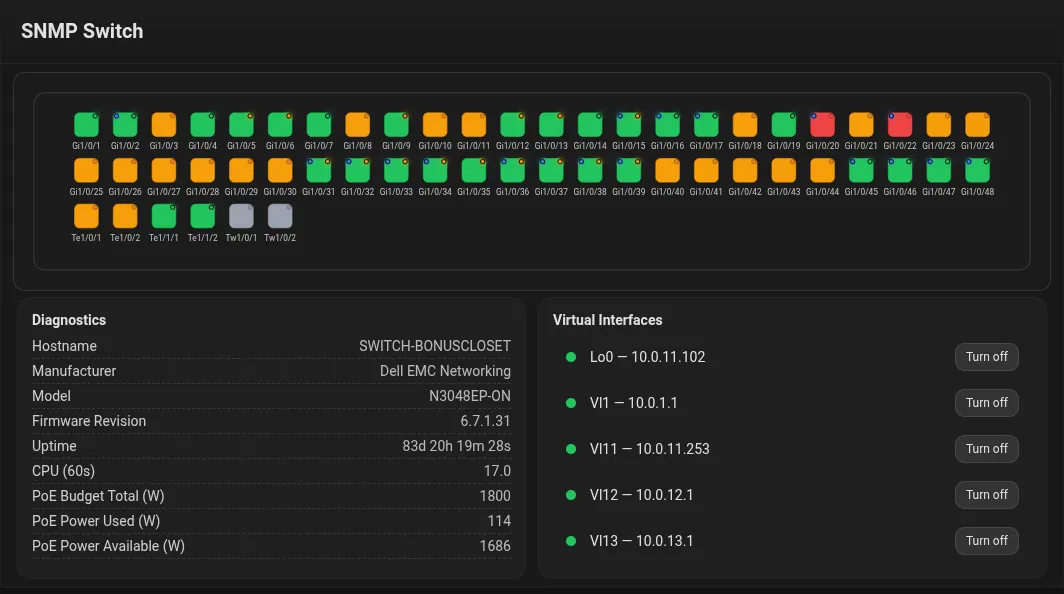
Screenshots From the README of OtisPresley/snmp-switch-manager.
About
SNMP Switch Manager monitors and controls SNMP-enabled managed switches from Home Assistant over the local network. Each port is exposed with its administrative state, operational status, description and VLAN, and the admin state can be switched up or down. It also covers Power over Ethernet budgets and per-port PoE monitoring and toggling, plus bandwidth throughput and traffic totals with include and exclude rules. Hardware health such as temperature, CPU load, memory, fans and power supplies is tracked, and vendor definitions are refreshed from a community database in the background. Connections work with SNMP v2c or v3, and port name rules can rename ports and filter out virtual interfaces. It is set up in the UI.
Automatic summary of the README and code of OtisPresley/snmp-switch-manager. Something wrong, or are you the maintainer and want your own text here? Get in touch
Supports
Works locally Talks to your devices on your own network. No vendor cloud in between.
From the Marketplace Installed through the Marketplace, formerly HACS.
Actively maintained Its author released or pushed a change in the last six months.
Setting it up
Install it from the Marketplace and restart Home Assistant, then add it under Settings, Devices and services.
Connect to your switch
- Host/IP
- Port
- SNMP version
Bandwidth Sensors
- Bandwidth data as
- Enable bandwidth sensors
Bandwidth Sensors
- Poll interval (seconds)
Environmental Sensors
- Enable environmental sensors
- Environmental data as
- Enable PoE sensors
- PoE data as
- Create per-port PoE Power sensors
- PoE Control Loops
SNMP v2c
- SNMP community (RW for alias writes)
SNMP v3
- SNMPv3 username
- Authentication protocol
- Authentication password
- Privacy protocol
- Privacy password
After setup
- Enable bandwidth sensors
- Bandwidth data as
- Enable bandwidth collection
- Go back (discard changes)
- Action
- Existing rule
- Match
- New value
- Value
- Go back (discard changes)
- RX Throughput icon
- RX Total icon
- TX Throughput icon
- TX Total icon
- Go back (discard changes)
- Action
- Existing rule
- Match
- New value
- Value
- Go back (discard changes)
- Poll interval (seconds)
- Go back (discard changes)
- Disabled built-in filter rules
- Go back (discard changes)
- SNMP version
- SNMP v2c — Community override (optional)
- SNMP v2c — Port override (optional)
- Uptime refresh interval (seconds)
- SNMP v3 — Username (optional)
- SNMP v3 — Authentication protocol (optional)
- SNMP v3 — Authentication password (optional)
- SNMP v3 — Privacy protocol (optional)
- SNMP v3 — Privacy password (optional)
- Go back (discard changes)
Texts from the code of OtisPresley/snmp-switch-manager.
From the README
SNMP Switch Manager discovers and monitors SNMP-enabled managed switches and network devices, exposing each port to Home Assistant with live administrative control, operational status, descriptions, VLAN identification, and active power management.

Shows in Vulpo
Select card.Information
- Installs
- 166 sharing analytics
- GitHub stars
- 12
- Connection
- Works locally
- Upkeep
- Updated in the last 6 months
- Version
- v0.6.10,
- Category
- Plugs and switches
- Kind
- Marketplace integration
- Needs
- Needs the Marketplace (HACS on 2026.10 and older)
- Domain
snmp_switch_manager- Issues
- Report an issue