Screenshots From the README of NoUsername10/Solax-Developer-API-for-Home-assistant.
About
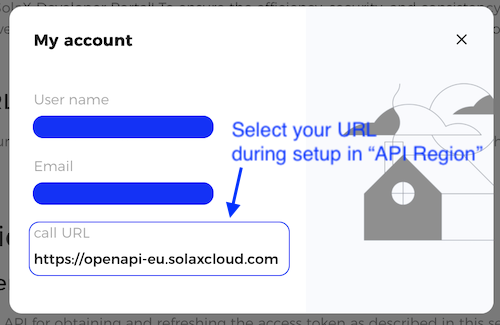
Solax Developer API for Home Assistant connects SolaX systems to Home Assistant through the SolaX Developer Portal cloud API. It discovers authorized plants and devices, such as inverters, batteries, meters, EV chargers and EMS systems, and creates sensors for each device plus system-wide totals. Entities include buttons, numbers, selects, switches, texts and times for EV charger and reserve charge controls. A Live View mode raises polling temporarily while limiting API calls to a set budget, and a separate night interval can slow polling. Alarm monitoring can raise persistent notifications, and history and statistics can be fetched from SolaX through actions. Inverter control actions are dry-run only and block writes, and manual meter and EMS entry is available. Setup happens in the UI with a Client ID, Client Secret and API region.
Automatic summary of the README and code of NoUsername10/Solax-Developer-API-for-Home-assistant. Something wrong, or are you the maintainer and want your own text here? Get in touch
Supports
Uses the vendor's cloud Needs an internet connection and an account with the vendor.
From the Marketplace Installed through the Marketplace, formerly HACS.
Actively maintained Its author released or pushed a change in the last six months.
Provides
- Switches
- Sensors
Setting it up
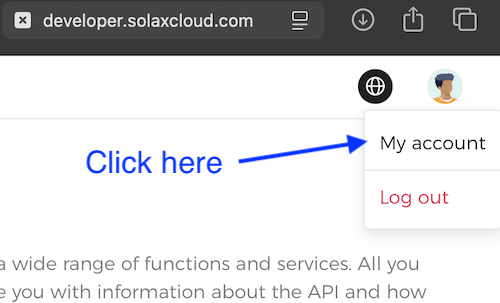
Install it from the Marketplace and restart Home Assistant, then add it under Settings, Devices and services.
Set up SolaX Developer API
- Client IDClient ID from your SolaX Developer Portal application.
- Client SecretClient Secret from the same Developer Portal application.
- System NameName used for the Home Assistant system device and entity ID prefix.
- Scan Interval (seconds)Normal polling interval in seconds.
- API RegionSolaX Developer API region assigned to your application.
Reconnect SolaX Developer API
- Client IDClient ID for the existing SolaX Developer API application.
- Client SecretCurrent Client Secret for the application.
- API RegionSolaX Developer API region assigned to the application.
Reconfigure SolaX Developer API
- Client IDClient ID to use after reconfiguration.
- Client SecretClient Secret to use after reconfiguration.
- System NameName used for the Home Assistant system device and entity ID prefix.
- API RegionSolaX Developer API region assigned to the application.
After setup
- Client IDClient ID from your SolaX Developer Portal application.
- Client SecretClient Secret from the same Developer Portal application.
- System NameName used for the Home Assistant system device and entity ID prefix.
- API RegionSolaX Developer API region assigned to your application.
- Scan Interval (seconds)Normal polling interval in seconds.
- Live View Default Duration (seconds)How long Live View remains active when no duration override is supplied.
- Live View Target Interval (seconds)Requested Live View polling interval. The effective interval may be increased to protect the API budget.
- Live View Call Budget (calls/min)Maximum API calls per minute reserved for Live View.
- Night Scan Interval (seconds)Polling interval used during the configured night period.
- Night Mode Start Hour (0-23)Local hour when night polling starts.
- Night Mode End Hour (0-23)Local hour when night polling ends.
- Add Manual Meter Serials (one per line, optional |businessType)Enter one accessible meter serial per line. Add |1 or |4 only when a business type must be forced.
- Manual Meter to RemoveSelect a previously added manual meter.
- Remove Selected Manual MeterConfirm removal of the selected manual meter.
- Add Manual EMS Systems (EMS serial|plant ID, one per line)Enter one EMS serial and plant ID per line as SERIAL|PLANT_ID.
- Manual EMS System to RemoveSelect a previously added manual EMS system.
- Remove Selected Manual EMS SystemConfirm removal of the selected manual EMS system.
- Rate Limit NotificationsShow Home Assistant notifications when SolaX reports a rate or quota limit.
- EV Charger ControlsAllow real write requests for EV charger control services only. When disabled, EV charger services stay dry-run blocked like the other control services.
- Alarm NotificationsShow Home Assistant persistent notifications when SolaX reports active alarms.
- Alarm Polling IntervalHow often to check SolaX for active alarms, in seconds.
Texts from the code of NoUsername10/Solax-Developer-API-for-Home-assistant.
Entities
- ButtonsStart Live View Boost, Lock Charger, Set Charger Available, Start Charging, Stop Charging, Apply Charge Scene, Apply QR Code, Apply Reserve Charge
- NumbersCurrent Limit, Reserve Charge Current
- SelectsWork Mode, Start Mode, Charge Scene
- SwitchesAPI Rate Limit Notifications, Live View Mode
- TextsQR Code, OCPP URL, OCPP Charger ID
- TimesReserve Charge Start Time, Reserve Charge End Time
Actions
- Manual RefreshTrigger an immediate refresh for all configured SolaX Developer API entries.Fields: Entry ID
- Start Live ViewEnable temporary realtime-focused polling with an automatic timeout.Fields: Entry ID, Duration (seconds), Target Interval (seconds)
- Stop Live ViewDisable live polling and return to standard/night profile timing.Fields: Entry ID
- List History DevicesList currently discovered devices that can be queried by the Developer API history endpoint. Does not call the SolaX API.Fields: Entry ID
- List Plant Statistics TargetsList currently discovered plants that can be queried by the Developer API plant statistics endpoint. Does not call the SolaX API.Fields: Entry ID
- Fetch Device HistoryRead historical telemetry from the Developer API and cache the result. Long time ranges are automatically split into API-safe windows.Fields: Entry ID, Device Serial List, Device Type, Business Type, Start Time, End Time, Time Interval, Request SN Type, Request ID
- Fetch Plant Year StatisticsRead monthly plant statistics for one year from the Developer API. Display-only; does not write to Home Assistant Recorder.Fields: Entry ID, Plant ID, Business Type, Year, Request ID
- Fetch Plant Month StatisticsRead daily plant statistics for one month from the Developer API. Display-only; does not write to Home Assistant Recorder.Fields: Entry ID, Plant ID, Business Type, Year, Month, Request ID
- Query Request ResultQuery asynchronous command request status by string requestId.Fields: Entry ID, Request ID
- Query Master Control DeviceRead the top-level master control device (C&I only, businessType=4).Fields: Entry ID, Device SN, Device Type, Business Type
- Set Export Control (Dry-Run)Dry-run only. Validates payload and blocks write execution.Fields: Entry ID, Device Serial List, Device Type, Enable Flag, Limit Value, Business Type, Control Mode
- Set Import Control (Dry-Run)Dry-run only. Validates payload and blocks write execution.Fields: Entry ID, Device Serial List, Device Type, Enable Flag, Limit Value, Business Type
- Inverter Self Use Mode (Dry-Run)Dry-run only. Validates payload and blocks write execution.Fields: Entry ID, Device Serial List, Min SOC, Charge From Grid Enable, Charge Upper SOC, Business Type, Charge Start Time Period 1, Charge End Time Period 1, Discharge Start Time Period 1, Discharge End Time Period 1
- Inverter Feed-in Priority Mode (Dry-Run)Dry-run only. Validates payload and blocks write execution.Fields: Entry ID, Device Serial List, Min SOC, Charge Upper SOC, Business Type, Charge Start Time Period 1, Charge End Time Period 1, Discharge Start Time Period 1, Discharge End Time Period 1, Enable Time Period 2
- Inverter Back Up Mode (Dry-Run)Dry-run only. Validates payload and blocks write execution.Fields: Entry ID, Device Serial List, Min SOC, Charge From Grid Enable, Charge Upper SOC, Business Type, Charge Start Time Period 1, Charge End Time Period 1, Discharge Start Time Period 1, Discharge End Time Period 1
- Inverter Manual Mode (Dry-Run)Dry-run only. Validates payload and blocks write execution.Fields: Entry ID, Device Serial List, Manual Mode, Business Type
- A1-Hybrid-G2 Self Use (Dry-Run)Dry-run only. Validates payload and blocks write execution.Fields: Entry ID, Device Serial List, Business Type
- A1-Hybrid-G2 Feed-in Priority (Dry-Run)Dry-run only. Validates payload and blocks write execution.Fields: Entry ID, Device Serial List, Business Type
- A1-Hybrid-G2 Back Up (Dry-Run)Dry-run only. Validates payload and blocks write execution.Fields: Entry ID, Device Serial List, Back Up Grid Enable, Back Up Charge Start Time, Back Up Charge End Time, Business Type
- A1-Hybrid-G2 Demand Mode (Dry-Run)Dry-run only. Validates payload and blocks write execution.Fields: Entry ID, Device Serial List, Demand Grid Enable, Peak Limit Time 1, Peak Limit Time 2, Demand Discharge Start Time 1, Demand Discharge End Time 1, Demand Discharge Start Time 2, Demand Discharge End Time 2, Charger Power Limit
Troubleshooting
- DiagnosticsDownloads a diagnostics file to attach to a bug report.
- Repair noticesNotices it can show in Settings, Repairs:SolaX Developer API rate limit is active, SolaX Developer API access is incomplete
From the README
SolaX Developer API integration to monitor and control your SolaX system in Home Assistant using the official SolaX Developer OpenAPI.
Automatically discovers authorized plants and devices, creates per-device sensors, and provides a system-wide overview with total sensors. Requires no YAML configuration or template sensors.

Shows in Vulpo
Quick Toggle card, Button card, Select card, Chart card, Apple Watch, Control Center.Information
- Installs
- 99 sharing analytics
- GitHub stars
- 2
- Connection
- Uses the vendor's cloud
- Upkeep
- Updated in the last 6 months
- Version
- v0.4.8,
- Category
- Energy, Solar and batteries
- Kind
- Marketplace integration
- Brand
- SolaX
- Needs
- Needs the Marketplace (HACS on 2026.10 and older)
- Domain
solax_developer_api- Issues
- Report an issue