Screenshots From the README of geappliances/geappliances-smarthq-integration.
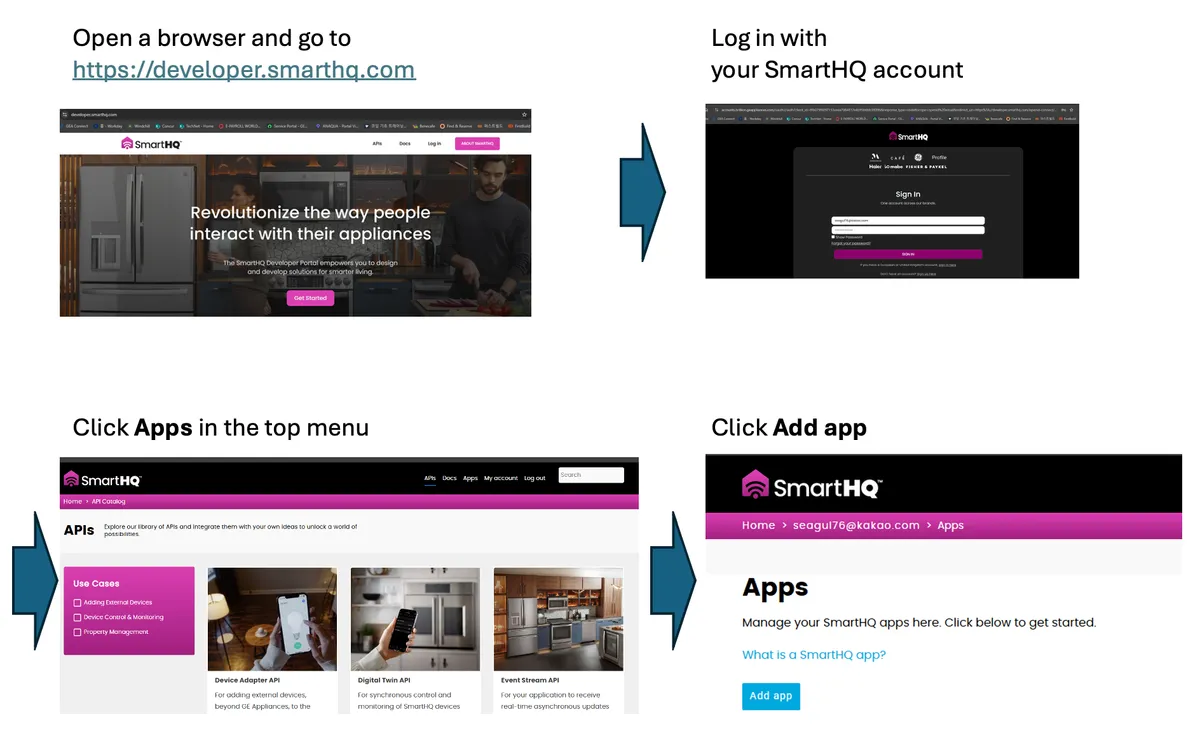
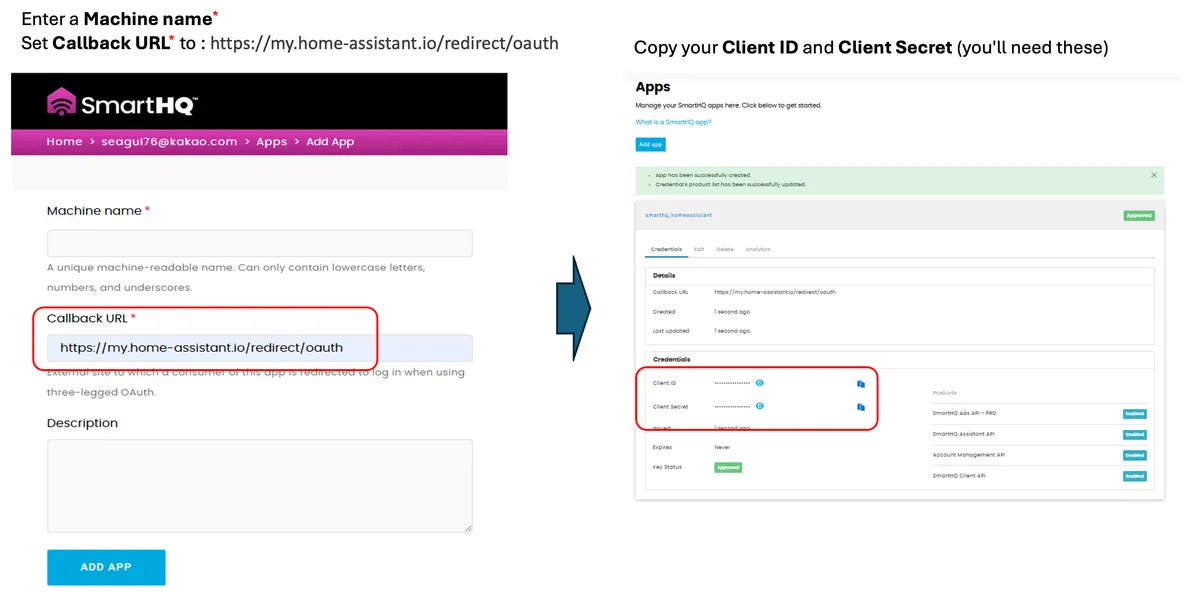
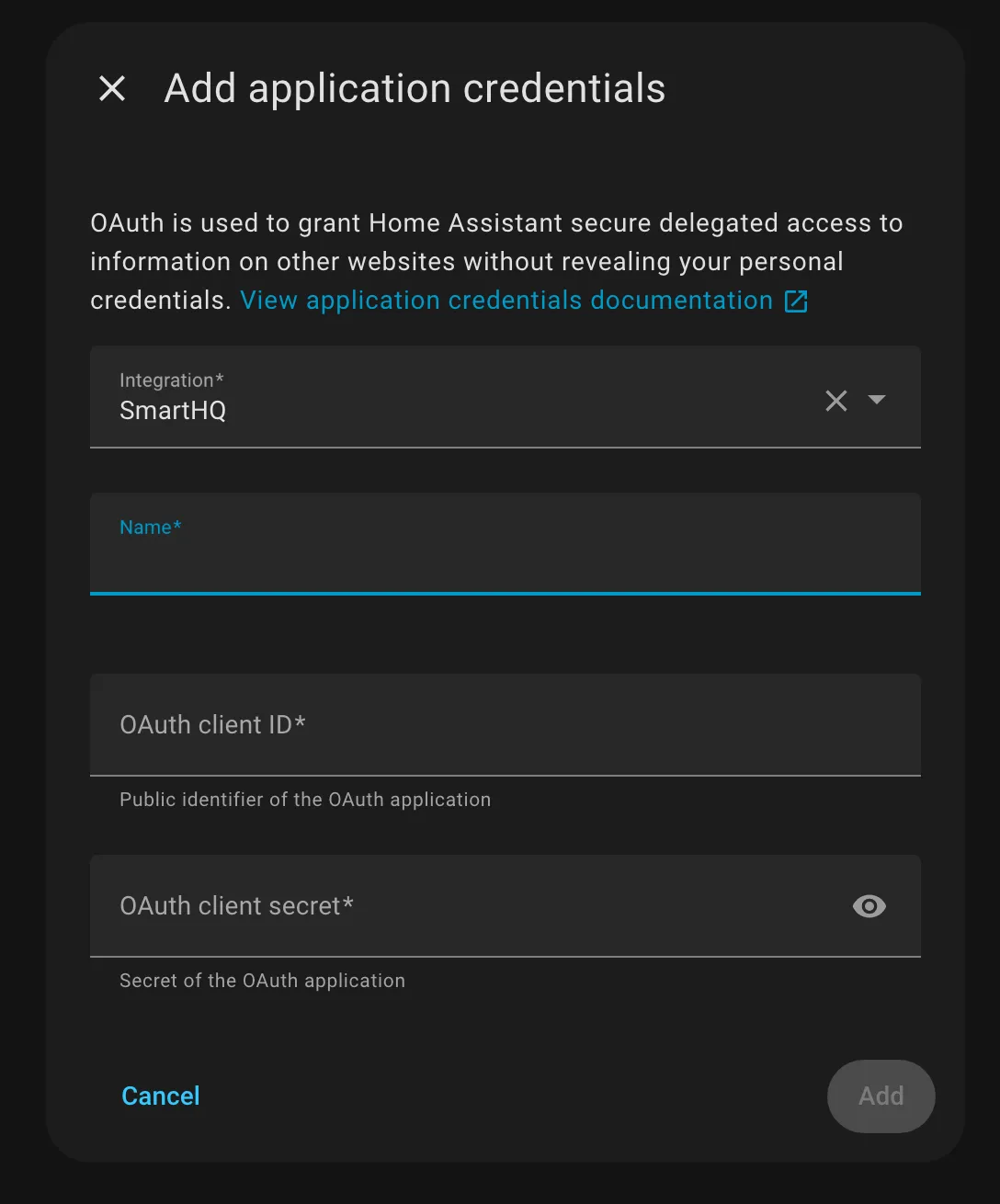
About
SmartHQ is a custom integration that connects GE Appliances SmartHQ devices to Home Assistant through the vendor's cloud. It signs in through the vendor's own sign-in page using application credentials and is set up in the UI. Entities are created from the services each appliance declares, so supported devices appear without hardcoded models. Platforms include binary sensors, buttons, climate, lights, numbers, selects, sensors, switches, texts and water heaters. Sensors cover temperatures, battery level, time remaining and humidity, and notification toggles from the settings API appear as switches. Options allow alternative temperature units, exposing appliances to Assist, and Telegram control with a chosen conversation agent and allowed chat IDs. It relies on the public v2 developer API, so some product lines have limited support.
Automatic summary of the README and code of geappliances/geappliances-smarthq-integration. Something wrong, or are you the maintainer and want your own text here? Get in touch
Supports
Uses the vendor's cloud Needs an internet connection and an account with the vendor.
Sign in with the vendor Connects through the vendor's own sign-in page.
From the Marketplace Installed through the Marketplace, formerly HACS.
Actively maintained Its author released or pushed a change in the last six months.
Provides
- Lights
- Climate
- Water heaters
- Switches
- Sensors
Setting it up
Install it from the Marketplace and restart Home Assistant, then add it under Settings, Devices and services.
After setup
- Show alternative temperature units
- Expose appliances to Assist (voice/text control)
- Enable Telegram control
- Conversation agent (for Telegram)Pick the conversation agent to use. SmartHQ will automatically enable its appliance tools on that agent, so you don't have to toggle it in the agent's own settings.
- Allowed Telegram chat IDs (comma separated)Only these Telegram chat IDs may control your appliances. Leave blank to rely solely on the Telegram bot's own allow-list.
Texts from the code of geappliances/geappliances-smarthq-integration.
Entities
- SensorsAmbient Temperature, Cavity Temperature, Probe Temperature, Target Temperature, Cavity Target Temperature, Probe Target Temperature, Brew Temperature, Battery Level, Cook Time Remaining, Cycle Time Remaining, Time Remaining, Humidity, and 6 more
From the README
Home Assistant custom integration for GE Appliances SmartHQ connected devices.
This integration uses OAuth2 Application Credentials with Authorization Code flow (no PKCE, empty scope).
- WebSocket connection for instant device state changes
- Automatic reconnection on connection loss (max 3 attempts with exponential backoff)
- Persistent notification when max retries reached
- Snapshot-based state management per service ID

Shows in Vulpo
Light card, Quick Toggle card, Climate card, Button card, Apple Watch, Control Center, Climate Live Activity.Information
- Installs
- 544 sharing analytics
- GitHub stars
- 34
- Connection
- Uses the vendor's cloud
- Upkeep
- Updated in the last 6 months
- Version
- v1.3.0,
- Category
- Appliances and cleaning
- Kind
- Marketplace integration
- Brand
- GE
- Needs
- Needs the Marketplace (HACS on 2026.10 and older)
- Domain
smarthq- Issues
- Report an issue