
Marstek Venus Energy Manager
On Home Assistant 2026.11 or newer? Open it in the Marketplace
- Installs
- 79 sharing analytics
- GitHub stars
- 148
- Connection
- Works locally
- Upkeep
- Updated in the last 6 months
- Version
- v2.1.1,
- Category
- Energy, Solar and batteries
- Kind
- Marketplace integration
- Brand
- Marstek
- Needs
- Needs the Marketplace (HACS on 2026.10 and older)
- Domain
marstek_venus_energy_manager- Issues
- Report an issue
Independent directory, made by the developer of Vulpo. Not affiliated with Home Assistant or the Open Home Foundation.
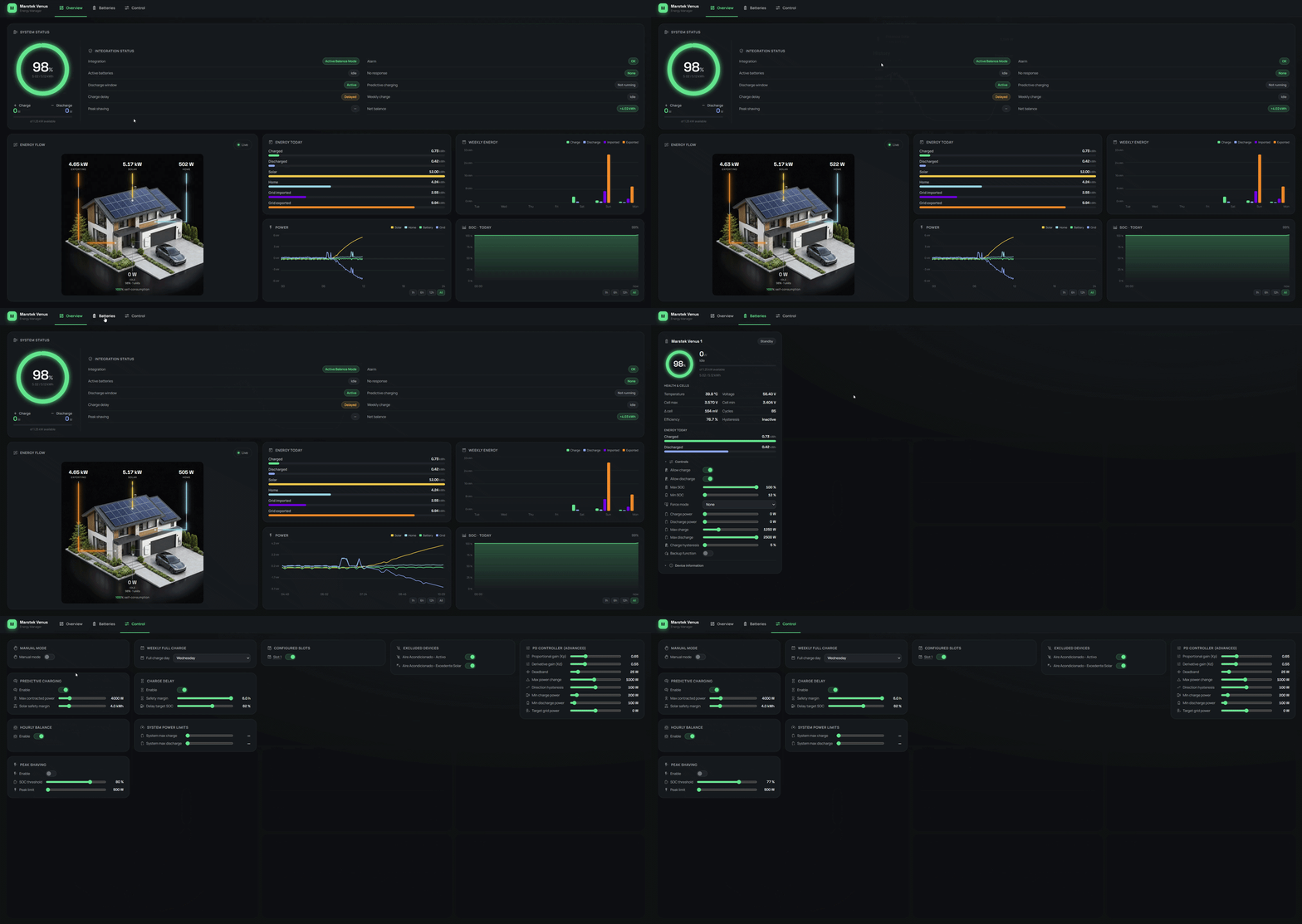
Screenshots From the README of ffunes/Marstek-Venus-Energy-Manager.
About
Marstek Venus Energy Manager monitors and controls Marstek Venus E, A and D batteries over local Modbus TCP. It adds a proportional-derivative controller that adjusts battery power to keep grid import and export near zero, with selectable tuning profiles and a control quality sensor. Predictive grid charging uses a solar forecast sensor to charge from the grid when forecast and battery will not cover the next day, and a charge delay holds this back while solar can still cover it. Per-battery time slots set when charging or discharging is allowed, with optional limits on charge level and power, and a manual mode that forces a fixed power. Other features include peak shaving, weekly full charge for cell balancing, load exclusion for high-power devices, and support for several batteries. The repair notice states the integration is discontinued and points to Omnibattery, and setup is done in the UI.
Automatic summary of the README and code of ffunes/Marstek-Venus-Energy-Manager. Something wrong, or are you the maintainer and want your own text here? Get in touch
Supports
Works locally Talks to your devices on your own network. No vendor cloud in between.
Found by itself Home Assistant spots it on the network and offers to add it.
From the Marketplace Installed through the Marketplace, formerly HACS.
Actively maintained Its author released or pushed a change in the last six months.
Provides
- Switches
- Sensors
Setting it up
Install it from the Marketplace and restart Home Assistant, then add it under Settings, Devices and services.
Configure Marstek Venus Energy Manager
- Grid consumption sensorSensor that indicates imported (+) or exported (-) power to the grid. The controller will adjust batteries to keep this value near 0W.
- Solar forecast sensor (optional)Sensor providing solar production forecast in kWh (e.g., Solcast). If configured here, it will be used automatically for predictive charging and solar charge delay.
- Solar production sensor (optional)Real-time PV production power sensor (W/kW) from an external inverter not wired through the battery MPPT inputs. Used to show the Solar node in the dashboard energy-flow diagram. Leave empty if your panels feed the battery MPPT directly.
- Inverted meter signEnable this option if your meter uses the opposite convention: positive = export, negative = import. The unit (W/kW) is detected automatically.
- Maximum contracted power (W)Total contracted power in watts. System won't exceed this limit when charging to avoid tripping the breaker
Number of batteries
- Number of batteries
Battery connection
- NameDescriptive name to identify this battery
- IP AddressIP address of the battery on your local network
- Modbus PortModbus port (usually 502)
- Modbus Slave IDModbus slave/unit id (default 1). Change only when a Modbus proxy maps several batteries to one IP:port using distinct slave ids.
- Battery ModelSelect your battery model version. Ev2 for older models, Ev3 for newer models with updated register map, A (Venus A) or D (Venus D) for hybrid inverter models
Battery limits
- Maximum charge power (W)Maximum power allowed to charge the battery
- Maximum discharge power (W)Maximum power allowed to discharge the battery
- Maximum SOC (%)Maximum state of charge - battery won't charge above this value
- Minimum SOC (%)Minimum state of charge - battery won't discharge below this value
- Enable Charge HysteresisPrevents battery from charging when SOC is near maximum
- Hysteresis Percentage (%)Battery will not charge until SOC drops to (max_soc - hysteresis). Ex: Max SOC 100% with 5% hysteresis = no charge until 95%
- Backup offgrid load threshold (W)Offgrid load above this value is treated as an active backup event, excluding the battery from PD control. Set higher if you have permanent loads (router, cameras) on the offgrid port.
- Enable 100% charge voltage taperWhen the target is 100%, limit charge to 95 W from 3.48 V max cell voltage and stop at 3.58 V to measure imbalance after 60 seconds.
Discharge time slots
- Configure time slots
Add time slot
- Start timeSlot start time (24h). Midnight crossing supported.
- End timeSlot end time (24h).
- Days of the weekDays when this slot applies.
- Target batterySelect 'all' to apply to every battery, or pick a specific one.
- Allow chargeIf checked, charge is allowed during the slot. If NO slot allows charge, charge is unrestricted by default.
- Allow dischargeIf checked, discharge is allowed during the slot. If NO slot allows discharge, discharge is unrestricted by default.
- Override slot SOC max/minIf checked, the slot overrides the battery's max/min SOC inside the window.
- Override slot max charge/discharge powerIf checked, the slot limits or forces the max power.
- Operation modePD: the predictive algorithm caps power using the slot value. Manual: forced discharge or charge at the configured power.
Add time slot details
- Battery 1 — Min SOC (%)
- Battery 1 — Max SOC (%)
- Battery 1 — Max charge power
- Battery 1 — Max discharge power
- Battery 2 — Min SOC (%)
- Battery 2 — Max SOC (%)
- Battery 2 — Max charge power
- Battery 2 — Max discharge power
- Battery 3 — Min SOC (%)
- Battery 3 — Max SOC (%)
- Battery 3 — Max charge power
- Battery 3 — Max discharge power
- Battery 4 — Min SOC (%)
- Battery 4 — Max SOC (%)
- Battery 4 — Max charge power
Add more time slots
- Add another time slot
After setup
- Grid consumption sensorSensor that indicates imported (+) or exported (-) power to the grid.
- Solar forecast sensor (optional)Sensor providing solar production forecast in kWh (e.g., Solcast). If configured here, it will be used automatically for predictive charging and solar charge delay.
- Solar production sensor (optional)Real-time PV production power sensor (W/kW) from an external inverter not wired through the battery MPPT inputs. Used to show the Solar node in the dashboard energy-flow diagram. Leave empty if your panels feed the battery MPPT directly.
- Inverted meter signEnable this option if your meter uses the opposite convention: positive = export, negative = import. The unit (W/kW) is detected automatically.
- Maximum contracted power (W)Total contracted power in watts. System won't exceed this limit when charging to avoid tripping the breaker
- Number of batteries
- NameDescriptive name to identify this battery
- IP AddressIP address of the battery on your local network
- Modbus PortModbus port (usually 502)
- Modbus Slave IDModbus slave/unit id (default 1). Change only when a Modbus proxy maps several batteries to one IP:port using distinct slave ids.
- Battery ModelSelect your battery model version. Ev2 for older models, Ev3 for newer models with updated register map, A (Venus A) or D (Venus D) for hybrid inverter models
- Maximum charge power (W)Maximum power allowed to charge the battery
- Maximum discharge power (W)Maximum power allowed to discharge the battery
- Maximum SOC (%)Maximum state of charge
- Minimum SOC (%)Minimum state of charge
- Enable Charge HysteresisPrevents battery from charging when SOC is near maximum
- Hysteresis Percentage (%)Battery will not charge until SOC drops to (max_soc - hysteresis). Ex: Max SOC 100% with 5% hysteresis = no charge until 95%
- Backup offgrid load threshold (W)Offgrid load above this value is treated as an active backup event, excluding the battery from PD control. Set higher if you have permanent loads (router, cameras) on the offgrid port.
- Enable 100% charge voltage taperWhen the target is 100%, limit charge to 95 W from 3.48 V max cell voltage and stop at 3.58 V to measure imbalance after 60 seconds.
- Configure time slots
- Start timeSlot start time (24h). Midnight crossing supported.
- End timeSlot end time (24h).
- Days of the weekDays when this slot applies.
- Target batterySelect 'all' to apply to every battery, or pick a specific one.
- Allow chargeIf checked, charge is allowed during the slot. If NO slot allows charge, charge is unrestricted by default.
- Allow dischargeIf checked, discharge is allowed during the slot. If NO slot allows discharge, discharge is unrestricted by default.
- Override slot SOC max/minIf checked, the slot overrides the battery's max/min SOC inside the window.
- Override slot max charge/discharge powerIf checked, the slot limits or forces the max power.
- Operation modePD: the predictive algorithm caps power using the slot value. Manual: forced discharge or charge at the configured power.
- Battery 1 — Min SOC (%)
- Battery 1 — Max SOC (%)
- Battery 1 — Max charge power
- Battery 1 — Max discharge power
- Battery 2 — Min SOC (%)
- Battery 2 — Max SOC (%)
- Battery 2 — Max charge power
- Battery 2 — Max discharge power
- Battery 3 — Min SOC (%)
- Battery 3 — Max SOC (%)
- Battery 3 — Max charge power
- Battery 3 — Max discharge power
- Battery 4 — Min SOC (%)
- Battery 4 — Max SOC (%)
- Battery 4 — Max charge power
- Add another time slot
Texts from the code of ffunes/Marstek-Venus-Energy-Manager.
Entities
- Binary sensorsPeak Shaving Active, Predictive Charging Active, WiFi Status, Cloud Status, Balancing Mode, Charge Hysteresis
- ButtonsReset Device
- NumbersSet Charge Power, Set Discharge Power, Max Charge Power, Max Discharge Power, Charging Cutoff Capacity, Discharging Cutoff Capacity, Charge To SOC, PD Kp, PD Kd, PD Deadband, PD Max Power Change, PD Direction Hysteresis, and 16 more
- SelectsForce Mode, User Work Mode, Weekly Full Charge Day, PD Tuning Profile
- SensorsDischarge Window, Active Batteries, System Battery Cell Power, Total Solar Power, Daily Solar Production, Daily Home Consumption, Home Consumption, PD Control Quality, Daily Grid Import, Daily Grid Export, Non-Responsive Batteries, Configuration Summary, and 54 more
- SwitchesManual Mode, Predictive Charging, Charge Delay, Peak Shaving, Backup Function, RS485 Control Mode, Allow Charge, Allow Discharge, 100% Charge Voltage Taper, Active Balance Mode, External Price Charging, Net Balance
- TimesExternal Charging End Time
Troubleshooting
- Repair noticesNotices it can show in Settings, Repairs:This integration is discontinued — migrate to Omnibattery
From the README
The Marstek Venus Energy Manager is a comprehensive Home Assistant integration designed to monitor and control Marstek Venus E and C series batteries (v2 and v3) and Venus D and Venus A series batteries via Modbus TCP. It provides advanced energy management features including predictive grid charging, customizable time slots for discharge control, and device load exclusion logic.
- Zero Export/Import PD Controller: Keeps grid exchange near zero using a Proportional-Derivative algorithm.
- Oscillation Prevention: Deadband and derivative gain prevent rapid charge/discharge cycling.
- One-Click PD Profiles + Quality Sensor: Pick a tuning profile (Very smooth → Very aggressive) instead of tuning gains by hand; a control-quality sensor reports whether the result is stable,…
- Multi-Battery Support: Manage up to 6 batteries with intelligent load sharing and SOC-based priority.
- Predictive Grid Charging: Automatically charges from the grid when solar forecast + battery won't cover tomorrow's consumption. Supports fixed time slots, dynamic pricing, and real-time pricing…
- Time Slots (v2): Per-battery windows with independent charge/discharge ticks, optional SOC and power overrides, and a manual mode that forces a fixed charge or discharge power. Up to 8 slots per…
- Weekly Full Charge: Forces 100% SOC once a week for LFP cell balancing.
- Solar-Aware Charge Delay: Holds back grid charging while solar can still cover the required energy.

Shows in Vulpo
Quick Toggle card, Button card, Select card, Chart card, Apple Watch, Control Center.Information
- Installs
- 79 sharing analytics
- GitHub stars
- 148
- Connection
- Works locally
- Upkeep
- Updated in the last 6 months
- Version
- v2.1.1,
- Category
- Energy, Solar and batteries
- Kind
- Marketplace integration
- Brand
- Marstek
- Needs
- Needs the Marketplace (HACS on 2026.10 and older)
- Domain
marstek_venus_energy_manager- Issues
- Report an issue