On Home Assistant 2026.10 or older? Open it in HACS
- Installs
- 74 sharing analytics
- GitHub stars
- 14
- Connection
- Works locally
- Upkeep
- Updated in the last 6 months
- Version
- v1.7.6,
- Category
- Energy, Solar and batteries
- Kind
- Marketplace integration
- Brand
- Zendure
- Needs
- Needs the Marketplace (HACS on 2026.10 and older)
- Domain
zendure_restapi- Issues
- Report an issue
Shows in Vulpo Quick Toggle card, Button card, Select card, Chart card, Apple Watch, Control Center.
Independent directory, made by the developer of Vulpo. Not affiliated with Home Assistant or the Open Home Foundation.
Screenshots From the README of windsurf/hassio-zendure-restapi.
About
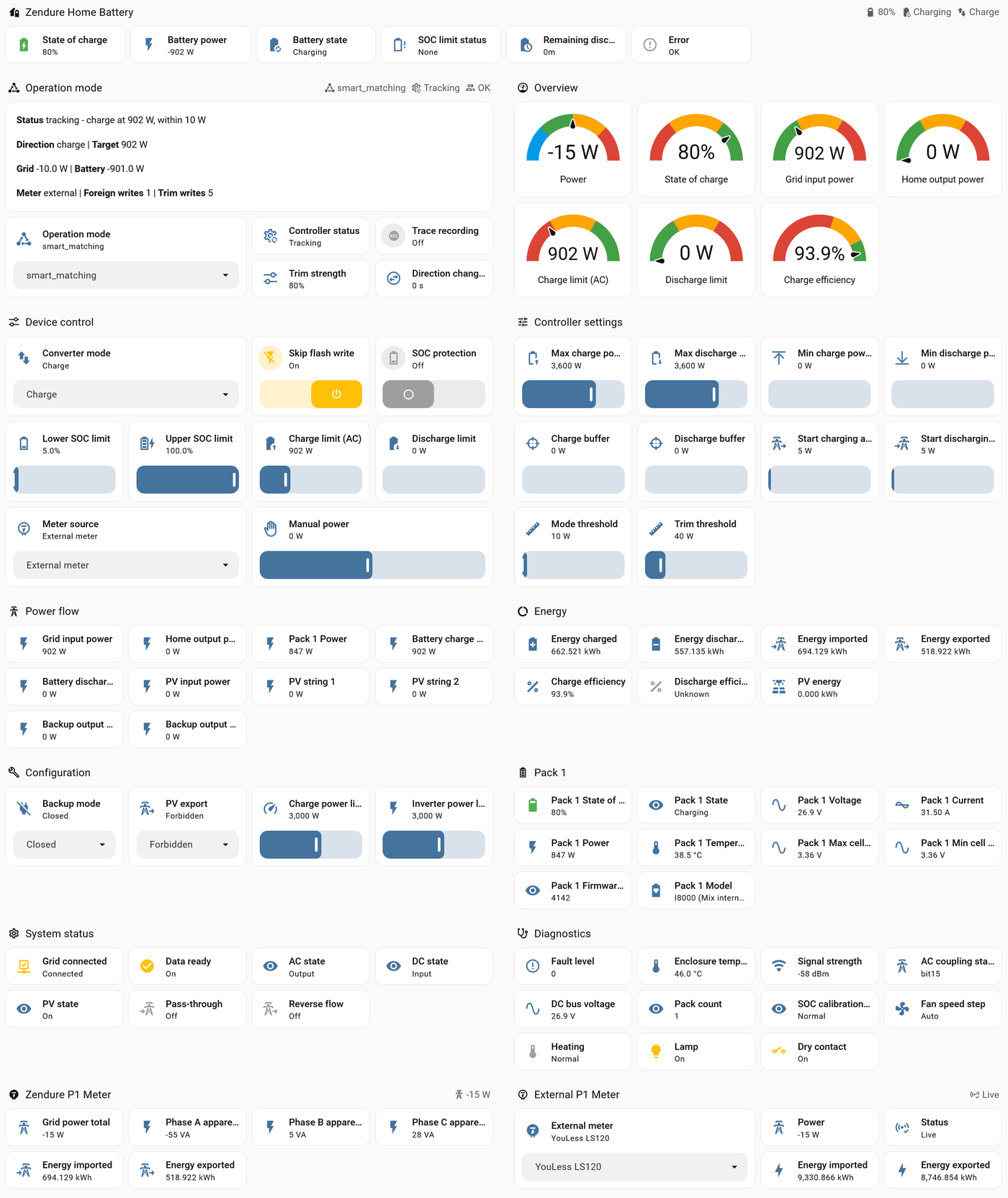
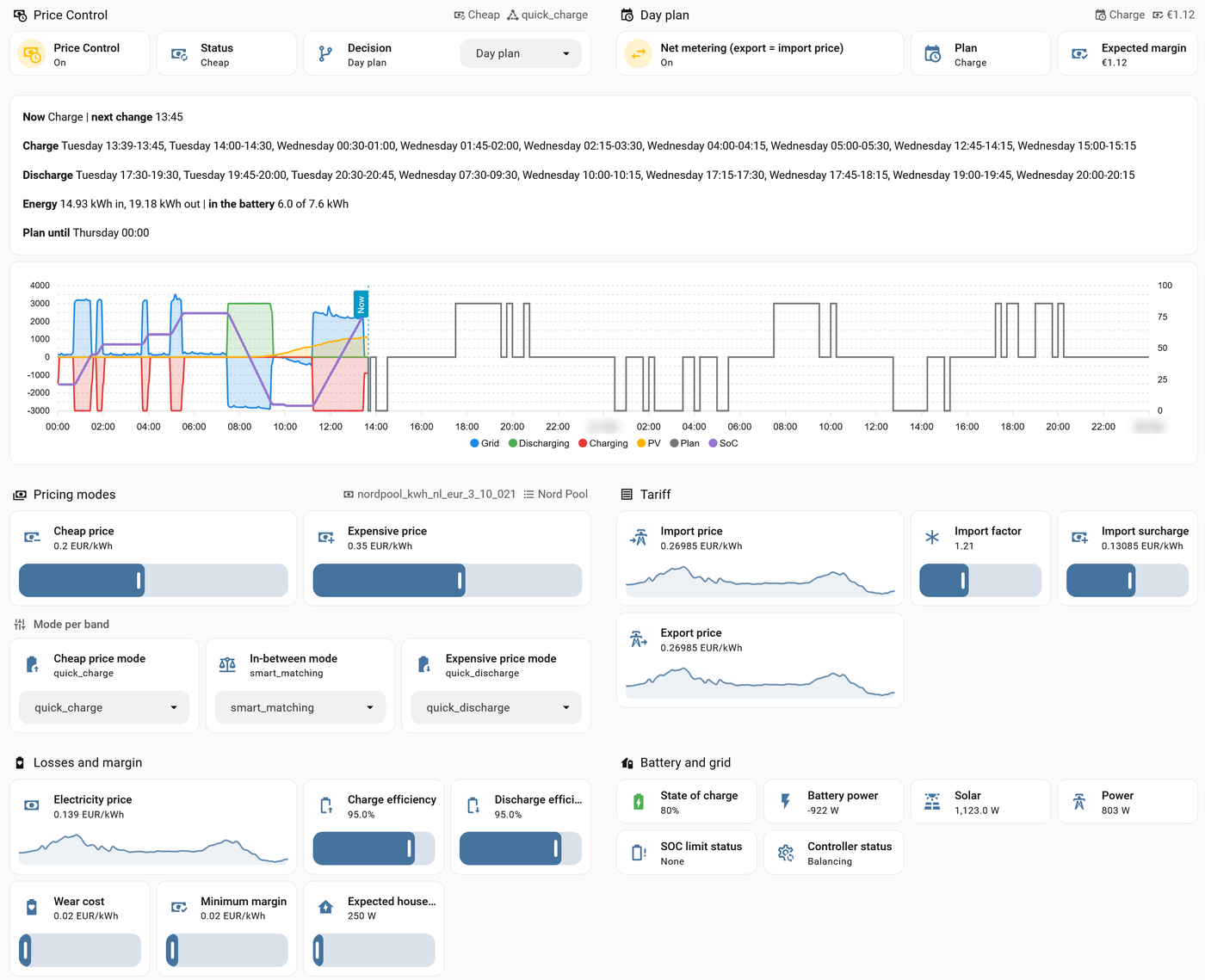
Zendure RestAPI is a local integration for Zendure SolarFlow batteries that keeps the grid connection near zero. It talks to the battery directly, with no cloud account or MQTT broker, and is added in the UI with the battery's IP address and HTTP port. A control loop reads the grid meter every second, charging the battery with surplus solar and discharging it to cover house demand. The meter can be a HomeWizard, YouLess, or Shelly P1 device read over IP, or any Home Assistant power sensor. Price control plans charging and discharging from a price sensor for dynamic tariffs, and a fixed-price mode stores solar surplus without one. It adds sensors, numbers, selects, switches, buttons and binary sensors, plus a generated dashboard with Price Control and History views.
Automatic summary of the README and code of windsurf/hassio-zendure-restapi. Something wrong, or are you the maintainer and want your own text here? Get in touch

Shows in Vulpo
Quick Toggle card, Button card, Select card, Chart card, Apple Watch, Control Center.Supports
- Works locallyTalks to your devices on your own network. No vendor cloud in between.
- Found by itselfHome Assistant spots it on the network and offers to add it.
- From the MarketplaceInstalled through the Marketplace, formerly HACS.
- Actively maintainedIts author released or pushed a change in the last six months.
Provides
- Switches
- Sensors
Setting it up
Install it from the Marketplace and restart Home Assistant, then add it under Settings, Devices and services.
Check the meter
- The meter reads export as positive (invert the sign)
Zendure device
- IP address
- HTTP port
- Create the Zendure RestAPI dashboard (battery only)
Zendure device found
- Create the Zendure RestAPI dashboard
External grid meter over IP
- Meter type
- IP address
- Milliseconds between polls (100-1000; below 1000 only for YouLess)
Home Assistant sensor
- Power sensor (import positive)
- Export sensor (optional, export positive)
- The meter reads export as positive (invert the sign)
Price control
- Battery or cluster
- Price sensor (price per kWh)Fixed prices: any sensor with the current price. Day plan: a sensor with a price list — Nord Pool (HACS), EPEX Spot (HACS), Zonneplan, ENTSO-e or Frank Energie.
- The price sensor holdsFor the day plan. Nord Pool (HACS) with VAT on and no additional costs: spot price incl. VAT. With VAT off: spot price. With your whole tariff in its additional costs: import price. EPEX Spot: Market price sensor: spot price; Total price sensor: import price. Zonneplan: import price.
Meter device
- Device
Virtual cluster (simulated)
- Battery to copyThe copies take its model, maxima, SOC limits and tuning; the first copy starts on its state of charge.
After setup
- Seconds between polls (1-60)
- Solar power from outside the battery (optional, for the dashboard)A smart plug on a micro inverter or a second inverter. The dashboard's PV series show it: instead of the battery's own PV when that is not in use, beside it otherwise. Control does not need it, the grid meter already sees this power.
- Solar energy from outside the battery (optional, for the dashboard)Its kWh counter, for the daily totals on the History tab.
- Reset settings: the controller settings back to their defaultsBuffers and start thresholds 5 W, Stop charging below 50 W, Stop discharging below 50 W, Stop after 30 s, Start after 30 s, Min charge power and Min discharge power 0 W, Mode threshold 10 W, Trim threshold 40 W, Trim strength 80 %, Direction change delay 10 s. Operation mode, Max charge power and Max discharge power, SOC protection, the meter and Price Control stay as they are. In a cluster the group's settings apply.
- Rebuild dashboard (your own changes to it are lost)
- IP address
- Milliseconds between polls (100-1000; below 1000 only for YouLess)
- Power sensor (import positive)
- Export sensor (optional, export positive)
- The meter reads export as positive (invert the sign)
- Price sensor (price per kWh)Fixed prices: any sensor with the current price. Day plan: a sensor with a price list — Nord Pool (HACS), EPEX Spot (HACS), Zonneplan, ENTSO-e or Frank Energie.
- The price sensor holdsFor the day plan. Nord Pool (HACS) with VAT on and no additional costs: spot price incl. VAT. With VAT off: spot price. With your whole tariff in its additional costs: import price. EPEX Spot: Market price sensor: spot price; Total price sensor: import price. Zonneplan: import price.
- The meter reads export as positive (invert the sign)
- External meter
- Rebuild dashboard (your own changes to it are lost)
- Reset copies: every copy still and started again around your battery's state of chargeThe copies stop, both limits go to 0, and each starts again at your battery's state of charge plus its SoC offset.
- Reset settings: every setting of the Virtual cluster and its copies back to its defaultCopies 3, Load factor 1, SoC offsets 0 / -20 / 15 %, extra response time 0 / 1 / 3 s, Max share 0, Operation mode Follow source, buffers and start thresholds 5 W, Stop charging below 50 W, Stop discharging below 50 W, Stop after 30 s, Start after 30 s, Concentrate below 300 W, Redistribute every 30 s. The copies keep running; tick Reset copies as well to start them with the new offsets. Your own battery and Price Control are not touched.
- Rebuild dashboard (your own changes to it are lost)
Texts from the code of windsurf/hassio-zendure-restapi.
Entities
- Binary sensorsData ready, Dry contact, Fan, Grid connected, Heating, HV battery control, Error, Lamp, Pass-through, PV-AC coupling, Reverse flow, SOC compensation, and 1 more
- ButtonsReset, Rebuild dashboard
- NumbersCalibration interval, Charge buffer, Charge efficiency, Charge power limit, Cheap price, Direction change delay, Discharge buffer, Discharge efficiency, Expected house load, Expensive price, Export factor, Export surcharge, and 30 more
- SelectsMeter source, Converter mode, Backup mode, PV export, Fan speed mode, External meter, Decision, Cheap price mode, Expensive price mode, Grid standard, In-between mode, Operation mode, and 1 more
- SensorsFan speed step, Battery state, AC state, DC state, PV state, SOC limit status, SOC calibration status, Controller status, Status, Plan, Phase A apparent power, AC coupling status, and 78 more
- SwitchesFan forced on, Net metering (export = import price), Skip flash write, Trace recording, Take part
Troubleshooting
- DiagnosticsDownloads a diagnostics file to attach to a bug report.
- Repair noticesNotices it can show in Settings, Repairs:Restarted holding a limit, Reports new properties
From the README
Your Zendure SolarFlow battery in Home Assistant, 100% local, in three steps. No cloud account, no MQTT broker, no YAML packages to copy. Install it from HACS, add your battery, pick a mode — the battery holds your grid at zero, once a second.
⚖️ Zero export, once a second. The battery holds your grid connection at zero (Dutch: nul op de meter, NOM). A fast loop reads your meter every second and corrects evenly on both sides of zero: what your solar panels would send to the grid goes into the battery, and what the house would take from the grid comes out of it, without swinging from one to the other.
Information
- Installs
- 74 sharing analytics
- GitHub stars
- 14
- Connection
- Works locally
- Upkeep
- Updated in the last 6 months
- Version
- v1.7.6,
- Category
- Energy, Solar and batteries
- Kind
- Marketplace integration
- Brand
- Zendure
- Needs
- Needs the Marketplace (HACS on 2026.10 and older)
- Domain
zendure_restapi- Issues
- Report an issue