

OPNsense
travisghansen
Not in the Marketplace catalog. Add https://github.com/travisghansen/hass-opnsense as a custom repository in the Marketplace.
- Installs
- 1.3k sharing analytics
- GitHub stars
- 470
- Connection
- Works locally
- Upkeep
- Updated in the last 6 months
- Version
- v1.3.0,
- Category
- Computers and network, Routers and network
- Kind
- Marketplace integration
- Brand
- OPNsense
- Needs
- Added as a custom repository in the Marketplace
- Domain
opnsense- Issues
- Report an issue
Independent directory, made by the developer of Vulpo. Not affiliated with Home Assistant or the Open Home Foundation.
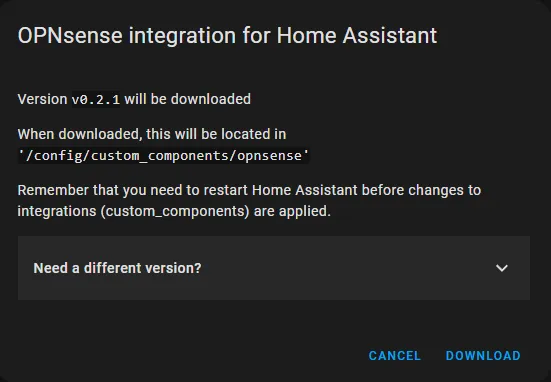
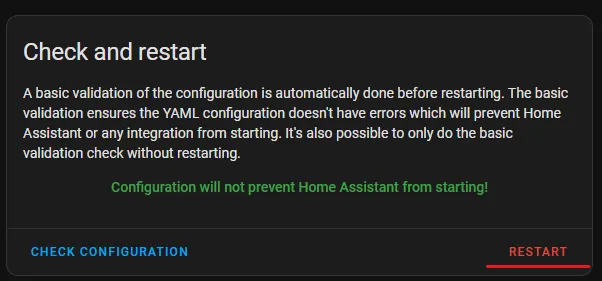
Screenshots From the README of travisghansen/hass-opnsense.
About
OPNsense is a Home Assistant integration that connects to an OPNsense firewall or router over the local network. It replaces the built-in OPNsense integration, which only offers device tracking, and adds binary sensors, sensors, switches, update entities and presence tracking. Categories such as telemetry, interfaces, DHCP leases, gateways, firmware, VPN, services, CARP, vnStat bandwidth and speedtest results can be synced selectively, so the API user can have narrower permissions. Actions cover starting, stopping and restarting services, rebooting or halting the router, sending wake-on-lan packets, killing states, generating captive portal vouchers, running a speedtest and toggling aliases or interfaces. A separate CARP virtual IP entry gives read-only visibility of the active responder, while each physical node is configured on its own. It is added as a custom repository in the Marketplace and set up in the Home Assistant UI with an API key and secret, and it requires OPNsense firmware 25.1 or newer.
Automatic summary of the README and code of travisghansen/hass-opnsense. Something wrong, or are you the maintainer and want your own text here? Get in touch
Supports
Works locally Talks to your devices on your own network. No vendor cloud in between.
From the Marketplace Installed through the Marketplace, formerly HACS.
Actively maintained Its author released or pushed a change in the last six months.
Provides
- Switches
- Sensors
- Presence
Setting it up
Add its repository to the Marketplace as a custom repository and install it, then restart Home Assistant and add it under Settings, Devices and services.
Connect to the OPNsense firewall / router
- URLUse the actual OPNsense device URL. Do not use a CARP virtual URL.
- API Key
- API Secret
- Firewall Name
- Verify SSL certificate
- Enable Granular Sync Options
Connect to the OPNsense CARP VIP entry
- URLUse the CARP virtual URL; individual physical nodes must also be configured separately via their management addresses.
- API Key
- API Secret
- CARP VIP display name
- Verify SSL certificate
Choose what items to sync
- Basic telemetry data
- Interface information
- Live interface traffic
- DHCP leases
- Gateway information
- Firmware updates
- VPN information and switches
- CARP information
- Service switches
- Notice information
- Firewall and NAT rules switches
- Unbound blocklist switches
- Security certificate information
- vnStat bandwidth usage
- Speedtest results
Update connection to the OPNsense firewall / router
- Display name
- URL
- API Key
- API Secret
- Verify SSL certificate
After setup
- Scan IntervalScan interval controls how often this entry polls its source.
- Device Tracker ModeFor Track only selected devices, a next step lets you pick devices from recent ARP detections and add MAC addresses manually
- Device Tracker Scan Interval
- Device Tracker Consider Home
- Resolve Device Tracker HostnamesAsk OPNsense to reverse-resolve ARP entries so device trackers are named by hostname instead of MAC address. Disable if the OPNsense host has no working reverse DNS for LAN clients.
- Enable Granular Sync Options
- Basic telemetry data
- vnStat bandwidth usage
- Speedtest results
- Live interface traffic
- SMART disk information
- NUT UPS status
- VPN information and switches
- Firmware updates
- CARP information
- DHCP leases
- Gateway information
- Service switches
- Notice information
- Firewall and NAT rules switches
- Unbound blocklist switches
- Devices to TrackOnly recently detected devices appear here. Previously selected devices that are not currently detected stay available in the list.
- Additional MAC addresses not currently detectedEnter MAC addresses separated by commas or new lines. Invalid MAC addresses are ignored. Example: 00:00:00:00:00:00
Texts from the code of travisghansen/hass-opnsense.
Entities
- SensorsActive responder, CARP VIP status
Actions
- Close noticeCloses one or all notices on OPNsenseFields: Notice ID, OPNsense Device, OPNsense Entity
- Start serviceStarts an OPNsense serviceFields: Service ID, Service Name, OPNsense Device, OPNsense Entity
- Stop serviceStops an OPNsense serviceFields: Service ID, Service Name, OPNsense Device, OPNsense Entity
- Restart serviceRestarts an OPNsense serviceFields: Service ID, Service Name, Only if Running, OPNsense Device, OPNsense Entity
- Halt systemHalts the OPNsense RouterFields: OPNsense Device, OPNsense Entity
- Reboot systemReboots the OPNsense RouterFields: OPNsense Device, OPNsense Entity
- Send WOLSends a wake-on-lan magic packetFields: Interface Name, MAC Address, OPNsense Device, OPNsense Entity
- Reload an InterfaceReload or restart an OPNsense interfaceFields: Interface Name, OPNsense Device, OPNsense Entity
- Generate Captive Portal VouchersVouchers for use with Captive Portal (like guest WiFi)Fields: Validity, Expires in, Number of vouchers, Groupname, Captive Portal Voucher Server, OPNsense Device, OPNsense Entity
- Kill StatesKill all states for an IP addressFields: IP Address, OPNsense Device, OPNsense Entity
- Run SpeedtestRun an OPNsense speedtest and return results as action response dataFields: OPNsense Device, OPNsense Entity
- Get vnStat MetricsGet parsed vnStat metrics for a selected period as action response dataFields: Period, OPNsense Device, OPNsense Entity
- Toggle AliasToggle, Turn On or Turn Off an AliasFields: Alias Name, Alias Action, OPNsense Device, OPNsense Entity
- Toggle InterfaceToggle, enable, or disable an interface. Requires OPNsense 26.7.6 or newer. Applies interface configuration and may disconnect Home Assistant.Fields: Interface Action, OPNsense Device, OPNsense Entity, Interface
Troubleshooting
- DiagnosticsDownloads a diagnostics file to attach to a bug report.
- Repair noticesNotices it can show in Settings, Repairs:OPNsense Firmware below Minimum Version, OPNsense Firmware below Recommended Version, Replacement hardware detected
From the README
hass-opnsense uses aiopnsense as the backend client library to integrate OPNsense with Home Assistant.
A Discord server to discuss the integration is available. Click the Discord badge at the beginning of the page for the invite link.

Shows in Vulpo
Quick Toggle card, Chart card, Apple Watch, Control Center.Information
- Installs
- 1.3k sharing analytics
- GitHub stars
- 470
- Connection
- Works locally
- Upkeep
- Updated in the last 6 months
- Version
- v1.3.0,
- Category
- Computers and network, Routers and network
- Kind
- Marketplace integration
- Brand
- OPNsense
- Needs
- Added as a custom repository in the Marketplace
- Domain
opnsense- Issues
- Report an issue











