
Screenshots From the README of traktore-org/sem-community.
About
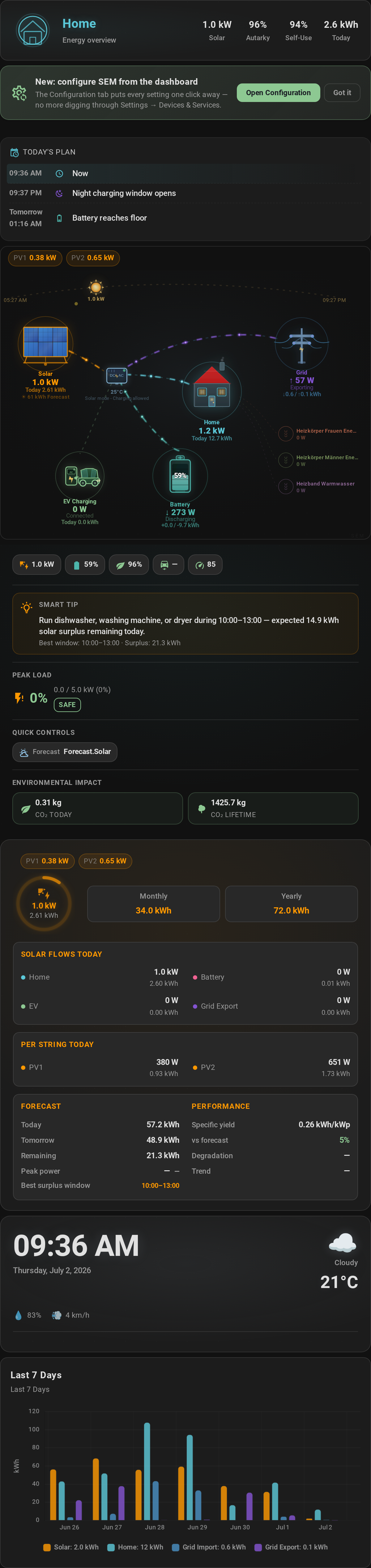
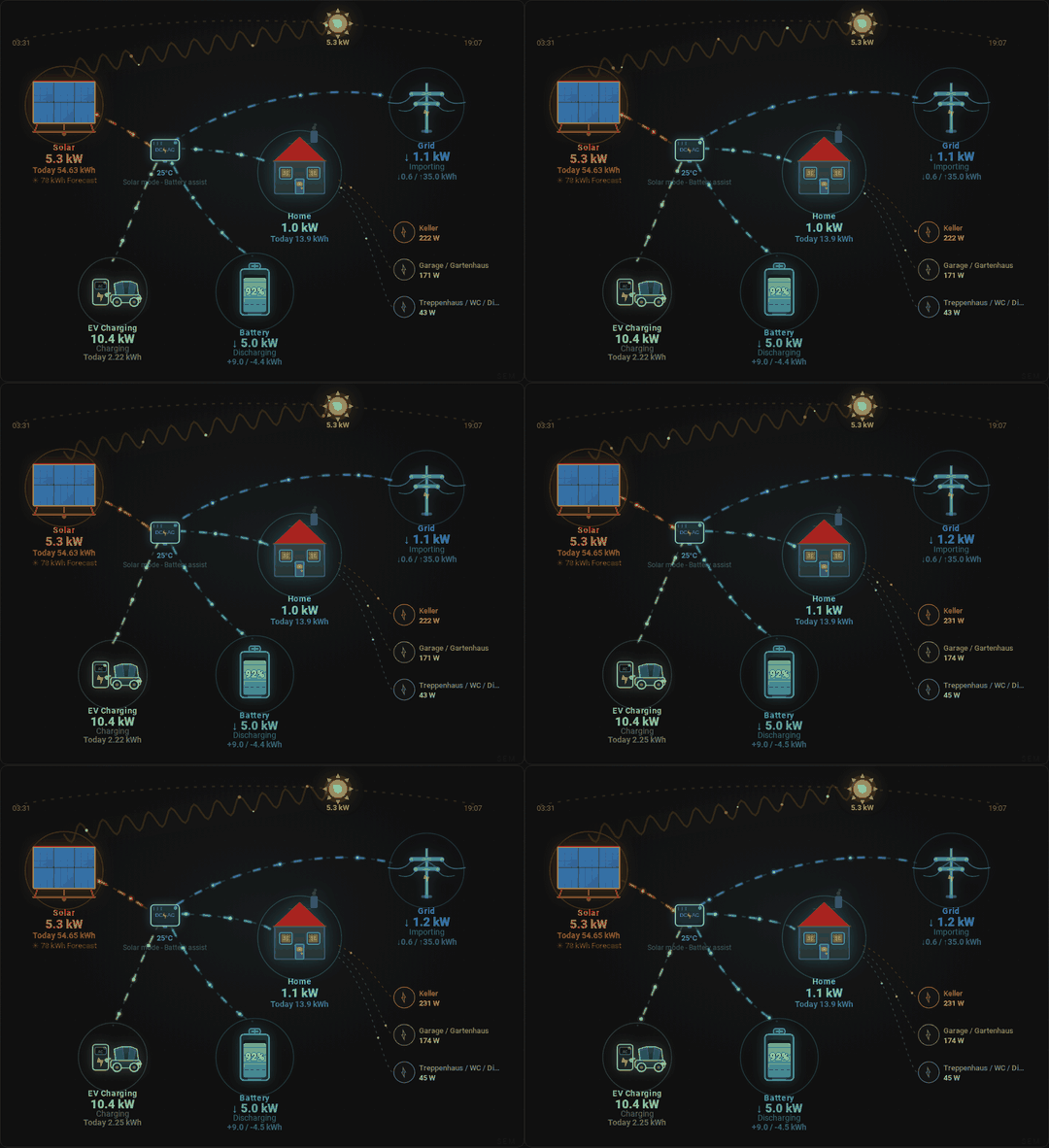
Solar Energy Management (SEM) distributes solar surplus across an EV charger, home battery, heat pump and other household loads. It reads solar, battery, grid and charger data every 10 seconds by default and allocates surplus by priority, all locally inside Home Assistant with no cloud or subscription. EV charging has several modes, including solar only, solar plus battery, cheapest hours and always, with the charging current adjusted to the available surplus. A four-zone battery strategy decides when the home battery helps the car and when it charges first. It also supports static, dynamic or calendar tariffs, peak load shedding, a battery charge scheduler and an observer mode that sends no commands to hardware. Setup is done in the UI, and it adds sensors, switches, numbers and repair notices.
Automatic summary of the README and code of traktore-org/sem-community. Something wrong, or are you the maintainer and want your own text here? Get in touch
Supports
Works locally Talks to your devices on your own network. No vendor cloud in between.
From the Marketplace Installed through the Marketplace, formerly HACS.
Actively maintained Its author released or pushed a change in the last six months.
Setting it up
Install it from the Marketplace and restart Home Assistant, then add it under Settings, Devices and services.
Solar Energy Management Setup
- Test mode (read-only — do not control hardware)Leave OFF for a normal install. Turn ON only on a test/staging Home Assistant that mirrors a production instance, so SEM never sends commands to KEBA, the inverter, or any switches.
EV Charger
- 🔌 EV Connected Status — vehicle plug connectionBinary sensor that reports whether the vehicle plug is currently connected. Auto-detected from KEBA / Easee / Wallbox / go-eCharger / Zaptec / ChargePoint / Heidelberg.
- ⚡ EV Charging Active — current charging stateBinary sensor that reports whether SEM should consider charging active. Auto-detected from your charger integration.
- 🚗 EV Charging Power — power delivered to vehicle (W)Numeric sensor (W) reporting how much power is currently flowing into the vehicle. Auto-detected from your charger integration.
- Number Entity for Current Control (Wallbox-style chargers)Number entity SEM writes to so it can change the charging current (e.g. number.wallbox_charging_current). Use this for chargers that expose a number entity instead of a service call. Leave blank if you fill in the Service path below.
- EV Charger Set-Current Service (KEBA-style chargers)Home Assistant service called to set the charging current (e.g. keba.set_current, easee.set_charger_max_limit). Auto-filled for KEBA. Leave blank if you fill in the Number Entity path above.
- EV Charger Service Target Entity (optional)Entity ID passed as the target of the service call. Auto-filled when needed; leave blank if the service is global.
- ⚡ EV Charging Current — charging amperage (A)Optional. Numeric sensor (A) reporting the actual charging current. Used for diagnostics.
- 🔋 EV Total Energy — cumulative energy delivered (kWh)Optional. Cumulative kWh counter for energy delivered to the vehicle. Used for accurate session tracking.
Hardware
- Home Battery Capacity (kWh)Total usable capacity of your home battery (NOT the EV) in kWh. Used by the forecast-driven charging strategy to estimate how much battery can bridge a solar deficit. Check your inverter spec.
- Generate the SEM dashboard now (restarts HA)When enabled, SEM creates the Lovelace dashboard immediately after this step finishes and then restarts Home Assistant ~5 s later so the new dashboard becomes visible. You can always re-run it manually later via the solar_energy_management.generate_dashboard service.
- System diagram styleChoose which system diagram card to use on the Home tab. 'SEM' uses the built-in animated diagram. 'K-Flow' uses the K-Flow HACS card (must be installed separately).
Name your energy sensors
- Solar powerLive production in watts — not a daily total.
- Grid powerLive import/export in watts. One signed sensor is fine; SEM works out which direction is which by watching it.
- Battery power (optional)Live charge/discharge in watts. Leave empty if you have no home battery.
- Observer mode (watch only, command nothing)Recommended for the first days: SEM shows every decision it would make and sends nothing to your hardware.
- Battery charge % (optional)State of charge in percent — SEM's four battery zones read it.
- Grid import power (optional)Only if your meter has no single signed sensor: the import side, always positive. Fill both of these or neither.
- Grid export power (optional)The export side, always positive. SEM computes export minus import, so no direction has to be guessed.
Reconfigure Solar Energy Management
- EV Connected StatusBinary sensor that reports whether the vehicle plug is currently connected.
- EV Charging StatusBinary sensor that reports whether the EV is actively charging.
- EV Charging PowerNumeric sensor (W) reporting power currently flowing into the vehicle.
- EV Charger ServiceHA service called to set the charging current (e.g. keba.set_current). Leave blank for number-entity chargers.
- EV Charger Service EntityEntity ID passed as the target of the service call. Leave blank if not needed.
- EV Total Energy CounterOptional cumulative kWh counter for energy delivered to the vehicle.
- Enable Charger Display NotificationsEnable/disable persistent notification banners shown on the charger status card.
- Enable Mobile NotificationsEnable/disable push notifications sent to your mobile device.
- Mobile Notification ServiceHA notify service for mobile push (e.g. notify.mobile_app_your_phone).
- Vehicle Battery SOCOptional sensor that reports the vehicle's current state of charge (0–100%).
- EV Battery Capacity (kWh)Total usable capacity of the EV battery in kWh. Used to estimate SOC and charge time.
- Consider full at (%)SEM stops treating the car as needing charge once it reaches this. It is a definition of "full", not a limit on charging.
After setup
- EV Connected StatusBinary sensor that reports whether the vehicle plug is connected.
- EV Charging StatusBinary sensor that reports whether the EV is actively charging.
- EV Charging PowerNumeric sensor (W) reporting power currently flowing into the vehicle.
- EV Charger Set-Current Service (optional)HA service called to set the charging current. Leave blank for number-entity chargers.
- EV Charger Service Target Entity (optional)Entity ID passed as the service call target. Leave blank if not needed.
- EV Total Energy Counter (optional)Optional cumulative kWh counter for energy delivered to the vehicle.
- Vehicle Battery SOC sensor (optional)Optional sensor reporting the vehicle's current state of charge (0–100%).
- EV battery capacity (kWh)Total usable capacity of the EV battery in kWh. Used to estimate SOC and charge time.
- Charger efficiency (%)Share of the metered AC energy that reaches the battery. Lower it if the SOC estimate runs ahead of the car. Typically 85-95%, less on single-phase or in cold weather.
- Consider full at (%)SEM stops treating the car as needing charge once it reaches this. It is a definition of "full", not a limit on charging.
- Never charge past (kWh)Solar surplus stops charging here. This is a ceiling, not a goal — leave it at full to charge freely from the sun.
- Never charge past (%)Solar surplus stops charging here. This is a ceiling, not a goal — leave at 100% to charge freely from the sun.
- Vehicle range sensorOptional real range sensor. Otherwise range is estimated from SOC × capacity × efficiency.
- Vehicle consumption (kWh/100km)Used to estimate driving range when no range sensor is configured.
- Update Interval (seconds)How often the coordinator reads sensors and adjusts hardware. 10 s gives the most accurate energy integration; values above 30 s will under-count energy. Range 10–60 s.
- Battery Priority SOC (%)Zone 1 → Zone 2 boundary. Below this SOC all solar goes to the battery and the EV is blocked. Default 30 %. The four-zone strategy (Architecture docs) needs this LOW (5–60 %) — do NOT confuse with the legacy 3-zone meaning where this was a high target.
- Minimum solar power — raw PV production (W)Raw PV-production floor — the panel output below which 'solar is up' is false: solar_only won't start and the deep-deficit guard treats it as darkness (so charging stops quickly instead of bridging on grid). This is RAW production, NOT surplus — contrast 'Battery assist minimum solar surplus' (solar − home), which decides when the home battery may help. Default 1000 W; keep below the EV charger's hardware minimum (~4140 W 3-phase, ~1380 W 1-phase).
- Guarantee at least (kWh)SEM tops up from the grid overnight so the car has at least this much by morning. This is a floor, not a limit — sunshine can add more. 0 = never use the grid.
- Battery Assist Max Power (W)Maximum power the home battery can discharge to assist the EV in Zone 3/4. Default 4500 W.
- Battery Assist Min Solar Surplus (W)Minimum real solar surplus before the home battery may help charge the EV — in any charging mode. Below this the battery is reserved for the house (the car draws from grid + solar). Default 1200 W. Set to 0 to let the battery support the EV everywhere, including overnight.
- Battery Capacity (kWh)Total usable home battery capacity (NOT the EV battery — that's a separate field on the EV step). Used by the forecast-driven charging strategy.
- Enable Battery Discharge ProtectionWhen ON, SEM caps the inverter's discharge limit during night EV charging so the home battery only powers the house (not the EV).
- Maximum Discharge Power (W)Hard upper limit on battery discharge enforced by the protection feature.
- Electricity Import Rate (per kWh)Day / flat tariff (CHF/kWh, incl. VAT). Used for cost tracking.
- Off-Peak Rate (per kWh)Off-peak rate (per kWh). Set equal to import rate if you don't have a dual tariff.
- Electricity Export Rate (per kWh)Feed-in rate paid by the utility (CHF/kWh).
- Demand Charge Rate (CHF/kW/month)Monthly demand charge per kW of peak (CHF/kW/month). Set to 0 if your contract has no demand charge.
- Observer Mode (Read-Only)When ON, SEM monitors and calculates everything but never sends a service call to hardware. Use on a test/staging HA mirroring a production install.
- Smart Night ChargingWhen ON, SEM intelligently skips or reduces night charging based on estimated EV SOC, solar forecast, temperature-adjusted consumption prediction, and learned driving patterns.
- Guarantee at least (kWh)SEM tops up from the grid overnight so the car has at least this much by morning. This is a floor, not a limit — sunshine can add more. 0 = never use the grid.
- Observer mode (read-only, no hardware control)When ON, SEM monitors everything but never sends commands to hardware.
- Reduce night target based on tomorrow's forecastWhen ON, SEM reduces the night charge target when tomorrow's solar forecast is sufficient.
- Minimum solar power to start EV charging (W)Minimum surplus solar power (W) required before SEM starts solar EV charging.
- Curtailment probe (harvest limited solar)When your inverter caps grid export (e.g. at negative prices), production clamps to consumption and real solar stays invisible. Opt-in: SEM briefly starts the EV at minimum amps and keeps charging only if production rises to follow.
- Export-limit entity (optional)Your inverter's export-limit entity (auto-detected for Huawei, GoodWe, SolaX, Victron and others when empty). Sharpens curtailment detection and prevents unnecessary probes.
- Tariff modeChoose 'Static' for fixed rates, 'Dynamic' for real-time pricing, or 'Calendar' for time-of-use schedules.
- Dynamic price entity (auto-detected if empty)Sensor providing the current electricity import price. Auto-detected from Tibber, Nordpool, etc.
- Price forecast entity (optional, auto-detected if empty)Optional sensor with hourly price forecasts used for smart scheduling.
- Feed-in price entity (optional, for dynamic export rate)Optional sensor providing the current feed-in / export price for dynamic export rate.
- Import rateDay/flat import rate (currency/kWh incl. VAT). Used as fallback when dynamic pricing is unavailable.
- Variable network-owner fee (currency/kWh)Optional total variable network-owner fee added to every imported kWh. May combine electricity transfer and energy tax. Use only when the dynamic price entity excludes these fees. No fixed subscription; does not affect export.
- Off-peak rate (if different)Night/off-peak import rate (currency/kWh). Set equal to import rate if you have a flat tariff.
- Export rateFeed-in rate paid by the utility (currency/kWh).
- Demand charge rateMonthly peak-demand charge (currency/kW/month). Set to 0 if your contract has none.
- Update interval (s)How often SEM reads sensors and adjusts hardware (seconds). Range 10–60 s.
- Grid import power sensor (optional, auto-detected)Optional sensor (W) for grid import power. Auto-detected from the Energy Dashboard; override here if needed.
- Grid export power sensor (optional, auto-detected)Optional sensor (W) for grid export power. Auto-detected from the Energy Dashboard; override here if needed.
- Price classification modePercentile buckets prices relative to today's range (recommended). Static uses fixed cheap/expensive thresholds.
- Solar forecast sourceWhich forecast integration SEM reads. Auto-detect prefers Solcast, then Forecast.Solar, then Open-Meteo — pick one explicitly if you run several side by side.
- Enable Load ManagementEnable/disable SEM's automatic load-shedding to stay under your grid peak limit.
- No grid limitTurn peak management off entirely: SEM stops sizing loads against the target peak limit and never sheds to defend it. Only for connections large enough that no household load can threaten them. This is separate from Enable Load Management, which stops the shedding but keeps the limit as a sizing ceiling.
- Target Peak Limit (kW)Maximum grid power (kW) before SEM starts shedding controllable loads.
- Warning Peak Level (kW)Power level (kW) at which SEM issues a warning before taking action. Must be below the target peak limit.
- Emergency Peak Level (kW)Power level (kW) at which SEM aggressively sheds loads to avoid demand charges. Must be above the target peak limit.
- Vehicle Battery SOCOptional sensor reporting the vehicle's current state of charge (0–100%).
- EV Battery Capacity (kWh)Total usable capacity of the EV battery in kWh.
- Consider full at (%)SEM stops treating the car as needing charge once it reaches this. It is a definition of "full", not a limit on charging.
- Enable Battery Charge Scheduler
- Battery Capacity
- Max Charge Power
- Round-trip Efficiency
- Battery Cycle Cost (degradation)
- Daily Evaluation Hour
- Maximum Target SOC
- Minimum Deficit Threshold
- Forecast Pessimism
- Force Charge on Negative Price
- Battery charge platformWhich inverter SEM commands for scheduled grid charging. Choose Deye to reveal the Deye wiring step.
- Replan interval (min)How often the charge schedule is recomputed against the latest forecast and prices.
- Prefer a consecutive charge windowOn keeps the cheap hours in one block (fewer start/stop cycles); off picks the individual cheapest hours even if scattered.
- Battery charge-power limit entity (for pacing)The inverter's max-charge-power number that charge pacing writes to (e.g. Huawei's 'Maximum charging power'). Leave empty to keep pacing advisory-only.
- Inverter AC output limitYour inverter's maximum AC output in watts. Charge pacing opens its cap wherever solar would exceed this, so clipped sun is captured. 0 = not set.
- Enable Charger Display NotificationsEnable/disable persistent notification banners on the charger status card.
- Enable Mobile NotificationsEnable/disable push notifications sent to your mobile device.
- Mobile Notification ServiceHA notify service for mobile push (e.g. notify.mobile_app_your_phone).
- Vehicle Battery SOCOptional sensor reporting the vehicle's current state of charge (0–100%).
- EV Battery Capacity (kWh)Total usable capacity of the EV battery in kWh.
- Consider full at (%)SEM stops treating the car as needing charge once it reaches this. It is a definition of "full", not a limit on charging.
- Charger NameFriendly name for this charger shown in the dashboard.
- EV Connected StatusBinary sensor that reports whether a vehicle is plugged into this charger.
- EV Charging StatusBinary sensor that reports whether this charger is actively delivering power.
- EV Charging PowerNumeric sensor (W) reporting power delivered by this charger.
- Charger Set-Current Service (optional)HA service used to set the charging current. Use for KEBA or Easee.
- Charger Service Target Entity (optional)Entity ID passed as the target of the service call. Leave blank if not needed.
- Start/Stop Entity (optional)Switch or button that physically starts/stops charging. Set this when dropping to 0 A does not release the charger (Smart EVSE, some OCPP boxes) — SEM opens it instead of leaving the contactor cycling.
- Offered Current Sensor (optional)Sensor reporting the current the charger is actually offering (A). Lets SEM verify a command landed instead of assuming it did.
- Charge Mode Select (optional)Select entity SEM switches to start/stop charging on boxes that need a mode change rather than a current of 0 A (go-e, Ohme, some OCPP).
- Charge Mode — Start Value (optional)The option SEM selects to START charging (e.g. "Instant Charging", "2"). Must match the select's option exactly.
- Charge Mode — Stop Value (optional)The option SEM selects to STOP charging. Leave blank if stopping is done by the start/stop entity or by setting 0 A.
- Surplus Priority (1=highest)Surplus allocation order across multiple chargers. Lower number = higher priority.
- Battery may assist this chargerLet the home battery help charge this vehicle. Off = this charger uses solar and grid only. The install-wide battery permission still applies.
- Current Control Entity (number — Wallbox, go-eCharger)Number entity used to set the charging current (A). Use for Wallbox, go-eCharger, and similar chargers.
- Never charge past (kWh)Solar surplus stops charging here. This is a ceiling, not a goal — leave it at full to charge freely from the sun.
Texts from the code of traktore-org/sem-community.
Entities
- Binary sensorsEV Connected, EV Charging, Battery Charging, Battery Discharging, Grid Export Active, Solar Active, Surplus Available, Forecast Available, Dynamic Tariff, Heat Pump Solar Boost, Heat Pump Registered, Layer Mismatch
- ButtonsRebuild battery-night history, Pause Charging
- NumbersUpdate Interval, Battery Priority SOC, Minimum Solar Power, Battery Assist Max Power, Battery Assist Min Solar Surplus, Export guard engage delay (s), Export guard release delay (s), Morning EV window (h), Morning EV drain floor (%), Regulation Offset, Demand Charge Rate, Cheap Price Threshold, and 28 more
- SelectsEV Target Type, Charge Mode, Phase Mode, Pause Charging For
- SensorsAutarky Rate, Available Reduction, Available Power, Battery Capacity Drift, Battery charge pacing, Battery Charge Power, Battery Cycles (Estimated), Battery Discharge Power, Battery Dynamic Floor, Battery Health Score, Battery Measured Capacity, Battery Power, and 214 more
- SwitchesObserver Mode, Vacation Mode, Energy Plan Actuation, Battery May Sell To Grid, Battery May Charge The Car, Forecast-Led Spending, Battery charge pacing, Export guard, Export guard: override external scheduling, House as a battery sink, Morning EV window
Troubleshooting
- DiagnosticsDownloads a diagnostics file to attach to a bug report.
- Repair noticesNotices it can show in Settings, Repairs:Sensor unavailable, Sensor frozen, No solar forecast integration detected, Recorder integration unavailable, Heat pump SG-Ready half-configured, Hot water boiler control unavailable, Hot water temperature sensor unavailable, KEBA failsafe is enabled — disable it for steady charging, SEM found a charger it is not managing, Lovelace is in YAML mode — add SEM's card resources, Battery-night history cannot be rebuilt, Rebuilt nights cannot see the grid's share, A load is set to current control but its entity is in watts, The grid peak is driven by a load SEM does not control, SEM is checking two guessed grid meters
From the README
Smart orchestration for solar, battery, EV & home loads in Home Assistant — maximize self-consumption, automate EV charging, optimize tariffs, and manage peak loads automatically.
SEM monitors your solar production, battery, grid, EV charger, and household devices every 10 seconds and distributes surplus power by priority. No cloud, no subscription — everything runs locally inside Home Assistant.
- Smart EV charging — dynamic 6-32A current control based on real-time solar surplus
- Six charging modes — Solar only, Solar + battery, Solar + cheapest hours, Min + Solar, Always (max), Off
- Auto mode — automatically switches between self-consumption and fast charging based on solar forecast vs EV need
- 1↔3-phase switching (#804) — off by default in 2.1 while the model is reworked; enable per charger under Configuration → EV chargers → Phase switching. For wallboxes with a phase-switch entity…
- Battery-aware — four-zone SOC strategy decides when battery helps the EV and when it charges first
- Min/Max charge-target range — a per-charger dual-handle slider (kWh or SOC %): Min is the guaranteed amount (night/grid tops up to it), Max is the solar ceiling (surplus charges up to it, then…
- Charge-by deadline — set a per-charger "be ready by HH:MM" time and SEM scales the night current to reach Min by then (overriding the gentle ramp when time is short), and warns if the target can't…
Information
- Installs
- 171 sharing analytics
- GitHub stars
- 52
- Connection
- Works locally
- Upkeep
- Updated in the last 6 months
- Version
- v2.1.0,
- Category
- Energy, Solar and batteries
- Kind
- Marketplace integration
- Needs
- Needs the Marketplace (HACS on 2026.10 and older)
- Domain
solar_energy_management- Issues
- Report an issue











