

UGREEN NAS
Tom-Bom-badil
On Home Assistant 2026.11 or newer? Open it in the Marketplace
- Installs
- 1.5k sharing analytics
- GitHub stars
- 270
- Connection
- Works locally
- Upkeep
- Updated in the last 6 months
- Version
- v2026.10.1,
- Category
- Computers and network, NAS and servers
- Kind
- Marketplace integration
- Needs
- Needs the Marketplace (HACS on 2026.10 and older)
- Domain
ugreen- Issues
- Report an issue
Independent directory, made by the developer of Vulpo. Not affiliated with Home Assistant or the Open Home Foundation.
Screenshots From the README of Tom-Bom-badil/home-assistant_ugreen-nas.
About
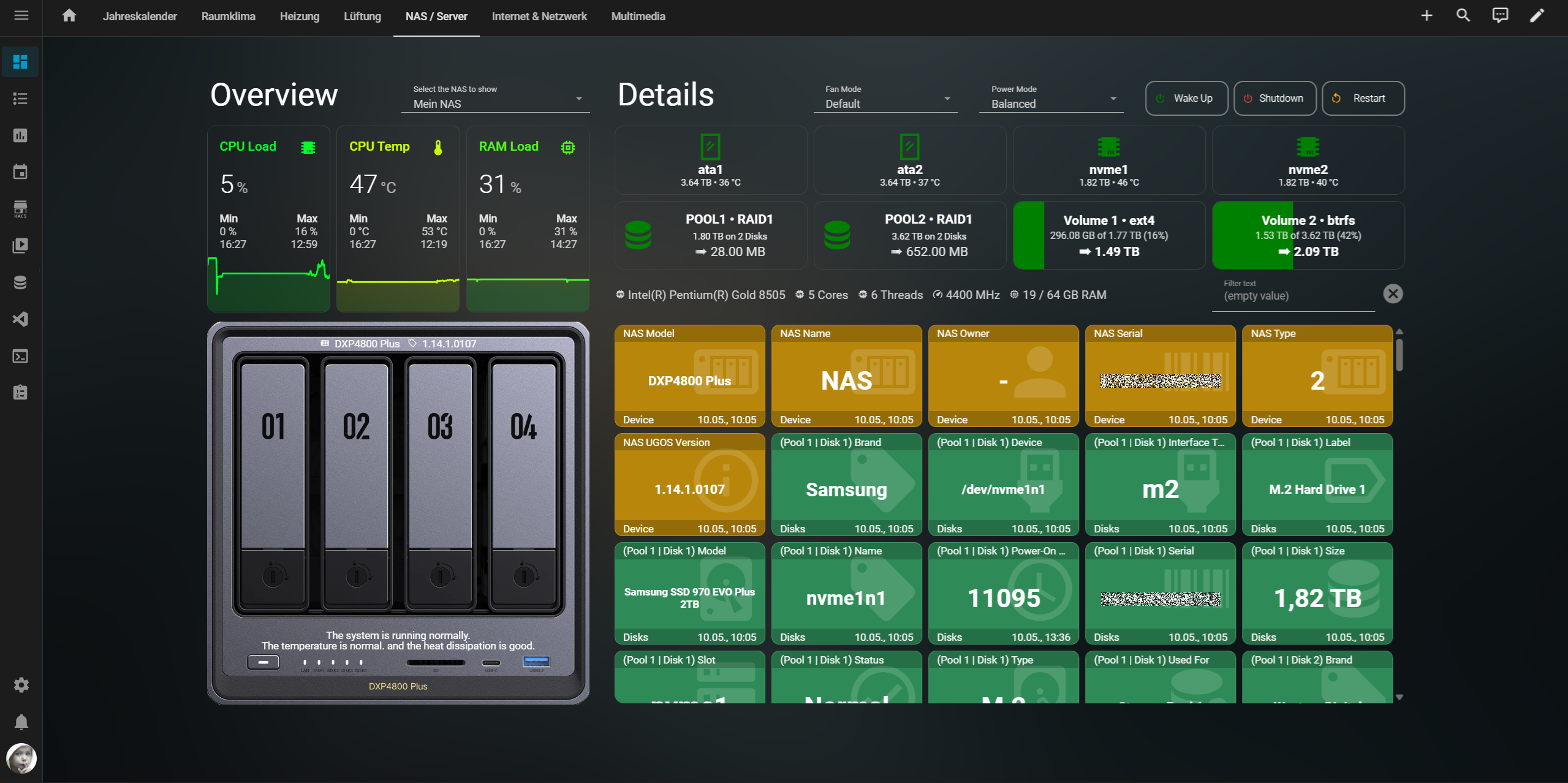
UGREEN NAS is a local integration that monitors settings and operational data of UGOS-based UGreen network attached storage devices. It reads data from the API that UGOS already provides, the same one used by its web interface and apps, so nothing extra is installed on the NAS and no SSH access is needed. It adds buttons, selects, sensors and text entities to Home Assistant. Home Assistant can discover the NAS on the network and offer to add it, and setup is done in the UI with the NAS address, port, admin login and an optional HTTPS connection. Accounts with two-factor authentication are supported by registering Home Assistant as a trusted device with a single authenticator code. Advanced options set the polling intervals for frequently and less frequently changing values, the keepalive ping rate, and the layout of a ready-made example dashboard.
Automatic summary of the README and code of Tom-Bom-badil/home-assistant_ugreen-nas. Something wrong, or are you the maintainer and want your own text here? Get in touch
Supports
Works locally Talks to your devices on your own network. No vendor cloud in between.
Found by itself Home Assistant spots it on the network and offers to add it.
From the Marketplace Installed through the Marketplace, formerly HACS.
Actively maintained Its author released or pushed a change in the last six months.
Provides
- Sensors
Setting it up
Install it from the Marketplace and restart Home Assistant, then add it under Settings, Devices and services.
Set up UGREEN NAS
- IP address or hostnameThe IP address or hostname of your UGREEN NAS (e.g. 192.168.1.100).
- PortPort used for the connection (default: 9999 for HTTP, 9443 for HTTPS).
- Admin usernameYour NAS admin username.
- Admin passwordYour NAS admin password (no special characters – UGOS bug!).
- Unique device name (default: UGREEN NAS)Must start with a letter; then letters, numbers, and spaces are allowed.
- Use HTTPSUse HTTPS for the connection.
- Account uses two-factor authentication (2FA)Tick this only if the NAS account above has 2FA enabled. You will be asked for one code on the next screen, used to register Home Assistant as a trusted device so it never needs a code again.
Register Home Assistant as a trusted device
- Authenticator codeThe current 6-digit code from your authenticator app. Codes expire quickly, so submit promptly.
After setup
- IP address or hostnameThe IP address or hostname of your UGREEN NAS.
- PortPort used for the connection (default: 9999 for HTTP, 9443 for HTTPS).
- Admin usernameYour NAS admin username.
- Admin passwordYour NAS admin password (no special characters – UGOS bug!).
- Unique device name (default: UGREEN NAS)Must start with a letter; then letters, numbers, and spaces are allowed.
- Use HTTPSUse an encrypted HTTPS connection (requires HTTPS port).
- Register a two-factor (2FA) trusted deviceLeave unticked for normal changes. Tick it and save only if the NAS account uses 2FA and Home Assistant is not registered yet, or you need to register again. You will be asked for one code on the next screen.
- Polling interval for state entities (5s)How often should frequently changing values be polled?
- Polling interval for configuration entities (60s)How often should less frequently changing values be polled?
- Keepalive API pings (20s)How often should an API keepalive ping be sent via WebSocket?
- [Example Dashboard] Max disk columns per row (5)Number of disk tiles for this NAS to be shown side by side on the dashboard.
- [Example Dashboard] Max pool columns per row (2)Number of pool tiles for this NAS to be shown side by side on the dashboard.
- [Example Dashboard] Max volume columns per row (2)Number of volume tiles for this NAS to be shown side by side on the dashboard.
- [Example Dashboard] Image file name (default_picture.png)Individual dashboard image file for this NAS in the www/community/ugreen/ folder.
- Authenticator codeThe current 6-digit code. Codes expire quickly, so submit promptly.
Texts from the code of Tom-Bom-badil/home-assistant_ugreen-nas.

Shows in Vulpo
Button card, Select card, Chart card, Apple Watch.Information
- Installs
- 1.5k sharing analytics
- GitHub stars
- 270
- Connection
- Works locally
- Upkeep
- Updated in the last 6 months
- Version
- v2026.10.1,
- Category
- Computers and network, NAS and servers
- Kind
- Marketplace integration
- Needs
- Needs the Marketplace (HACS on 2026.10 and older)
- Domain
ugreen- Issues
- Report an issue











