On Home Assistant 2026.10 or older? Open it in HACS
- Installs
- 55 sharing analytics
- GitHub stars
- 8
- Connection
- Uses the vendor's cloud
- Upkeep
- Updated in the last 6 months
- Version
- v2.0.0,
- Category
- Computers and network, Printers
- Kind
- Marketplace integration
- Brand
- Bambu Lab
- Needs
- Needs the Marketplace (HACS on 2026.10 and older)
- Domain
bambu_filaments- Issues
- Report an issue
Independent directory, made by the developer of Vulpo. Not affiliated with Home Assistant or the Open Home Foundation.
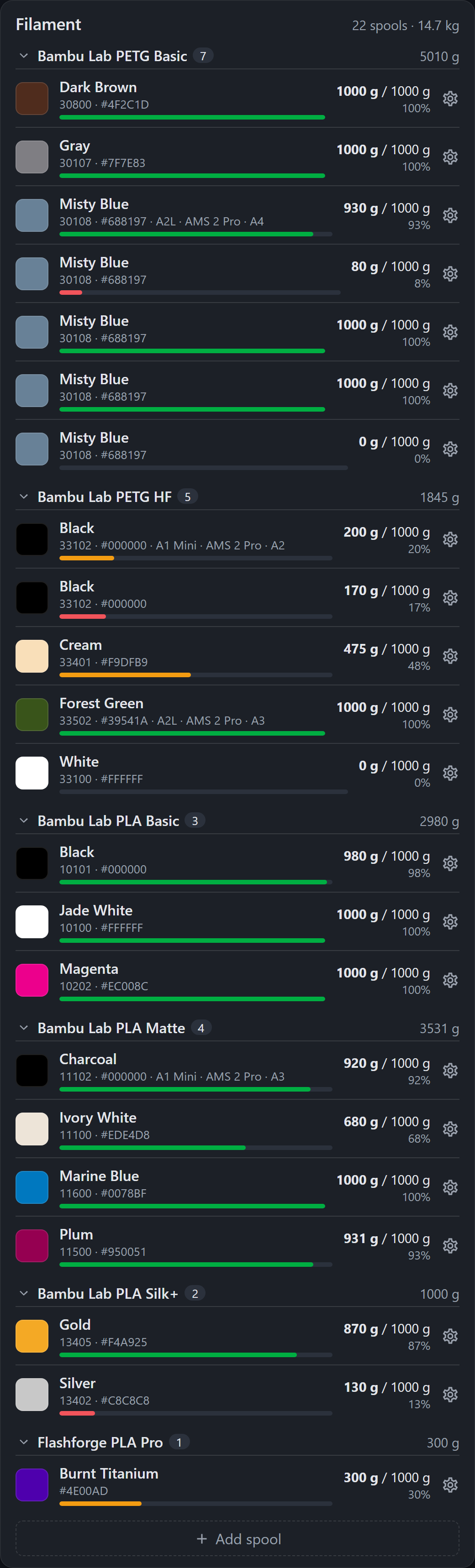
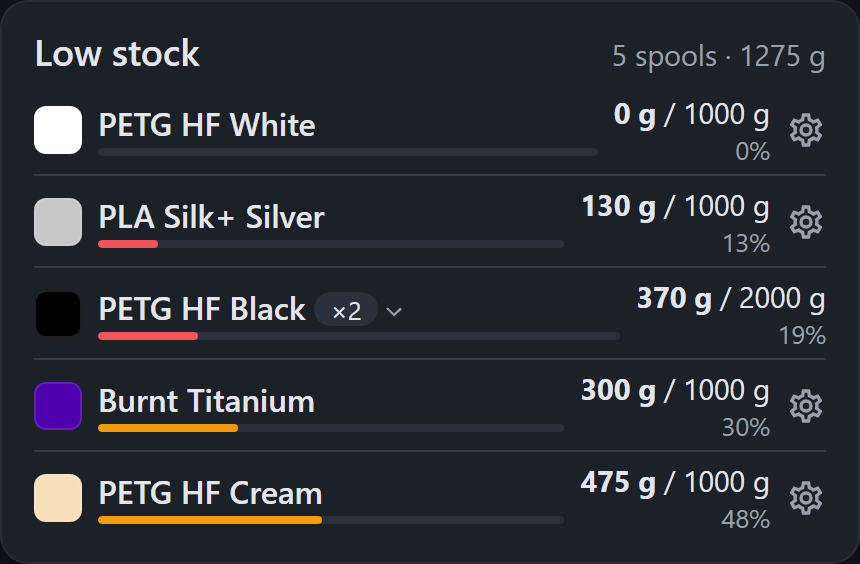
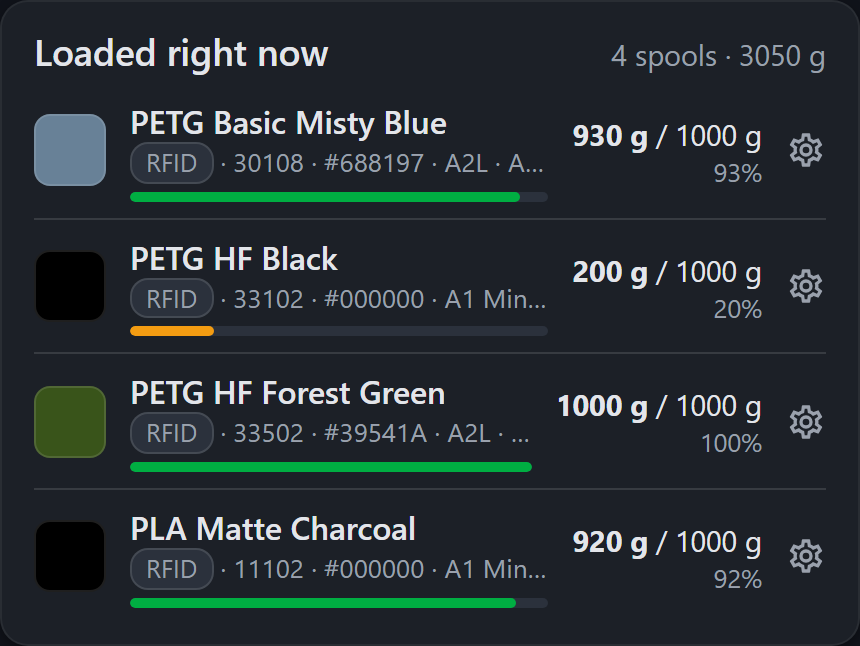
Screenshots From the README of Timmes123/ha-bambu-filaments.
About
Home Assistant integration for the Bambu Lab cloud filament library (Filament Manager)
Description from Timmes123/ha-bambu-filaments

Shows in Vulpo
Button card, Chart card, Apple Watch.Installs over time
#1,477 of 1,551 Marketplace integrations. Installs sharing analytics.
Supports
- Uses the vendor's cloudNeeds an internet connection and an account with the vendor.
- From the MarketplaceInstalled through the Marketplace, formerly HACS.
- Actively maintainedIts author released or pushed a change in the last six months.
Provides
- Sensors
Setting it up
Install it from the Marketplace and restart Home Assistant, then add it under Settings, Devices and services.
Bambu Lab account
- Region
- Email address
- Password
Verification code
- Verification code
- Request new code
Two-factor authentication
- 2FA code
Features
- Polling interval (minutes)
- Create one device per spool
- Auto-remove manual duplicates when a spool is loaded into the AMSWhen the AMS registers a new official spool, one matching full, manually created spool is deleted from the cloud library - pre-entered stock no longer turns into duplicates.
- Color name language
- Auto-register new RFID spools loaded into the AMSWhen an official RFID spool sits in an AMS slot but is missing from the cloud library, it is added automatically - no need to open the Bambu app or Studio first. Uses the AMS slot sensors of the Bambu Lab printer integration.
- Auto-register new RFID spools loaded into the AMS (unavailable)
- Sync remaining weight from the AMS to the cloud libraryPushes the AMS remaining-weight estimate of official RFID spools to the library whenever it changes - like Studio does, but without Studio running. A spool reading 0 % is booked as empty immediately. Uses the Bambu Lab printer integration.
- Sync remaining weight from the AMS to the cloud library (unavailable)
- Also mark as empty when removed with at most this much left (%, 0 = off)Optional extra rule: any spool taken out of the AMS whose last reading was at or below this percentage is set to 0 g, regardless of printing. Leave at 0 unless you want that.
- Also mark as empty when removed with at most this much left (%, 0 = off) (unavailable)
- Deduct print usage from manually created spoolsBambu never books consumption for third-party spools. With this on, every print job finished after enabling is booked once against the manual spool the library shows in that AMS slot, using the per-slot grams the cloud records for the job. RFID spools are never touched; jobs already booked elsewhere are skipped. Cancelled jobs are booked proportionally when the printer integration saw the progress.
- Mark a spool as empty when it is removed while a print was drawing from itThe safe runout rule: a spool that was the active tray of a running or paused print (an AMS backup switch is remembered too) and is then taken out of the AMS before that print ends is set to 0 g. Spools removed after a finished print, or mid-print with more than 20 % left (filament change), are never touched.
- Mark a spool as empty when it is removed while a print was drawing from it (unavailable)
After setup
- Polling interval (minutes)
- Create one device per spool
- Auto-remove manual duplicates when a spool is loaded into the AMSWhen the AMS registers a new official spool, one matching full, manually created spool is deleted from the cloud library - pre-entered stock no longer turns into duplicates.
- Color name language
- Auto-register new RFID spools loaded into the AMSWhen an official RFID spool sits in an AMS slot but is missing from the cloud library, it is added automatically - no need to open the Bambu app or Studio first. Uses the AMS slot sensors of the Bambu Lab printer integration.
- Auto-register new RFID spools loaded into the AMS (unavailable)
- Sync remaining weight from the AMS to the cloud libraryPushes the AMS remaining-weight estimate of official RFID spools to the library whenever it changes - like Studio does, but without Studio running. A spool reading 0 % is booked as empty immediately. Uses the Bambu Lab printer integration.
- Sync remaining weight from the AMS to the cloud library (unavailable)
- Also mark as empty when removed with at most this much left (%, 0 = off)Optional extra rule: any spool taken out of the AMS whose last reading was at or below this percentage is set to 0 g, regardless of printing. Leave at 0 unless you want that.
- Also mark as empty when removed with at most this much left (%, 0 = off) (unavailable)
- Deduct print usage from manually created spoolsBambu never books consumption for third-party spools. With this on, every print job finished after enabling is booked once against the manual spool the library shows in that AMS slot, using the per-slot grams the cloud records for the job. RFID spools are never touched; jobs already booked elsewhere are skipped. Cancelled jobs are booked proportionally when the printer integration saw the progress.
- Mark a spool as empty when it is removed while a print was drawing from itThe safe runout rule: a spool that was the active tray of a running or paused print (an AMS backup switch is remembered too) and is then taken out of the AMS before that print ends is set to 0 g. Spools removed after a finished print, or mid-print with more than 20 % left (filament change), are never touched.
- Mark a spool as empty when it is removed while a print was drawing from it (unavailable)
Texts from the code of Timmes123/ha-bambu-filaments.
Entities
- ButtonsDelete from Bambu Cloud
- SensorsSpools, Total remaining filament, Remaining, Remaining weight
Actions
- RefreshFetch the filament library from the Bambu cloud immediately.
- Set remaining weightSet the remaining filament weight of a spool in the cloud library.
- Spool ID
- Remaining weight
- Set noteSet the note of a spool in the cloud library.
- Spool ID
- Note
- Set slicer profile (filament ID)Link a spool to a Bambu filament profile so Bambu Studio can assign it with matching print settings (e.g. GFA00 for Bambu PLA Basic, GFL99 for Generic PLA). An empty string unlinks the profile again.
- Spool ID
- Filament ID
- Create spoolAdd a new spool to the Bambu cloud filament library (appears in Studio and the Bambu app too).
- Vendor
- Material
- Filament name
- Color
- Spool size
- Remaining weight
- Filament ID
- Custom name
- Note
- Count
- Update spoolChange fields of an existing spool in the Bambu cloud library. Only the provided fields are written; empty strings clear the custom name, note or slicer profile.
- Spool ID
- Vendor
- Material
- Filament name
- Color
- Spool size
- Remaining weight
- Note
- Filament ID
- Custom name
- Get filament catalogReturns the vendor/product combinations the Bambu cloud accepts when creating spools, plus the account's own slicer presets (usable as filament_id).
- Delete spoolDelete a spool from the Bambu cloud filament library.
- Spool ID
Troubleshooting
- DiagnosticsDownloads a diagnostics file to attach to a bug report.
From the README
Your Bambu Lab cloud filament library (the Filament Manager of Bambu Studio 2.6.1+ and the Bambu app) in Home Assistant: every spool with vendor, material, official color name and remaining weight — as devices, sensors, actions and a dashboard card. With the Bambu Lab printer integration installed it also does what Bambu's apps only do while they are open: registers spools you load into the AMS, keeps remaining weights current and books empty spools.
- One device per spool with remaining % and grams, official color name, mount location and a delete button; aggregate sensors for spool count and total remaining.
- Dashboard card in the look of Studio's Filament Manager: grouping, sorting, ×n stacks for identical spools, filters, RFID/manual badges, add and edit dialogs — third-party brands and multi-spool…
- Actions to create, update, delete and refresh spools; catalog lookup.
- AMS bridge (optional, needs ha-bambulab): auto-register loaded spools, sync AMS remaining weights, book runouts.
- Stock tracking: pre-register sealed spools, auto-remove the manual entry when the real spool hits the AMS, deduct print usage from third-party spools.
- Email-code and 2FA login, re-auth, diagnostics, English and German.
Information
- Installs
- 55 sharing analytics
- GitHub stars
- 8
- Connection
- Uses the vendor's cloud
- Upkeep
- Updated in the last 6 months
- Version
- v2.0.0,
- Category
- Computers and network, Printers
- Kind
- Marketplace integration
- Brand
- Bambu Lab
- Needs
- Needs the Marketplace (HACS on 2026.10 and older)
- Domain
bambu_filaments- Issues
- Report an issue