

Device Pulse
studiobts
On Home Assistant 2026.11 or newer? Open it in the Marketplace
- Installs
- 1.4k sharing analytics
- GitHub stars
- 131
- Connection
- Works locally
- Upkeep
- Updated in the last 6 months
- Version
- v1.8.1,
- Category
- Computers and network, Monitoring
- Kind
- Marketplace integration
- Needs
- Needs the Marketplace (HACS on 2026.10 and older)
- Domain
device_pulse- Issues
- Report an issue
Independent directory, made by the developer of Vulpo. Not affiliated with Home Assistant or the Open Home Foundation.
Screenshots From the README of studiobts/home-assistant-device-pulse.
About
Device Pulse is an integration that monitors IP-based devices in Home Assistant through ping checks. Devices can be taken from an existing integration that exposes a host or IP address, or added by name and host to a custom group. Each setup can define how many failed pings mark a device as disconnected, the interval between pings, and the ping method, either ICMP or ARP. ARP only works for devices on the same local subnet as Home Assistant. It adds binary sensors, sensors and buttons, including summary sensors for each group and for all devices, with optional per-device sensors for failed pings, last offline time and round-trip time. A reset action clears the total failed ping counter, and checks run locally.
Automatic summary of the README and code of studiobts/home-assistant-device-pulse. Something wrong, or are you the maintainer and want your own text here? Get in touch
Supports
Works locally Talks to your devices on your own network. No vendor cloud in between.
From the Marketplace Installed through the Marketplace, formerly HACS.
Actively maintained Its author released or pushed a change in the last six months.
Provides
- Sensors
Setting it up
Install it from the Marketplace and restart Home Assistant, then add it under Settings, Devices and services.
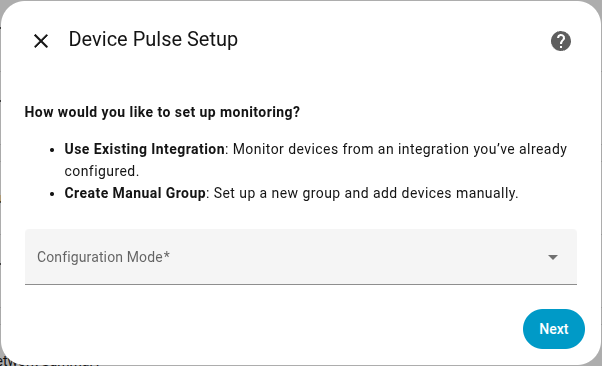
Device Pulse Setup
- Configuration Mode
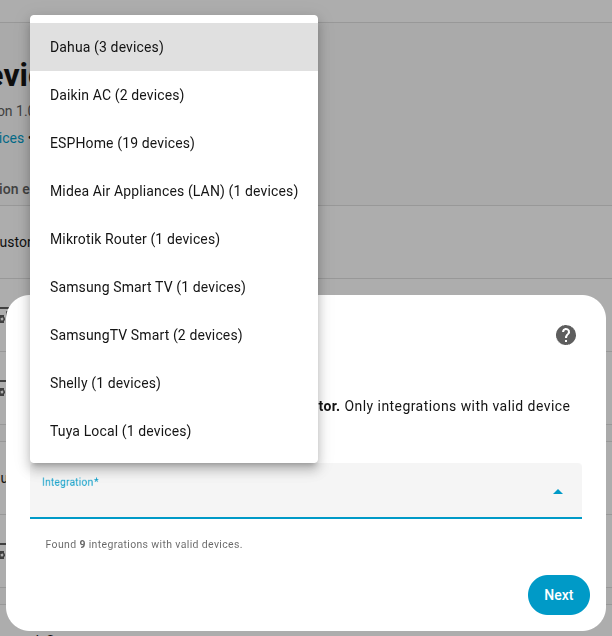
Select Integration
- Integration
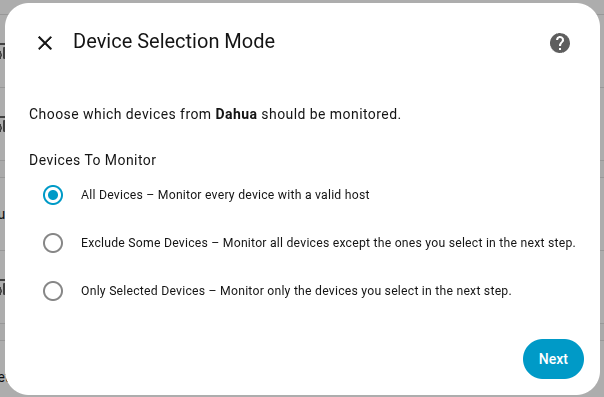
Device Selection Mode
- Devices To Monitor
Device Selection
- Devices
Also asked when at the device selection step.
Create Devices Group
- Group NameThe name that will identify this monitoring group.
Add Device to Group
- Device NameA friendly name to identify the device.
- HostThe hostname or IP address of the device to monitor.
Add a New Devices or Continue
- Action
After setup
- Devices To Monitor
- Devices
- Devices
- Action
- Device NameA friendly name to identify the device.
- HostThe hostname or IP address of the device to monitor.
- Devices to Remove
- Device to Edit
- HostThe hostname or IP address of the device to monitor.
Texts from the code of studiobts/home-assistant-device-pulse.
Actions
- Reset total failed pingsReset the total failed ping counter for a monitored Device Pulse entity.

Shows in Vulpo
Button card, Chart card, Apple Watch.Information
- Installs
- 1.4k sharing analytics
- GitHub stars
- 131
- Connection
- Works locally
- Upkeep
- Updated in the last 6 months
- Version
- v1.8.1,
- Category
- Computers and network, Monitoring
- Kind
- Marketplace integration
- Needs
- Needs the Marketplace (HACS on 2026.10 and older)
- Domain
device_pulse- Issues
- Report an issue











