
Cable Modem Monitor
solentlabs
On Home Assistant 2026.11 or newer? Open it in the Marketplace
- Installs
- 106 sharing analytics
- GitHub stars
- 56
- Connection
- Works locally
- Upkeep
- Updated in the last 6 months
- Version
- v3.14.1,
- Category
- Computers and network, Routers and network
- Kind
- Marketplace integration
- Needs
- Needs the Marketplace (HACS on 2026.10 and older)
- Domain
cable_modem_monitor- Issues
- Report an issue
Independent directory, made by the developer of Vulpo. Not affiliated with Home Assistant or the Open Home Foundation.
Screenshots From the README of solentlabs/cable_modem_monitor.
About
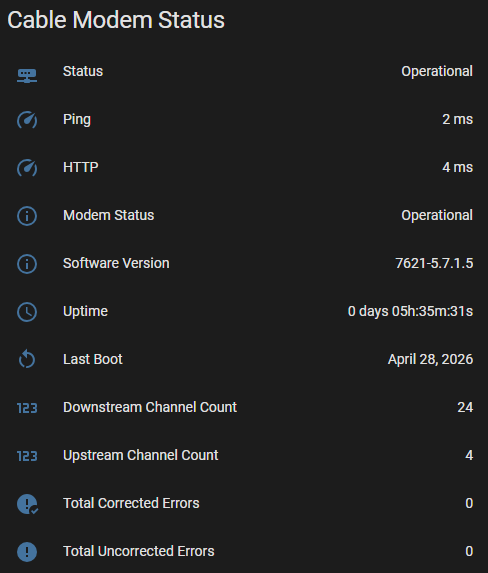
Cable Modem Monitor tracks cable modem signal quality, power levels and error rates locally from Home Assistant. It reports power, signal-to-noise ratio and frequency for each downstream and upstream channel, along with corrected and uncorrected error counts and per-minute error rates. Connection status, uptime, last boot time and reboot detection are included, and ping, TCP and HTTP health probes run on a separate schedule from the full data poll. A button restarts the modem, and actions can refresh data on demand, generate dashboard YAML, and clean up orphaned statistics. Modems from many manufacturers are supported, including ISP-branded units, and entities can be named by channel number or by channel ID. Setup happens in the UI, where the modem model, address and optional credentials are entered, and no data goes to a cloud service.
Automatic summary of the README and code of solentlabs/cable_modem_monitor. Something wrong, or are you the maintainer and want your own text here? Get in touch
Supports
Works locally Talks to your devices on your own network. No vendor cloud in between.
From the Marketplace Installed through the Marketplace, formerly HACS.
Actively maintained Its author released or pushed a change in the last six months.
Provides
- Sensors
Setting it up
Install it from the Marketplace and restart Home Assistant, then add it under Settings, Devices and services.
Cable Modem Monitor
- Manufacturer
Modem Found
- Is this your modem?Choose the first option to continue. The second lists the other likely matches from the search, and the third opens the full manufacturer list.
- Entity ID PrefixAdds model name or IP to entity IDs. Required when monitoring multiple modems.
- Channel NamingChannel Number names entities after the modem's row position (stable across reboots). Channel ID uses the DOCSIS Channel ID (matches ISP diagnostics but can change on reboot).
Select Modem
- Modem ModelSelect your modem model from the list.
- Entity ID PrefixAdds model name or IP to entity IDs. Required when monitoring multiple modems.
- Channel NamingChannel Number names entities after the modem's row position (stable across reboots). Channel ID uses the DOCSIS Channel ID (matches ISP diagnostics but can change on reboot).
Also asked when at the modems found step.
Firmware Variant
- VariantIf unsure, try the first option. Options marked * have not yet been verified on real hardware.
Connection
- VariantSwitch only if you think a different variant matches your modem.
- Modem IP AddressUsually 192.168.100.1. Include http:// or https:// to skip protocol detection.
- UsernameLeave blank if not required.
- PasswordLeave blank if not required.
Reauthenticate
- Modem IP Address
- Username
- Password
After setup
- Modem IP AddressUsually 192.168.100.1
- UsernameLeave blank if not required.
- PasswordBlank keeps current password.
- Data Poll IntervalHow often to poll modem data. Default 10 minutes. Set to 00:00:00 to disable automatic polling (manual only via Update button).
- Health Check IntervalHow often to check modem reachability. Default 30 seconds. Set to 00:00:00 to disable health checks.
Texts from the code of solentlabs/cable_modem_monitor.
Actions
- Generate DashboardGenerates ready-to-use Lovelace YAML for your cable modem dashboard. Copy the output and paste it into a Manual card.Fields: Device, Status Card, Downstream Power Graph, Downstream SNR Graph, Downstream Frequency Graph, Upstream Power Graph, Upstream Frequency Graph, Error Graphs, Error Rate Graphs, Latency Graph
- Request RefreshTriggers an immediate modem data poll, bypassing any connectivity backoff. Use in automations to refresh modem data on demand.
- Request Health CheckTriggers an immediate health check (ICMP and HTTP probes). Only works if health monitoring is enabled for the modem.
- Convert Channel IdentityRenames recorder statistics to match the current channel identity mode after re-adding the integration in the other mode. Modem must be online.Fields: Device
- Orphaned StatisticsFinds recorder statistics for this modem that have no registered entity — left behind by a mode switch, channel rebonding (ID mode), or a prefix change. Without execute, returns a preview of orphaned entities. With execute: true, purges them all directly. Purge is permanent.Fields: Device, Execute
Troubleshooting
- DiagnosticsDownloads a diagnostics file to attach to a bug report.
From the README
Monitor your cable modem's signal quality, power levels, and error rates from Home Assistant. Spot line issues before they cause outages, and build automations that alert you when something looks off.

Shows in Vulpo
Button card, Chart card, Apple Watch.Information
- Installs
- 106 sharing analytics
- GitHub stars
- 56
- Connection
- Works locally
- Upkeep
- Updated in the last 6 months
- Version
- v3.14.1,
- Category
- Computers and network, Routers and network
- Kind
- Marketplace integration
- Needs
- Needs the Marketplace (HACS on 2026.10 and older)
- Domain
cable_modem_monitor- Issues
- Report an issue











