

Solar Manager
Soardiac
On Home Assistant 2026.11 or newer? Open it in the Marketplace
- Installs
- 84 sharing analytics
- GitHub stars
- 23
- Connection
- Uses the vendor's cloud
- Upkeep
- Updated in the last 6 months
- Version
- v1.12.1,
- Category
- Energy, Solar and batteries
- Kind
- Marketplace integration
- Needs
- Needs the Marketplace (HACS on 2026.10 and older)
- Domain
solarmanager- Issues
- Report an issue
Independent directory, made by the developer of Vulpo. Not affiliated with Home Assistant or the Open Home Foundation.
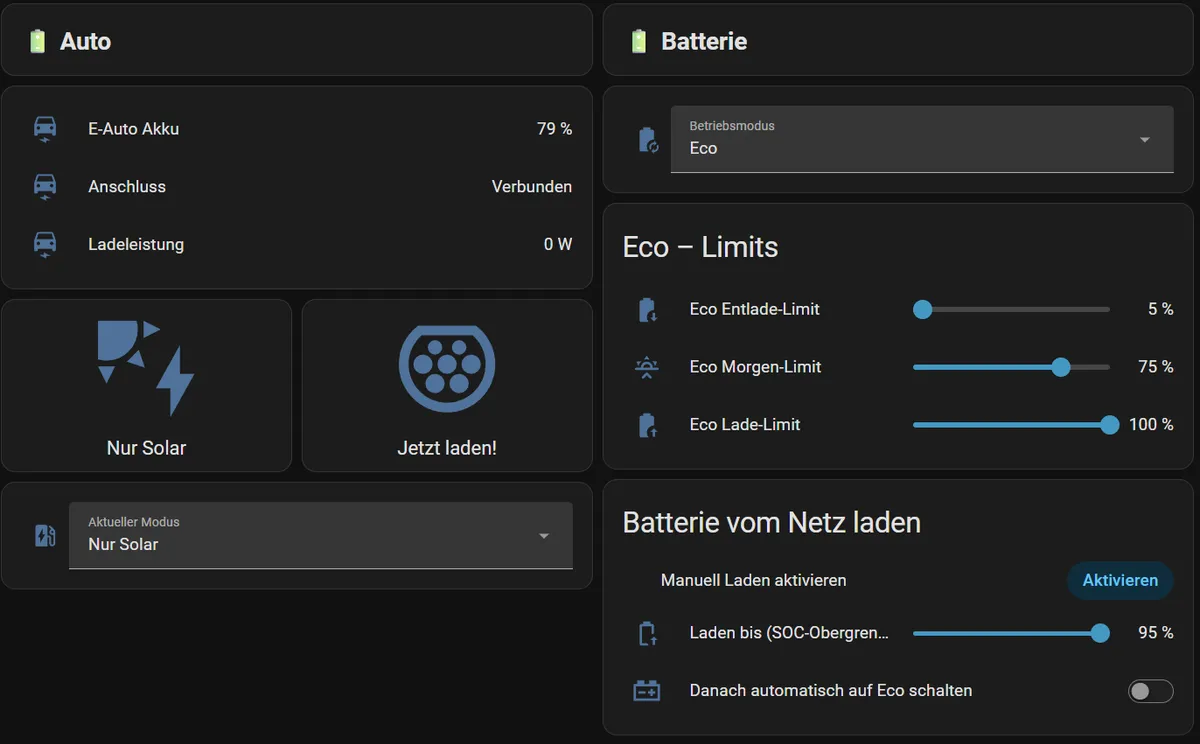
Screenshots From the README of Soardiac/ha-solarmanager.
About
Solar Manager connects a Solar Manager gateway to Home Assistant, in cloud or local mode. Cloud mode needs the vendor's cloud and offers full functionality, including reading and writing values. Local mode talks to the gateway directly, needs no internet, and provides sensors only. It adds sensors for PV power, house consumption, battery power and grid flow, plus numbers, selects and date and time entities for limits, charging targets and device modes. Device triggers, a diagnostics file and repair notices are also included, and setup runs through the UI with an API key or email and password. The integration is unofficial and not supported by the vendor.
Automatic summary of the README and code of Soardiac/ha-solarmanager. Something wrong, or are you the maintainer and want your own text here? Get in touch
Supports
Uses the vendor's cloud Needs an internet connection and an account with the vendor.
Device triggers Its devices can start automations directly.
From the Marketplace Installed through the Marketplace, formerly HACS.
Actively maintained Its author released or pushed a change in the last six months.
Provides
- Sensors
Setting it up
Install it from the Marketplace and restart Home Assistant, then add it under Settings, Devices and services.
Choose connection mode
- ModeCloud: full functionality with account. Local: sensors only, no internet required.
Set up Solarmanager Cloud
- Password
- System ID (smId)The smId of your Solarmanager system from the cloud interface.
- Cloud API key (recommended)Cloud API key for modern authentication (recommended). Found in the profile settings under «Cloud API Keys». Create the token without an expiry date, enable all four scopes (read, write, externalOverride:read, externalOverride:write), do NOT enable «Allow renewal». Important: the token is only visible right after creation — copy it immediately!
Set up local connection
- IP address / hostnameIP address or hostname of the Solar Manager gateway (e.g. 192.168.1.100).
- ProtocolHTTP for unencrypted, HTTPS for encrypted (self-signed certificates are accepted).
- API key (optional)Optional API key to secure the local connection. Leave empty if no key is configured.
Re-authenticate Solarmanager
- Password
- Cloud API key (recommended)
Update local API key
- API key
Reconfigure Solarmanager Cloud
- Password
- System ID (smId)
- Cloud API key
Reconfigure local connection
- IP address / hostname
- Protocol
- API key (optional)
After setup
- Cloud API keyLeave empty to keep the existing credentials. Enter a new key to switch to API key authentication or to replace the existing key.
- Polling interval (seconds)How often the API is polled. Recommended: 10 seconds.
Texts from the code of Soardiac/ha-solarmanager.
Entities
- Binary sensorsConnection
- Dates and timesCharging target SOC deadline, Charging target kWh deadline
- NumbersEco discharge limit, Eco morning limit, Eco charge limit, Feed-in limit, Constant current, Charging target SOC, Charging target SOC maximum, Charging target amount (kWh), Charging target maximum (kWh), Power, SOC upper limit, SOC lower limit, and 8 more
- SelectsBattery mode, Wallbox mode, V2X mode, Heat pump mode, Water heater mode, Smart plug mode, Switch mode, Manual direction
- SensorsPV power, House consumption, Battery power (+charge/-discharge), Grid import, Grid export, Grid power (+import/-export), PV energy (interval), Consumption (interval), Grid import (interval), Grid export (interval), Battery charged (interval), Battery discharged (interval), and 29 more
Troubleshooting
- DiagnosticsDownloads a diagnostics file to attach to a bug report.
From the README
Inoffiziell. Die Firma Solar Manager AG ist für diesen Code nicht verantwortlich und bietet keinen Support dafür.
Bindet das Solar Manager Gateway in Home Assistant ein — wahlweise über die Cloud-API (voller Funktionsumfang) oder direkt über die lokale REST-API (nur Sensoren, kein Internet nötig).

Shows in Vulpo
Select card, Chart card, Apple Watch.Information
- Installs
- 84 sharing analytics
- GitHub stars
- 23
- Connection
- Uses the vendor's cloud
- Upkeep
- Updated in the last 6 months
- Version
- v1.12.1,
- Category
- Energy, Solar and batteries
- Kind
- Marketplace integration
- Needs
- Needs the Marketplace (HACS on 2026.10 and older)
- Domain
solarmanager- Issues
- Report an issue











