On Home Assistant 2026.10 or older? Open it in HACS
- Installs
- 50 sharing analytics
- GitHub stars
- 6
- Connection
- Works locally
- Upkeep
- Updated in the last 6 months
- Version
- 0.5.7,
- Category
- Media and entertainment, Music and radio services
- Kind
- Marketplace integration
- Needs
- Needs the Marketplace (HACS on 2026.10 and older)
- Domain
wake_alarm- Issues
- Report an issue
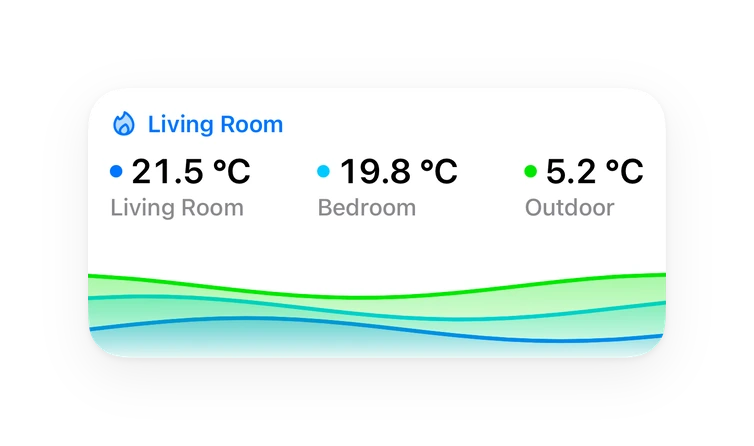
Shows in Vulpo Quick Toggle card, Button card, Chart card, Apple Watch, Control Center.
Independent directory, made by the developer of Vulpo. Not affiliated with Home Assistant or the Open Home Foundation.
Screenshots From the README of scootaash/hass-wake-alarm.
About
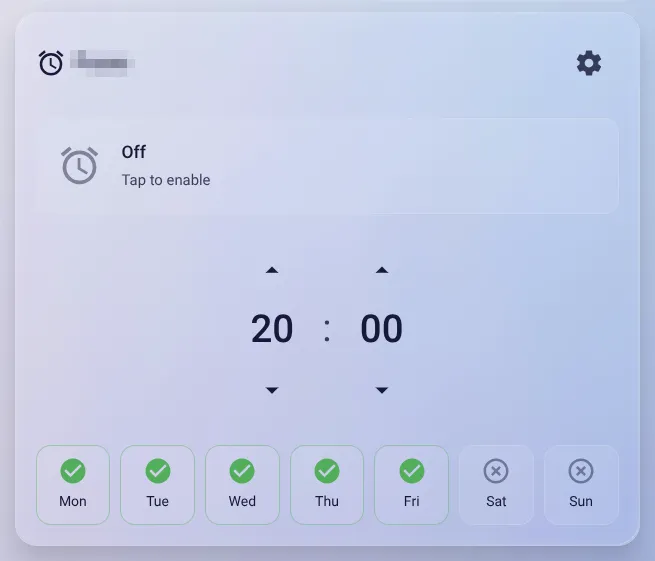
Sunrise wake-up alarms for Home Assistant. Lights ramp up before alarm time, music fades in at alarm time. Multi-instance, multi-room, custom Lovelace card included.
Description from scootaash/hass-wake-alarm

Shows in Vulpo
Quick Toggle card, Button card, Chart card, Apple Watch, Control Center.Installs over time
#1,538 of 1,551 Marketplace integrations. Installs sharing analytics.
Supports
- Works locallyTalks to your devices on your own network. No vendor cloud in between.
- From the MarketplaceInstalled through the Marketplace, formerly HACS.
- Actively maintainedIts author released or pushed a change in the last six months.
Provides
- Switches
- Sensors
Setting it up
Install it from the Marketplace and restart Home Assistant, then add it under Settings, Devices and services.
Wake Alarm
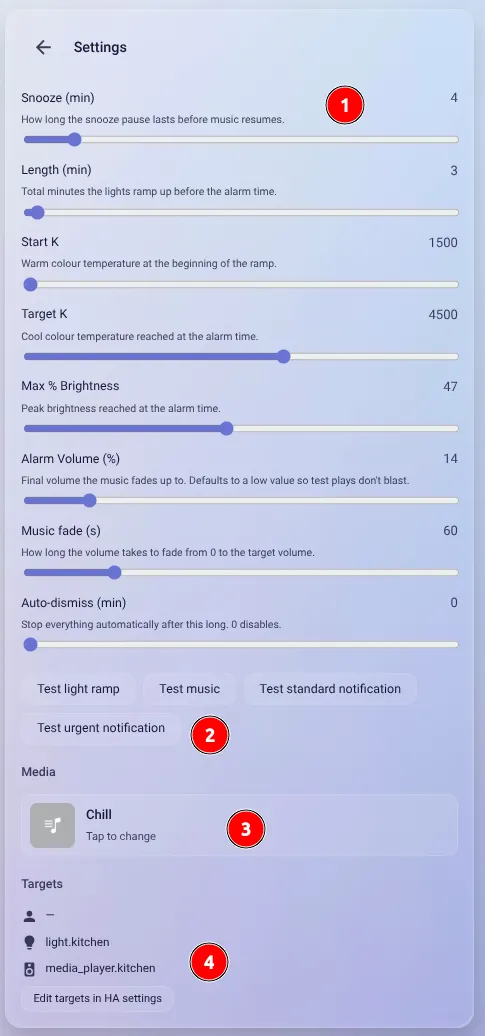
- NameFriendly name for this alarm — used as a prefix for every entity ID. Cannot be changed after setup.
- Lights (optional)Lights that ramp from warm + dim to cool + bright before the alarm time. Optional — leave blank for a music-only alarm.
- Media players (optional)Speakers to play music on at alarm time. Optional — leave blank for a lights-only sunrise alarm. To pick more than one, they must all come from the same integration AND support synchronised group playback (e.g. multiple Sonos speakers). At least one light or media player is required.
- Presence (optional)If set, the alarm fires only when this person is home. Leave blank to fire regardless.
- Condition sensor (optional)If set, the alarm fires only while this binary sensor is on — e.g. a bed sensor (only when you're in bed) or Home Assistant's Workday sensor (skip bank holidays). Checked alongside presence; both must pass.
- Standard notification target (optional)Mobile notification at alarm time, with Snooze and Dismiss buttons. Leave blank for no notification.
- Urgent notification target (optional)Critical notification when speakers are unavailable or no media has been picked. Set to a different channel for a distinct sound.
- Notification tap opens (optional)Optional. Tapping the notification opens this dashboard path (e.g. lovelace/0 or wake-alarm). Leave blank to do nothing. Snooze and Dismiss are always available by long-pressing the notification.
- Run script before the alarm (optional)Runs once when the wake-up sequence begins — at the light-ramp start, i.e. 'Length' minutes before the alarm time. Same moment even for a music-only alarm (no lights, but the sequence still starts then); it only lands on the alarm time after a restart catch-up. Fired non-blocking, so a slow or failing script never delays the alarm. The instance slug and name are passed as script variables.
- Run script at alarm time (optional)Runs once exactly at the alarm time — the moment the music starts (or, for a lights-only alarm, when the alarm fires). Skipped if the alarm is gated off by presence/condition. Fired non-blocking; the instance slug and name are passed as script variables.
- Run script after the alarm (optional)Runs once when the wake-up ends: a dismiss or an auto-dismiss. A lights-only alarm (no music) runs it at the alarm time. Not run on snooze. Fired non-blocking; the slug and name are passed as variables.
After setup
- Lights (optional)Lights that ramp before the alarm time. Leave blank for a music-only alarm.
- Media players (optional)Speakers for music. Leave blank for a lights-only alarm. Multi-select requires the same integration AND group-playback support. At least one light or media player is required.
- Presence (optional)Skip the alarm when this person isn't home. Leave blank to fire regardless.
- Condition sensor (optional)Skip the alarm unless this binary sensor is on (e.g. a bed sensor or the Workday sensor). ANDed with presence; leave blank to ignore.
- Standard notification target (optional)Mobile notification at alarm time.
- Urgent notification target (optional)Mobile notification when speakers are unavailable or no media has been picked.
- Notification tap opens (optional)Optional. Tapping the notification opens this dashboard path (e.g. lovelace/0 or wake-alarm). Leave blank to do nothing. Snooze and Dismiss are always available by long-pressing the notification.
- Run script before the alarm (optional)Runs (non-blocking) when the wake-up sequence begins — at the light-ramp start, i.e. 'Length' minutes before the alarm time (same moment even for a music-only alarm). Slug and name are passed as variables.
- Run script at alarm time (optional)Runs (non-blocking) exactly at the alarm time — when the music starts (or the alarm fires for a lights-only alarm). Skipped if gated off by presence/condition. Slug and name are passed as variables.
- Run script after the alarm (optional)Runs (non-blocking) when the wake-up ends: a dismiss or an auto-dismiss (a lights-only alarm ends at the alarm time). Not run on snooze.
Texts from the code of scootaash/hass-wake-alarm.
Entities
- Binary sensorsActive
- ButtonsTest light ramp, Cancel ramp, Test music, Test standard notification, Test urgent notification, Dismiss, Snooze
- NumbersLength, Start temperature, Target temperature, Max brightness, Volume, Snooze, Steps per minute, Music fade, Auto dismiss
- SensorsNext Alarm, State, Media selection
- SwitchesEnabled, Enable Mon, Enable Tue, Enable Wed, Enable Thu, Enable Fri, Enable Sat, Enable Sun
- TimesAlarm Time
Actions
- Set mediaPersist a media selection for a Wake Alarm instance. Called by the card after the user picks media via the browser modal.
- Media Content ID
- Media Content Type
- Title
- Thumbnail URL
- SnoozeSnooze the alarm. Pauses any active music, cancels the ramp, and starts a snooze timer for the configured snooze_min minutes.
- DismissFully dismiss the alarm. Stops music, unjoins any group, cancels every pending task or timer, and recomputes the next fire time.
- Cancel rampStop the light ramp without dismissing the alarm. Music will still play at alarm_time.
- Test light rampRun the light ramp now using current settings, regardless of schedule.
- Test musicRun the music sequence now using current settings and the selected media.
- Test standard notificationSend the standard alarm notification now. Uses iOS active interruption level and the Android wake_alarm_standard channel.
- Test urgent notificationSend the urgent fallback notification now. Uses iOS critical sound + critical interruption level and the Android wake_alarm_urgent channel.
Troubleshooting
- DiagnosticsDownloads a diagnostics file to attach to a bug report.
From the README
Sunrise wake-up alarms for Home Assistant. Lights ramp up before alarm time, music fades in at alarm time. Multi-instance, multi-room, custom Lovelace card included.
Tested with: Philips Hue lights, Sonos speakers, and the iOS Companion app. Not tested on Android or with other light / media-player integrations — should work everywhere HA supports the underlying light.turn_on and media_player.play_media services, but YMMV.
Information
- Installs
- 50 sharing analytics
- GitHub stars
- 6
- Connection
- Works locally
- Upkeep
- Updated in the last 6 months
- Version
- 0.5.7,
- Category
- Media and entertainment, Music and radio services
- Kind
- Marketplace integration
- Needs
- Needs the Marketplace (HACS on 2026.10 and older)
- Domain
wake_alarm- Issues
- Report an issue