

Smappee EV
myny-git
On Home Assistant 2026.11 or newer? Open it in the Marketplace
- Installs
- 231 sharing analytics
- GitHub stars
- 39
- Connection
- Uses the vendor's cloud
- Upkeep
- Updated in the last 6 months
- Version
- 2026.10.0,
- Category
- Energy, Meters and monitoring
- Kind
- Marketplace integration
- Needs
- Needs the Marketplace (HACS on 2026.10 and older)
- Domain
smappee_ev- Issues
- Report an issue
Independent directory, made by the developer of Vulpo. Not affiliated with Home Assistant or the Open Home Foundation.
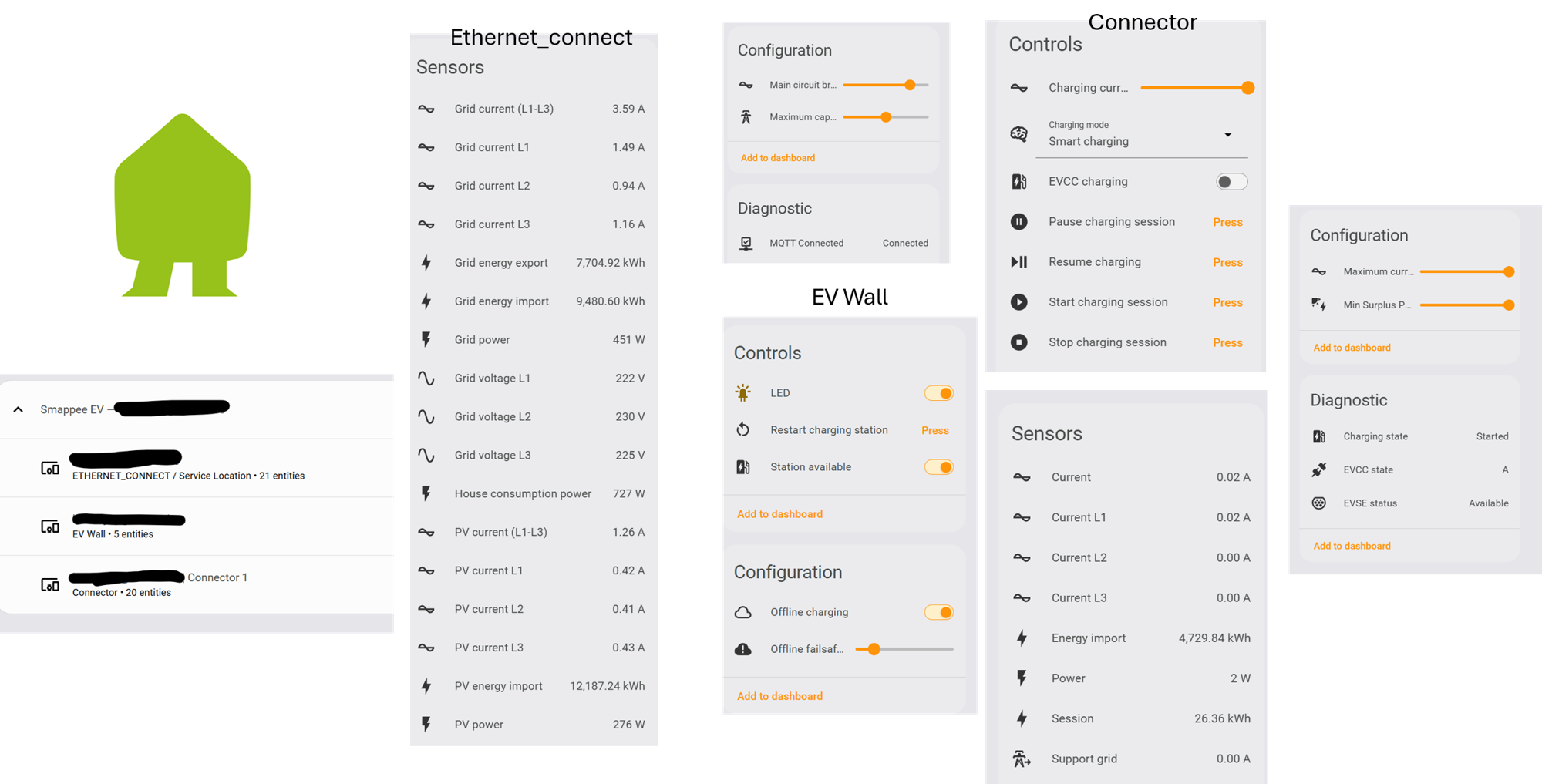
Screenshots From the README of myny-git/smappee_ev.
About
Smappee EV is an integration that monitors and controls Smappee EV chargers from Home Assistant. It adds charging mode selection, current limits, start, pause, stop and resume actions, LED control, a cable lock and station availability switches. Live power, current and energy readings come over MQTT, while the Smappee Dashboard REST API handles discovery, charger configuration and recent sessions. Battery sensors are added to the site device when Smappee measurements are configured as storage, alongside grid, PV and house consumption power sensors. Where two stations share a connector number, actions accept a station serial number to pick the right one. It needs the Smappee cloud, uses the Smappee Dashboard username and password, and is set up in the UI.
Automatic summary of the README and code of myny-git/smappee_ev. Something wrong, or are you the maintainer and want your own text here? Get in touch
Supports
Uses the vendor's cloud Needs an internet connection and an account with the vendor.
From the Marketplace Installed through the Marketplace, formerly HACS.
Actively maintained Its author released or pushed a change in the last six months.
Provides
- Lights
- Locks
- Switches
- Sensors
Setting it up
Install it from the Marketplace and restart Home Assistant, then add it under Settings, Devices and services.
Connect
- Your username on Smappee dashboardThe username used to sign in to the Smappee Dashboard.
- Your password on Smappee dashboardThe password used to sign in to the Smappee Dashboard.
Station serial
- Charging-station serial number
Sign in again
- Your username on Smappee dashboardThe username used by the existing Smappee EV config entry.
- Your password on Smappee dashboardThe updated Smappee Dashboard password.
Change the connection
- Your username on Smappee dashboardThe username used by the existing Smappee EV config entry.
- Your password on Smappee dashboardThe Smappee Dashboard password to save for this config entry.
Texts from the code of myny-git/smappee_ev.
Entities
- Binary sensorsMQTT Connected
- ButtonsStart charging session, Pause charging session, Stop charging session, Restart charging station, Resume charging
- LightsLED
- LocksCable lock
- NumbersMin Surplus Percentage, Charging current limit, Maximum current, Maximum capacity, Main circuit breaker, Offline failsafe current
- SelectsCharging mode
- SensorsBattery power, Battery charged energy, Battery discharged energy, Grid power, House consumption power, Always-on power, PV power, Grid energy import, Grid energy export, PV energy import, Current L1, Current L2, and 22 more
- SwitchesStation available, EVCC charging, Offline charging
Actions
- Start chargingStart charging for the selected connector.Fields: Config entry ID, Service Location ID, Connector ID, Charging station serial number
- Pause chargingPause charging for the selected connector via the Dashboard v10 device action when available.Fields: Config entry ID, Service Location ID, Connector ID, Charging station serial number
- Stop chargingStop charging for the selected connector.Fields: Config entry ID, Service Location ID, Connector ID, Charging station serial number
- Resume chargingResume charging by restoring the selected charging mode, or STANDARD when no mode is known.Fields: Config entry ID, Service Location ID, Connector ID, Charging station serial number
- Set currentSet the charging current in Ampere (1 decimal precision). Converted to the nearest integer percentage and sent via setPercentageLimit. The slider and number entities update immediately.Fields: Config entry ID, Service Location ID, Connector ID, Current (A), Charging station serial number
- Set charging modeSet the charging mode of a connector.Fields: Config entry ID, Service Location ID, Connector ID, Mode, Charging station serial number
Troubleshooting
- DiagnosticsDownloads a diagnostics file to attach to a bug report.
From the README
- MQTT remains the live data source for power, current, energy and fast charger state.
- Smappee Dashboard REST API v10/v11 is used for discovery, station details, charger configuration, capacity protection, overload protection, recent sessions and charger availability.
- Dashboard v10/v11 calls are used for charging mode, start, pause, stop, percentage/current limit, LED brightness, min surplus percentage and availability.
- Dashboard configuration data refreshes at most every 30 minutes, with a forced refresh shortly after supported dashboard writes.
- Smartdevice polling runs every 30 minutes with fresh charger MQTT traffic, or every 5 minutes when MQTT is unavailable/stale or station/connector REST data is unavailable. Station and connectors…

Shows in Vulpo
Light card, Quick Toggle card, Lock card, Button card, Apple Watch, Control Center.Information
- Installs
- 231 sharing analytics
- GitHub stars
- 39
- Connection
- Uses the vendor's cloud
- Upkeep
- Updated in the last 6 months
- Version
- 2026.10.0,
- Category
- Energy, Meters and monitoring
- Kind
- Marketplace integration
- Needs
- Needs the Marketplace (HACS on 2026.10 and older)
- Domain
smappee_ev- Issues
- Report an issue











