
Brewfather batch information for Home Assistant
MvdDonk
On Home Assistant 2026.11 or newer? Open it in the Marketplace
- Installs
- 82 sharing analytics
- GitHub stars
- 29
- Connection
- Uses the vendor's cloud
- Upkeep
- Updated in the last 6 months
- Version
- v2.7.8,
- Category
- Appliances and cleaning, Cooking
- Kind
- Marketplace integration
- Needs
- Needs the Marketplace (HACS on 2026.10 and older)
- Domain
brewfather- Issues
- Report an issue
Independent directory, made by the developer of Vulpo. Not affiliated with Home Assistant or the Open Home Foundation.
Screenshots From the README of MvdDonk/brewfather.
About
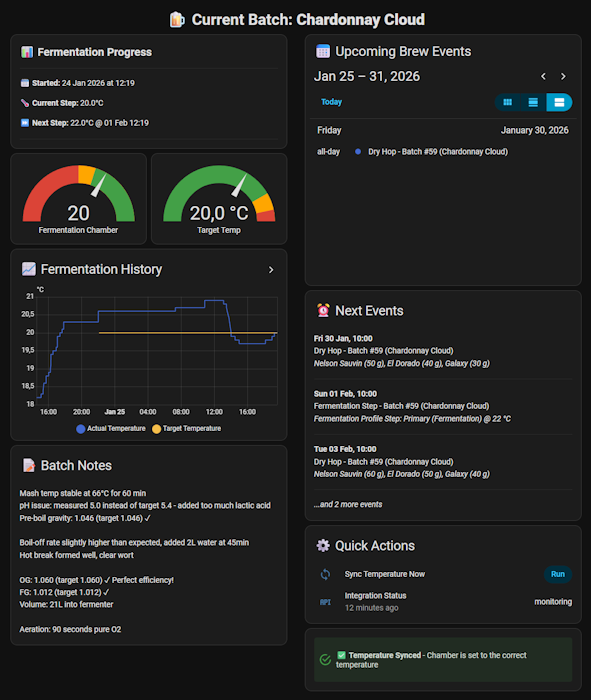
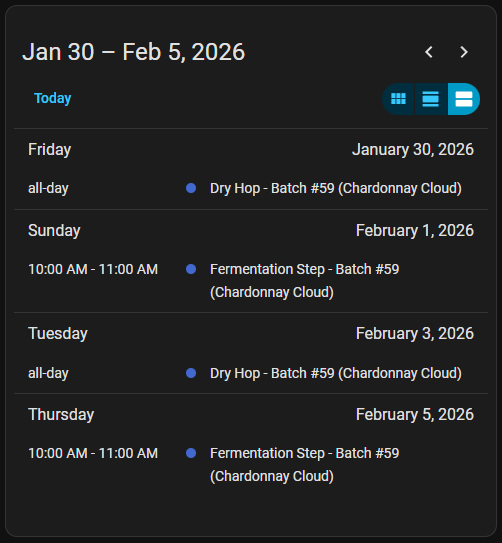
Brewfather batch information for Home Assistant connects a Brewfather account to Home Assistant through the vendor's cloud. It adds sensors for the current and upcoming target temperatures, fermentation dates, days remaining, recipe name and batch number, plus a calendar of fermentation temperature changes, dry hopping, bottling day and custom brew events. The target temperature is exposed as a sensor, so an automation can adjust any climate entity to follow the recipe schedule. An optional temperature ramping setting changes the target gradually during ramp periods instead of jumping at once. A custom stream option sends temperature and specific gravity readings from chosen Home Assistant sensors back to Brewfather. Setup is done in the UI with a Brewfather user ID and API key, and further options cover multiple batches and an all batches sensor, both marked experimental.
Automatic summary of the README and code of MvdDonk/brewfather. Something wrong, or are you the maintainer and want your own text here? Get in touch
Supports
Uses the vendor's cloud Needs an internet connection and an account with the vendor.
From the Marketplace Installed through the Marketplace, formerly HACS.
Actively maintained Its author released or pushed a change in the last six months.
Provides
- Sensors
- Calendars
Setting it up
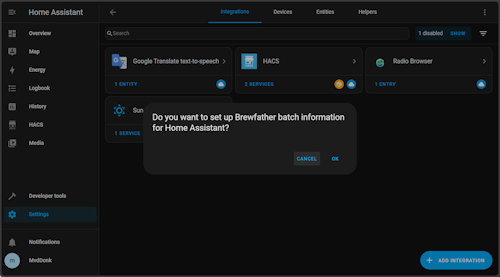
Install it from the Marketplace and restart Home Assistant, then add it under Settings, Devices and services.
Brewfather Integration Setup
- Connection nameA friendly name for this Brewfather connection in Home Assistant
- User IDYour Brewfather UserId (not email address)
- API-KeyYour API key from Brewfather Settings > API
Choose Features
- Enable temperature rampingAutomatically adjust target temperatures during fermentation steps with ramping schedules
- Multiple batch support (experimental)Monitor and display data from multiple fermenting batches simultaneously
- All batches data sensor (experimental)Create an additional sensor containing detailed information about all batches
- Enable custom stream for temperature monitoringAutomatically send temperature readings from Home Assistant to Brewfather
Custom Stream Configuration
- Brewfather Logging ID or Stream URLEnter your logging ID or paste the complete stream URL from Brewfather
- Primary Temperature SensorSelect the primary fermentation temperature sensor to stream to Brewfather
- Fridge/Chamber Temperature Sensor (Optional)Select the auxiliary temperature sensor (fridge/chamber) to stream to Brewfather (optional)
- Room/Ambient Temperature Sensor (Optional)Select the external temperature sensor (room/ambient) to stream to Brewfather (optional)
- Specific Gravity Sensor (Optional)Select the specific gravity sensor (e.g., from hydrometer) to stream to Brewfather
After setup
- Enable temperature rampingAutomatically adjust target temperatures during fermentation steps with ramping schedules
- Multiple batch supportMonitor and display data from multiple fermenting batches simultaneously
- All batches data sensorCreate an additional sensor containing detailed information about all batches
- Enable custom streamAutomatically send fermentation data from Home Assistant to Brewfather (temperature & gravity readings)
- Brewfather Logging ID or Stream URLEnter your logging ID or paste the complete stream URL from Brewfather
- Primary Temperature SensorSelect the primary fermentation temperature sensor to stream to Brewfather
- Fridge Temperature Sensor (Optional)Appears as 'Fridge Temp' in Brewfather. Select the fridge/chamber temperature sensor to stream (optional)
- Room Temperature Sensor (Optional)Appears as 'Room Temp' in Brewfather. Select the room temperature sensor to stream (optional)
- Specific Gravity Sensor (Optional)Select the specific gravity sensor (e.g., from hydrometer) to stream to Brewfather
Texts from the code of MvdDonk/brewfather.
Entities
- SensorsIntegration Status
From the README
- Fermentation temperature changes
- Dry hopping schedules
- Bottling day reminders
- Custom brew events

Shows in Vulpo
Calendar card, Chart card, Apple Watch.Information
- Installs
- 82 sharing analytics
- GitHub stars
- 29
- Connection
- Uses the vendor's cloud
- Upkeep
- Updated in the last 6 months
- Version
- v2.7.8,
- Category
- Appliances and cleaning, Cooking
- Kind
- Marketplace integration
- Needs
- Needs the Marketplace (HACS on 2026.10 and older)
- Domain
brewfather- Issues
- Report an issue