

Must Inverter
mukaschultze
On Home Assistant 2026.11 or newer? Open it in the Marketplace
- Installs
- 129 sharing analytics
- GitHub stars
- 69
- Connection
- Works locally
- Upkeep
- No update in 6 to 18 months
- Version
- v0.2.5,
- Category
- Energy, Solar and batteries
- Kind
- Marketplace integration
- Needs
- Needs the Marketplace (HACS on 2026.10 and older)
- Domain
must_inverter- Issues
- Report an issue
Independent directory, made by the developer of Vulpo. Not affiliated with Home Assistant or the Open Home Foundation.
Screenshots From the README of mukaschultze/ha-must-inverter.
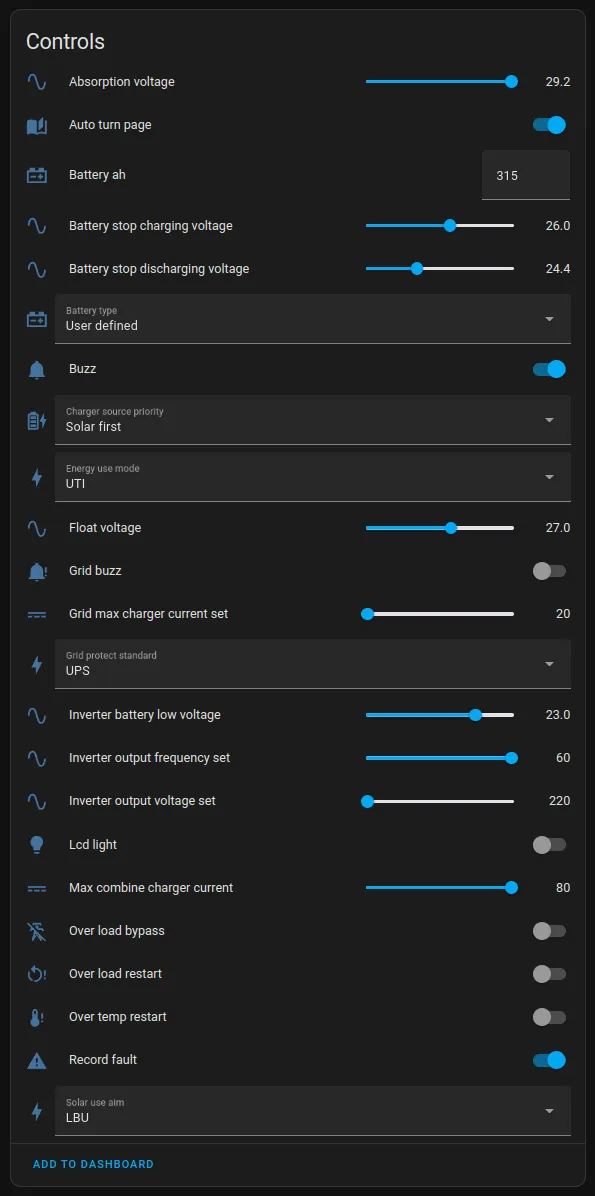
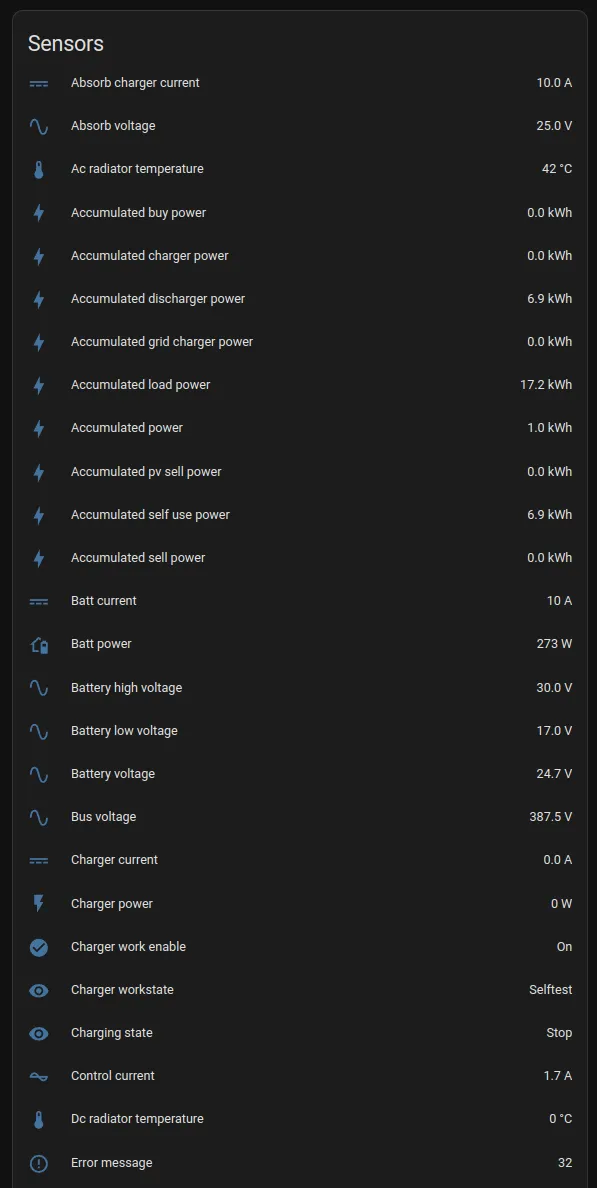
About
Must Inverter is a local integration for monitoring and controlling Must solar inverters in Home Assistant. It reads live data such as power production and battery status, and it exposes binary sensors, buttons, numbers, selects, sensors, switches and time entities. Writable settings include charging voltages, battery equalization schedule, battery type, charger source priority and switches for charging from the grid or discharging to the grid. The inverter can be reached over USB or serial, TCP or UDP, with advanced Modbus options for device ID, timeout, retries and reconnect delay. Model detection is automatic by default, and the polling interval can be changed. Repair notices appear for a missing serial number or mismatched Modbus registers, and a diagnostics file can be downloaded for bug reports.
Automatic summary of the README and code of mukaschultze/ha-must-inverter. Something wrong, or are you the maintainer and want your own text here? Get in touch
Supports
Works locally Talks to your devices on your own network. No vendor cloud in between.
From the Marketplace Installed through the Marketplace, formerly HACS.
Provides
- Switches
- Sensors
Setting it up
Install it from the Marketplace and restart Home Assistant, then add it under Settings, Devices and services.
Common settings
- NameLeave empty to use the inverter model as name.
- ModelLeave in Auto Detect unless you're not seeing data that should be available for your device.
- Scan Interval (seconds)The interval in seconds to poll the inverter for data.
- Connection typeThe connection type to use to communicate with the inverter, usually via the included USB cable or via TCP/UDP for wireless connections.
USB or serial
- USB or Serial device pathThe path to the USB or Serial device to use for the connection, usually /dev/ttyUSB0 or /dev/ttyS0.
- Baud rate
- Parity (‘E’ven, ‘O’dd or ‘N’one)
- Stop bits (1, 1.5, 2)
- Byte size (7, 8)
TCP
- Host
- Port
Also asked when at the udp step.
PyModbus advanced settings
- Device IDThe Modbus device ID (slave address) of the inverter. Default is 4 (0x04). Use this option only when there are multiple inverters connected to the same serial port (such as in cases of inverters running in parallel)
- Timeout (seconds)Timeout for connecting and receiving data.
- RetriesMax number of retries per request.
- Reconnect Delay (seconds)Minimum delay before reconnecting. Set to 0 to disable reconnecting.
- Max Reconnect Delay (seconds)Maximum delay before reconnecting. Pymodbus doubles the delay after each unsuccessful connection attempt.
After setup
- NameLeave empty to use the inverter model as name.
- ModelLeave in Auto Detect unless you're not seeing data that should be available for your device.
- Scan Interval (seconds)The interval in seconds to poll the inverter for data.
- Connection typeThe connection type to use to communicate with the inverter, usually via the included USB cable or via TCP/UDP for wireless connections.
- USB or Serial device pathThe path to the USB or Serial device to use for the connection, usually /dev/ttyUSB0 or /dev/ttyS0.
- Baud rate
- Parity (‘E’ven, ‘O’dd or ‘N’one)
- Stop bits (1, 1.5, 2)
- Byte size (7, 8)
- Host
- Port
- Host
- Port
- Device IDThe Modbus device ID (slave address) of the inverter. Default is 4 (0x04). Use this option only when there are multiple inverters connected to the same serial port (such as in cases of inverters running in parallel)
- Timeout (seconds)Timeout for connecting and receiving data.
- RetriesMax number of retries per request.
- Reconnect Delay (seconds)Minimum delay before reconnecting. Set to 0 to disable reconnecting.
- Max Reconnect Delay (seconds)Maximum delay before reconnecting. Pymodbus doubles the delay after each unsuccessful connection attempt.
Texts from the code of mukaschultze/ha-must-inverter.
Entities
- Binary sensorsRelay Battery, Relay PV, Relay Inverter, Relay Grid, Relay Load, Relay N Line, Relay DC, Relay Earth
- ButtonsRemove Accumulated Data, Remove Accumulated Data (Inverter)
- NumbersFloat Voltage, Absorption Voltage, Battery Low Voltage, Max Charger Current, Battery Capacity (Ah), Battery Equalization Voltage, Battery Equalization Time, Battery Equalization Timeout, Battery Equalization Interval, Calibration Inverter Battery Voltage, Calibration Inverter Voltage, Calibration Grid Voltage, and 13 more
- SelectsBattery Type, Energy Use Mode, Grid Protect Standard, Solar Use Aim, Charger Source Priority
- SensorsAbsorb Voltage, Battery High Voltage, Absorb Charger Current, Charger Workstate, MPPT State, Charging State, PV Voltage, Battery Voltage, Charger Current, Charger Power, Inverter Temperature, Ambient Temperature, and 115 more
- SwitchesCharger, Battery Equalization, Battery Equalization Immediately, Offgrid Work, Power Saving Mode, Ongrid Work, Charger From Grid, Discharger, Discharger To Grid, Solar Power Balance, Overload Restart, Over Temperature Restart, and 6 more
- TimesBattery Equalization Start Time, Battery Equalization End Time
Troubleshooting
- DiagnosticsDownloads a diagnostics file to attach to a bug report.
- Repair noticesNotices it can show in Settings, Repairs:No serial number set, Mismatched Modbus Registers
From the README
The Home Assistant Must Solar Inverter Plugin is a custom integration that adds support for monitoring and controlling Must solar inverters within the Home Assistant platform. This plugin enables you to retrieve real-time data, such as power production, battery status, and more, directly from your Must solar inverter.
- Real-time Monitoring: View live data from your Must solar inverter, including power production, battery status, and other relevant information.
- Integration with Home Assistant: Seamlessly integrate Must solar inverter data into your Home Assistant setup.
- Control Functionality: Control certain aspects of your Must solar inverter directly through Home Assistant.

Shows in Vulpo
Quick Toggle card, Button card, Select card, Chart card, Apple Watch, Control Center.Information
- Installs
- 129 sharing analytics
- GitHub stars
- 69
- Connection
- Works locally
- Upkeep
- No update in 6 to 18 months
- Version
- v0.2.5,
- Category
- Energy, Solar and batteries
- Kind
- Marketplace integration
- Needs
- Needs the Marketplace (HACS on 2026.10 and older)
- Domain
must_inverter- Issues
- Report an issue











