

Deye Cloud
maxbanton
On Home Assistant 2026.11 or newer? Open it in the Marketplace
- Installs
- 78 sharing analytics
- GitHub stars
- 5
- Connection
- Uses the vendor's cloud
- Upkeep
- Updated in the last 6 months
- Version
- v1.8.0,
- Category
- Energy, Solar and batteries
- Kind
- Marketplace integration
- Needs
- Needs the Marketplace (HACS on 2026.10 and older)
- Domain
deye_cloud- Issues
- Report an issue
Independent directory, made by the developer of Vulpo. Not affiliated with Home Assistant or the Open Home Foundation.
Screenshots From the README of maxbanton/hass-deye-cloud.
About
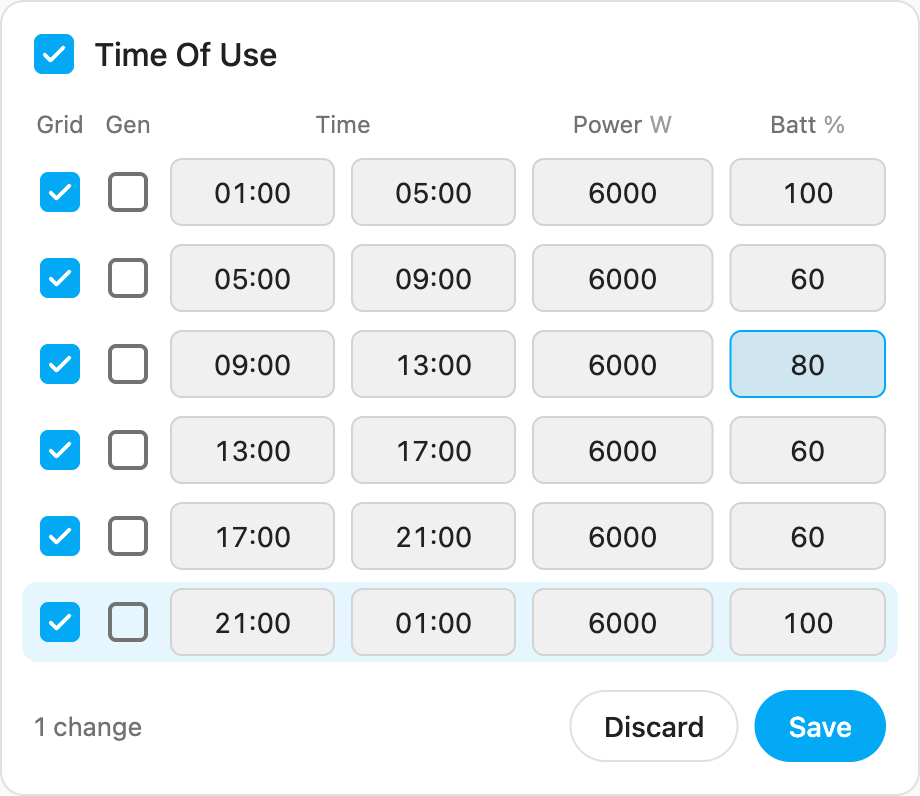
Deye Cloud is an integration that brings Deye solar inverters and hybrid storage systems into Home Assistant through the Deye Cloud API. It polls station and device measurements from the cloud, discovers fields dynamically, and takes units from the API so energy sensors work with the Energy dashboard. Besides sensors, it adds numbers, selects, switches and time entities, including Time Of Use controls set slot by slot with a state of charge target and start time. Entities follow what each inverter reports, and non-essential sensors are hidden by default. It needs a developer app ID and secret from the Deye Cloud portal plus account details, and the poll intervals for measurements and inverter settings can be changed in options. Because it relies on the cloud, data updates only every few minutes and entities go unavailable if the cloud is down, but no extra hardware is needed.
Automatic summary of the README and code of maxbanton/hass-deye-cloud. Something wrong, or are you the maintainer and want your own text here? Get in touch
Supports
Uses the vendor's cloud Needs an internet connection and an account with the vendor.
From the Marketplace Installed through the Marketplace, formerly HACS.
Actively maintained Its author released or pushed a change in the last six months.
Provides
- Switches
- Sensors
Setting it up
Install it from the Marketplace and restart Home Assistant, then add it under Settings, Devices and services.
Deye Cloud
- Region
- App ID
- App Secret
- Account email
- Account password
Deye Cloud
- App Secret
- Account password
After setup
- Measurement poll interval (seconds)
- Inverter settings poll interval (minutes)
Texts from the code of maxbanton/hass-deye-cloud.
Entities
- NumbersLow Battery SOC, Battery DC Charge Current, Battery DC Discharge Current, Max Sell Power
- SelectsEnergy Pattern
- SensorsAC Current R-UA, AC Output Frequency R, AC Temperature, AC Voltage R-UA, Battery Current, Battery Power, Battery Rated Capacity, Battery Voltage, Cumulative Consumption, Cumulative Energy Purchased, Cumulative Grid Feed-In, Daily Active Production, and 52 more
- SwitchesSolar Sell, Time Of Use
Troubleshooting
- DiagnosticsDownloads a diagnostics file to attach to a bug report.
From the README
Home Assistant integration for Deye solar inverters and hybrid energy storage systems, using the official Deye Cloud OpenAPI.
- Cloud polling of station and device measure points, discovered dynamically from the API, so new fields a firmware exposes show up automatically.
- Units come straight from the API payload, with correct device and state classes, so energy sensors feed the Energy dashboard and long term statistics.
- Controls on the device page. Time Of Use is exposed slot by slot: for each of the six slots a SOC target and a Time Start, with Power, Voltage, Grid Charge and Generator available per slot too…
- Entities follow what each inverter actually has. The integration reads the measure points Deye defines for the inverter's product and only the settings the inverter reports, so a string (on-grid)…
- Inputs are validated only against universal limits (SOC 0-100, slot times kept in ascending order). Per-model limits are left to the inverter, which is the authority: values it will not accept are…
- Non-essential sensors are hidden by default (enable any from the entity settings); the essentials (SOC, powers, temperatures, key energies) stay on.

Shows in Vulpo
Quick Toggle card, Select card, Chart card, Apple Watch, Control Center.Information
- Installs
- 78 sharing analytics
- GitHub stars
- 5
- Connection
- Uses the vendor's cloud
- Upkeep
- Updated in the last 6 months
- Version
- v1.8.0,
- Category
- Energy, Solar and batteries
- Kind
- Marketplace integration
- Needs
- Needs the Marketplace (HACS on 2026.10 and older)
- Domain
deye_cloud- Issues
- Report an issue











