

Sunsynk / Deye Solar Inverter
MarcinG81
On Home Assistant 2026.11 or newer? Open it in the Marketplace
- Installs
- 120 sharing analytics
- GitHub stars
- 13
- Connection
- Uses the vendor's cloud
- Upkeep
- Updated in the last 6 months
- Version
- v2.0.0,
- Category
- Energy, Solar and batteries
- Kind
- Marketplace integration
- Needs
- Needs the Marketplace (HACS on 2026.10 and older)
- Domain
sunsynk- Issues
- Report an issue
Independent directory, made by the developer of Vulpo. Not affiliated with Home Assistant or the Open Home Foundation.
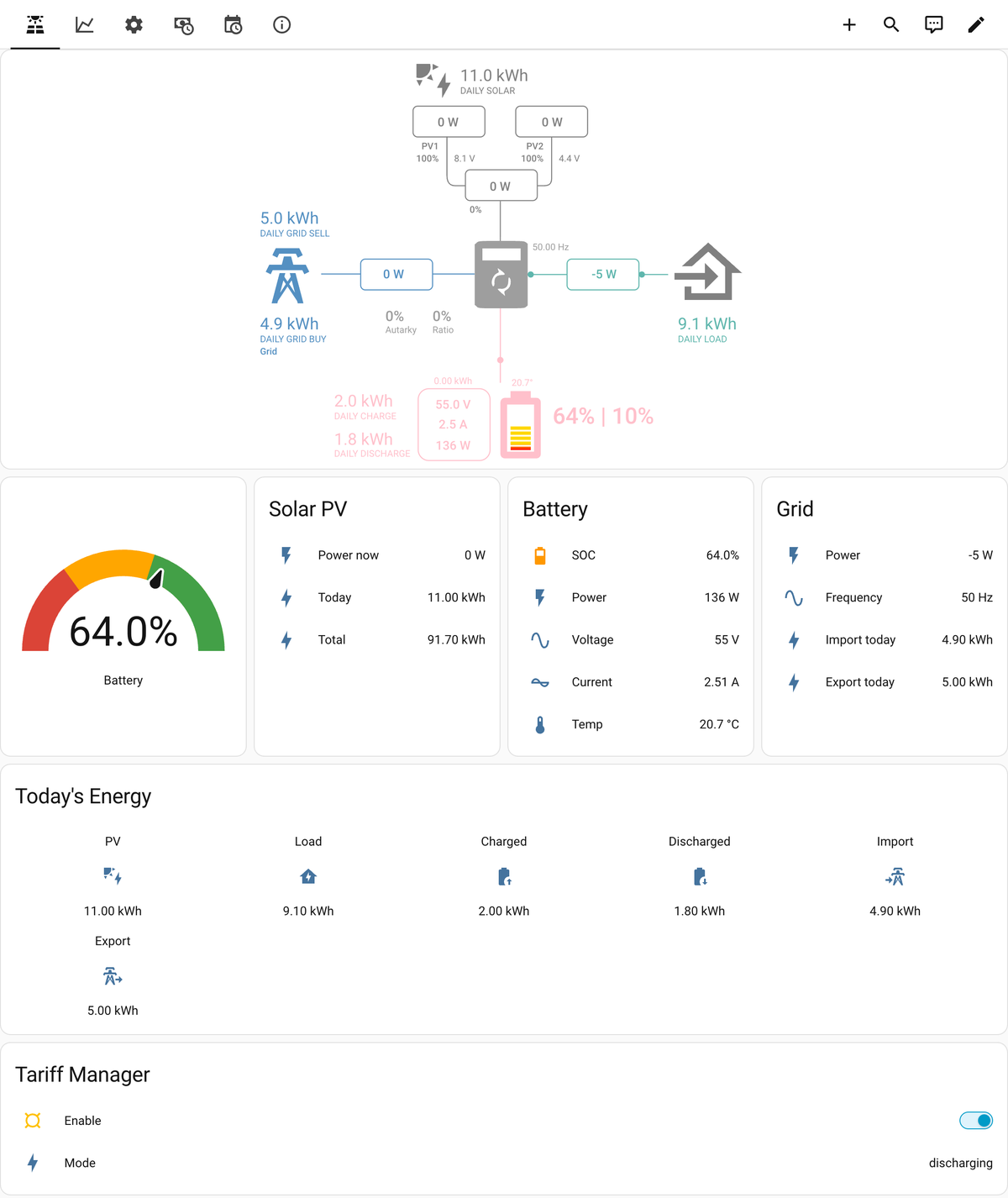
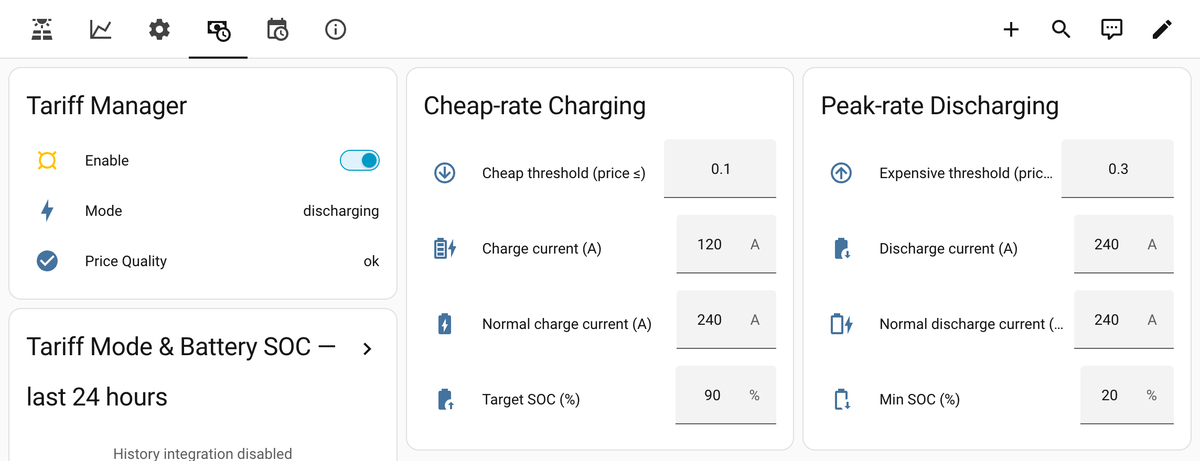
Screenshots From the README of MarcinG81/SunSynk_HA_Integration.
About
Sunsynk / Deye Solar Inverter is a custom integration that monitors and controls Sunsynk and Deye hybrid inverters through the Sunsynk cloud API. It adds sensors for PV generation, battery state, grid import and export, and load, plus per-phase values for 3-phase systems and every MPPT string it finds. Number, switch and text entities let key inverter settings be changed from Home Assistant, such as battery thresholds, charge and discharge current, time slots and sell power limits. Optional extras include a solar forecast based on Open-Meteo, a tariff manager that charges at cheap rates and discharges at peak rates from a price sensor, and a virtual slot scheduler. One entry can cover several inverters, including parallel groups, and control actions can be limited to administrators. It needs the vendor's cloud, so the inverter must already be connected through the Sunsynk dongle, and it is set up in the UI.
Automatic summary of the README and code of MarcinG81/SunSynk_HA_Integration. Something wrong, or are you the maintainer and want your own text here? Get in touch
Supports
Uses the vendor's cloud Needs an internet connection and an account with the vendor.
From the Marketplace Installed through the Marketplace, formerly HACS.
Actively maintained Its author released or pushed a change in the last six months.
Provides
- Switches
- Sensors
Setting it up
Install it from the Marketplace and restart Home Assistant, then add it under Settings, Devices and services.
Sunsynk / Deye Inverter Setup
- API Server
- Sunsynk Account Email
- Sunsynk Account Password
- Inverter Serial Number(s)For multiple inverters: SN123456;SN789012
- Refresh Interval (seconds)How often to poll the Sunsynk API (minimum 60 seconds)
After setup
- API Server
- Sunsynk Account Email
- New Sunsynk Account PasswordLeave blank to keep the saved password. Enter a new password after changing it in the Sunsynk or Deye portal.
- Inverter Serial Number(s)
- Refresh Interval (seconds)
- Create and maintain Sunsynk dashboardOpt in to creating a Lovelace dashboard, registering the bundled card resource, and updating that dashboard on each integration reload. Disabled by default.
- Allow only administrators to use control actionsWhen ticked, the Sunsynk control actions (force charge/discharge, work mode, virtual slots) can only be run by Home Assistant administrators. Automations and scripts are unaffected. Only administrators can change this setting.
- Latitude (Solar Forecast)Optional — defaults to your HA home location
- Longitude (Solar Forecast)Optional — defaults to your HA home location
- Panel Peak Power (kWp)Total installed panel capacity in kilowatt-peak. Leave blank to disable solar forecast.
- Performance Ratio (0–1)System efficiency factor, default 0.80
- Import/Buy Price SensorAny sensor reporting electricity price (e.g. Octopus Agile, NordPool, Tibber). Leave blank to disable tariff management.
- Export/Sell Price Sensor (optional)Drives discharge/sell decisions instead of the import price above — for tariffs where import and export rates aren't linked (e.g. Octopus Intelligent Go + Outgoing). Leave blank to use the import price for both.
- Charge below price (cheap rate threshold)When price ≤ this value, charge the battery. Leave blank to disable cheap-rate charging.
- Charge current at cheap rate (A)Battery charge current during cheap period (e.g. 100 A).
Texts from the code of MarcinG81/SunSynk_HA_Integration.
Troubleshooting
- DiagnosticsDownloads a diagnostics file to attach to a bug report.
- Repair noticesNotices it can show in Settings, Repairs:Sunsynk authentication failed
From the README
A native Home Assistant integration (not an add-on) for monitoring and controlling Sunsynk and Deye hybrid solar inverters via the Sunsynk cloud API.
Note: This integration communicates with the Sunsynk cloud API (api.sunsynk.net or pv.inteless.com). Your inverter must already be connected to the cloud via the Sunsynk dongle/Wi-Fi stick.
- Real-time monitoring — PV generation, battery state, grid import/export, load consumption
- Multi-MPPT support — Automatically discovers all MPPT strings on your inverter
- 3-phase support — Per-phase voltage, current and power for grid, load and inverter output
- Writable settings — Change key inverter parameters directly from HA (battery thresholds, charge/discharge current, time slots, sell power limits, etc.)
- Solar Forecast — Optional sensors for predicted PV yield today/tomorrow, cloud cover, precipitation and solar irradiance (GHI/DNI) via Open-Meteo (free, no API key)
- Tariff Manager — Automatic cheap-rate charging and peak-rate discharging based on any HA electricity price sensor (Octopus Agile, NordPool, Tibber, G12, input_number, etc.), with an optional…
- Virtual Slot Scheduler — Up to 10 charge/discharge/idle windows per inverter, defined in Home Assistant and put onto the inverter's own timer, with Tariff Manager price decisions taking priority.…
- Multiple and parallel inverters — One integration entry supports multiple serial numbers. A parallel group's slave is recognised and every write goes to its master

Shows in Vulpo
Quick Toggle card, Chart card, Apple Watch, Control Center.Information
- Installs
- 120 sharing analytics
- GitHub stars
- 13
- Connection
- Uses the vendor's cloud
- Upkeep
- Updated in the last 6 months
- Version
- v2.0.0,
- Category
- Energy, Solar and batteries
- Kind
- Marketplace integration
- Needs
- Needs the Marketplace (HACS on 2026.10 and older)
- Domain
sunsynk- Issues
- Report an issue











