

Epson WorkForce Printer
lymanepp
On Home Assistant 2026.11 or newer? Open it in the Marketplace
- Installs
- 324 sharing analytics
- GitHub stars
- 26
- Connection
- Works locally
- Upkeep
- Updated in the last 6 months
- Version
- v0.9.5,
- Category
- Computers and network, Printers
- Kind
- Marketplace integration
- Needs
- Needs the Marketplace (HACS on 2026.10 and older)
- Domain
epson_workforce- Issues
- Report an issue
Independent directory, made by the developer of Vulpo. Not affiliated with Home Assistant or the Open Home Foundation.
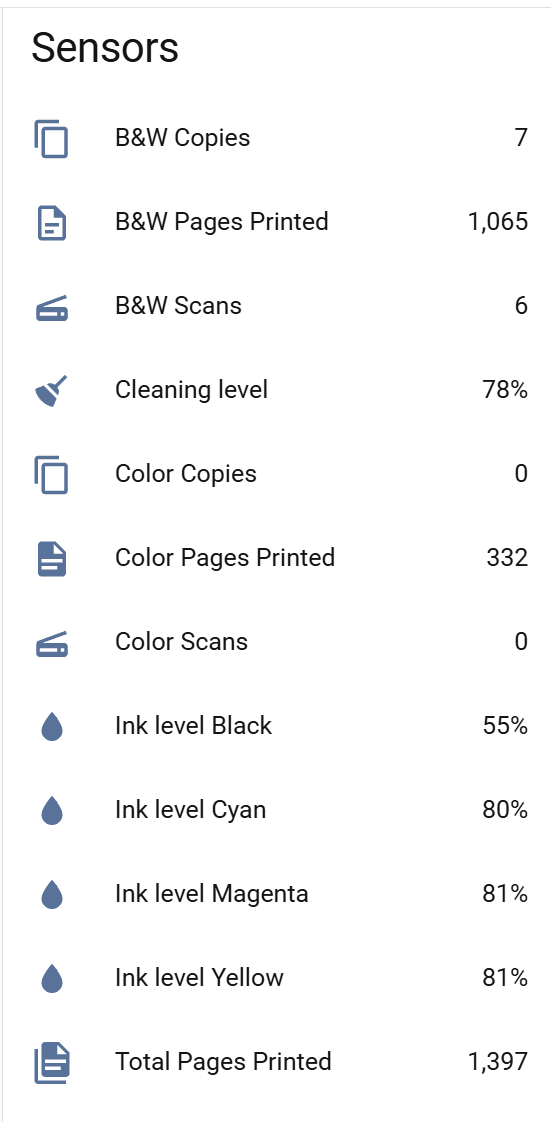
Screenshots From the README of lymanepp/ha-epson-workforce.
About
Epson WorkForce Printer is a Marketplace integration that monitors Epson printer ink levels, status and usage statistics. It reads the status page the printer serves over HTTP, so it talks to the printer locally and works with Epson models that expose that page. It adds sensors that are created from what the specific printer reports, so cartridge slots or features a model lacks produce no sensor. Extra pages for page counters, network details and hardware status are used where the printer offers them, and older models without them are detected on the first poll. Setup happens in the UI and asks for the printer's IP address, after which the printer is polled every 60 seconds. Sensors turn unavailable when the printer is off and return once it is reachable again.
Automatic summary of the README and code of lymanepp/ha-epson-workforce. Something wrong, or are you the maintainer and want your own text here? Get in touch
Supports
Works locally Talks to your devices on your own network. No vendor cloud in between.
From the Marketplace Installed through the Marketplace, formerly HACS.
Actively maintained Its author released or pushed a change in the last six months.
Provides
- Sensors
Setting it up
Install it from the Marketplace and restart Home Assistant, then add it under Settings, Devices and services.
Epson WorkForce Printer
- IP Address
Texts from the code of lymanepp/ha-epson-workforce.
From the README
Monitor your Epson printer's ink levels, status, and usage statistics directly in Home Assistant.

Shows in Vulpo
Chart card, Apple Watch.Information
- Installs
- 324 sharing analytics
- GitHub stars
- 26
- Connection
- Works locally
- Upkeep
- Updated in the last 6 months
- Version
- v0.9.5,
- Category
- Computers and network, Printers
- Kind
- Marketplace integration
- Needs
- Needs the Marketplace (HACS on 2026.10 and older)
- Domain
epson_workforce- Issues
- Report an issue











