On Home Assistant 2026.10 or older? Open it in HACS
- Installs
- 69 sharing analytics
- GitHub stars
- 13
- Connection
- Uses the vendor's cloud
- Upkeep
- Updated in the last 6 months
- Version
- v0.4.4,
- Category
- Computers and network, Printers
- Kind
- Marketplace integration
- Needs
- Needs the Marketplace (HACS on 2026.10 and older)
- Domain
anycubic_ha_integration- Issues
- Report an issue

Shows in Vulpo Light card, Quick Toggle card, Button card, Chart card, Apple Watch, Control Center.
Independent directory, made by the developer of Vulpo. Not affiliated with Home Assistant or the Open Home Foundation.
Screenshots From the README of ljschmitt/hass-anycubic_cloud_v3.
About
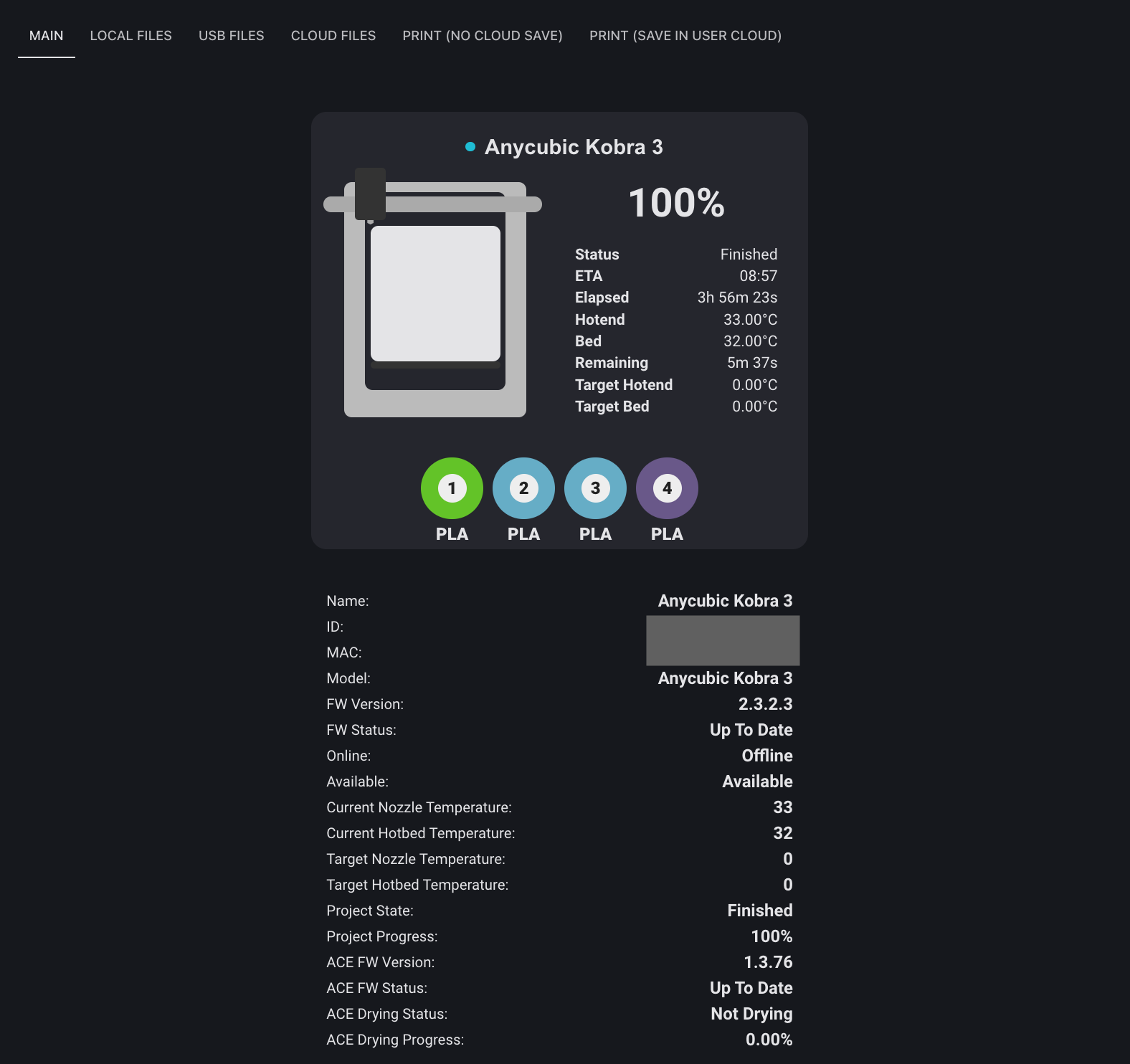
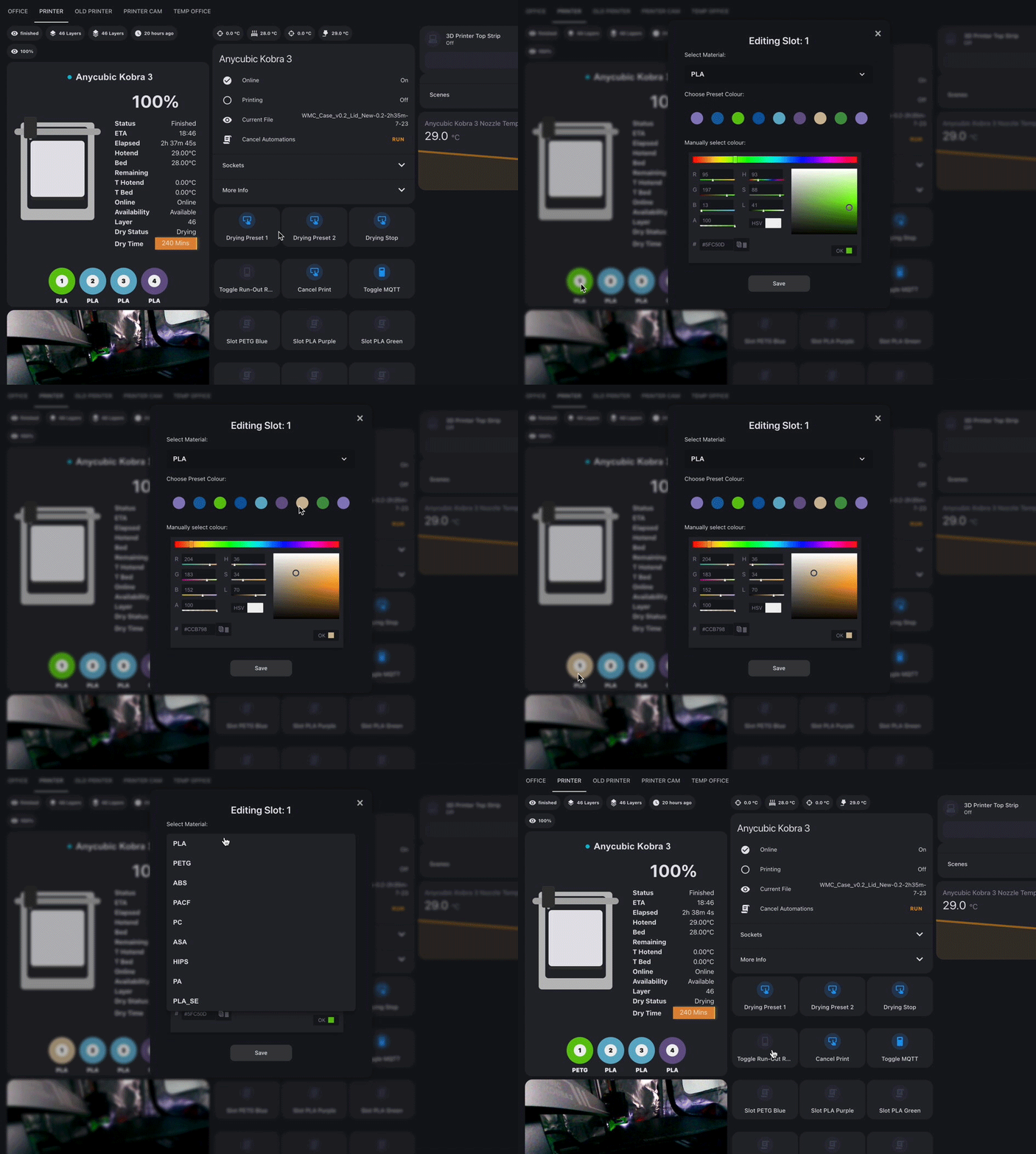
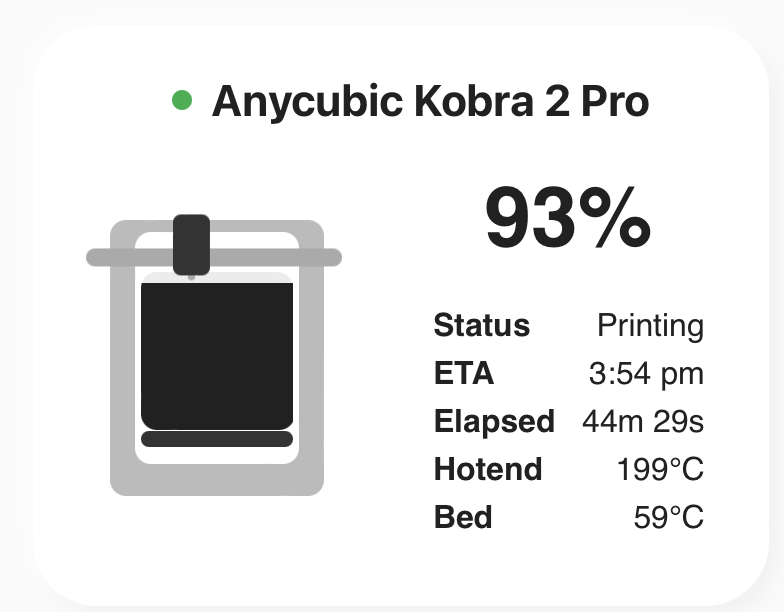
Anycubic Cloud for Home Assistant: printer status, MQTT updates, print and file controls, ACE material and drying support, and cloud camera view.
Description from ljschmitt/hass-anycubic_cloud_v3

Shows in Vulpo
Light card, Quick Toggle card, Button card, Chart card, Apple Watch, Control Center.Supports
- Uses the vendor's cloudNeeds an internet connection and an account with the vendor.
- From the MarketplaceInstalled through the Marketplace, formerly HACS.
- Actively maintainedIts author released or pushed a change in the last six months.
Provides
- Lights
- Switches
- Sensors
Setting it up
Install it from the Marketplace and restart Home Assistant, then add it under Settings, Devices and services.
Authentication Mode - Web
- User Token
Authentication Mode - Slicer Next
- Slicer Access Token
Authentication Mode - Android App
- User Token
- Device ID (Required for Android)
Choose your printers.
- Monitored Printers
After setup
- MQTT Connection Mode
- Dry Preset 1 Duration
- Dry Preset 1 Temperature
- Dry Preset 2 Duration
- Dry Preset 2 Temperature
- Dry Preset 3 Duration
- Dry Preset 3 Temperature
- Dry Preset 4 Duration
- Dry Preset 4 Temperature
- Panel Card Config (YAML format)
- Debug Log all MQTT messages
- Debug Log all API calls
Texts from the code of ljschmitt/hass-anycubic_cloud_v3.
Entities
- Binary sensorsJob In Progress, Job Complete, Job Failed, Job Paused, Printer Online, MQTT Connection Active, Is Busy, Is Available, Drying Active, Secondary Drying Active
- ButtonsDrying Preset 1, Drying Preset 2, Drying Preset 3, Drying Preset 4, Drying Stop, Secondary Drying Preset 1, Secondary Drying Preset 2, Secondary Drying Preset 3, Secondary Drying Preset 4, Secondary Drying Stop, Pause Print, Resume Print, and 5 more
- ImagesJob Preview
- LightsCamera Light
- SensorsCurrent Status, Nozzle Temperature, Hotbed Temperature, Job Name, Job Progress %, Job Time Elapsed, Job Time Remaining, Job ETA, Job State, Job Current Layer, Job Total Layers, Job Speed Mode, and 30 more
- SwitchesACE Run-out Refill, Secondary ACE Run-out Refill, Manual MQTT Connection Enabled
- UpdatesPrinter Firmware, ACE Firmware, Secondary ACE Firmware
Actions
- ACE Set Slot - PLASets PLA slot properties in ACE unit.
- Config Entry
- Printer Device
- Printer ID
- Box ID
- Slot Number
- Slot Color Red
- Slot Color Green
- Slot Color Blue
- ACE Set Slot - PETGSets PETG slot properties in ACE unit.
- Config Entry
- Printer Device
- Printer ID
- Box ID
- Slot Number
- Slot Color Red
- Slot Color Green
- Slot Color Blue
- ACE Set Slot - ABSSets ABS slot properties in ACE unit.
- Config Entry
- Printer Device
- Printer ID
- Box ID
- Slot Number
- Slot Color Red
- Slot Color Green
- Slot Color Blue
- ACE Set Slot - PACFSets PACF slot properties in ACE unit.
- Config Entry
- Printer Device
- Printer ID
- Box ID
- Slot Number
- Slot Color Red
- Slot Color Green
- Slot Color Blue
- ACE Set Slot - PCSets PC slot properties in ACE unit.
- Config Entry
- Printer Device
- Printer ID
- Box ID
- Slot Number
- Slot Color Red
- Slot Color Green
- Slot Color Blue
- ACE Set Slot - ASASets ASA slot properties in ACE unit.
- Config Entry
- Printer Device
- Printer ID
- Box ID
- Slot Number
- Slot Color Red
- Slot Color Green
- Slot Color Blue
- ACE Set Slot - HIPSSets HIPS slot properties in ACE unit.
- Config Entry
- Printer Device
- Printer ID
- Box ID
- Slot Number
- Slot Color Red
- Slot Color Green
- Slot Color Blue
- ACE Set Slot - PASets PA slot properties in ACE unit.
- Config Entry
- Printer Device
- Printer ID
- Box ID
- Slot Number
- Slot Color Red
- Slot Color Green
- Slot Color Blue
- ACE Set Slot - PLA SESets PLA SE slot properties in ACE unit.
- Config Entry
- Printer Device
- Printer ID
- Box ID
- Slot Number
- Slot Color Red
- Slot Color Green
- Slot Color Blue
- ACE Filament ExtrudeActivate filament extrude on ACE.
- Config Entry
- Printer Device
- Printer ID
- Box ID
- Slot Number
- Extrude Finished
- ACE Filament RetractActivate filament retract on ACE.
- Config Entry
- Printer Device
- Printer ID
- Box ID
- Print and upload (save in user cloud).Print and upload, save in user cloud store.
- Config Entry
- Printer Device
- Printer ID
- Slot Number List
- Gcode File
- Print and upload (no cloud save).Print and upload, but don't save in user cloud store.
- Config Entry
- Printer Device
- Printer ID
- Slot Number List
- Gcode File
- Print file (Local)Start printing an existing file from printer local storage.
- Config Entry
- Printer Device
- Printer ID
- Slot Number List
- File Name
- Path
- Print file (USB Disk)Start printing an existing file from printer USB disk.
- Config Entry
- Printer Device
- Printer ID
- Slot Number List
- File Name
- Path
- Delete file (Local)Delete a file from printer local storage.
- Config Entry
- Printer Device
- Printer ID
- File Name
- Path
- Delete file (USB Disk)Delete a file from printer USB disk.
- Config Entry
- Printer Device
- Printer ID
- File Name
- Path
- Delete file (Cloud)Delete a file from user cloud store.
- Config Entry
- Printer Device
- Printer ID
- File ID
- Migrate entity IDsRename existing Anycubic entity IDs to stable English IDs for dashboard-card compatibility. Existing dashboards and automations may need to be updated.
- Config Entry
- Dry run
- Change Print Speed ModeChange Print Speed Mode
- Config Entry
- Printer Device
- Printer ID
- Speed Mode
Troubleshooting
- DiagnosticsDownloads a diagnostics file to attach to a bug report.
From the README
Home-Assistant-Integration fuer Anycubic-Cloud-Drucker mit Statussensoren, MQTT-Echtzeitupdates, Druck- und Dateifunktionen, ACE-/Materialverwaltung und optionaler Kameraansicht.
Die Integration ist derzeit ueber HACS als benutzerdefiniertes Repository installierbar. Die Aufnahme in den standardmaessigen HACS-Katalog befindet sich in der Pruefung.
- Mehrere Drucker gleichzeitig
- Die Druckerauswahl zeigt nur Geraete dieser Integration; gleichnamige Netzwerkgeraete anderer Integrationen werden nicht als zusaetzliche Drucker aufgefuehrt.
- Druckstart / Pause / Fortsetzen / Abbruch (via Services & UI)
- Vorbereiteter Druckstart aus lokalen und USB-Dateilisten mit farbiger Auswahl aller aktuell geladenen Materialquellen. Beim Kobra X werden Materialregal und ACE gemeinsam angeboten, waehrend die…
- Die Druckvorbereitung zeigt eine Vorschau, wenn die Anycubic-Projekthistorie fuer denselben Drucker einen exakt passenden Dateinamen mit Bild enthaelt. Ohne sicheren Treffer bleibt der Druck…
- Leere lokale und USB-Unterordner werden als leere Ordner angezeigt, auch wenn der Drucker in der MQTT-Antwort kein records-Feld mitsendet.
- ACE-Slot-Verwaltung (Farbe, Presets, Services)
- Dateimanager (MQTT benötigt)
- Sensoren: Temp, Speed, Fan, Job-Fortschritt, Name, Zeit, …
- Firmware-Update-Entitäten
- MQTT-Aktivität automatisch während Druck (oder dauerhaft)
- Frontend-Panel mit Status, Nebenansicht + Dateimanager
Information
- Installs
- 69 sharing analytics
- GitHub stars
- 13
- Connection
- Uses the vendor's cloud
- Upkeep
- Updated in the last 6 months
- Version
- v0.4.4,
- Category
- Computers and network, Printers
- Kind
- Marketplace integration
- Needs
- Needs the Marketplace (HACS on 2026.10 and older)
- Domain
anycubic_ha_integration- Issues
- Report an issue