

Solar Optimizer
jmcollin78
On Home Assistant 2026.11 or newer? Open it in the Marketplace
- Installs
- 285 sharing analytics
- GitHub stars
- 245
- Connection
- Works locally
- Upkeep
- Updated in the last 6 months
- Version
- 3.9.0,
- Category
- Energy, Solar and batteries
- Kind
- Marketplace integration
- Needs
- Needs the Marketplace (HACS on 2026.10 and older)
- Domain
solar_optimizer- Issues
- Report an issue
Independent directory, made by the developer of Vulpo. Not affiliated with Home Assistant or the Open Home Foundation.
Screenshots From the README of jmcollin78/solar_optimizer.
About
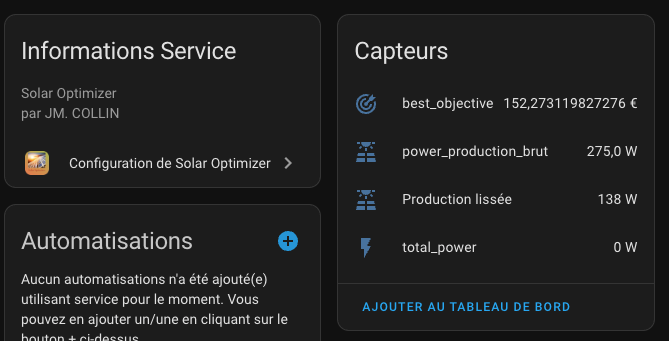
Solar Optimizer starts and stops equipment in Home Assistant based on net solar production. It manages devices with fixed power draw, switched through a service call or an event, and devices whose power can be adjusted. At a configurable interval, a simulated annealing algorithm tries on/off and power combinations and applies the one with the lowest cost, which depends on imported and exported power and on energy prices. Per-device settings include minimum on and stop durations to avoid flickering, daily minimum and maximum run times, and forced running during off-peak hours. Optional battery state of charge and charging power sensors can be added, and each device gets a switch that removes it from the algorithm's control. It works locally and is set up in the UI.
Automatic summary of the README and code of jmcollin78/solar_optimizer. Something wrong, or are you the maintainer and want your own text here? Get in touch
Supports
Works locally Talks to your devices on your own network. No vendor cloud in between.
From the Marketplace Installed through the Marketplace, formerly HACS.
Actively maintained Its author released or pushed a change in the last six months.
Provides
- Switches
- Sensors
Setting it up
Install it from the Marketplace and restart Home Assistant, then add it under Settings, Devices and services.
Configuration type
- Device typeSimple on/off device or device with variable power management
Common parameters
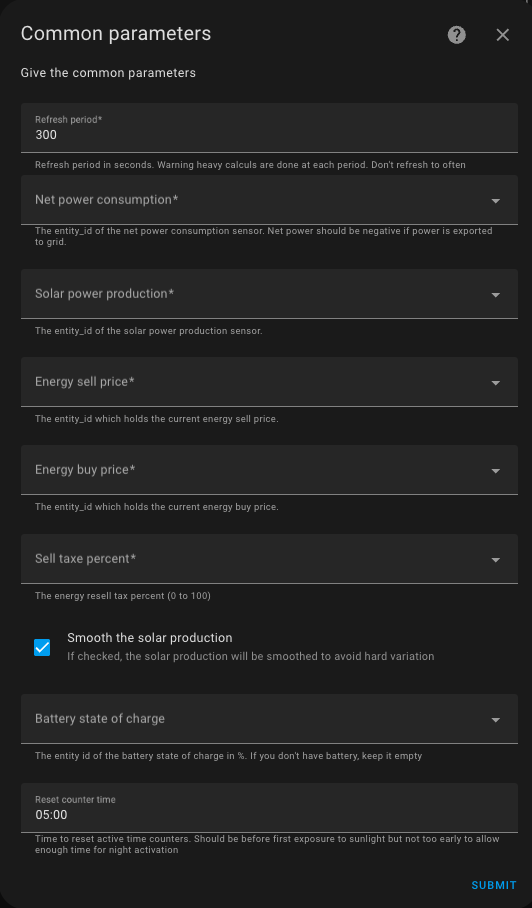
- Refresh periodEven with no new data, refresh at least in with this period in seconds. Warning heavy calculations are done at each period, so keep an eye on the CPU load. Don't refresh to often
- Net power consumptionThe entity_id of the net power consumption sensor. Net power should be negative if power is exported to grid.
- Solar power productionThe entity_id of the solar power production sensor.
- Recalculate with every new Production/Consumption ValueSubscribe to events to recalculate with new data, as soon as they are avalaible. Keep an eye on the CPU load.
- Energy sell priceThe entity_id which holds the current energy sell price.
- Energy buy priceThe entity_id which holds the current energy buy price.
- Sell taxe percentThe energy resell tax percent (0 to 100)
- Smooth the solar productionIf checked, the solar production will be smoothed to avoid hard variation
- Battery state of chargeThe entity id of the battery state of charge in %. If you don't have battery, keep it empty
- Battery charging powerThe entity id of the battery power net charging rate in watt. It should be negative if battery is charging and positive if battery is discharging. Keep it empty if no solar battery is used.
- Reset counter timeTime to reset active time counters. Should be before first exposure to sunlight but not too early to allow enough time for night activation
Device parameters
- Device nameThe name of the device
- Device entity idThe entity_id of the device
- Device powerThe power of the device when activated. Can be a number or a template
- Usable templateThe template to check if the device is usable. Example True or states('sensor.my_sensor') | float > 10 (don't forgeet double accolades)
- Active templateThe template to check if the device is active. Keep it empty for switch type device or apparented. Example is_state_attr('sensor.my_sensor', 'hvac_mode', 'heat') (with double accolades)
- Duration minThe minimum duration of the device when turned on in minutes
- Duration stop minThe minimum duration of the device when turned off in minutes
- Action modeThe action mode of the device. service to service call a service to turn on or off or event to send an event to turn on or off
- Activation serviceThe service to activate the device. Example switch/turn_on or climate/set_hvac_mode/hvac_mode:cool
- Deactivation serviceThe service to deactivate the device. Example switch/turn_off or climate/set_hvac_mode/hvac_mode:off. Keep it empty if the device will turn off by itself
- Battery soc thresholdThe battery state of charge threshold to activate the device. Can be a number or a template
- Max on time per dayThe maximum time per day in state on in minutes. Can be a number or a template. If minium time is not reached during daylight, it will be activated during offpeak time until max time is reached
- Min on time per dayThe minimum time per day in state on in minutes. Can be a number or a template. If minium time is not reached during daylight, it will be activated during offpeak time
- Max on time during off-peak hoursMaximum forced running time during off-peak hours in minutes. Defaults to the daily maximum and must be between the daily minimum and maximum.
- Offpeak timeThe offpeak time with format HH:MM
Powered device parameters
- Device nameThe name of the device
- Device entity idThe entity_id of the device
- Device max powerThe power of the device when activated. Can be a number or a template
- Device min powerThe min power consumption of the device when activated
- Device power stepThe step of power for the device
- Usable templateThe template to check if the device is usable. Example True or states('sensor.my_sensor') | float > 10 (don't forgeet double accolades)
- Active templateThe template to check if the device is active. Keep it empty for switch type device or apparented. Example is_state_attr('sensor.my_sensor', 'hvac_mode', 'heat') (with double accolades)
- Duration minThe minimum duration of the device when turned on in minutes
- Duration stop minThe minimum duration of the device when turned off in minutes
- Action modeThe action mode of the device. service to service call a service to turn on or off or event to send an event to turn on or off
- Activation serviceThe service to activate the device. Example switch/turn_on or climate/set_hvac_mode/hvac_mode:cool
- Deactivation serviceThe service to deactivate the device. Example switch/turn_off or climate/set_hvac_mode/hvac_mode:off
- Power entity idThe entity id of the power sensor
- Duration of power changeThe minimal duration of each power change in minutes
- Power change serviceThe service used to change the power. Example number/set_value
After setup
- Device typeCommon configuration or specific device configuration
- Refresh periodEven with no new data, refresh at least in with this period in seconds. Warning heavy calculations are done at each period, so keep an eye on the CPU load. Don't refresh to often
- Net power consumptionthe entity_id of the net power consumption sensor. Net power should be negative if power is exported to grid.
- Solar power productionthe entity_id of the solar power production sensor.
- Recalculate with every new Production/Consumption ValueSubscribe to events to recalculate with new data, as soon as they are avalaible. Keep an eye on the CPU load.
- Energy sell priceThe entity_id which holds the current energy sell price.
- Energy buy priceThe entity_id which holds the current energy buy price.
- Sell taxe percentThe energy resell tax percent (0 to 100)
- Smooth the solar productionIf checked, the solar production will be smoothed to avoid hard variation
- Battery state of chargeThe entity id of the battery state of charge in %. If you don't have battery, keep it empty
- Battery charging powerThe entity id of the battery power net charging rate in watt. It should be negative if battery is charging and positive if battery is discharging. Keep it empty if no solar battery is used.
- Reset counter timeTime to reset active time counters. Should be before first exposure to sunlight but not too early to allow enough time for night activation
- Device nameThe name of the device
- Device entity idThe entity_id of the device
- Device powerThe power of the device when activated. Can be a number or a template
- Usable templateThe template to check if the device is usable. Example True or states('sensor.my_sensor') | float > 10 (don't forgeet double accolades)
- Active templateThe template to check if the device is active. Keep it empty for switch type device or apparented. Example is_state_attr('sensor.my_sensor', 'hvac_mode', 'heat') (with double accolades)
- Duration minThe minimum duration of the device when turned on in minutes
- Duration stop minThe minimum duration of the device when turned off in minutes
- Action modeThe action mode of the device. service to service call a service to turn on or off or event to send an event to turn on or off
- Activation serviceThe service to activate the device. Example switch/turn_on or climate/set_hvac_mode/hvac_mode:cool
- Deactivation serviceThe service to deactivate the device. Example switch/turn_off or climate/set_hvac_mode/hvac_mode:off. Keep it empty if the device will turn off by itself
- Battery soc thresholdThe battery state of charge threshold to activate the device. Can be a number or a template
- Max on time per dayThe maximum time per day in state on in minutes. Can be a number or a template. If minium time is not reached during daylight, it will be activated during offpeak time until max time is reached
- Min on time per dayThe minimum time per day in state on in minutes. Can be a number or a template. If minium time is not reached during daylight, it will be activated during offpeak time
- Max on time during off-peak hoursMaximum forced running time during off-peak hours in minutes. Defaults to the daily maximum and must be between the daily minimum and maximum.
- Offpeak timeThe offpeak time with format HH:MM
- Device nameThe name of the device
- Device entity idThe entity_id of the device
- Device max powerThe power of the device when activated. Can be a number or a template
- Device min powerThe min power consumption of the device when activated
- Device power stepThe step of power for the device
- Usable templateThe template to check if the device is usable. Example True or states('sensor.my_sensor') | float > 10 (don't forgeet double accolades)
- Active templateThe template to check if the device is active. Keep it empty for switch type device or apparented. Example is_state_attr('sensor.my_sensor', 'hvac_mode', 'heat') (with double accolades)
- Duration minThe minimum duration of the device when turned on in minutes
- Duration stop minThe minimum duration of the device when turned off in minutes
- Action modeThe action mode of the device. service to service call a service to turn on or off or event to send an event to turn on or off
- Activation serviceThe service to activate the device. Example switch/turn_on or climate/set_hvac_mode/hvac_mode:cool
- Deactivation serviceThe service to deactivate the device. Example switch/turn_off or climate/set_hvac_mode/hvac_mode:off
- Power entity idThe entity id of the power sensor
- Duration of power changeThe minimal duration of each power change in minutes
- Power change serviceThe service used to change the power. Example number/set_value
Texts from the code of jmcollin78/solar_optimizer.
From the README
This integration allows you to optimize the use of your solar energy. It controls the switching on and off of your equipment, the activation of which is deferred over time depending on production and current electricity consumption.
This integration will allow you to maximize the use of your solar production. You delegate to it the control of your equipment whose activation can be deferred over time (water heater, swimming pool pump, electric vehicle charge, dishwasher, washing machine, etc.) and it takes care of launching them when the power produced is sufficient.

Shows in Vulpo
Quick Toggle card, Select card, Chart card, Apple Watch, Control Center.Information
- Installs
- 285 sharing analytics
- GitHub stars
- 245
- Connection
- Works locally
- Upkeep
- Updated in the last 6 months
- Version
- 3.9.0,
- Category
- Energy, Solar and batteries
- Kind
- Marketplace integration
- Needs
- Needs the Marketplace (HACS on 2026.10 and older)
- Domain
solar_optimizer- Issues
- Report an issue











