On Home Assistant 2026.10 or older? Open it in HACS
- Installs
- 59 sharing analytics
- GitHub stars
- 19
- Connection
- Works locally
- Upkeep
- Updated in the last 6 months
- Version
- v2.2.2,
- Category
- Computers and network, Printers
- Kind
- Marketplace integration
- Needs
- Needs the Marketplace (HACS on 2026.10 and older)
- Domain
snapmaker_u1_card- Issues
- Report an issue
Shows in Vulpo Light card, Quick Toggle card, Camera card, Button card, Apple Watch, Control Center.
Independent directory, made by the developer of Vulpo. Not affiliated with Home Assistant or the Open Home Foundation.
Screenshots From the README of Ironoxx/ha-snapmaker-u1-card.
About
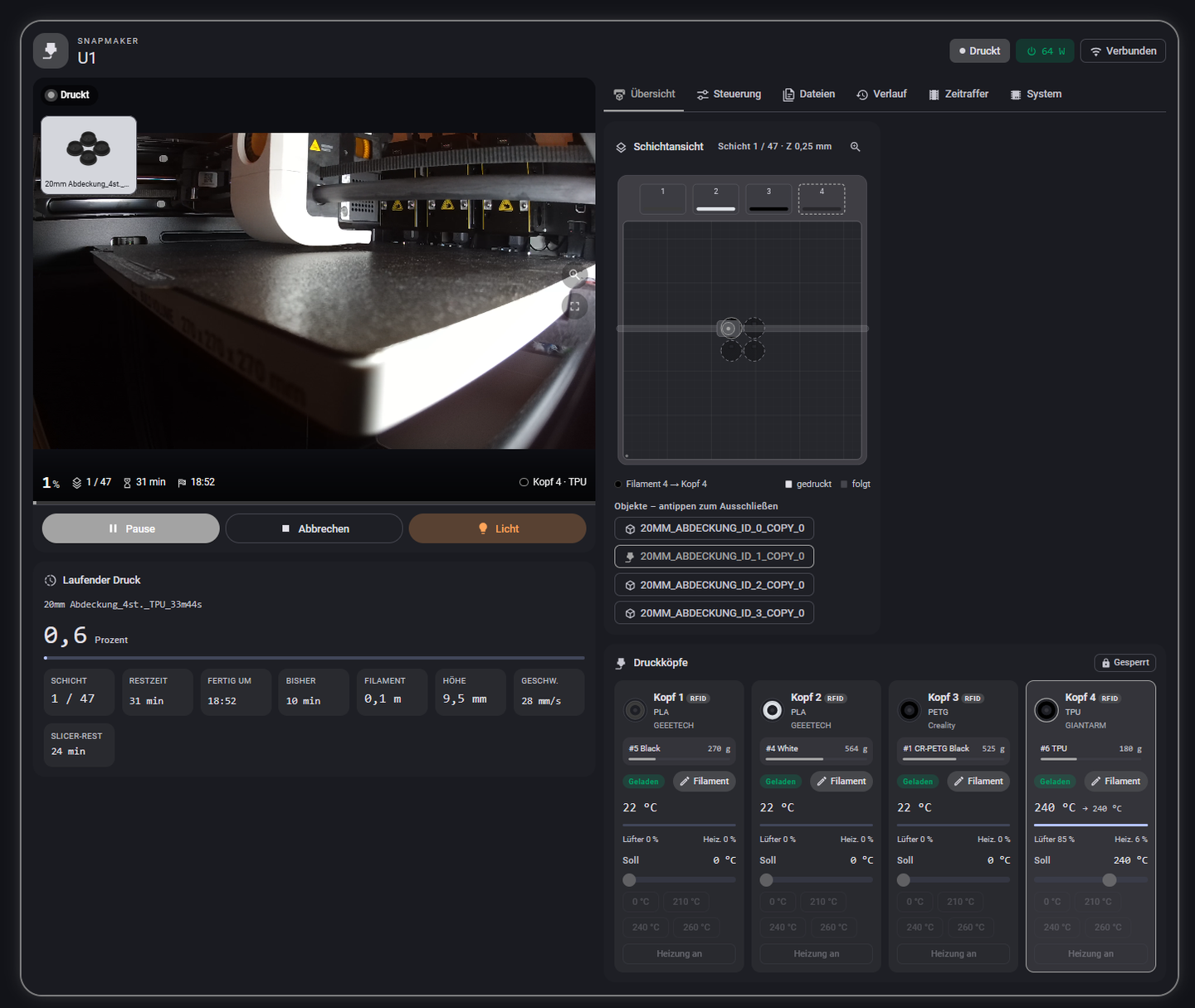
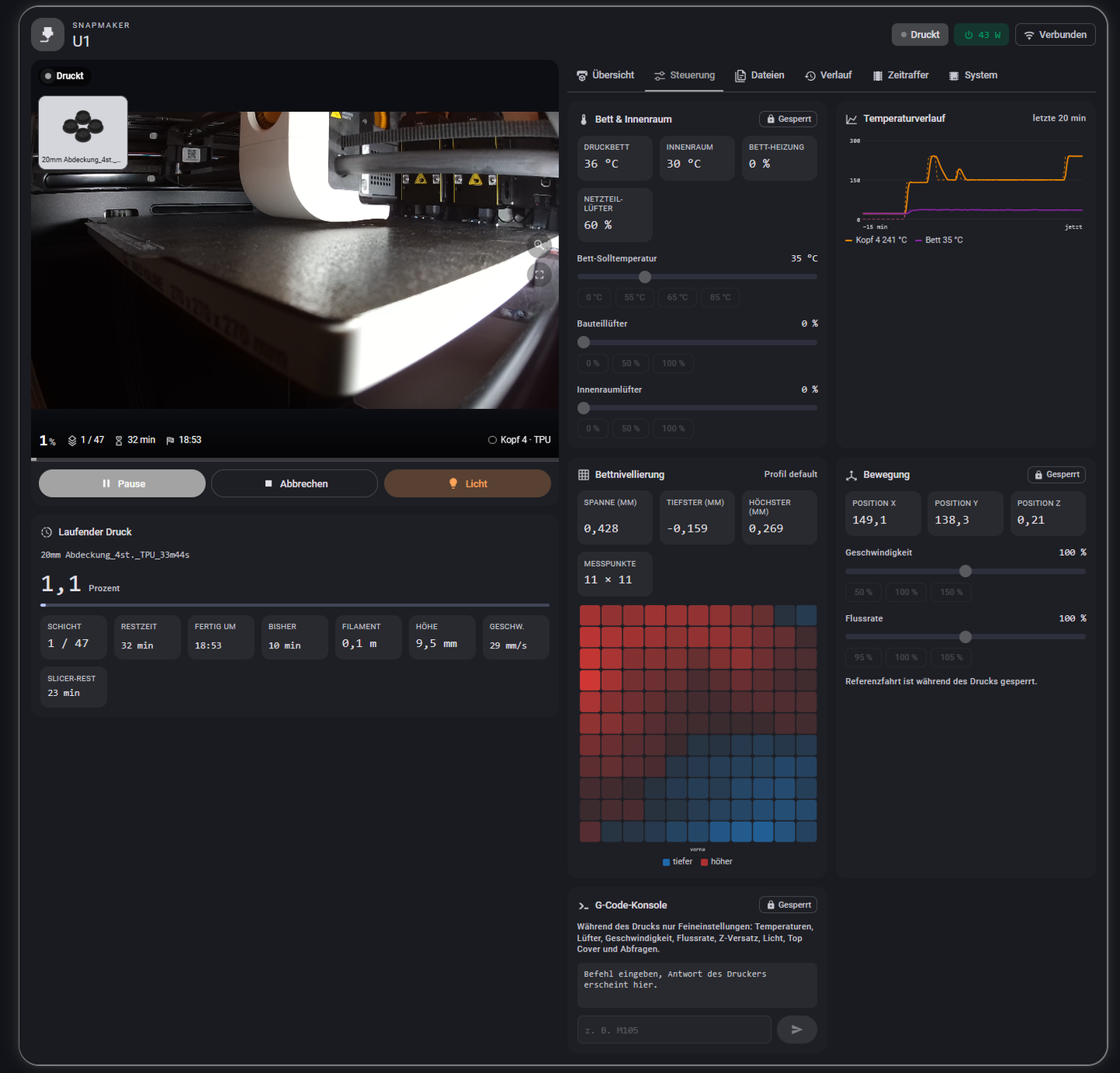
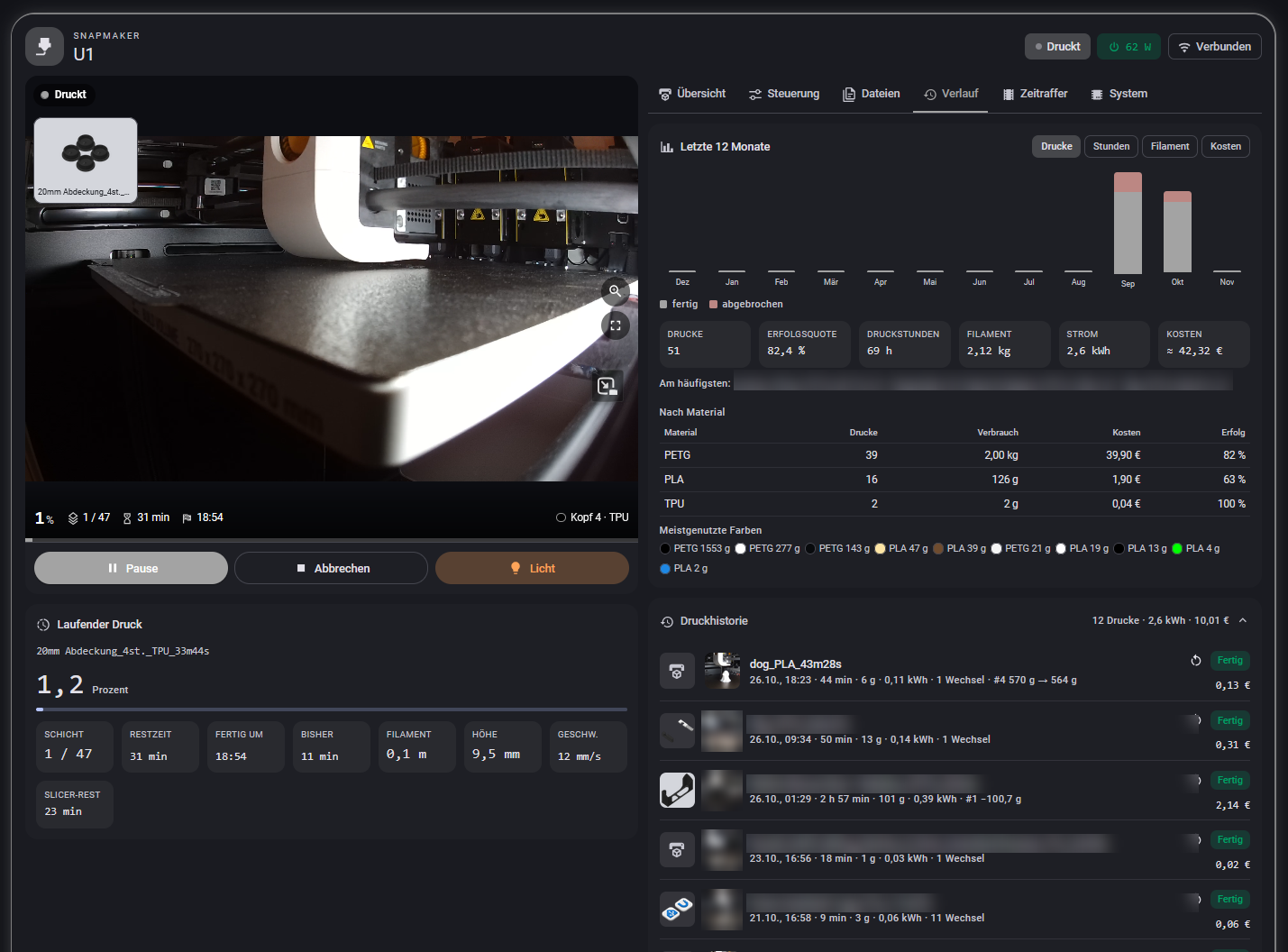
Snapmaker U1 Card is an integration with a bundled dashboard card for monitoring and controlling a Snapmaker U1 printer. It talks to the printer directly, so the separate Moonraker integration, extra cards and add-ons are not needed, and setup is done in the UI with the printer's address. It provides live values, pause, cancel, emergency stop and homing controls, cameras, a light, fan and temperature settings, and a firmware update entity. Prints can be started with filament mapping like Snapmaker Orca, placed in a queue, and tracked with history and per-print energy and cost. Filament data can be tied to Spoolman spools per toolhead. Settings cover a power switch with clean shutdown and automatic switch-on and switch-off, plus phone notifications.
Automatic summary of the README and code of Ironoxx/ha-snapmaker-u1-card. Something wrong, or are you the maintainer and want your own text here? Get in touch

Shows in Vulpo
Light card, Quick Toggle card, Camera card, Button card, Apple Watch, Control Center.Supports
- Works locallyTalks to your devices on your own network. No vendor cloud in between.
- From the MarketplaceInstalled through the Marketplace, formerly HACS.
- Actively maintainedIts author released or pushed a change in the last six months.
Provides
- Lights
- Cameras
- Switches
- Sensors
Setting it up
Install it from the Marketplace and restart Home Assistant, then add it under Settings, Devices and services.
Snapmaker U1
- Host
- Port
- Moonraker API key (optional)
Also asked when changing the connection.
Settings
- Printer power switchUsed for the on/off button on the card. Switching off is blocked while printing.
- Power sensor (W)Live power draw, usually from the same plug.
- Energy meter (kWh)Total energy counter. Used for the consumption of each print.
- Electricity price entitySensor or helper with the current price (dynamic tariffs). Empty = fixed price below or the energy dashboard.
- Shut the printer down before cutting powerSends a shutdown to the printer, waits until it is gone plus 10 s, then switches off. If the printer refuses, it is switched off after 10 s like with its rocker switch.
- Switch on automatically when a print is startedStarting a print from the card while the printer is off switches it on and waits until it is ready (about 1–2 min).
- Switch off automatically after a printAfter a finished or cancelled print, once all heaters have cooled down.
- Auto-off below temperatureNozzles and bed must be below this temperature.
- Auto-off delay after the printMinimum time between the end of the print and switching off.
- Switch off after idleHours without a print and without heating, then shut down cleanly and switch off. 0 = off.
- Fixed energy pricePer kWh, used when no price entity is set. Without both, the price from the energy dashboard is used.
- Notify servicese.g. notify.mobile_app_pixel_8. Several are possible.
- Notify on
- Camera for the pictureThe companion app attaches a current image. Also used for the result photo in the history.
- “Almost done” warningMinutes before the estimated end.
After setup
- Printer power switchUsed for the on/off button on the card. Switching off is blocked while printing.
- Power sensor (W)Live power draw, usually from the same plug.
- Energy meter (kWh)Total energy counter. Used for the consumption of each print.
- Electricity price entitySensor or helper with the current price (dynamic tariffs). Empty = fixed price below or the energy dashboard.
- Shut the printer down before cutting powerSends a shutdown to the printer, waits until it is gone plus 10 s, then switches off. If the printer refuses, it is switched off after 10 s like with its rocker switch.
- Switch on automatically when a print is startedStarting a print from the card while the printer is off switches it on and waits until it is ready (about 1–2 min).
- Switch off automatically after a printAfter a finished or cancelled print, once all heaters have cooled down.
- Auto-off below temperatureNozzles and bed must be below this temperature.
- Auto-off delay after the printMinimum time between the end of the print and switching off.
- Switch off after idleHours without a print and without heating, then shut down cleanly and switch off. 0 = off.
- Fixed energy pricePer kWh, used when no price entity is set. Without both, the price from the energy dashboard is used.
- Notify servicese.g. notify.mobile_app_pixel_8. Several are possible.
- Notify on
- Camera for the pictureThe companion app attaches a current image. Also used for the result photo in the history.
- “Almost done” warningMinutes before the estimated end.
Texts from the code of Ironoxx/ha-snapmaker-u1-card.
Entities
- Binary sensorsLive connection
- ButtonsPause print, Resume print, Cancel print, Emergency stop, Home all axes
- CamerasCamera, Camera 2
- LightsChamber light
- NumbersFlow, Top cover exhaust fan, Top cover circulation fan, Chamber heater target, Bed target, Part cooling fan, Speed factor, Top cover chamber target
- SelectsEntangle detection sensitivity, Top cover mode
- SensorsFilaments, Print files, Tool changes, Tool changes (print), Energy (print), Cost (print), Print history, Timelapses, Queue, Print hours, Maintenance due, Printer messages, and 13 more
- SwitchesPower, Auto-replenish filament, Replenish ignoring colour, Filament entangle detection, Light off after print, Progress notification (Android), Chamber heater filter
- UpdatesFirmware
Actions
- Start printStarts a print file on the printer with filament mapping, like Snapmaker Orca.
- File
- Filament mapping
- Bed leveling
- Flow calibration
- Timelapse
- Plate
- Printer
- Pause before layer
- RefreshReload file list and filaments immediately.
- Printer
- Power onSwitch the printer on.
- Wait until ready
- Printer
- Power off safelyShut the printer down and then switch it off. Refused while printing.
- Printer
- Force
- Assign spoolAssigns a Spoolman spool to a toolhead. Without spool_id the integration picks automatically again.
- Toolhead
- Spool ID
- Printer
- Add to queuePlans a print with mapping and options. It is started manually (queue_start) once the bed is cleared.
- File
- Filament mapping
- Bed leveling
- Flow calibration
- Timelapse
- Plate
- Printer
- Pause before layer
- Remove from queueRemoves a job.
- Job
- Printer
- Move jobChanges the order.
- Job
- Position
- Printer
- Start jobStarts the first (or the given) job. Clear the bed first.
- Job
- Printer
- Clear queueRemoves all jobs.
- Printer
- Maintenance doneResets the counter of a maintenance item.
- Item
- Printer
- Back up timelapses nowBacks up missing timelapses to the media folder, then cleans up the printer.
- Printer
- Back up printer configurationCopies printer.cfg etc. from the printer to /config/snapmaker_u1_backup (new version only when changed).
- Printer
- File detailsMetadata and thumbnail of a print file, including older ones (for the card's search).
- File
- Printer
- Slicer settingsLayer height, walls, infill, supports, plate and temperatures from the G-code's settings block.
- File
- Printer
- Delete fileDeletes a print file on the printer. Not while it is printing or queued.
- File
- Printer
- Rename/move fileNew name or path; subfolders are created.
- File
- Destination
- Printer
- Self-testChecks printer, live connection, storage, Moonraker integration, camera, power, notifications, Spoolman, Assist and media folder.
- Printer
- Language
- Set printer preferenceChanges a firmware preference of the printer. Possible during a print.
- Preference
- Value
- Printer
- Set filamentSets material, sub type, vendor and colour of a toolhead by hand, e.g. for spools without RFID. Not during a print.
- Toolhead
- Material
- Sub type
- Vendor
- Colour
- Colours (multi-colour)
- Overwrite official spool
- Printer
Troubleshooting
- DiagnosticsDownloads a diagnostics file to attach to a bug report.
From the README
One integration for the Snapmaker U1 in Home Assistant, with its own dashboard card. It talks to the printer directly and covers everything: live values and controls, camera, filament and Spoolman, notifications, energy and cost. No Moonraker integration, no extra cards, no add-ons.
- Start prints with the filament mapping of Snapmaker Orca, including a cost estimate, the file's slicer settings and a warning when a spool will not last
- Queue, pause at a layer, reprint from the history, exclude objects during a print
- Layer view in the colours of the loaded spools with sliders for layer and progress, G-code preview of any file before printing, remaining time calibrated on the real print
Information
- Installs
- 59 sharing analytics
- GitHub stars
- 19
- Connection
- Works locally
- Upkeep
- Updated in the last 6 months
- Version
- v2.2.2,
- Category
- Computers and network, Printers
- Kind
- Marketplace integration
- Needs
- Needs the Marketplace (HACS on 2026.10 and older)
- Domain
snapmaker_u1_card- Issues
- Report an issue