
SwitchBot KVS Camera
On Home Assistant 2026.11 or newer? Open it in the Marketplace
- Installs
- 77 sharing analytics
- GitHub stars
- 16
- Connection
- Uses the vendor's cloud
- Upkeep
- Updated in the last 6 months
- Version
- v0.2.2,
- Category
- Security and safety, Cameras
- Kind
- Marketplace integration
- Brand
- SwitchBot
- Needs
- Needs the Marketplace (HACS on 2026.10 and older)
- Domain
switchbot_camera- Issues
- Report an issue
Independent directory, made by the developer of Vulpo. Not affiliated with Home Assistant or the Open Home Foundation.
Screenshots From the README of hsakoh/ha-switchbot-kvs-camera.
About
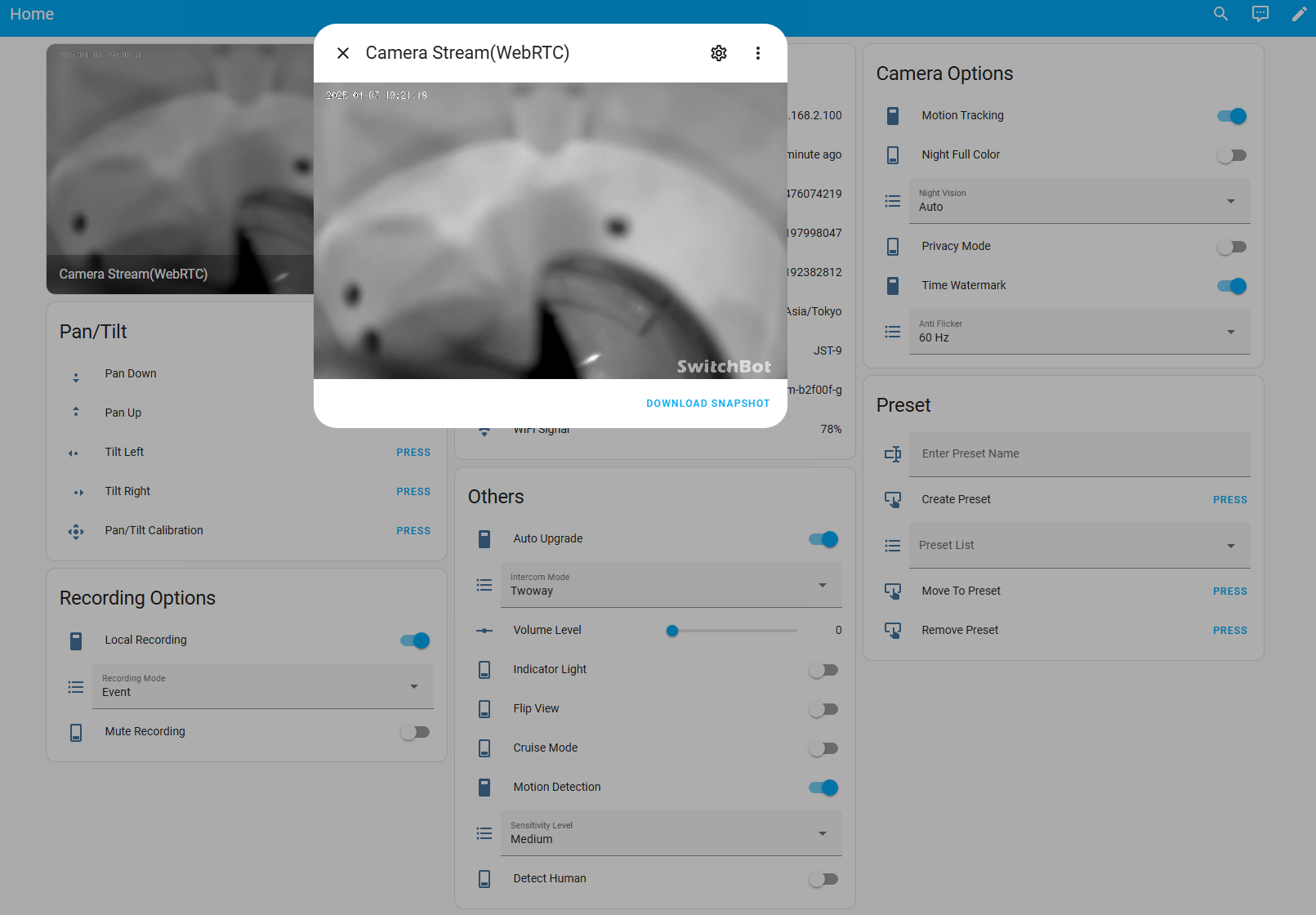
SwitchBot KVS Camera is a custom integration that connects SwitchBot Pan/Tilt Cam Plus cameras to Home Assistant through the vendor's cloud. It adds camera entities along with controls for panning and tilting, saving and moving to presets, volume, night vision, recording mode, and sensitivity. Switches cover privacy mode, cruise mode, motion detection, motion tracking, human detection, the indicator light, and local recording. Sensors report the camera's IP address, signal strength, storage usage, time zone, and RTSP stream addresses. Options cover camera resolution, snapshots, and how long a snapshot stays cached. Sign-in uses the SwitchBot account email and password in the UI, with a verification code step for two-factor authentication, and it requires the Marketplace. Audio is not supported.
Automatic summary of the README and code of hsakoh/ha-switchbot-kvs-camera. Something wrong, or are you the maintainer and want your own text here? Get in touch
Supports
Uses the vendor's cloud Needs an internet connection and an account with the vendor.
From the Marketplace Installed through the Marketplace, formerly HACS.
Actively maintained Its author released or pushed a change in the last six months.
Provides
- Cameras
- Switches
- Sensors
Setting it up
Install it from the Marketplace and restart Home Assistant, then add it under Settings, Devices and services.
Connect
- Password
- Username(Email Address)
Also asked when changing the connection.
Two-factor authentication
- Verification code
After setup
- Camera Resolution
- Snapshot Enable
- Snapshot Cache Expires(seconds)
Texts from the code of hsakoh/ha-switchbot-kvs-camera.
Entities
- ButtonsTilt Left, Tilt Right, Pan Up, Pan Down, Pan/Tilt Calibration, Create Preset, Move To Preset, Remove Preset, Camera Account Update
- NumbersVolume Level
- SelectsAnti Flicker, Night Vision, Intercom Mode, Sensitivity Level, Recording Mode, Preset List
- SensorsIP Address, WiFi Signal, WiFi Name, SdCard Free(GB), SdCard Total(GB), SdCard Used(GB), Timezone(ID), Timezone(Posix), Last Update, Device Mac, RTSP MainUrl, RTSP SubUrl
- SwitchesAuto Upgrade, Cruise Mode, Privacy Mode, Night Full Color, Flip View, Detect Human, Indicator Light, Motion Tracking, Motion Detection, Local Recording, Time Watermark, Mute Recording, and 1 more
- TextsEnter Preset Name, Camera Account Password, Camera Account UserName
From the README
Custom Component for Integrating SwitchBot Pan/Tilt Cam Plus with Home Assistant

Shows in Vulpo
Quick Toggle card, Camera card, Button card, Select card, Apple Watch, Control Center.Information
- Installs
- 77 sharing analytics
- GitHub stars
- 16
- Connection
- Uses the vendor's cloud
- Upkeep
- Updated in the last 6 months
- Version
- v0.2.2,
- Category
- Security and safety, Cameras
- Kind
- Marketplace integration
- Brand
- SwitchBot
- Needs
- Needs the Marketplace (HACS on 2026.10 and older)
- Domain
switchbot_camera- Issues
- Report an issue