On Home Assistant 2026.10 or older? Open it in HACS
- Installs
- 53 sharing analytics
- GitHub stars
- 20
- Connection
- Works locally
- Upkeep
- Updated in the last 6 months
- Version
- v1.9.0,
- Category
- Vehicles and transport, Flights
- Kind
- Marketplace integration
- Needs
- Needs the Marketplace (HACS on 2026.10 and older)
- Domain
adsb_aircraft_tracker- Issues
- Report an issue
Independent directory, made by the developer of Vulpo. Not affiliated with Home Assistant or the Open Home Foundation.
Screenshots From the README of hook-365/adsb-aircraft-tracker.
About
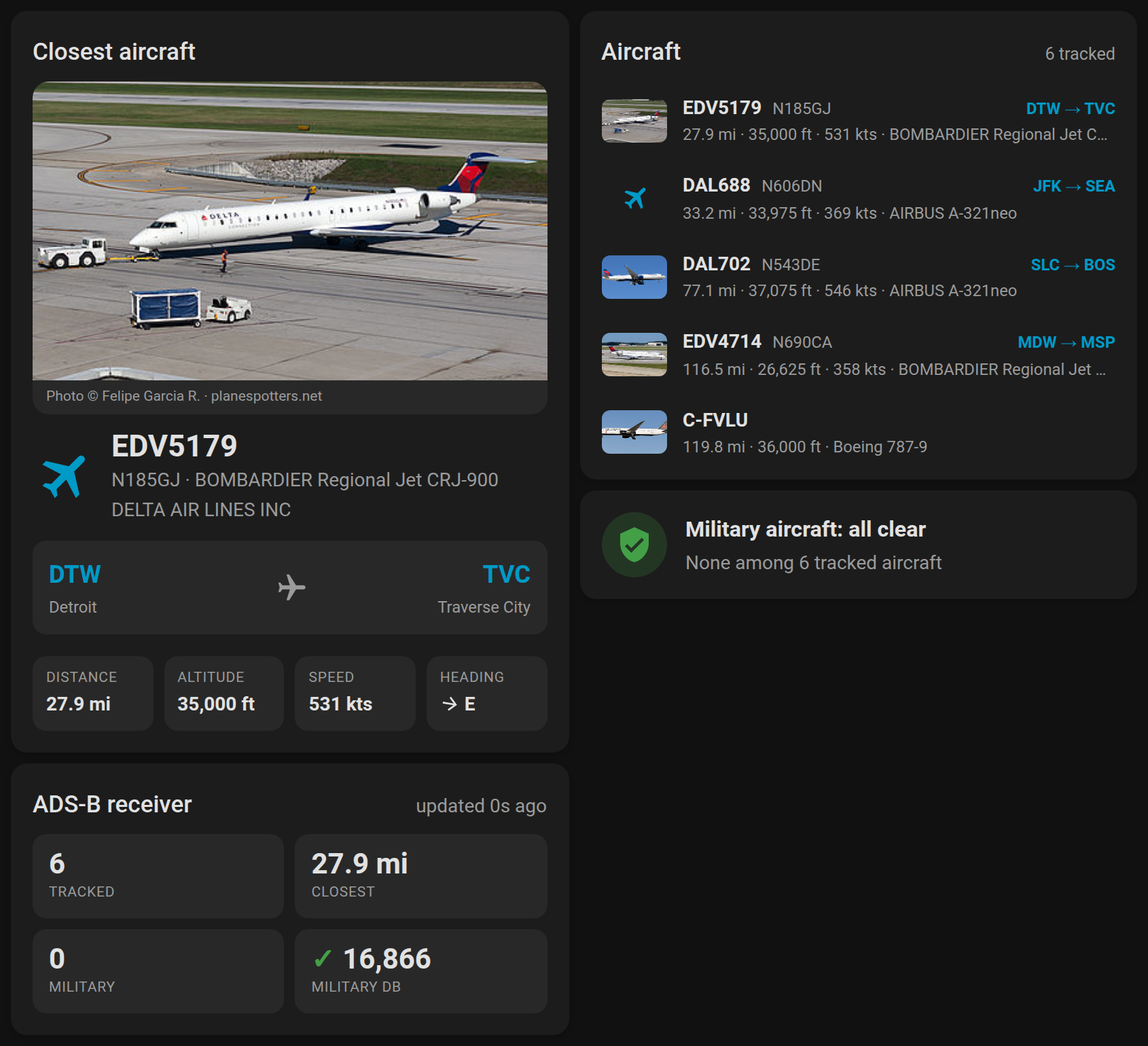
ADSB Aircraft Tracker shows aircraft near the home location in Home Assistant, using data from a local ADSB feeder. It reads readsb-style aircraft data from sources such as tar1090, readsb and dump1090-fa, and detects the data path automatically. Built-in dashboard cards cover the nearest aircraft, closest aircraft detail, military alerts and receiver stats, with routes and photos from planespotters.net. Binary sensors flag military aircraft, emergency squawks and close aircraft, while sensors report the closest aircraft and feeder status. Alerts go to one or more phones or notify groups, cover overhead passes and low flyovers, and use wording that can be edited. It also adds voice queries for Assist and is set up in the UI.
Automatic summary of the README and code of hook-365/adsb-aircraft-tracker. Something wrong, or are you the maintainer and want your own text here? Get in touch

Shows in Vulpo
Chart card, Apple Watch.Supports
- Works locallyTalks to your devices on your own network. No vendor cloud in between.
- Works with AssistBrings its own voice commands to Home Assistant's Assist.
- From the MarketplaceInstalled through the Marketplace, formerly HACS.
- Actively maintainedIts author released or pushed a change in the last six months.
Provides
- Sensors
Setting it up
Install it from the Marketplace and restart Home Assistant, then add it under Settings, Devices and services.
ADSB Aircraft Tracker Setup
- ADSB Feeder IP AddressIP address of your ADSB feeder (e.g., 192.168.1.100). Find this in your feeder's web interface or network settings.
- Port NumberPort number where your feeder serves aircraft data. Default is 8085 for tar1090. Check your feeder's configuration if unsure.
- Data Path (optional)Leave blank to auto-detect. Standard locations are tried in order: /data/aircraft.json (tar1090/readsb), /tar1090/data/aircraft.json, /skyaware/data/aircraft.json, /dump1090-fa/data/aircraft.json, /dump1090/data/aircraft.json, /aircraft.json, then the root /. Enter a path only if your feeder or adapter serves aircraft JSON somewhere else.
- Update Frequency (seconds)How often to refresh aircraft data. Recommended: 10 seconds (range: 5-300). Lower values = more real-time data but higher system load.
- Aircraft Range Filter
Setup Complete!
- Choose Your Next Step
Configure Key Notifications
- 📱 Devices for alertsPick one or more notify services: phones with the Home Assistant mobile app, and any notify groups you have defined. Every alert goes to all of them. Leave empty to disable notifications.
- 🗺️ External ADSB Website
- 🪖 Military Aircraft AlertsGet notified when military aircraft are detected nearby. Uses verified database with 16,000+ confirmed military aircraft to prevent false positives. Perfect for aviation enthusiasts and plane spotters.
- 🚨 Emergency Squawk AlertsReceive immediate alerts for aviation emergency codes: 7700 (general emergency), 7600 (radio failure), 7500 (hijack). These are critical aviation safety signals that are rare but important to monitor.
- ✈️ Close Aircraft AlertsReceive alerts when aircraft pass very close overhead or at low altitude. Great for spotting interesting aircraft in your immediate area and monitoring air traffic patterns.
- ⬆️ Overhead AlertsGet notified when an aircraft passes almost straight above you, at any altitude. The cone is 15° around straight up by default; change it later in the integration options.
After setup
- Configuration Area
- ⏱️ Data Refresh Rate (seconds)How frequently to refresh aircraft data, in seconds. Recommended: 10 seconds for balance of real-time data vs system performance. Range: 5-300 seconds.
- 📍 Aircraft Range Limit
- ✉️ Route lookup contact (optional)Email address or URL sent to adsb.im in the User-Agent of flight-route lookups. adsb.im is a one-person hobby service and asks callers to identify themselves. Leave empty to send only the project URL.
- 📷 Aircraft photosShow a photo of each nearby or military aircraft from planespotters.net on the cards and in notifications. One small request per new airframe, cached for a day; photographer credit and a link to the photo page are included. The same contact is sent in the User-Agent.
- 📐 UnitsAutomatic is how the integration has always behaved: distance in miles or kilometers following your Home Assistant unit system, altitude in feet and speed in knots.
- 📱 Devices for alertsPick one or more notify services: phones with the Home Assistant mobile app, and any notify groups you have defined. Every alert goes to all of them. Leave empty to disable notifications.
- 🗺️ External ADSB Website
- 🪖 Military Aircraft AlertsGet notified when military aircraft are detected nearby. Uses verified database with 16,000+ confirmed military aircraft to prevent false positives. Perfect for aviation enthusiasts and plane spotters.
- ✈️ Close Aircraft AlertsReceive alerts when aircraft pass very close overhead or at low altitude. Great for spotting interesting aircraft in your immediate area and monitoring air traffic patterns.
- 📏 Alert Distance Threshold
- 📐 Alert Altitude Threshold
- ⬆️ Overhead AlertsGet notified when an aircraft passes almost straight above you, at any altitude. An aircraft that also triggers the close aircraft alert is announced once, not twice.
- 📐 Overhead Angle
- 🔝 Overhead Maximum Altitude
- 🚨 Emergency Squawk AlertsReceive immediate alerts for aviation emergency codes: 7700 (general emergency), 7600 (radio failure), 7500 (hijack). These are critical aviation safety signals that are rare but important to monitor.
- 🪖 Military alert title
- 🪖 Military alert message
- ✈️ Close aircraft alert title
- ✈️ Close aircraft alert message
- ⬆️ Overhead alert title
- ⬆️ Overhead alert message
- 🚨 Emergency alert title
- 🚨 Emergency alert message
Texts from the code of hook-365/adsb-aircraft-tracker.
Entities
- Binary sensorsMilitary Aircraft Detected, Emergency Squawk Detected, Close Aircraft Detected, Feeder Connected
- SensorsTotal Aircraft Tracked, Aircraft in Range, Closest Aircraft, Military Aircraft, Emergency Aircraft, Tracked Entities, Feeder Status, Closest Aircraft Distance, Closest Aircraft Altitude, Closest Aircraft Heading, Closest Aircraft Speed, Closest Aircraft Type, and 14 more
Actions
- Refresh DataManually refresh aircraft data from the ADSB feeder
- Send Test NotificationSend a test notification to verify your device setup
- Message
- Install Voice SentencesInstall custom sentence triggers for aircraft voice queries. Restart Home Assistant after running for sentences to take effect.
From the README
A comprehensive Home Assistant integration for tracking aircraft using ADSB data from dump1090/tar1090 feeders, with built-in dashboard cards, voice queries and military aircraft alerts.
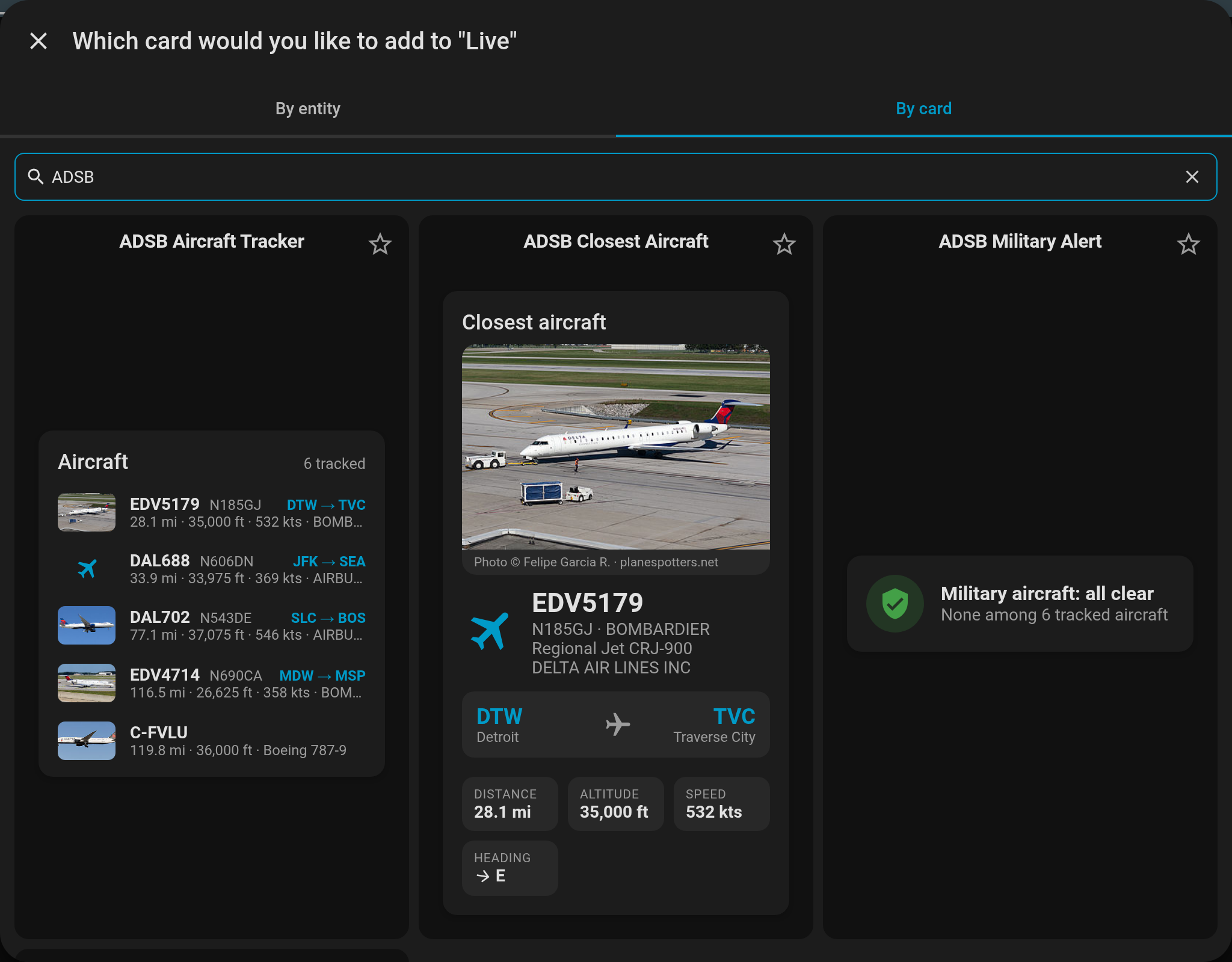
- Four ready-made cards in the dashboard Add card picker (live preview, one click): nearest aircraft, closest aircraft detail, military alert, receiver stats
- Routes, climb/descent and heading at a glance
- A photo of the airframe from planespotters.net on the closest-aircraft card, thumbnails in the list, and the picture in notifications (nearest and military aircraft, cached a day, credited)
- Find your tracker's entities automatically, with a visual editor, and work with multiple feeders
Information
- Installs
- 53 sharing analytics
- GitHub stars
- 20
- Connection
- Works locally
- Upkeep
- Updated in the last 6 months
- Version
- v1.9.0,
- Category
- Vehicles and transport, Flights
- Kind
- Marketplace integration
- Needs
- Needs the Marketplace (HACS on 2026.10 and older)
- Domain
adsb_aircraft_tracker- Issues
- Report an issue
You might also like


 Kia Uvo / Hyundai Bluelink6.8k installs · A Home Assistant HACS integration that supports Kia Connect(Uvo…Open

 Tesla Custom Integration4.4k installs · Tesla custom integration for Home Assistant. This requires a re…Open