
Kia Uvo / Hyundai Bluelink
On Home Assistant 2026.11 or newer? Open it in the Marketplace
- Installs
- 6.3k sharing analytics
- GitHub stars
- 978
- Connection
- Uses the vendor's cloud
- Upkeep
- Updated in the last 6 months
- Version
- v3.21.0,
- Category
- Vehicles and transport, Cars and EVs
- Kind
- Marketplace integration
- Brand
- Kia
- Needs
- Needs the Marketplace (HACS on 2026.10 and older)
- Domain
kia_uvo- Issues
- Report an issue
Independent directory, made by the developer of Vulpo. Not affiliated with Home Assistant or the Open Home Foundation.
Screenshots From the README of Hyundai-Kia-Connect/kia_uvo.
About
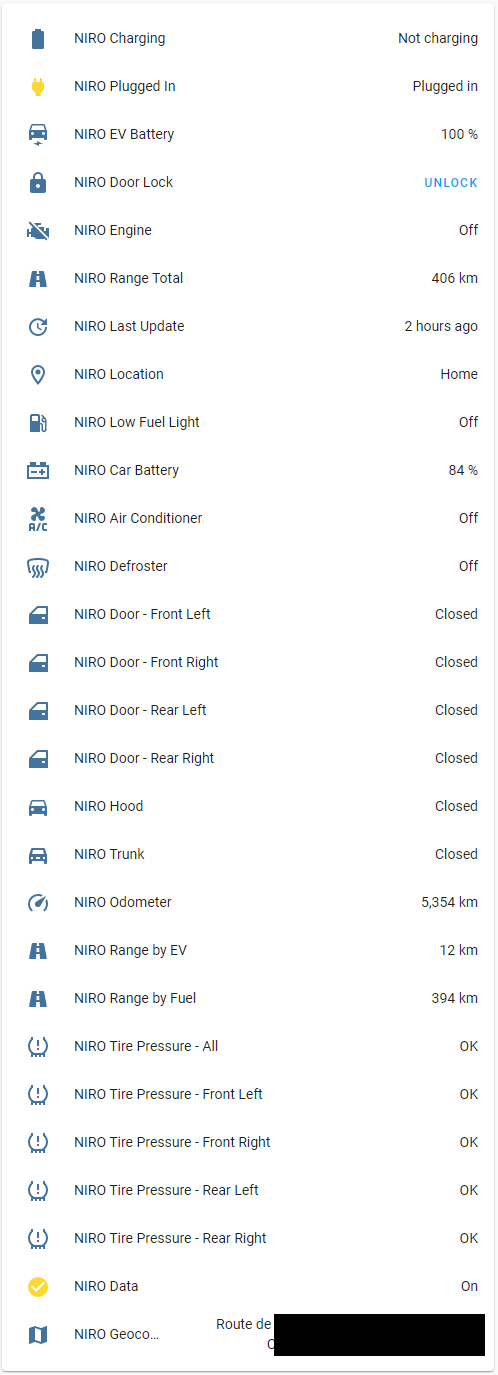
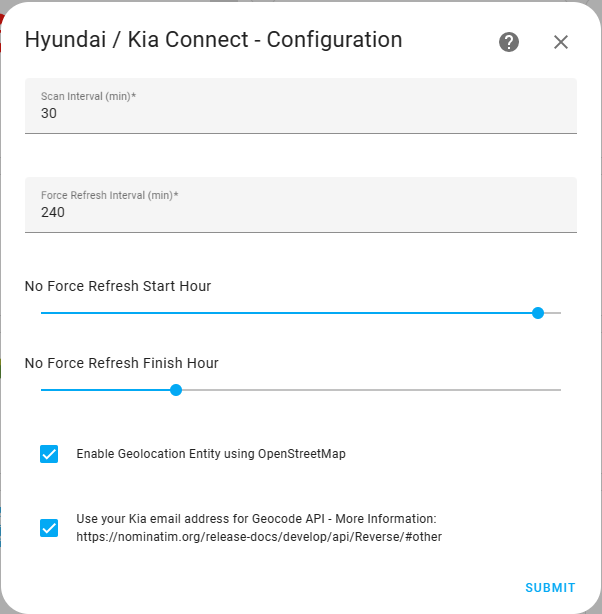
Kia Uvo / Hyundai Bluelink is a HACS integration that connects Kia Connect and Hyundai Bluelink vehicles to Home Assistant. It talks to the vendor's cloud and is set up in the UI with account credentials, a region and a brand, and some regions also ask for a PIN or a one-time password. It adds sensors and binary sensors for battery, range, doors, windows, locks and warnings, plus a device tracker style location, climate control, door locks, window covers and charge limit numbers. Switches and buttons cover EV charging, scheduled departures, the charge port, valet mode, hazard lights and a forced data refresh. Surround view camera images can be captured on vehicles that support them. Options set how often cached data is fetched and how often the car is asked for fresh data, with quiet hours for forced refresh, and the README says setting that too low drains the 12v battery.
Automatic summary of the README and code of Hyundai-Kia-Connect/kia_uvo. Something wrong, or are you the maintainer and want your own text here? Get in touch
Supports
Uses the vendor's cloud Needs an internet connection and an account with the vendor.
From the Marketplace Installed through the Marketplace, formerly HACS.
Actively maintained Its author released or pushed a change in the last six months.
Provides
- Climate
- Covers
- Locks
- Switches
- Sensors
- Presence
Setting it up
Install it from the Marketplace and restart Home Assistant, then add it under Settings, Devices and services.
Hyundai / Kia Connect - Region and Brand
- Region
- Brand
Hyundai / Kia Connect - Credentials
- Username
- Password
- Pin
Hyundai / Kia Connect - Credentials
- Username
- Token
- Pin
Select OTP Method
- OTP delivery method
Enter One‑Time Password
- One‑time password
Hyundai / Kia Connect - Reconfigure
- What would you like to do?
Hyundai / Kia Connect - Set PIN
- PIN
After setup
- Scan Interval (min)
- Force Refresh Interval (min), use caution setting this too low as it consumes 12v battery
- No Force Refresh Start Hour
- No Force Refresh Finish Hour
- Enable Geolocation Entity using OpenStreetMap
- Use your Kia email address for Geocode API. Increases polling ability but provides it to the API.
Texts from the code of Hyundai-Kia-Connect/kia_uvo.
Entities
- Binary sensorsAccessory, Air Cleaning, Air Conditioner, Auto-Cut Battery Pre-Warning, Back Left Door Lock, Back Left Door, Back Left Window, Back Right Door Lock, Back Right Door, Back Right Window, Back Window Heater, Brake Fluid Warning, and 63 more
- ButtonsForce Refresh, Start Hazard Lights, Start Hazard Lights and Horn, Start Valet Mode, Stop Valet Mode, Open All Windows, Close All Windows, Vent All Windows, Capture SVM Image
- ClimateClimate Control
- CoversFront Left Window, Front Right Window, Back Left Window, Back Right Window
- PresenceLocation
- ImagesSVM Front Camera, SVM Rear Camera, SVM Left Camera, SVM Right Camera, SVM Bird's-eye View
- LocksDoor Lock
- NumbersAC Charging Limit, DC Charging Limit, V2L Limit
- SensorsSet Temperature, Car Battery Level, Daily Driving Stats, Data, DTC Count, EV Battery Capacity, EV Battery Pack Voltage, EV Battery Level, EV Battery Remaining Energy, EV State of Health Battery, EV Battery Temperature Max, and 50 more
- SwitchesEV Charging, Climate, First departure defrost, First departure climate, EV Scheduled Departure 1, Second departure defrost, Second departure climate, EV Scheduled Departure 2, Off-peak charge only, Scheduled charging, Charge Port, and 2 more
- TimesOff-peak charge start time, Off-peak charge end time
Actions
- Force UpdateForce your vehicle to update its data. All vehicles on the same account as the vehicle selected will be updated.Fields: Vehicle
- UpdateUpdate vehicle data from service cacheFields: Vehicle
- Start ClimatePlease use cautiously - Starts climate and engine. Not all options are available on all cars or regions. Use your car's mobile app as a guide and match the options available in your car.Fields: Vehicle, Duration, Climate, Temperature, Defrost, Heating, Steering Wheel Heat, Front Left Seat, Front Right Seat, Rear Left Seat
- Stop ClimatePlease use cautiously - stop car and climateFields: Vehicle
- Stop ChargeStop chargingFields: Vehicle
- Start chargeStart chargingFields: Vehicle
- LockLock the vehicleFields: Vehicle
- UnlockUnlock the vehicleFields: Vehicle
- Close Charge PortClose Charging PortFields: Vehicle
- Open Charging PortOpen Charge PortFields: Vehicle
- Set Charge Limitssets ac and dc charge capacity limitsFields: Vehicle, DC Charge limit, AC Charge limit
- Set AC charging currentSets the AC charging current capacityFields: Vehicle, Charging current
- Schedule charging and climatePlease use cautiously - Schedule charging and climate. Not all options are available on all cars or regions. Use your car's mobile app as a guide and match the options available in your car.Fields: Vehicle, Scheduled charging, 1st departure, 1st departure days, 1st departure time, 2nd departure, 2nd departure days, 2nd departure time, Off-peak start time, Off-peak end time
- Turn on the hazard lightsTurn on the hazard lights for 30 seconds.Fields: Vehicle
- Turn on the hazard lights and hornTurn on the hazard lights and horn for 30 seconds.Fields: Vehicle
- Start valet modeActivate valet mode. If remote valet mode is activated while driving, the vehicle display screen is deactivated.Fields: Vehicle
- Stop valet modeDeactivate valet mode.Fields: Vehicle
- Set WindowsControl the windows of the vehicle. Open or close windows as needed.Fields: Vehicle, Front Left Window, Front Right Window, Rear Left Window, Rear Right Window
- Capture SVM ImageTrigger a fresh Surround View Monitor capture. The vehicle wakes up and captures a 360 image.Fields: Vehicle
Troubleshooting
- DiagnosticsDownloads a diagnostics file to attach to a bug report.

Shows in Vulpo
Quick Toggle card, Cover card, Climate card, Lock card, Apple Watch, Control Center, Climate Live Activity.Information
- Installs
- 6.3k sharing analytics
- GitHub stars
- 978
- Connection
- Uses the vendor's cloud
- Upkeep
- Updated in the last 6 months
- Version
- v3.21.0,
- Category
- Vehicles and transport, Cars and EVs
- Kind
- Marketplace integration
- Brand
- Kia
- Needs
- Needs the Marketplace (HACS on 2026.10 and older)
- Domain
kia_uvo- Issues
- Report an issue