Tado CE
On Home Assistant 2026.11 or newer? Open it in the Marketplace
- Installs
- 917 sharing analytics
- GitHub stars
- 177
- Connection
- Uses the vendor's cloud
- Upkeep
- Updated in the last 6 months
- Version
- v4.5.1,
- Category
- Climate, Thermostats and heating
- Kind
- Marketplace integration
- Brand
- tado
- Needs
- Needs the Marketplace (HACS on 2026.10 and older)
- Domain
tado_ce- Issues
- Report an issue
Independent directory, made by the developer of Vulpo. Not affiliated with Home Assistant or the Open Home Foundation.
Screenshots From the README of hiall-fyi/tado_ce.
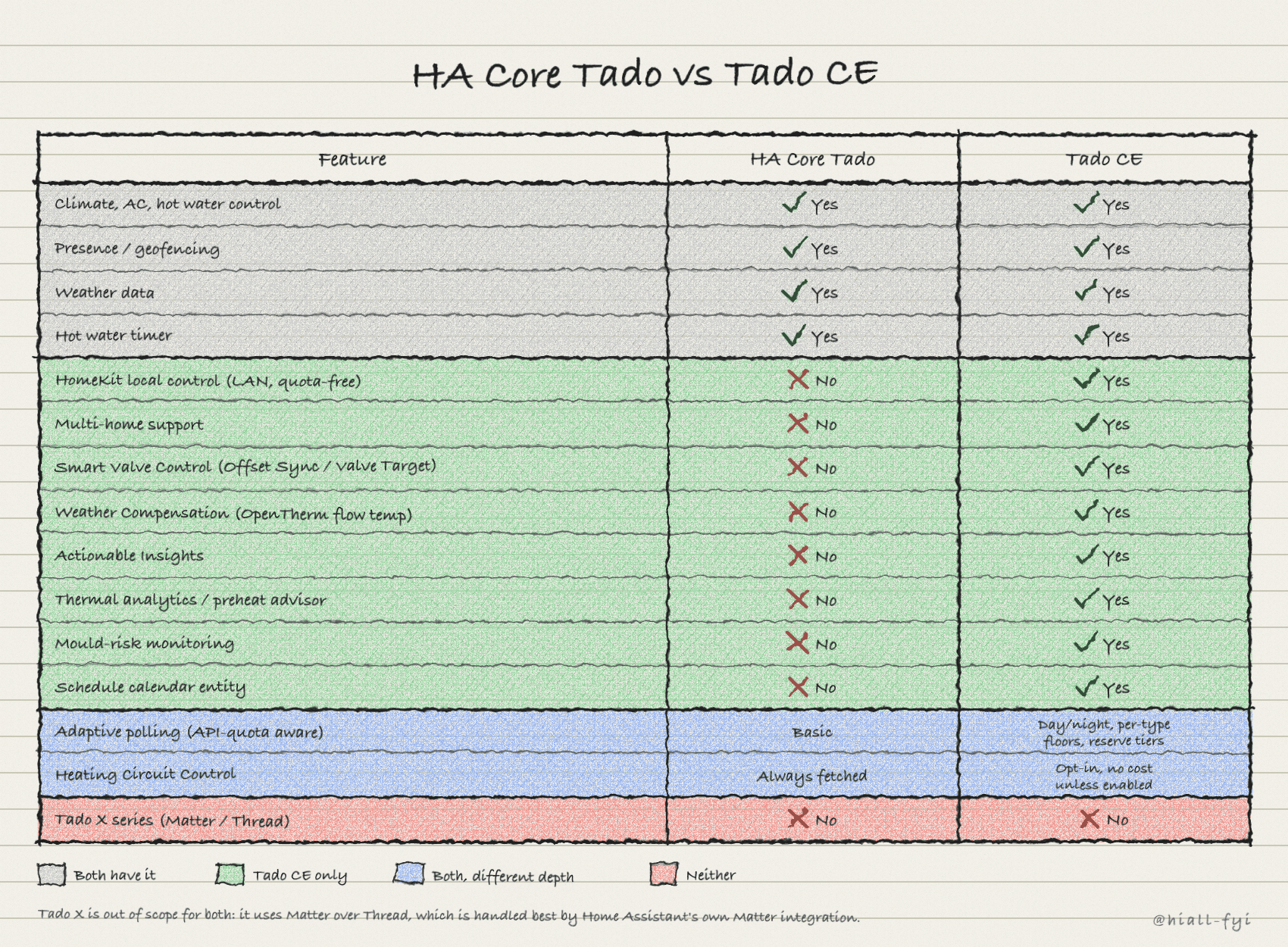
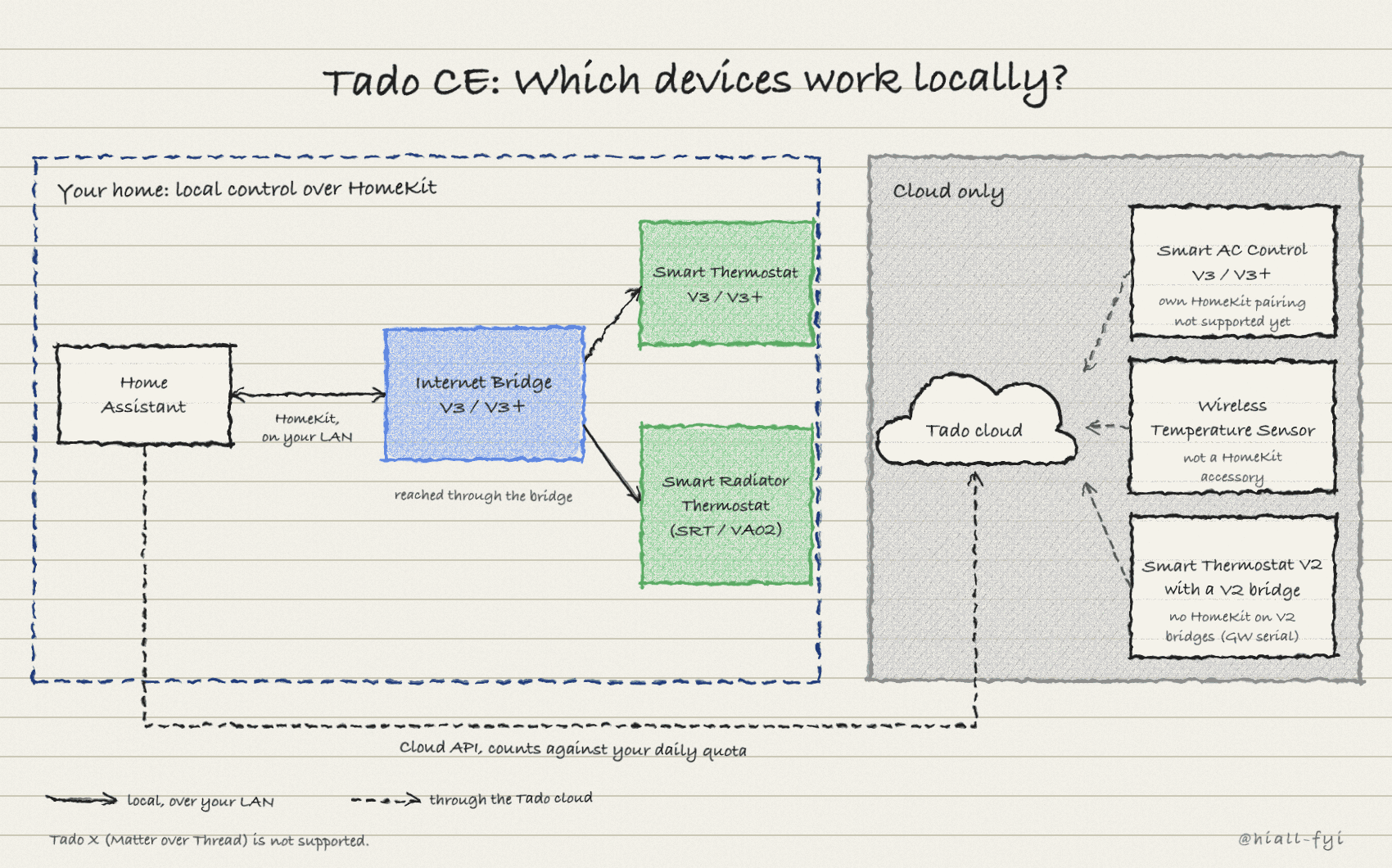
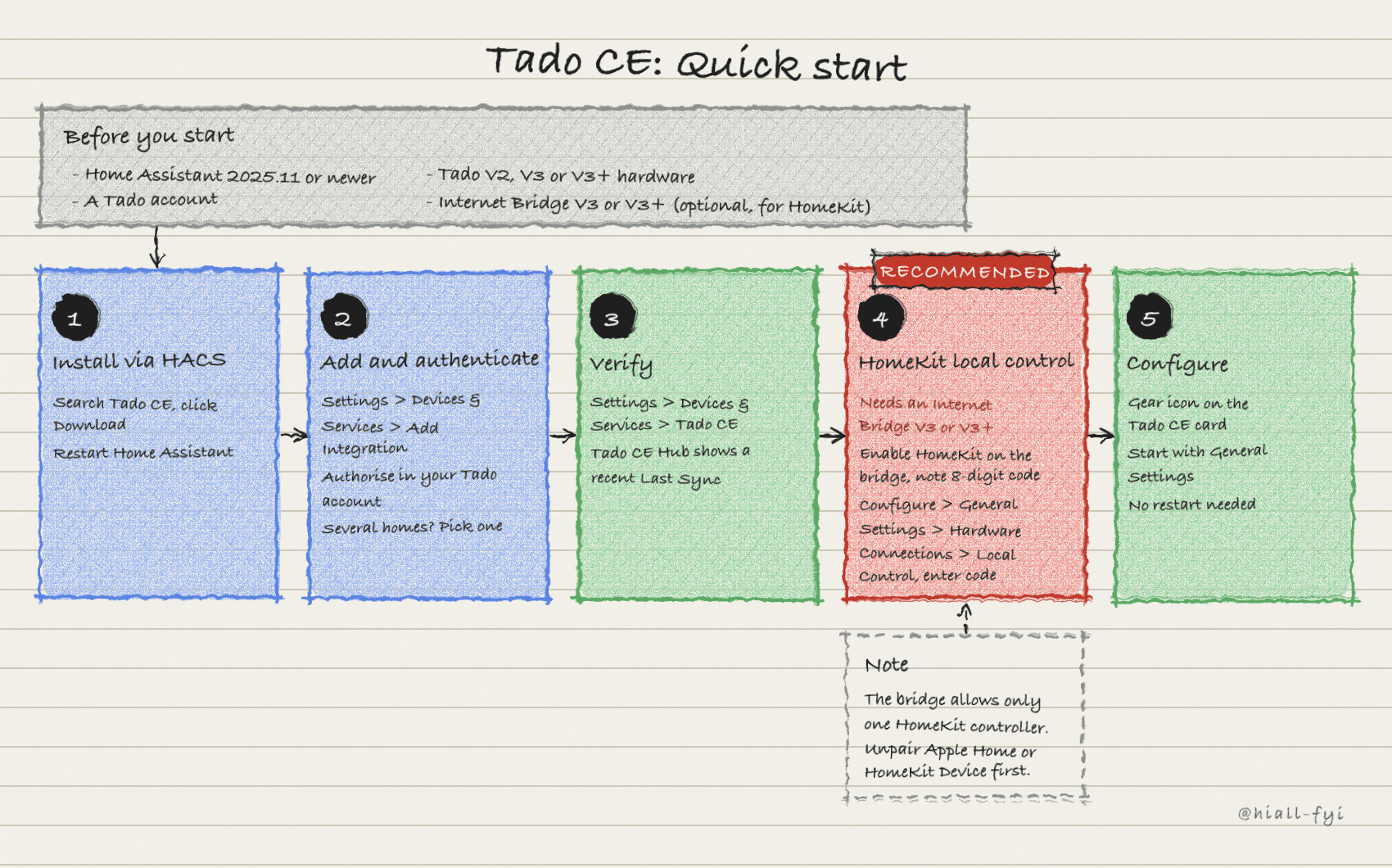
About
Tado CE is a community-built Tado integration that adds local HomeKit control, multi-home support and Smart Valve Control. It is developed independently of Tado and works with V2, V3 and V3+ hardware, while it still needs Tado's cloud for part of its data. With an Internet Bridge paired over HomeKit, room and target temperatures are read locally, which reduces use of Tado's daily API quota. Smart Valve Control uses an external sensor to correct radiator valve readings, either by syncing a temperature offset or by overriding the valve setpoint. Weather Compensation adjusts boiler flow temperature to outdoor conditions and needs the bridge credentials. It also provides a schedule calendar, mold risk and comfort sensors, thermal analytics, and actions for timers, open window handling and meter readings.
Automatic summary of the README and code of hiall-fyi/tado_ce. Something wrong, or are you the maintainer and want your own text here? Get in touch
Supports
Uses the vendor's cloud Needs an internet connection and an account with the vendor.
From the Marketplace Installed through the Marketplace, formerly HACS.
Actively maintained Its author released or pushed a change in the last six months.
Provides
- Climate
- Water heaters
- Switches
- Sensors
- Presence
- Calendars
Setting it up
Install it from the Marketplace and restart Home Assistant, then add it under Settings, Devices and services.
Manual Token
- Refresh TokenPaste the refresh_token value from the Tado web app
Select Home
- HomeThe Tado home to connect this integration to
Select Home
- Home
After setup
- Home Presence (Home/Away)Sync your home's overall presence (Home/Away). About 1 API call each refresh. Refresh interval configurable in Advanced Settings → Polling & API.
- Weather DataOutside temperature and solar intensity from Tado. About 1 API call each refresh. Refresh interval configurable in Advanced Settings → Polling & API.
- Mobile Device TrackingTrack each phone's location for per-device presence. Updates on HA restart only. To refresh in the background, turn this on, save, then enable Frequent Mobile Sync in Advanced Settings → Polling & API.
- Schedule CalendarSee your Tado heating schedules as calendar entries in HA
- Device Temperature OffsetsShow the temperature calibration offset that appears in the Tado app on climate entities (+1 API call per device on restart)
- Heating Circuit ControlAssign each heating zone to a boiler circuit, or to none so its valves still open for residual heat without firing the boiler. Needs a bridge with boiler circuits. Refreshes on the normal sync cadence, not instantly.
- Internet BridgeConnect to your Tado Internet Bridge for boiler flow temperature readings (required for Weather Compensation)
- Local Control (HomeKit)Control heating locally via HomeKit, even when Tado's cloud is down
- Smart ComfortComfort scoring, mold risk, condensation, and dew point sensors for each zone
- Thermal AnalyticsTrack how fast your rooms heat up and how your system performs over time
- Adaptive PreheatAutomatically start heating early so your room is warm when the schedule kicks in. Replaces Tado's Early Start with local logic
- Weather CompensationNeeds the Internet Bridge enabled first. Automatically adjusts your boiler's flow temperature based on the outdoor weather.
- Per-Zone ConfigurationCustomise sensors, manual overrides, and heating per zone
- Smart Comfort ModeHow much Tado CE nudges zone target temperature toward comfort. Light = subtle, Aggressive = noticeable. Start with Light.
- Use Feels-Like TemperatureFactor in wind chill and humidity instead of raw temperature
- Window TypeYour window type. Affects how surface temperature is estimated for mold risk
- Temperature History (days)How many days of temperature data to use for heating rate estimates (1–30)
- Thermal Analytics ZonesChoose which zones show thermal analytics sensors (leave empty for all zones)
- Heating Cycle History (days)How many days of heating cycle data to keep (1–30)
- Minimum Heating CyclesWait for this many completed cycles before showing results (1–10)
- Inertia Threshold (°C)Temperature change below this is considered 'settled' after heating stops (0.05–0.5°C)
- Bridge Serial NumberPrinted on the bottom of your bridge (starts with IB, e.g. IB0123456789)
- Bridge Auth Code4-digit code from the sticker on your bridge (keep confidential)
- Heating System TypeCustom lets you set your own slope; the other options calculate it automatically from your Max/Min Flow, Shutoff and Design Outdoor Temp fields above.
- Heating Curve SlopeHow steeply flow temperature rises as it gets colder outside. Higher = more aggressive heating (0.3–3.0). Only used when the heating system preset above is Custom; otherwise it's calculated from your Max/Min Flow, Shutoff and Design Outdoor Temp values.
- Design Outdoor TemperatureThe coldest temperature you expect in your area (-30 to 10°C)
- Maximum Flow TemperatureHighest flow temperature your boiler should reach at the coldest outdoor temp (25–80°C). Feeds the automatic slope calculation unless the preset above is Custom.
- Minimum Flow TemperatureLowest flow temperature, also used when heating shuts off (25–60°C). Feeds the automatic slope calculation unless the preset above is Custom.
- Serial NumberStarts with IB (e.g. IB0123456789)
- Auth Code4-digit code from the sticker on your bridge (keep confidential)
- Also enable Internet BridgeSet up bridge credentials in the next step
- Reset Scope
- Zone
- Heat Emitter TypeRadiator or underfloor heating
- UFH Buffer (minutes)Extra minutes for UFH warm-up (0-60)
- Adaptive Preheat ModeOff: disabled. Active: auto-start heating and capture state for restoration. Passive: auto-start only when no overlay is active.
- Smart Comfort ModeAdjust target temp based on outdoor conditions
- Window TypeWindow type for mold risk calculation
- Window Detection ModeActive: detects only when HVAC is running. Passive: detects regardless of HVAC state. Auto: uses Active when HVAC is on, Passive when off.
- Window Detection SensitivityHow easily the window detection triggers. Higher sensitivity = more false positives but catches smaller drafts.
- Override Tado's Temperature SensorTurn off to temporarily revert to Tado's built-in sensor. Your selection stays saved, so you can toggle back on anytime.
- External Temperature SensorSelect a sensor to override Tado's built-in reading. Disable the toggle above to pause without losing the selection.
- Override Tado's Humidity SensorTurn off to temporarily revert to Tado's built-in humidity sensor. Your selection stays saved, so you can toggle back on anytime.
- External Humidity SensorSelect a humidity sensor to override Tado's built-in reading. Disable the toggle above to pause without losing the selection.
- Smart Valve Control ModeUse your external sensor to improve TRV accuracy. Offset Sync (recommended) quietly corrects the TRV's temperature reading. It works alongside Tado, with better TRV battery life. Valve Target directly overrides the TRV setpoint. It is more aggressive, so use it only when Offset Sync isn't enough.
- Offset Sync SensitivityHow much the offset must change before writing to the TRV. Higher values mean fewer writes (better for battery life) but less precise temperature display in the Tado app
- Override behaviourHow long a temperature change from HA, the Tado app or a service call lasts before Tado’s schedule resumes.
- Override Timer Duration (minutes)Duration for Timer override mode (15 min to 12 hours)
- HomeKit PIN8-digit code from your Tado Internet Bridge (e.g. 123-45-678)
Texts from the code of hiall-fyi/tado_ce.
Entities
- Binary sensorsGeofencing, Window, Preheat Now, Window Predicted, Connection, Power, HomeKit
- ButtonsResume All Schedules, Refresh AC Capabilities, Refresh Schedule, Boost, Smart Boost
- CalendarsSchedule
- NumbersMax Flow Temperature
- SelectsPresence Mode, Override duration, Overlay Timer, Heating Circuit
- SensorsTemperature, Humidity, Heating, AC, Boiler Flow Temp, Target, Overlay, Outside Temp, Solar Intensity, Weather, Battery, Home ID, and 48 more
- SwitchesEarly Start, Child Lock, Quota Reserve
Actions
- Set Climate TimerSet heating/cooling with a timer that automatically ends after the specified duration, or until the next schedule block. Compatible with the built-in Tado integration.Fields: Temperature, Time Period, Overlay Type
- Set Schedule TemperatureSet a zone's target temperature from an automation, such as a holiday calendar, without Smart Valve Control treating it as a manual override. Smart Valve Control keeps working towards this target and resumes your normal schedule at the next block change.Fields: Temperature, Overlay Type, Force override
- Set Water Heater TimerTurn on hot water with a timer and optional temperature setting.Fields: Time Period, Temperature
- Resume ScheduleDelete any manual override and return to the automatic schedule.
- Set Climate Temperature OffsetSet the temperature offset (calibration) for a Tado climate device. Compatible with the built-in Tado integration.Fields: Entity, Offset
- Add Meter ReadingAdd an energy meter reading for Energy IQ. Supports specifying the date for historical readings (Tado CE enhancement).Fields: Reading, Date
- Identify DeviceMake a Tado device flash its LED to help identify it.Fields: Device Serial
- Set Away ConfigurationConfigure what temperature to use when everyone is away from home.Fields: Entity, Mode, Temperature, Comfort Level
- Get Temperature OffsetFetch the current temperature offset (calibration) for a Tado climate device. Returns the offset value for use in automations.Fields: Entity
- Activate Open Window (Auto-Assist)Confirm an open window that Tado has already detected, same as tapping the icon in the Tado app. Only works when Tado's built-in detection has flagged an open window event. For triggering open window mode from external sensors, use 'Set Open Window Mode' instead.
- Deactivate Open WindowCancel an open window that Tado detected itself, or one you confirmed with 'Activate Open Window', and resume normal heating/cooling. This does not clear 'Set Open Window Mode'. That mode writes a frost overlay, so clear it with 'Resume Schedule' or 'Restore Previous State' instead.
- Set Open Window ModeTrigger open window mode from external sensors (Zigbee, Z-Wave contact sensors, etc.). Sets the zone to frost protection temperature, with no Tado detection required. Duration defaults to the zone's Open Window Detection timeout setting, or 15 minutes if not configured.Fields: Duration, Capture State
- Restore Previous StateRestore a zone to its state before the last overlay operation. If no captured state exists, falls back to resuming the schedule.
- Turn Off All RoomsPlace every climate zone (heating + AC) into a manual OFF overlay. Mirrors the Tado app's 'Turn OFF all rooms' button. Schedules stay suppressed until you manually resume each zone.
- RefreshForce an immediate fetch of presence data, bypassing the minimum refresh interval. For users driving their own refresh cadence from an automation; the automatic polling floor still protects your API quota the rest of the time.Fields: Data to refresh
Troubleshooting
- DiagnosticsDownloads a diagnostics file to attach to a bug report.
- Repair noticesNotices it can show in Settings, Repairs:Tado CE: Authentication expired, Tado CE: Cloud rate-limited, HomeKit pairing lost, A zone's settings were reset
From the README
Tado CE reads your Tado heating locally over HomeKit, saves your daily API calls, and adds what the built-in Home Assistant integration doesn't have: multi-home, Smart Valve Control and Weather Compensation.
- Offset Sync (recommended): writes a device temperature offset so Tado's own heating algorithm sees your external sensor's reading. Tado then modulates as normal.
- Valve Target (advanced): overrides the TRV setpoint directly. Use when Offset Sync's ±10 °C range isn't enough.

Shows in Vulpo
Quick Toggle card, Climate card, Button card, Select card, Apple Watch, Control Center, Climate Live Activity.Information
- Installs
- 917 sharing analytics
- GitHub stars
- 177
- Connection
- Uses the vendor's cloud
- Upkeep
- Updated in the last 6 months
- Version
- v4.5.1,
- Category
- Climate, Thermostats and heating
- Kind
- Marketplace integration
- Brand
- tado
- Needs
- Needs the Marketplace (HACS on 2026.10 and older)
- Domain
tado_ce- Issues
- Report an issue