
Screenshots From the README of ffunes/Omnibattery.
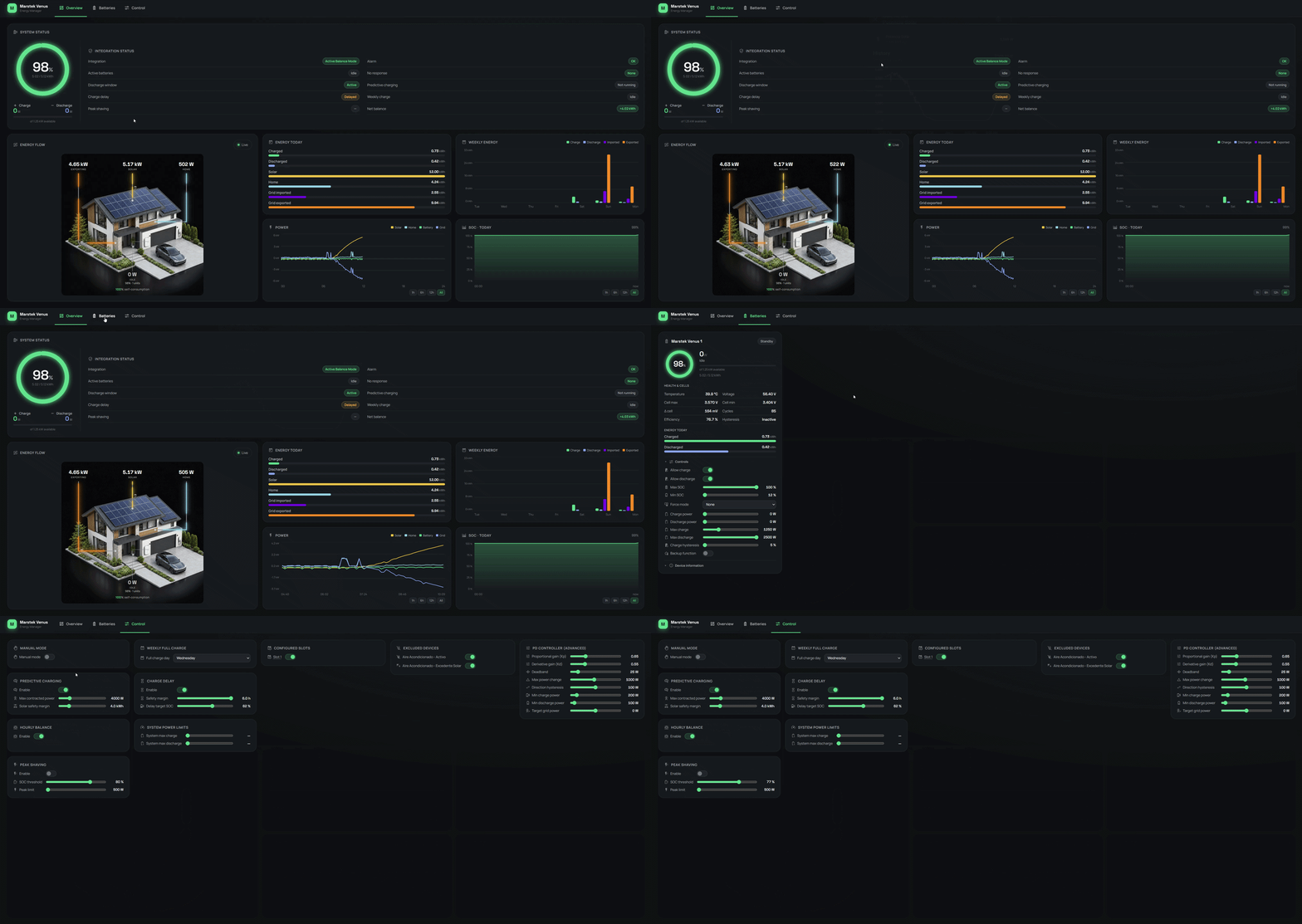
About
Omnibattery is a custom integration that monitors and controls Marstek Venus and Zendure home batteries, among other brands. It talks to the batteries locally, using Modbus TCP, serial Modbus RTU or local HTTP depending on the brand, and is set up in the UI. A proportional-derivative controller keeps grid exchange near zero, with selectable tuning profiles and a sensor that reports control quality. Several batteries of different brands can be managed together with load sharing and priority based on state of charge. Charging can be planned from the solar forecast and dynamic prices, with per-battery time slots, a weekly full charge and peak shaving. It adds sensors, switches, numbers, selects, buttons and binary sensors, plus optional three-phase current protection and repair notices.
Automatic summary of the README and code of ffunes/Omnibattery. Something wrong, or are you the maintainer and want your own text here? Get in touch
Supports
Works locally Talks to your devices on your own network. No vendor cloud in between.
Found by itself Home Assistant spots it on the network and offers to add it.
From the Marketplace Installed through the Marketplace, formerly HACS.
Actively maintained Its author released or pushed a change in the last six months.
Provides
- Switches
- Sensors
Setting it up
Install it from the Marketplace and restart Home Assistant, then add it under Settings, Devices and services.
Configure Omnibattery
- Grid consumption sensorReal-time sensor for imported (+) or exported (-) grid power. Updates every 1-2 seconds are recommended. Slower sensors are accepted, but delayed readings reduce regulation quality; the latest reading is followed for up to 65 seconds.
- Off-grid power sensor (optional)Separate W/kW meter for the backed-up circuit. It must differ from the normal grid sensor. Configuring it exposes a software switch that selects this source for control and statistics; it does not enable the battery's physical off-grid/EPS port.
- Off-grid meter sign invertedEnable when the off-grid sensor uses the opposite convention: positive = export and negative = consumption. This setting applies only while off-grid meter mode is active.
- Whole-day solar forecast sensor (legacy)Legacy sensor providing the whole-day solar forecast. Existing installations can keep using it during the transition; prefer Remaining Today for new configurations.
- Solar forecast remaining today sensor (recommended)Sensor providing solar production still expected today in kWh. Saving it replaces the legacy whole-day forecast and it is never reduced by production already measured.
- Solar production sensor (optional)Real-time PV production power sensor (W/kW) from an external inverter not wired through the battery MPPT inputs. Used to show the Solar node in the dashboard energy-flow diagram. Leave empty if your panels feed the battery MPPT directly.
- Inverted meter signEnable this option if your meter uses the opposite convention: positive = export, negative = import. The unit (W/kW) is detected automatically.
- Maximum contracted power (W)Total contracted power in watts. System won't exceed this limit when charging to avoid tripping the breaker
- Enable three-phase current protectionOptional safety envelope for three-phase installations. Configure one signed RMS current sensor in A, one fuse-size limit in A and the physical battery phase for each circuit in the next step.
Three-phase current protection
- L1 grid current sensorReal-time signed RMS current on physical phase L1. Positive import, negative export; A and mA are accepted.
- L2 grid current sensorReal-time signed RMS current on physical phase L2. Positive import, negative export; A and mA are accepted.
- L3 grid current sensorReal-time signed RMS current on physical phase L3. Positive import, negative export; A and mA are accepted.
- L1 fuse size (A)Fuse rating/current limit for L1 in amperes. Enter a value below the nameplate rating to leave margin for latency and transient peaks.
- L2 fuse size (A)Fuse rating/current limit for L2 in amperes. Enter a value below the nameplate rating to leave margin for latency and transient peaks.
- L3 fuse size (A)Fuse rating/current limit for L3 in amperes. Enter a value below the nameplate rating to leave margin for latency and transient peaks.
Phase assignments
- Physical battery phase
Number of batteries
- Number of batteries
Battery brand
- BrandMarstek Venus: Modbus TCP. Zendure SolarFlow: local HTTP (HEMS must be disabled for Omnibattery control). Anker SOLIX Solarbank Max AC / 4 E5000 Pro: Modbus TCP (enable Modbus TCP under Third-Party Control in the Anker app; only one Modbus client at a time). Sessy: local HTTP.
Battery connection
- NameDescriptive name to identify this battery
- IP AddressIP address of the battery on your local network. Leave empty if you use a serial port.
- Modbus PortModbus port (usually 502)
- Modbus Slave IDModbus slave/unit id (default 1). Change only when a Modbus proxy maps several batteries to one IP:port using distinct slave ids.
- Battery ModelSelect your battery model version. Ev2 for older models, Ev3 for newer models with updated register map, A (Venus A) or D (Venus D) for hybrid inverter models
- Serial port (Modbus RTU)USB-RS485 adapter path, e.g. /dev/ttyUSB0 or COM3. Fill this instead of the IP address to use Modbus RTU over serial; leave empty for TCP.
- Reached through an RS485 gatewayTick when the Modbus TCP connection goes to an RS485 gateway (Elfin EW11, USB-RS485 bridge, ...) instead of the battery's own TCP port. The wait between messages only exists in the battery's TCP server, so dropping it to 30 ms makes polling roughly three times faster on a Venus Ev3/A/D. The wait is applied per battery: on a gateway shared by several batteries the bus carries that many times the traffic, so untick it again if reads start failing or timing out. Leave off when you connect straight to the battery's IP.
Battery connection zendure
- NameDescriptive name to identify this battery
- IP AddressIP address of the Zendure device on your local network
- HTTP PortHTTP port (default 80)
Battery connection hoymiles
- Name
- MQTT device IDHoymiles MQTT device ID, for example MSA-280024341346.
- Battery modelUse automatic discovery unless the device publishes an incorrect or generic model.
After setup
- Battery
- Grid consumption sensorReal-time sensor for imported (+) or exported (-) grid power. Updates every 1-2 seconds are recommended. Slower sensors are accepted, but delayed readings reduce regulation quality; the latest reading is followed for up to 65 seconds.
- Off-grid power sensor (optional)Separate W/kW meter for the backed-up circuit. It must differ from the normal grid sensor. Configuring it exposes a software switch that selects this source for control and statistics; it does not enable the battery's physical off-grid/EPS port.
- Off-grid meter sign invertedEnable when the off-grid sensor uses the opposite convention: positive = export and negative = consumption. This setting applies only while off-grid meter mode is active.
- Whole-day solar forecast sensor (legacy)Legacy sensor providing the whole-day solar forecast. Existing installations can keep using it during the transition; prefer Remaining Today for new configurations.
- Solar forecast remaining today sensor (recommended)Sensor providing solar production still expected today in kWh. Saving it replaces the legacy whole-day forecast and it is never reduced by production already measured.
- Solar production sensor (optional)Real-time PV production power sensor (W/kW) from an external inverter not wired through the battery MPPT inputs. Used to show the Solar node in the dashboard energy-flow diagram. Leave empty if your panels feed the battery MPPT directly.
- Inverted meter signEnable this option if your meter uses the opposite convention: positive = export, negative = import. The unit (W/kW) is detected automatically.
- Maximum contracted power (W)Total contracted power in watts. System won't exceed this limit when charging to avoid tripping the breaker
- Enable three-phase current protectionOptional safety envelope for three-phase installations. Configure one signed RMS current sensor in A, one fuse-size limit in A and the physical battery phase for each circuit in the next step.
- L1 grid current sensorReal-time signed RMS current on physical phase L1. Positive import, negative export; A and mA are accepted.
- L2 grid current sensorReal-time signed RMS current on physical phase L2. Positive import, negative export; A and mA are accepted.
- L3 grid current sensorReal-time signed RMS current on physical phase L3. Positive import, negative export; A and mA are accepted.
- L1 fuse size (A)Fuse rating/current limit for L1 in amperes. Enter a value below the nameplate rating to leave margin for latency and transient peaks.
- L2 fuse size (A)Fuse rating/current limit for L2 in amperes. Enter a value below the nameplate rating to leave margin for latency and transient peaks.
- L3 fuse size (A)Fuse rating/current limit for L3 in amperes. Enter a value below the nameplate rating to leave margin for latency and transient peaks.
- Physical battery phase
- Number of batteries
- BrandMarstek Venus: Modbus TCP. Zendure SolarFlow: local HTTP (HEMS must be disabled for Omnibattery control). Anker SOLIX Solarbank Max AC / 4 E5000 Pro: Modbus TCP (enable Modbus TCP under Third-Party Control in the Anker app; only one Modbus client at a time). Sessy: local HTTP.
- NameDescriptive name to identify this battery
- IP AddressIP address of the battery on your local network. Leave empty if you use a serial port.
- Modbus PortModbus port (usually 502)
- Modbus Slave IDModbus slave/unit id (default 1). Change only when a Modbus proxy maps several batteries to one IP:port using distinct slave ids.
- Battery ModelSelect your battery model version. Ev2 for older models, Ev3 for newer models with updated register map, A (Venus A) or D (Venus D) for hybrid inverter models
- Serial port (Modbus RTU)USB-RS485 adapter path, e.g. /dev/ttyUSB0 or COM3. Fill this instead of the IP address to use Modbus RTU over serial; leave empty for TCP.
- Reached through an RS485 gatewayTick when the Modbus TCP connection goes to an RS485 gateway (Elfin EW11, USB-RS485 bridge, ...) instead of the battery's own TCP port. The wait between messages only exists in the battery's TCP server, so dropping it to 30 ms makes polling roughly three times faster on a Venus Ev3/A/D. The wait is applied per battery: on a gateway shared by several batteries the bus carries that many times the traffic, so untick it again if reads start failing or timing out. Leave off when you connect straight to the battery's IP.
- NameDescriptive name to identify this battery
- IP AddressIP address of the Zendure device on your local network
- HTTP PortHTTP port (default 80)
Texts from the code of ffunes/Omnibattery.
Entities
- Binary sensorsPeak Shaving Active, Predictive Charging Active, Smart Pre-discharge Status, Surplus Price Hold Status, Discharge Reserve Status, WiFi Status, Cloud Status, ESP WiFi Status, PLL Abnormal Restart, Overtemperature Limit, Low Temperature Limit, Fan Abnormal Warning, and 22 more
- ButtonsReset Device, Re-evaluate Predictive Charging
- NumbersSurplus Hold Minimum Saving, Discharge Reserve Minimum Saving, Set Charge Power, Set Discharge Power, Max Charge Power, Max Discharge Power, Charging Cutoff Capacity, Discharging Cutoff Capacity, Charge To SOC, PD Kp, PD Kd, PD Deadband, and 37 more
- SelectsForce Mode, Battery Phase, Off-Grid Mode, User Work Mode, Weekly Full Charge Day, Charge priority, Primary battery, High-Price Sale, PD Tuning Profile
- SensorsDischarge Window, Active Batteries, Three-Phase Protection Status, System Battery Cell Power, Total Solar Power, Daily Solar Production, Daily Home Consumption, Expected Home Consumption Profile, Current Consumption Profile Capture, Daily Operation Timeline, Home Consumption, PD Control Quality, and 125 more
- SwitchesSurplus Price Hold, Discharge Reserve, Feed the real demand forward, Status LEDs, Weekly Full Charge, Price-Based Discharge, Smart Pre-discharge / Anti-curtailment, Negative-price opportunistic charging, Manual Mode, Three-Phase Current Protection, No-PD Direct Tracking, Off-grid Meter Mode, and 19 more
- TimesExternal Charging End Time
Actions
- Exclude consumption daysKeeps whole local days out of the learned consumption, for a day that does not represent the household: a meter outage, a one-off event, a stay away from home. Physical energy counters and history are untouched; only learning ignores the days. The exclusion is persisted, so a later Recorder backfill cannot bring the days back.Fields: Start date, End date
Troubleshooting
- DiagnosticsDownloads a diagnostics file to attach to a bug report.
- System healthAdds its status to Home Assistant's system information.
- Repair noticesNotices it can show in Settings, Repairs:Mark your EV charger among excluded devices, Configured sensor no longer exists, Grid power sensor has stopped publishing, Grid power sensor updates too slowly, Price data unusable, Solar forecast unusable, Use a remaining solar forecast, Three-phase protection can be bypassed by manual commands
From the README
- Mix and match different battery brands: Marstek, Zendure, Anker Solix, Sessy, Hoymiles MQTT and more to come!
- Zero Export/Import PD Controller: Keeps grid exchange near zero using a Proportional-Derivative algorithm.
- Integrated dashboard: All the controls and adjustments from a single place. Graphs and power flow diagram included!
- One-Click PD Profiles + Quality Sensor: Pick a tuning profile (Very smooth → Very aggressive) instead of tuning gains by hand; a control-quality sensor reports whether the result is stable,…
- Multi-Battery Support: Manage up to 10 batteries with intelligent load sharing and SOC-based priority.
- Predictive Grid Charging: Automatically charges from the grid when solar forecast + battery won't cover tomorrow's consumption. Supports fixed time slots, dynamic pricing, and real-time pricing…
- Negative-price opportunistic charging: Optional Dynamic Pricing-only charging fills each battery to its configured maximum SOC during negative import-price slots, even without solar panels or a…
- Smart Pre-discharge / Anti-curtailment: Optional Dynamic Pricing-only planning creates battery headroom before forecast PV surplus at negative-injection prices, then blocks discharge during the…
- Time Slots: Per-battery windows with independent charge/discharge ticks, optional SOC and power overrides, and a manual mode that forces a fixed charge or discharge power. Up to 8 slots per…
- Weekly Full Charge: Forces 100% SOC once a week for LFP cell balancing.

Shows in Vulpo
Quick Toggle card, Button card, Select card, Chart card, Apple Watch, Control Center.Information
- Installs
- 838 sharing analytics
- GitHub stars
- 206
- Connection
- Works locally
- Upkeep
- Updated in the last 6 months
- Version
- v1.5.0,
- Category
- Energy, Solar and batteries
- Kind
- Marketplace integration
- Needs
- Needs the Marketplace (HACS on 2026.10 and older)
- Domain
omnibattery- Issues
- Report an issue











