
Screenshots From the README of consultingtedds/ha-home-energy-advisor.
About
Home Assistant integration explaining the financial impact of per-device energy usage
Description from consultingtedds/ha-home-energy-advisor
Supports
Works locally Talks to your devices on your own network. No vendor cloud in between.
From the Marketplace Installed through the Marketplace, formerly HACS.
Actively maintained Its author released or pushed a change in the last six months.
Provides
- Sensors
Setting it up
Install it from the Marketplace and restart Home Assistant, then add it under Settings, Devices and services.
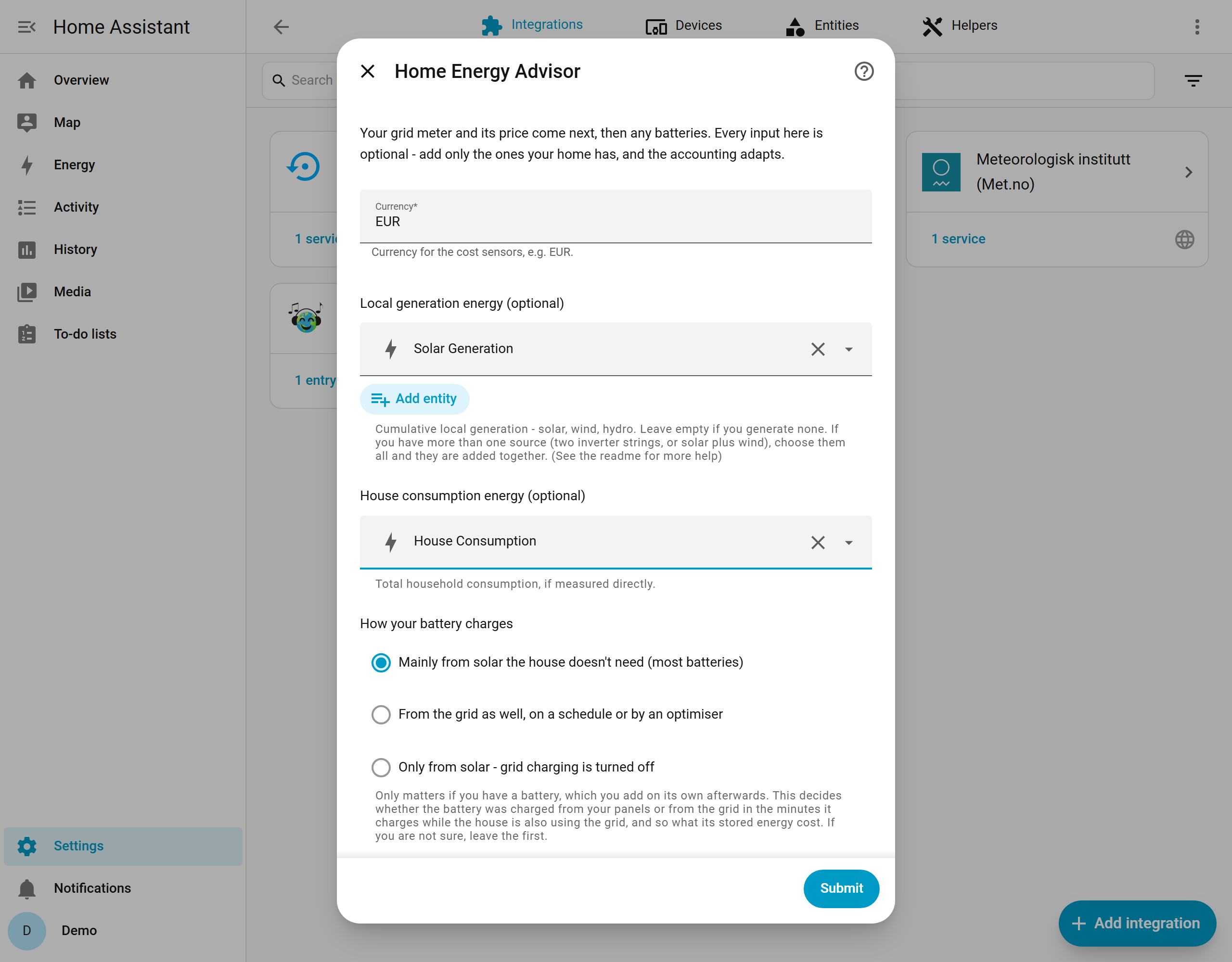
Home Energy Advisor
- CurrencyCurrency for the cost sensors, e.g. EUR.
- Local generation energy (optional)Cumulative local generation - solar, wind, hydro. Leave empty if you generate none. If you have more than one source (two inverter strings, or solar plus wind), choose them all and they are added together. (See the readme for more help)
- House consumption energy (optional)Total household consumption, if measured directly.
- How your battery chargesOnly matters if you have a battery, which you add on its own afterwards. This decides whether the battery was charged from your panels or from the grid in the minutes it charges while the house is also using the grid, and so what its stored energy cost. If you are not sure, leave the first.
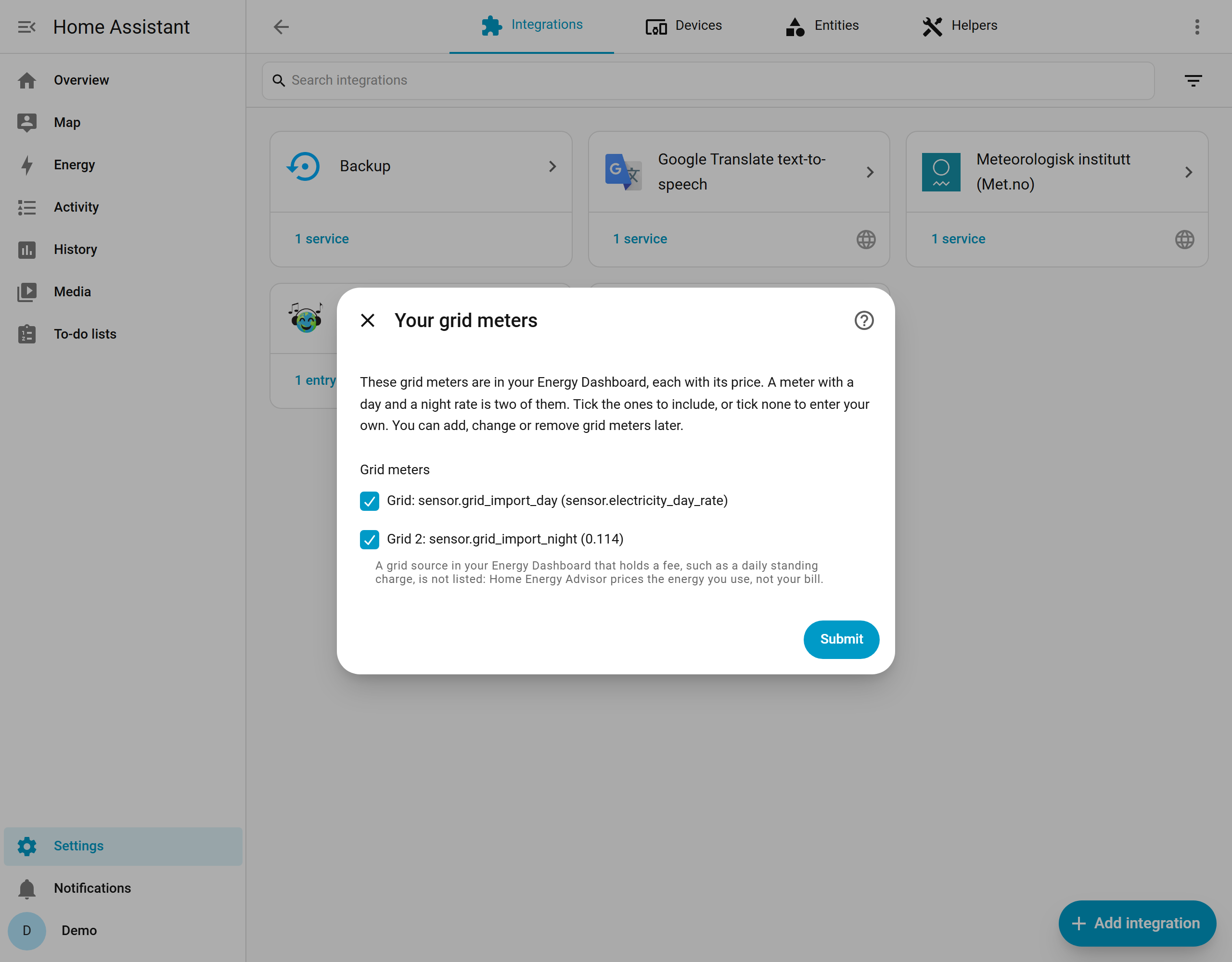
Your grid meters
- Grid metersA grid source in your Energy Dashboard that holds a fee, such as a daily standing charge, is not listed: Home Energy Advisor prices the energy you use, not your bill.
Your grid meter
- NameHow this grid meter appears in Home Assistant.
- Grid import energyCumulative energy imported from the grid through this meter.
- Import priceThe sensor or Number helper giving the current import price per kWh. Fill in this or the fixed price.
- Fixed import priceA price per kWh that does not change, as on your bill. Fill in this or the import price.
- Grid export energy (optional)Cumulative energy exported to the grid; used to work out how much generation you used yourself.
Your batteries
- BatteriesIf a battery's level or capacity is missing, the Energy Dashboard is the best place to add it. Home Energy Advisor fills it in for you when you next add or edit the battery.
Edit Home Energy Advisor
- CurrencyCurrency for the cost sensors, e.g. EUR.
- Local generation energy (optional)Cumulative local generation - solar, wind, hydro. Leave empty if you generate none. If you have more than one source (two inverter strings, or solar plus wind), choose them all and they are added together. (See the readme for more help)
- House consumption energy (optional)Total household consumption, if measured directly.
- How your battery chargesOnly matters if you have a battery, which is edited on its own. This decides whether the battery was charged from your panels or from the grid in the minutes it charges while the house is also using the grid, and so what its stored energy cost. If you are not sure, leave the first.
After setup
- Publish a cost range for each device
- Daily totals
- Monthly totals
- Weekly totals
- Quarterly totals
- Yearly totals
- Devices to add
Texts from the code of consultingtedds/ha-home-energy-advisor.
Entities
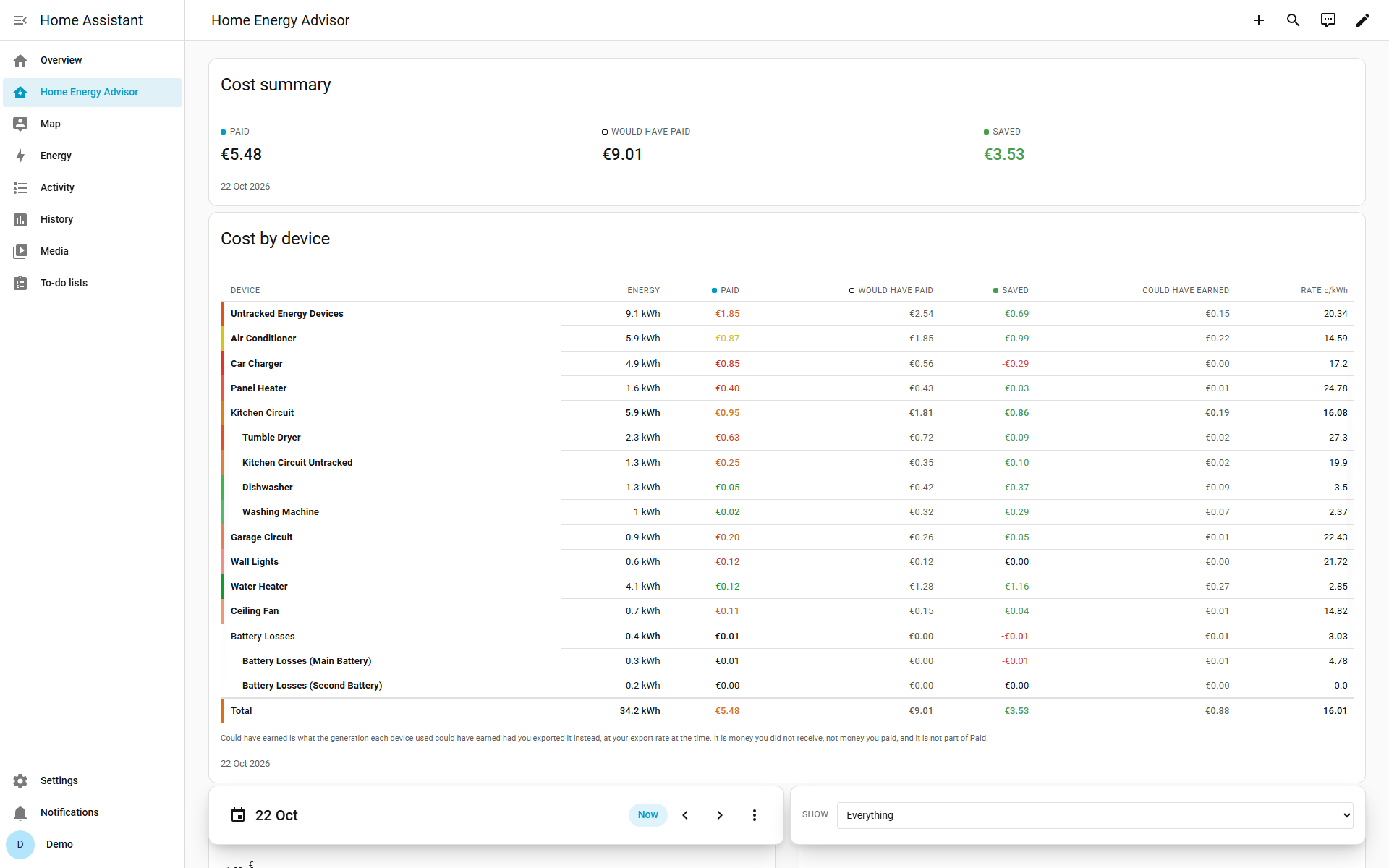
- SensorsEnergy Used, Actual Cost, Cost at Grid Price, Cost Savings, Forgone Export, Energy From Grid, Energy From Generation, Energy From Battery, Energy From Battery (Solar), Devices, Unreconciled Energy, Last Reading, and 3 more
Actions
- Reset totalsStarts every Home Energy Advisor figure again from zero and clears the recorded history behind them. Cannot be undone.Fields: Household
Troubleshooting
- DiagnosticsDownloads a diagnostics file to attach to a bug report.
- Repair noticesNotices it can show in Settings, Repairs:An energy input is no longer available, An energy input has been unavailable for over an hour, The import price has been unavailable for over an hour, Is tracked by a sensor that has never reported, A required helper was re-created, One or more cycle-total helpers were re-created, These totals no longer add up to your meter, An energy input jumped by more than any house could use, An energy input is counting in a unit that cannot be used, An energy input does not say what unit it is counting in, An energy input's counter changed the scale it reports in, Has no figures at all, Of Home Energy Advisor's figures are switched off, Your Energy Dashboard's batteries or grid meters differ from Home Energy Advisor's
From the README
A Home Assistant integration that tells you what each device in your home cost to run, what it would have cost on grid electricity alone, and how much your own generation (for example: solar, wind or hydro) and battery saved you.
Home Assistant already shows you where your energy went. This shows you where your money went.

Shows in Vulpo
Chart card, Apple Watch.Information
- Installs
- 63 sharing analytics
- GitHub stars
- 24
- Connection
- Works locally
- Upkeep
- Updated in the last 6 months
- Version
- v1.0.1,
- Category
- Energy, Meters and monitoring
- Kind
- Marketplace integration
- Needs
- Needs the Marketplace (HACS on 2026.10 and older)
- Domain
home_energy_advisor- Issues
- Report an issue











