

ČEZ HDO
Cmajda
On Home Assistant 2026.11 or newer? Open it in the Marketplace
- Installs
- 329 sharing analytics
- GitHub stars
- 37
- Connection
- Uses the vendor's cloud
- Upkeep
- Updated in the last 6 months
- Version
- v3.2.3,
- Category
- Energy, Energy prices
- Kind
- Marketplace integration
- Needs
- Needs the Marketplace (HACS on 2026.10 and older)
- Domain
cez_hdo- Issues
- Report an issue
Independent directory, made by the developer of Vulpo. Not affiliated with Home Assistant or the Open Home Foundation.
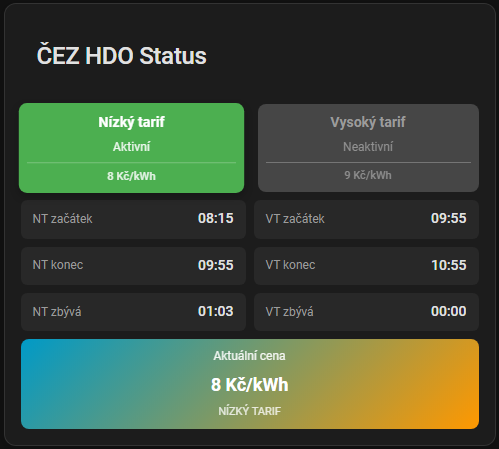
Screenshots From the README of Cmajda/ha_cez_distribuce.
About
ČEZ HDO is a Marketplace integration that shows the ČEZ low and high tariff (HDO) schedule in Home Assistant. It reads the data from the vendor's cloud and is set up in the UI by entering an EAN number, a code from a CAPTCHA image and the HDO signal to follow. Binary sensors report whether the low tariff or the high tariff is active and whether the data is valid. Sensors give the start, end and remaining time of each tariff period, the current price, the schedule, the raw data, and how old the data is and how long it stays valid. Prices for the low and high tariff can be entered in CZK per kWh, and automatic data refresh can be switched on. Actions refresh the data, list available signals, reload the frontend card and set tariff prices, and a diagnostics download is available for bug reports.
Automatic summary of the code of Cmajda/ha_cez_distribuce. Something wrong, or are you the maintainer and want your own text here? Get in touch
Supports
Uses the vendor's cloud Needs an internet connection and an account with the vendor.
From the Marketplace Installed through the Marketplace, formerly HACS.
Actively maintained Its author released or pushed a change in the last six months.
Provides
- Sensors
Setting it up
Install it from the Marketplace and restart Home Assistant, then add it under Settings, Devices and services.
ČEZ HDO Setup
- EAN Number
CAPTCHA Verification
- Code from image
Select HDO Signal
- HDO Signal
Entity ID Suffix
- Entity Suffix
Tariff Prices Setup
- NT Price (CZK/kWh)
- VT Price (CZK/kWh)
- Auto refresh data
After setup
- EAN Number
- Code from image
- HDO Signal
- NT Price (CZK/kWh)
- VT Price (CZK/kWh)
- Auto refresh data
Entities
- Binary sensorsLow tariff active, High tariff active, Data valid
- SensorsLow tariff start, Low tariff end, Low tariff remaining, High tariff start, High tariff end, High tariff remaining, Current price, HDO schedule, Raw data, Data valid until, Data age, Days until expiry
Actions
- Refresh HDO dataFields: Entry ID
- List available signalsFields: EAN number
- Reload frontend card
- Set tariff pricesFields: Low tariff price, High tariff price
Troubleshooting
- DiagnosticsDownloads a diagnostics file to attach to a bug report.

Shows in Vulpo
Chart card, Apple Watch.Information
- Installs
- 329 sharing analytics
- GitHub stars
- 37
- Connection
- Uses the vendor's cloud
- Upkeep
- Updated in the last 6 months
- Version
- v3.2.3,
- Category
- Energy, Energy prices
- Kind
- Marketplace integration
- Needs
- Needs the Marketplace (HACS on 2026.10 and older)
- Domain
cez_hdo- Issues
- Report an issue











