
Bose
cavefire
On Home Assistant 2026.11 or newer? Open it in the Marketplace
- Installs
- 709 sharing analytics
- GitHub stars
- 64
- Connection
- Works locally
- Upkeep
- Updated in the last 6 months
- Version
- 1.3.5,
- Category
- Media and entertainment, Speakers and audio
- Kind
- Marketplace integration
- Brand
- Bose
- Needs
- Needs the Marketplace (HACS on 2026.10 and older)
- Domain
bose- Issues
- Report an issue
Independent directory, made by the developer of Vulpo. Not affiliated with Home Assistant or the Open Home Foundation.
Screenshots From the README of cavefire/Bose-Homeassistant.
About
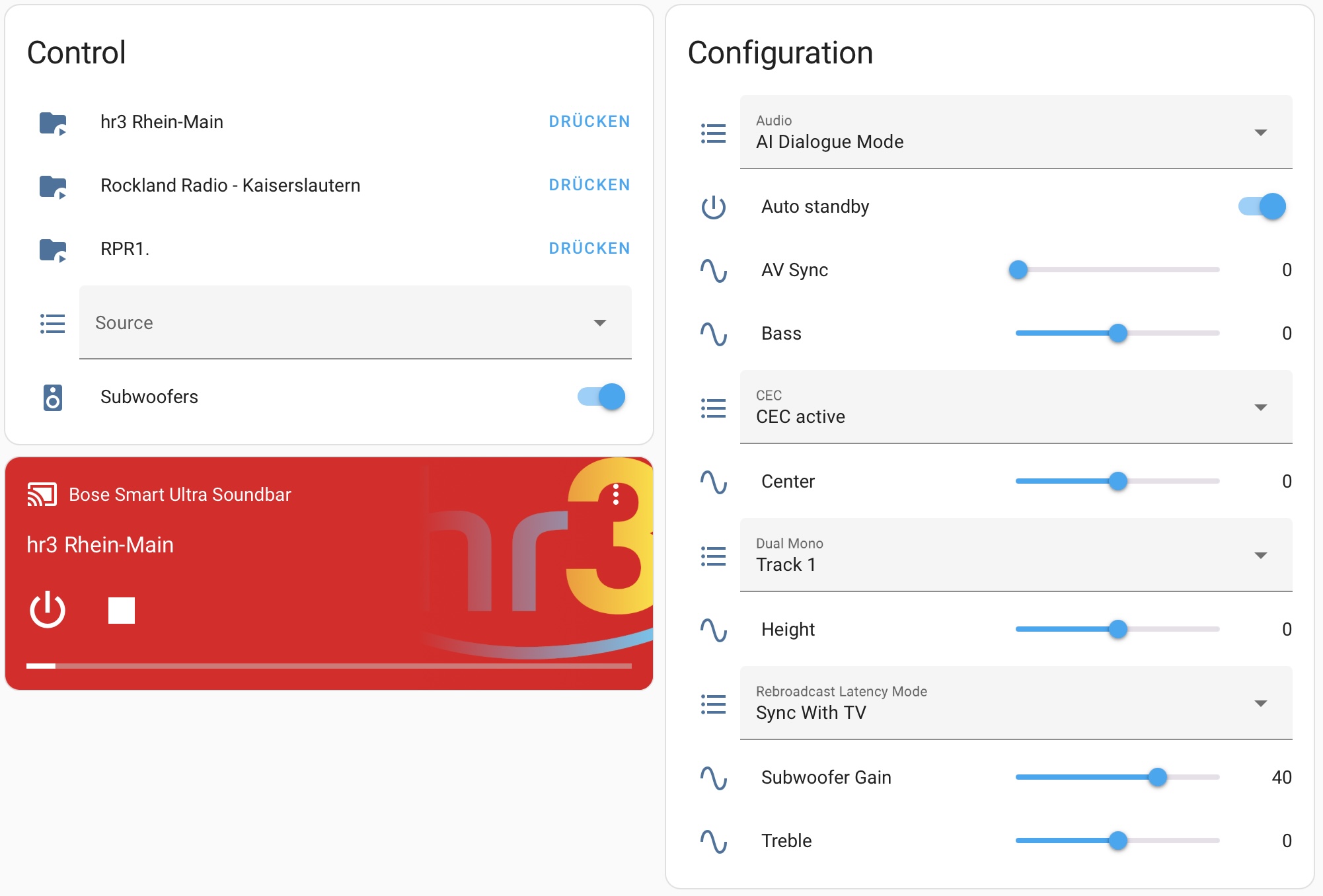
Bose is an integration that controls Bose soundbars and speakers from Home Assistant over the local network. It adds a media player with playback control, volume, source selection and grouping of several speakers, plus sound settings such as bass, treble, center, surround and subwoofer gain. Further entities cover audio mode, HDMI-CEC settings, dual mono, auto standby, rear speakers, Bluetooth pairing, and battery and WiFi status for portable models. Two actions are included: one removes a paired Bluetooth device by its MAC address, the other sends a custom request straight to a speaker. A Bose account is required during setup, although control after the first call stays local. Devices are found automatically on the network, and setup runs in the interface, with an option to enable Chromecast built-in for text-to-speech and media playback.
Automatic summary of the README and code of cavefire/Bose-Homeassistant. Something wrong, or are you the maintainer and want your own text here? Get in touch
Supports
Works locally Talks to your devices on your own network. No vendor cloud in between.
Found by itself Home Assistant spots it on the network and offers to add it.
From the Marketplace Installed through the Marketplace, formerly HACS.
Actively maintained Its author released or pushed a change in the last six months.
Provides
- Media
- Switches
- Sensors
Setting it up
Install it from the Marketplace and restart Home Assistant, then add it under Settings, Devices and services.
Connect
- Select your BOSE device
- Email address of your BOSE account
- Enter IP address manually
- Password of your BOSE account
Confirm the device
- Email address of your BOSE account
- Password of your BOSE account
Also asked when signing in again.
Manual ip
- IP address of your BOSE device
Source settings
- Source
Configure source initial
- Custom name (optional)
- Linked media player (optional)
Connectivity settings
- Automatically enable Chromecast built-in on connectionWhen enabled, Chromecast functionality will be automatically activated when connecting to the device. Chromecast is needed for TTS and media playback via the media player entity!
After setup
- Source
- Custom name (optional)
- Linked media player (optional)
- Automatically enable Chromecast built-in on connectionWhen enabled, Chromecast functionality will be automatically activated when connecting to the device. Chromecast is needed for TTS and media playback via the media player entity!
Texts from the code of cavefire/Bose-Homeassistant.
Entities
- Binary sensorsCharging State
- ButtonsBluetooth Pairing
- MediaMedia Player
- NumbersAV Sync, Bass, Center Channel, Height Channel, Subwoofer Gain, Rear Speakers Gain, Treble, Midrange, Surround
- SelectsAudio Mode, CEC Settings, Dual Mono, Group Synchronization
- SensorsBattery Level, Time Until Empty, Time Until Full, WiFi Signal Strength, WiFi SSID, Network Type, Network IP Address
- SwitchesAuto Standby, Rear Speakers, Subwoofer
Actions
- Remove Bluetooth DeviceRemove a paired Bluetooth device by MAC address.Fields: MAC Address
- Send Custom RequestSend a direct request to a Bose speaker.Fields: Request Body, HTTP Method, Resource
From the README
This is a custom component for Home Assistant to integrate with Bose soundbars / speakers. The speakers are controlled 100% locally. However, a cloud account is needed and required configured in the integration. Read more about this in the BOSE Account section.
- Control power
- Control volume
- See current volume
- See currently playing media (title, artist, album, cover, duration and position)
- Control media (play, pause, next, previous)
- Select sources (aux, chinch, optical - based on the speaker)
- Control bluetooth
- Audio setup (bass, treble, center, surround)
- Enable / disable bass module and gain
- Enable / disable surround speakers
- Group speakers
- HDMI-CEC settings

Shows in Vulpo
Quick Toggle card, Media Player card, Button card, Select card, Apple Watch, Control Center.Information
- Installs
- 709 sharing analytics
- GitHub stars
- 64
- Connection
- Works locally
- Upkeep
- Updated in the last 6 months
- Version
- 1.3.5,
- Category
- Media and entertainment, Speakers and audio
- Kind
- Marketplace integration
- Brand
- Bose
- Needs
- Needs the Marketplace (HACS on 2026.10 and older)
- Domain
bose- Issues
- Report an issue