
Screenshots From the README of BackupBaTTerY/energypriceforecast-home-assistant.
About
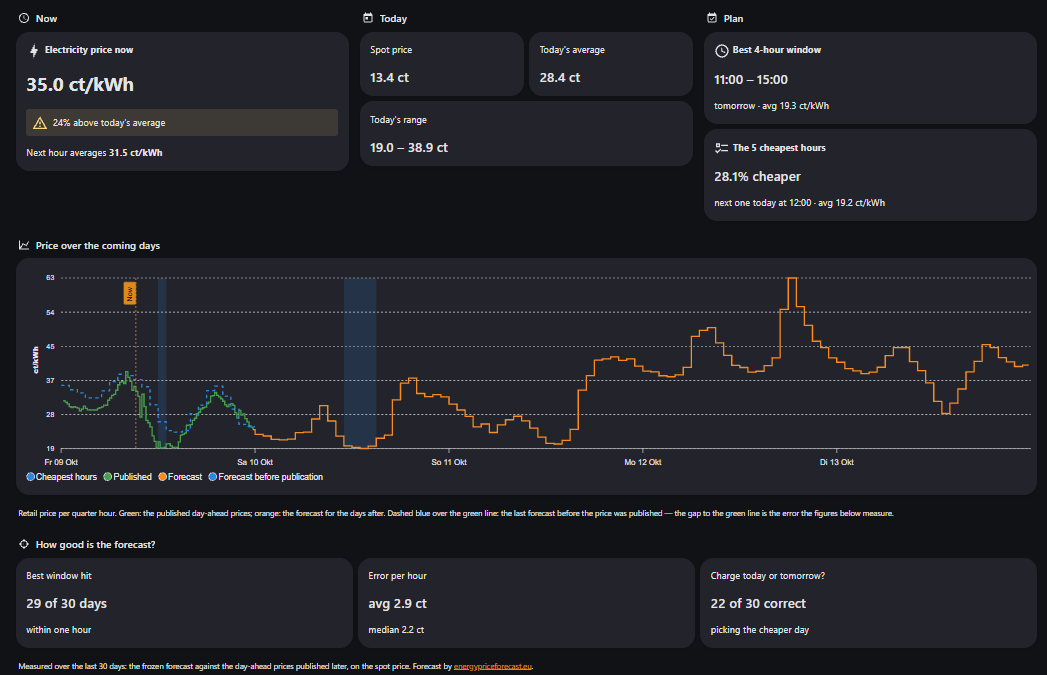
Energy Price Forecast EU is an integration that provides electricity price and CO2 intensity forecasts for European price zones. It combines published day-ahead prices with forecast values for the hours not yet published, and it keeps the forecast separate from the published prices. Sensors report the current price and CO2 intensity, plus the start, end and average of the cheapest and greenest windows, and binary sensors show whether a window is active. It can also pick the cheapest, cleanest or most expensive hours within repeating blocks, plus a separate weekend plan, and these plans stay fixed once chosen. Retail price can come from an assumption-based estimate for a few countries or from an own formula with a factor and a surcharge, and prices can be shown in some local currencies. It runs alongside existing price integrations, uses the vendor's cloud with an optional API key, and is set up in the UI.
Automatic summary of the README and code of BackupBaTTerY/energypriceforecast-home-assistant. Something wrong, or are you the maintainer and want your own text here? Get in touch
Supports
Uses the vendor's cloud Needs an internet connection and an account with the vendor.
From the Marketplace Installed through the Marketplace, formerly HACS.
Actively maintained Its author released or pushed a change in the last six months.
Provides
- Sensors
Setting it up
Install it from the Marketplace and restart Home Assistant, then add it under Settings, Devices and services.
Add electricity-price and CO2 forecast
- Market or price zone
- Requested horizonThe API reports the actually permitted horizon as a diagnostic sensor.
- Best-window durationLength of the cheapest and greenest continuous window. You can ask for quarter hours, for example 3.5 for a charge that takes three and a half. The forecast-quality figure beside it is reported for the nearest whole hour.
- API key (optional)Leave empty for public access. The key is stored in the Home Assistant config entry.
- Price resolution of your tariffExchanges price every quarter hour, but many contracts still bill the hourly mean of those quarters. Choose the hourly tariff only if your bill works that way; prices, plans and windows then use whole hours.
- Retail priceEstimate: our assumption-based all-in price (grid fee, levies, VAT), only for DE, NL, DK, AT and NO; Germany needs a postal code. Own formula: day-ahead price × factor + surcharge, in every market. Either way the plans are then built on the retail price.
- Time-of-day grid chargesGrid charges that change with the time of day, priced inside your own formula - its factor adds the VAT to them. Enter the windows and amounts from your price sheet; in Norway they can be prefilled from your grid operator, in Denmark they are looked up automatically. Needs "Own formula" as the retail price.
- Show prices in local currencyConverts prices from euro into Czech koruna (CZ), Polish złoty (PL) or Swedish krona (SE1-SE4) at the ECB's daily reference rate. Denmark and Norway always get their own currency; all other markets stay in euro. Switching changes the unit of the price sensors, so Home Assistant starts their long-term statistics afresh.
- Update interval (minutes)How often to poll the API. Data resolution is 15 minutes, so shorter intervals rarely add new information.
- Cheapest hours per block (0 to disable)Time is split into fixed, back-to-back blocks (set below), and this many individual - possibly non-contiguous - hours are picked as the cheapest in each block. Good for a heat pump: e.g. 12 of 24 hours picks the twelve cheapest hours every calendar day. Once a block's plan has been picked it is never reshuffled, even if the forecast later changes. Must not be greater than the block length, and no plan is published at all if the forecast does not yet fully cover the block.
- Block length (hours)How long each repeating block is. 24 repeats daily; 48 picks hours from a fixed two-day block (e.g. Monday 00:00 to Wednesday 00:00, then Wednesday to Friday, and so on). A longer block gives more hours to choose from - typically more savings, but a less evenly spread runtime. The cleanest-hours plan uses the same block.
- Block start hour (local time)Local hour of day (0-23) at which each block starts. 0 means blocks start at midnight; with a 24-hour block this is simply the start of each calendar day.
- Cheapest hours for the weekend plan (0 to disable)A separate plan for a fixed Saturday 00:00 to Monday 00:00 block, independent of the block above - useful for a car charger that should only use weekend flexibility. Picked and locked the same way, but requires the entire weekend to be covered by the forecast (including hours already in the past) before it locks in, so a plan built after a late reload is never partial.
- Cleanest hours per block (0 to disable)The same blocks as above, but the hours are picked on the grid's CO2 intensity instead of price. Same rules: once a block's plan has been picked it is not reshuffled, and no plan is published at all until the forecast covers the block. Must not be greater than the block length.
- Most expensive hours per block (0 to disable)The same blocks as above, read from the other end: the hours to keep a load out of, or to discharge a battery into. Same rules - once a block's plan is picked it is not reshuffled, and nothing is published until the forecast covers the block. Must not be greater than the block length.
Postal code for the estimate
- Postal codeUsed to look up the local grid fee.
Your own formula
- FactorMultiplies the day-ahead price, e.g. 1.21 for 21% VAT.
- Surcharge per kWh incl. VATFixed amount per kWh including VAT, added after the factor, in the unit of the price sensors - e.g. 0.1350 for 13.50 ct/kWh. Supplier fees, energy tax and any per-kWh grid charge belong here. Grid charges that change with the time of day go into "Time-of-day grid charges" instead.
Start from your grid operator
- Grid operatorOnly operators in your price area are listed.
When is the grid cheap or expensive?
- Low rate from (hour)Start of the cheapest window, e.g. 22 or 0.
- Low rate until (hour)End of the cheapest window, e.g. 6.
- Peak rate from (hour)Start of the most expensive window, e.g. 17. Leave it equal to the end for a tariff with two levels.
- Peak rate until (hour)End of the most expensive window, e.g. 21.
- WeekendsSome operators charge the whole weekend at the low rate.
- Different prices in winterTick if your operator charges more in winter, as in Denmark, Sweden or France.
- Winter from monthFirst winter month, 1-12, e.g. 11 for November.
- Winter until monthLast winter month, inclusive, e.g. 3 for March. A range across New Year works.
Grid charges per kWh
- Low ratePer kWh, without VAT.
- Standard rateEvery hour outside the low and the peak window.
- Peak ratePer kWh, without VAT.
- Low rate in winterPer kWh, without VAT.
- Standard rate in winterEvery hour outside the low and the peak window.
- Peak rate in winterPer kWh, without VAT.
Your Danish grid tariff
- Grid operator and tariffThe amounts change with the season; the integration follows them by itself.
Reconfigure forecast
- Market or price zone
- Requested horizonThe API reports the actually permitted horizon as a diagnostic sensor.
- Best-window durationLength of the cheapest and greenest continuous window. You can ask for quarter hours, for example 3.5 for a charge that takes three and a half. The forecast-quality figure beside it is reported for the nearest whole hour.
- New API key (optional)
- Price resolution of your tariffExchanges price every quarter hour, but many contracts still bill the hourly mean of those quarters. Choose the hourly tariff only if your bill works that way; prices, plans and windows then use whole hours.
- Retail priceEstimate: our assumption-based all-in price (grid fee, levies, VAT), only for DE, NL, DK, AT and NO; Germany needs a postal code. Own formula: day-ahead price × factor + surcharge, in every market. Either way the plans are then built on the retail price.
- Time-of-day grid chargesGrid charges that change with the time of day, priced inside your own formula - its factor adds the VAT to them. Enter the windows and amounts from your price sheet; in Norway they can be prefilled from your grid operator, in Denmark they are looked up automatically. Needs "Own formula" as the retail price.
- Show prices in local currencyConverts prices from euro into Czech koruna (CZ), Polish złoty (PL) or Swedish krona (SE1-SE4) at the ECB's daily reference rate. Denmark and Norway always get their own currency; all other markets stay in euro. Switching changes the unit of the price sensors, so Home Assistant starts their long-term statistics afresh.
- Update interval (minutes)How often to poll the API. Data resolution is 15 minutes, so shorter intervals rarely add new information.
- Cheapest hours per block (0 to disable)Time is split into fixed, back-to-back blocks (set below), and this many individual - possibly non-contiguous - hours are picked as the cheapest in each block. Good for a heat pump: e.g. 12 of 24 hours picks the twelve cheapest hours every calendar day. Once a block's plan has been picked it is never reshuffled, even if the forecast later changes. Must not be greater than the block length, and no plan is published at all if the forecast does not yet fully cover the block.
- Block length (hours)How long each repeating block is. 24 repeats daily; 48 picks hours from a fixed two-day block (e.g. Monday 00:00 to Wednesday 00:00, then Wednesday to Friday, and so on). A longer block gives more hours to choose from - typically more savings, but a less evenly spread runtime. The cleanest-hours plan uses the same block.
- Block start hour (local time)Local hour of day (0-23) at which each block starts. 0 means blocks start at midnight; with a 24-hour block this is simply the start of each calendar day.
- Cheapest hours for the weekend plan (0 to disable)A separate plan for a fixed Saturday 00:00 to Monday 00:00 block, independent of the block above - useful for a car charger that should only use weekend flexibility. Picked and locked the same way, but requires the entire weekend to be covered by the forecast (including hours already in the past) before it locks in, so a plan built after a late reload is never partial.
- Cleanest hours per block (0 to disable)The same blocks as above, but the hours are picked on the grid's CO2 intensity instead of price. Same rules: once a block's plan has been picked it is not reshuffled, and no plan is published at all until the forecast covers the block. Must not be greater than the block length.
- Most expensive hours per block (0 to disable)The same blocks as above, read from the other end: the hours to keep a load out of, or to discharge a battery into. Same rules - once a block's plan is picked it is not reshuffled, and nothing is published until the forecast covers the block. Must not be greater than the block length.
Texts from the code of BackupBaTTerY/energypriceforecast-home-assistant.
Entities
- Binary sensorsCheapest window active, Greenest window active, Cheapest hours active, Weekend cheapest hours active, Most expensive hours active, Cleanest hours active, Published prices missing, Combined window active, Cheapest window active (retail)
- SensorsCurrent price, Current CO2 intensity, Cheapest window average price, Cheapest window start, Cheapest window end, Greenest window average CO2, Greenest window start, Greenest window end, Combined window score (deprecated), Combined score now, Combined window start, Combined window end, and 28 more
Troubleshooting
- DiagnosticsDownloads a diagnostics file to attach to a bug report.
From the README
Home Assistant integration for electricity-price and consumption-based CO2 forecasts from Energy Price Forecast EU, for 34 price zones across Europe. Installable straight from the HACS default store.
The integration combines published day-ahead prices with forecast values for the remaining horizon. It exposes ready-to-use entities for automations without requiring YAML or JSON templates.
- UI-based setup through Home Assistant's integration flow
- Current electricity price and current CO2 intensity
- Cheapest price window and greenest CO2 window, with a countdown to the end of each
- Binary sensors indicating whether a best window is active now
- Best-window duration in quarter hours (1.13.0): ask for the 3.5 hours a charge actually takes
- Hourly or quarter-hourly tariff (1.12.0): tell the integration how your contract prices time, so every number matches your bill
- Everything that describes "now" switches at the slot boundary (1.11.0): current price, CO2 intensity, the window countdowns and every "active now" flag change on the quarter hour themselves, instead…
- Combined price/CO2 window: when the best compromise between a low price and low emissions is
- Combined score now (1.5.0): how the present ranks against the published hours ahead, on price and CO2 together - a 0-100 number an automation can act on
- Combined score outlook (1.10.0): the same ranking for every upcoming published slot on one shared scale, for charts and advance planning

Shows in Vulpo
Chart card, Apple Watch.Information
- Installs
- 79 sharing analytics
- GitHub stars
- 7
- Connection
- Uses the vendor's cloud
- Upkeep
- Updated in the last 6 months
- Version
- 1.16.1,
- Category
- Energy, Energy prices
- Kind
- Marketplace integration
- Needs
- Needs the Marketplace (HACS on 2026.10 and older)
- Domain
energypriceforecast- Issues
- Report an issue











