

VServer SSH Stats
404GamerNotFound
On Home Assistant 2026.11 or newer? Open it in the Marketplace
- Installs
- 108 sharing analytics
- GitHub stars
- 24
- Connection
- Works locally
- Upkeep
- Updated in the last 6 months
- Version
- v1.5.11,
- Category
- Computers and network, Cloud and developer tools
- Kind
- Marketplace integration
- Needs
- Needs the Marketplace (HACS on 2026.10 and older)
- Domain
vserver_ssh_stats- Issues
- Report an issue
Independent directory, made by the developer of Vulpo. Not affiliated with Home Assistant or the Open Home Foundation.
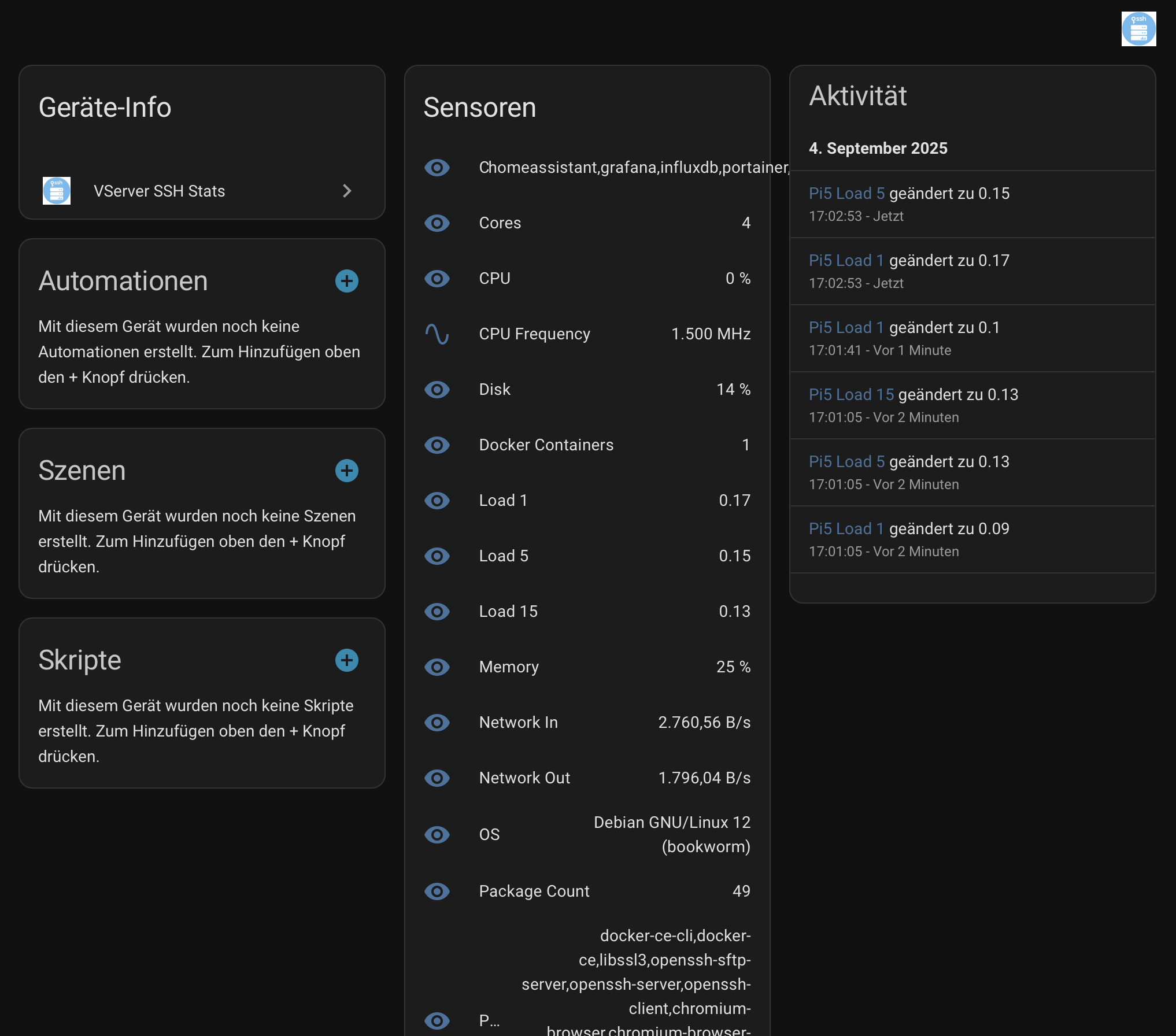
Screenshots From the README of 404GamerNotFound/vserver-ssh-stats.
About
VServer SSH Stats monitors remote Linux servers over SSH without installing an agent on the target host. It connects to each configured server, runs a compact collector script, reads standard system interfaces and exposes the results as sensors, binary sensors, buttons, switches and an update entity. Several servers can be added from the UI, using either a password or a private key, with SSH host-key fingerprints checked and a live connection test before a server is saved. Custom command sensors can run on their own interval and timeout, and an optional allowlist limits which commands may be run. Actions cover running an SSH command, updating packages, rebooting the host, listing SSH sessions and testing a connection. Repairs issues are raised for degraded software RAID, a read-only root filesystem and SMART or NVMe storage failures, and a reauthentication flow appears when SSH login keeps failing.
Automatic summary of the README and code of 404GamerNotFound/vserver-ssh-stats. Something wrong, or are you the maintainer and want your own text here? Get in touch
Supports
Works locally Talks to your devices on your own network. No vendor cloud in between.
Found by itself Home Assistant spots it on the network and offers to add it.
From the Marketplace Installed through the Marketplace, formerly HACS.
Actively maintained Its author released or pushed a change in the last six months.
Provides
- Switches
- Sensors
Setting it up
Install it from the Marketplace and restart Home Assistant, then add it under Settings, Devices and services.
VServer SSH Stats
- Update interval (seconds)
- Server name
- Label (optional, e.g. prod/staging/lab)
- Host
- SSH port
- SSH host-key SHA256 fingerprints (one per line)
- Username
- Password
- Key file
- Add another server after this
- Target system
- Use sudo (disable for root-only systems such as LibreELEC)
- Monitored TCP ports
- History retention days
Sign in again
- Username
- SSH host-key SHA256 fingerprints (one per line)
- Password
- Key file
After setup
- Update interval (seconds)
- SSH connect timeout (seconds)
- Collection command timeout (seconds)
- Package metrics interval (seconds)
- Docker metrics interval (seconds)
- SMART/NVMe metrics interval (seconds, 0 disables)
- Slow collector timeout (seconds)
- Allowed run_command entries (one per line, optional * suffix for prefixes)
- Edit an existing server
- Add another server
- Remove a server
- Replace the full server list
- Add a custom command sensor
- Edit a custom command sensor
- Remove a custom command sensor
- Server
- Server name
- Label (optional, e.g. prod/staging/lab)
- Host
- SSH port
- SSH host-key SHA256 fingerprints (one per line)
- Username
- Password (leave empty to keep current)
- Remove stored password
- Key file
- Remove stored key file
- Target system
- Use sudo (disable for root-only systems such as LibreELEC)
- Monitored TCP ports
- History retention days
- Server name
- Label (optional, e.g. prod/staging/lab)
- Host
- SSH port
- SSH host-key SHA256 fingerprints (one per line)
- Username
- Password
- Key file
- Add another server after this
- Target system
- Use sudo (disable for root-only systems such as LibreELEC)
- Monitored TCP ports
- History retention days
- Server
- Confirm removal
- Custom sensor
- Sensor name
- Server
- Command
- Collection interval (seconds)
- Command timeout (seconds)
- Sensor name
- Server
- Command
- Collection interval (seconds)
- Command timeout (seconds)
Texts from the code of 404GamerNotFound/vserver-ssh-stats.
Entities
- ButtonsPurge history, Purge old history
Actions
- Get local IPRetrieve the host's local IP address.
- Get uptimeRetrieve system uptime in seconds.
- List SSH connectionsList IP addresses of active SSH sessions.
- Purge history with retentionPurge recorder history for one configured server while keeping the requested number of days.Fields: Host, Keep days
- Run SSH commandExecute an arbitrary command on a remote server.Fields: Host, Username, Command, Password, Key file, SSH host-key fingerprints, SSH port, SSH connect timeout, Command timeout
- Update packagesUpdate system packages using apt, dnf, or yum.Fields: Host, Username, Password, Key file, SSH host-key fingerprints, SSH port, Target system, SSH connect timeout, Command timeout
- Reboot hostReboot the remote server.Fields: Host, Username, Password, Key file, SSH host-key fingerprints, SSH port, Target system, SSH connect timeout, Command timeout
- Test connectionVerify SSH connectivity for a server without changing any state on the host.Fields: Host, Username, Password, Key file, SSH host-key fingerprints, SSH port, Target system, SSH connect timeout, Command timeout
Troubleshooting
- DiagnosticsDownloads a diagnostics file to attach to a bug report.
From the README
- Agentless monitoring over SSH with password or private-key authentication.
- Multi-server setup from the Home Assistant UI.
- Automatic SSH host discovery on local networks and Zeroconf discovery support.
- Live SSH connection test on add/edit before a server can be saved, catching bad credentials, host keys, or unreachable hosts during setup instead of afterward.
- Per-server options for name, host, SSH port, username, credentials, target OS, monitored TCP ports, history retention days, polling interval, SSH connect timeout, and command timeout.
- Optional free-text server label (for example prod, staging, lab) exposed as an attribute for area-style filtering in dashboards and automations.
- Editable options flow for changing, adding, removing, or fully replacing configured servers.
- Adaptive polling backoff after repeated collection failures.
- Native Home Assistant sensors, binary sensors, action buttons, service responses, and events.
- An update entity that checks the GitHub releases feed once a day and reports when a newer integration version is published.
- Scheduled custom command sensors with an independent interval and timeout per sensor.
- Optional run_command allowlist with exact matches and prefix rules ending in *.

Shows in Vulpo
Quick Toggle card, Button card, Chart card, Apple Watch, Control Center.Information
- Installs
- 108 sharing analytics
- GitHub stars
- 24
- Connection
- Works locally
- Upkeep
- Updated in the last 6 months
- Version
- v1.5.11,
- Category
- Computers and network, Cloud and developer tools
- Kind
- Marketplace integration
- Needs
- Needs the Marketplace (HACS on 2026.10 and older)
- Domain
vserver_ssh_stats- Issues
- Report an issue











