
Panasonic Comfort Cloud
On Home Assistant 2026.11 or newer? Open it in the Marketplace
- Installs
- 3.6k sharing analytics
- GitHub stars
- 278
- Connection
- Uses the vendor's cloud
- Upkeep
- Updated in the last 6 months
- Version
- 2026.10.0,
- Category
- Climate, Heat pumps and air conditioning
- Kind
- Marketplace integration
- Brand
- Panasonic
- Needs
- Needs the Marketplace (HACS on 2026.10 and older)
- Domain
panasonic_cc- Issues
- Report an issue
Independent directory, made by the developer of Vulpo. Not affiliated with Home Assistant or the Open Home Foundation.
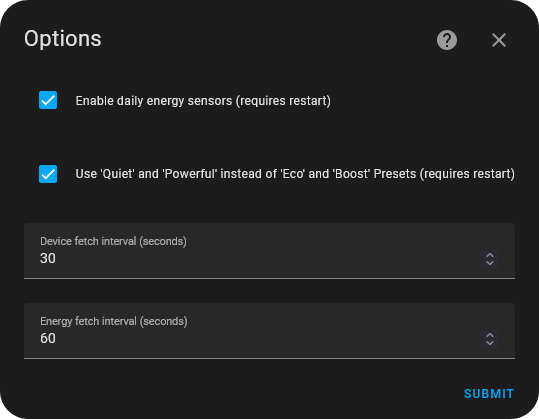
Screenshots From the README of sockless-coding/panasonic_cc.
About
Panasonic Comfort Cloud is a custom integration that controls Panasonic Comfort Cloud devices through the vendor's cloud. It covers Panasonic air conditioners and heat pumps, Aquarea air-to-water heat pump systems, and standalone HWS hot water tanks. Air conditioners and Aquarea zones get climate entities with heat, cool, auto, dry and fan modes, target temperature, fan speeds the unit supports, and presets where available. Water heater entities handle the Aquarea tank and HWS tanks, while selects handle swing direction and switches cover items like Nanoe, Force DHW, Holiday Timer and Weekly Timer. Actions replace weekly timer days for air conditioners and Aquarea units, and set the weekly schedule of hot water heat pumps. Setup runs in the UI with Panasonic ID and password, with options for daily energy sensors and fetch intervals.
Automatic summary of the README and code of sockless-coding/panasonic_cc. Something wrong, or are you the maintainer and want your own text here? Get in touch
Supports
Uses the vendor's cloud Needs an internet connection and an account with the vendor.
From the Marketplace Installed through the Marketplace, formerly HACS.
Actively maintained Its author released or pushed a change in the last six months.
Provides
- Climate
- Water heaters
- Switches
- Sensors
Setting it up
Install it from the Marketplace and restart Home Assistant, then add it under Settings, Devices and services.
Panasonic Comfort Cloud
- Panasonic ID
- Password
- Enable daily energy sensors
- Enable Nanoe switch for all devices
- Use 'Quiet' and 'Powerful' instead of 'Eco' and 'Boost' Presets
- Automatically power on device when changing settings
- Device fetch interval (seconds)
- Energy fetch interval (seconds)
Two-factor authentication
- Verification code
Updated Panasonic agreements
- I have read and accept the agreements above
Reauthenticate Panasonic Comfort Cloud
- Password
Reconfigure Panasonic Comfort Cloud
- Panasonic ID
- Password
After setup
- Force outside sensor
- Enable daily energy sensors (requires restart)
- Enable Nanoe switch for all devices (requires restart)
- Use 'Quiet' and 'Powerful' instead of 'Eco' and 'Boost' Presets (requires restart)
- Automatically power on device when changing settings (requires restart)
- Device fetch interval (seconds)
- Energy fetch interval (seconds)
Texts from the code of sockless-coding/panasonic_cc.
Entities
- Binary sensorsError Status, Defrost
- ButtonsRequest Defrost
- SelectsQuiet Mode, Powerful Mode
- SensorsOutside Temperature, Tank Temperature, Direction, Pump Status, DHW Cycles Today, Zone Cycles Today, Defrost Cycles Today, Heating Accumulated Consumption, Cooling Accumulated Consumption, Tank Accumulated Consumption, Accumulated Consumption, Heating Consumption, and 8 more
- SwitchesForce DHW, Force Heater, Holiday Timer, Boost Mode, Weekly Timer
- Water heatersTank
Actions
- Set the horizontal swing modeSet the horizontal swing mode for climate device.Fields: Entity id, Swing mode
- Set weekly timer dayReplace the patterns of one or more days of an air conditioner's weekly timer. Saving also turns the weekly timer on unless enabled is false, like the Comfort Cloud app does.Fields: Weekdays, Patterns, Enabled
- Set Aquarea weekly timer dayReplace the patterns of one or more days of an Aquarea heat pump's weekly timer. Saving also turns the weekly timer on unless enabled is false, like the Comfort Cloud app does.Fields: Weekdays, Patterns, Enabled
- Set hot water weekly scheduleReplace the weekly schedule of a standalone hot water heat pump.Fields: Weekly schedule
Troubleshooting
- DiagnosticsDownloads a diagnostics file to attach to a bug report.
From the README
This is a custom integration to control Panasonic Comfort Cloud devices in Home Assistant. It supports Panasonic air conditioners/heat pumps, Panasonic Aquarea air-to-water heat pump systems, and standalone HWS heat pump hot water tanks.
- Full climate entity for Panasonic air conditioners and heat pumps
- Full climate entity for Panasonic Aquarea zones
- Support for Heat, Cool, Auto, Dry, and Fan modes
- Target temperature control
- Fan mode selection, limited to the fan speeds the unit supports (ducted/commercial units may have only Low/Mid/High or a fixed fan speed)
- Preset modes (Quiet, Powerful, +8/15°C heat), where the unit supports them

Shows in Vulpo
Quick Toggle card, Climate card, Button card, Select card, Apple Watch, Control Center, Climate Live Activity.Information
- Installs
- 3.6k sharing analytics
- GitHub stars
- 278
- Connection
- Uses the vendor's cloud
- Upkeep
- Updated in the last 6 months
- Version
- 2026.10.0,
- Category
- Climate, Heat pumps and air conditioning
- Kind
- Marketplace integration
- Brand
- Panasonic
- Needs
- Needs the Marketplace (HACS on 2026.10 and older)
- Domain
panasonic_cc- Issues
- Report an issue