
Smart thermostat
ScratMan
On Home Assistant 2026.11 or newer? Open it in the Marketplace
- Installs
- 852 sharing analytics
- GitHub stars
- 540
- Connection
- Works locally
- Upkeep
- Updated in the last 6 months
- Version
- 2026.10.2,
- Category
- Climate, Thermostats and heating
- Kind
- Marketplace integration
- Needs
- Needs the Marketplace (HACS on 2026.10 and older)
- Domain
smart_thermostat- Issues
- Report an issue
Independent directory, made by the developer of Vulpo. Not affiliated with Home Assistant or the Open Home Foundation.
Screenshots From the README of ScratMan/HASmartThermostat.
About
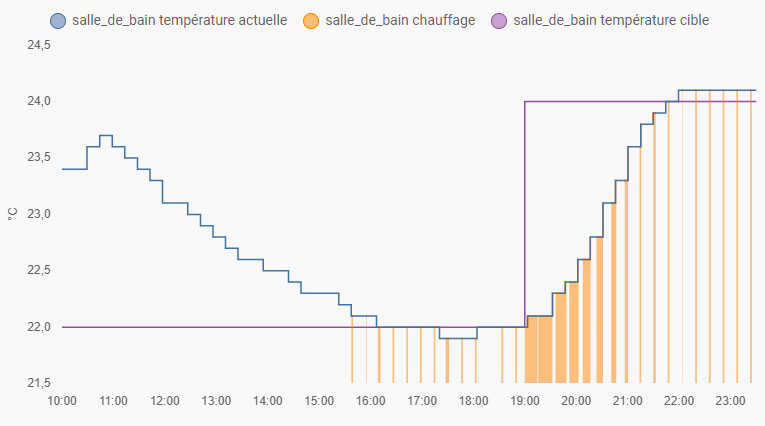
Smart thermostat is a Home Assistant integration that adds a virtual thermostat driven by a PID controller. It appears as a climate entity and works locally, with setup done in the UI. A heater or air conditioner with a simple on/off switch can be controlled through pulse width modulation, where the on time depends on the temperature error and how it changes over time. The heating actuator can be a switch, valve, light or number entity, and a room temperature sensor is required, with optional cooling actuators and an outdoor sensor for compensation. Settings cover target temperature limits, hot and cold tolerance, preset temperatures, PID gains, sampling period and autotune options. Safety settings set an output level for when the sensor stops updating or becomes unavailable.
Automatic summary of the README and code of ScratMan/HASmartThermostat. Something wrong, or are you the maintainer and want your own text here? Get in touch
Supports
Works locally Talks to your devices on your own network. No vendor cloud in between.
From the Marketplace Installed through the Marketplace, formerly HACS.
Actively maintained Its author released or pushed a change in the last six months.
Provides
- Climate
Setting it up
Install it from the Marketplace and restart Home Assistant, then add it under Settings, Devices and services.
Main Configuration
- Thermostat NameName displayed for the climate entity in Home Assistant.
- Heating Actuator(s)Switch, valve, light, or number entity controlling heat (Required).
- Room Temperature SensorTemperature sensor measuring the room temperature (Required).
- Cooling Actuator(s)Optional actuator used when cooling mode is active.
- Outdoor Temperature SensorOptional outdoor sensor used for Ke compensation.
- Invert Actuator PolarityEnable if the actuator must be turned off to heat (e.g., inverted relay).
- Cooling / AC ModeSwitch the main actuator to cooling mode instead of heating.
- Force Actuator Off When Thermostat is OffEnsures the actuator is physically turned off when HVAC mode is OFF.
Temperature Settings
- Minimum Target TemperatureLeave blank to use Home Assistant default value.
- Maximum Target TemperatureLeave blank to use Home Assistant default value.
- Initial Target Temperature
- Hot ToleranceHysteresis above setpoint.
- Cold ToleranceHysteresis below setpoint.
- Initial HVAC Mode
- Preset Sync Mode
- Disable PID in Boost PresetForces PID mode to OFF when Boost preset is enabled.
Preset Temperatures
- Away Temperature
- Eco Temperature
- Boost Temperature
- Comfort Temperature
- Home Temperature
- Sleep Temperature
- Activity Temperature
PID Controller
- Proportional Gain (Kp)
- Integral Gain (Ki)
- Derivative Gain (Kd)
- Outdoor Compensation Gain (Ke)Gain applied to the difference between target and outdoor temperature.
- PWM PeriodFull cycle time for pulse-width modulation regulation.
- Keep-alive IntervalPeriodically re-sends turn on/off commands to actuators.
- PID Sampling Period
- Autotune Rule
- Autotune Noise Band
- Autotune Lookback Period
Advanced Settings
- Output Precision
- Minimum Output
- Maximum Output
- Output Clamp Low
- Output Clamp High
- Minimum Cycle Duration
- Minimum Off Cycle Duration
- Sensor Stall TimeoutTimeout before falling back to safety level if sensor stops updating.
- Safety Output LevelOutput percentage applied when sensor is stalled or unavailable.
- Debug Mode
Texts from the code of ScratMan/HASmartThermostat.

Shows in Vulpo
Climate card, Apple Watch, Climate Live Activity.Information
- Installs
- 852 sharing analytics
- GitHub stars
- 540
- Connection
- Works locally
- Upkeep
- Updated in the last 6 months
- Version
- 2026.10.2,
- Category
- Climate, Thermostats and heating
- Kind
- Marketplace integration
- Needs
- Needs the Marketplace (HACS on 2026.10 and older)
- Domain
smart_thermostat- Issues
- Report an issue










