

Flair
RobertD502
On Home Assistant 2026.11 or newer? Open it in the Marketplace
- Installs
- 565 sharing analytics
- GitHub stars
- 139
- Connection
- Uses the vendor's cloud
- Upkeep
- No update in 6 to 18 months
- Version
- 0.2.4,
- Category
- Climate
- Kind
- Marketplace integration
- Needs
- Needs the Marketplace (HACS on 2026.10 and older)
- Domain
flair- Issues
- Report an issue
Independent directory, made by the developer of Vulpo. Not affiliated with Home Assistant or the Open Home Foundation.
Screenshots From the README of RobertD502/home-assistant-flair.
About
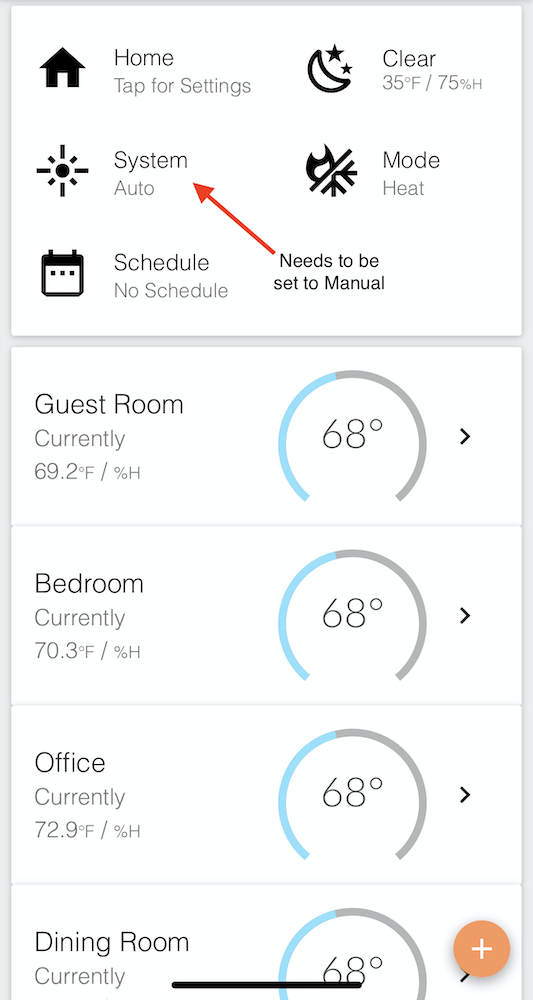
Flair is a custom integration that controls and monitors Flair pucks, vents, rooms, structures, bridges and IR mini-split units. Each mini-split, puck, room, structure and vent appears as a device in Home Assistant, with entities across binary sensors, buttons, climate, covers, numbers, selects, sensors and switches. It connects through the vendor's cloud and is set up in the UI using OAuth 2.0 client ID and client secret credentials from a Flair account. Room climate entities change the room set temperature, and the hold length follows the Default Hold Duration setting, which can also be changed from a Home Assistant entity. Vents in rooms with a temperature sensor and mini-split units need the Flair structure in Manual mode for full control, and a structure's system mode select entity can switch this.
Automatic summary of the README and code of RobertD502/home-assistant-flair. Something wrong, or are you the maintainer and want your own text here? Get in touch
Supports
Uses the vendor's cloud Needs an internet connection and an account with the vendor.
From the Marketplace Installed through the Marketplace, formerly HACS.
Provides
- Climate
- Covers
- Switches
- Sensors
Setting it up
Install it from the Marketplace and restart Home Assistant, then add it under Settings, Devices and services.
Fill in your Flair OAuth 2.0 credentials
- OAuth 2.0 client_id
- OAuth 2.0 client_secret
Also asked when signing in again.
Texts from the code of RobertD502/home-assistant-flair.

Shows in Vulpo
Quick Toggle card, Cover card, Climate card, Button card, Apple Watch, Control Center, Climate Live Activity.Information
- Installs
- 565 sharing analytics
- GitHub stars
- 139
- Connection
- Uses the vendor's cloud
- Upkeep
- No update in 6 to 18 months
- Version
- 0.2.4,
- Category
- Climate
- Kind
- Marketplace integration
- Needs
- Needs the Marketplace (HACS on 2026.10 and older)
- Domain
flair- Issues
- Report an issue










